
Overview:
The blog describes how to build an AI chatbot for customer support that actually delivers results, not the one that frustrates users.
It covers:
- Why AI chatbots are becoming essential for modern customer support
- Widely recognized errors that lead to customer support chatbots failure
- A chronological guide to developing, training and deploying an AI chatbot
- How to guarantee accuracy, personalization and smooth human escalation
- Best practices to maximize the performance, trust and customer satisfaction
Supported by the actual statistics as well as practical insights, the guide assists startups, product teams, and enterprise leaders to create scalable, reliable and customer-friendly AI chatbots that deliver real business impact.
According to IBM, well-designed chatbots can handle up to 80% of routine customer service questions – cutting support costs by around 30%.
However, not all companies can achieve real results after implementing their customer support bots. This step-by-step manual will demonstrate how to create an AI chatbot for customer support that doesn’t disappoint your customers. A bot that provides the speedy 24/7 response, and makes customers feel pleased and helps your team to be even more efficient.
We’ve already discussed why AI-powered support is a game-changer in another blog post. So, we will discuss step-by-step implementation, the pitfalls to avoid and a few best practices, all supported by statistics and real-world examples, to make your chatbot reach high customer satisfaction (CSAT) rather than frustration.
How to Create an AI Customer Support Chatbot (Step-by-Step Guide)
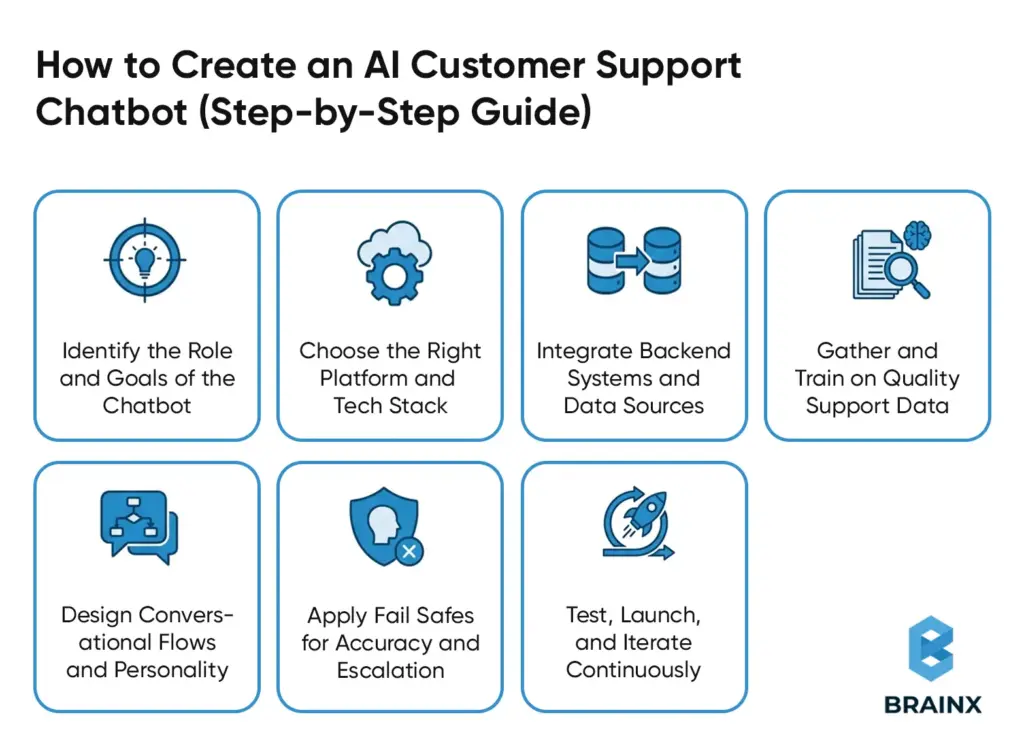
There is no magic involved in designing an effective AI chatbot for customer service, but rather a series of sensible steps and guidelines to follow. Here is a step-by-step outline:
1. Identify the Role and Goals of the Chatbot
The first step is to explicitly know customer support issues that your chatbot can address. A focused use case ensures better outcomes and easier measurement.
Common goals include:
- Responding to commonly posed questions
- Helping in troubleshooting
- Processing order tracking, returns or status updates
As an example, you can work to avoid repetitive “Where is my order?” questions from live agents. The training, the design of conversations and success metrics like decreased number of live chats or first response time have a defined mission.
2. Choose the Right Platform and Tech Stack
Choose between no code platform chatbot or custom development approach. Consider the following:
- No code platforms offer visual builders and pre trained AI models for faster deployment
- Custom builds are flexible when it comes to complex or highly specialized applications
- Make sure that it supports the NLP and AI models including LLMs to understand the language naturally
- Select a scaling cloud infrastructure web backend such as Python or Node.js.
Choose a stack that matches the expertise of your team and that can be easily integrated with your existing systems.
3. Integrate Backend Systems and Data Sources
An AI chatbot would be useful only when it can access real time data and take significant actions.
The important integrations can be:
- CRM systems for customer context
- Order management and inventory systems
- Ticketing tools for case creation and updates
- Knowledge bases for accurate responses
The integrations mentioned above allow the bot to fetch order status, update tickets, and the processing of returns or reset passwords and make it a functional virtual support agent rather than a static FAQ tool.
4. Gather and Train on Quality Support Data
Train your chatbot using accurate, representative support data.
Training sources should include:
- FAQs and help center articles
- Product documentation and manuals
- Past support tickets and chat transcripts
During training:
- Define clear intents and sample user phrases
- Identify things like order numbers or product names
- Add conversational elements like greetings and polite fallbacks
High quality, up to date data ensures the bot understands real customer language and responds accurately.
5. Design Conversational Flows and Personality
Design how conversations should unfold for each major intent, similar to UX design for chat.
Best practices include:
- Step by step guidance through common scenarios
- Fallback options when the bot is unsure
- Clear paths to reach a human agent
The tone of the chatbot must match your brand voice of either being friendly or formal. Encourage natural and human-like interaction with customers through the use of polite language, empathy, and consistency.
6. Apply Fail-Safes for Accuracy and Escalation
Protect customers from incorrect or misleading responses by adding safety mechanisms.
Key safeguards include:
- Retrieval based responses grounded in verified knowledge sources
- Confidence thresholds to detect uncertainty
- Automatic escalation triggers for repeated confusion or user requests
When the bot is unsure, it should clearly hand off to a human agent. Such measures avoid hallucinations, dead ends, and loss of customer trust.
7. Test, Launch, and Iterate Continuously
The chatbot should be tested with real world scenarios before launch in order to identify gaps and edge cases.
After deployment:
- Monitor resolution rate, escalation frequency, and handle time
- Collect user feedback and sentiment signals
- Identify new question patterns and update training data
The chatbot is to be treated like a living product. It requires continuous testing, learning and optimization because customer requirements and the offerings of the business keep changing.
Through these steps, you shall have a customer support chatbot that is not only purpose-driven but also well-integrated and trained and tested comprehensively. But the work doesn’t stop at launch – the best AI support systems are refined constantly.
Now, we will discuss some of the pitfalls that you should avoid while building your customer service chatbot.
6 Pitfalls to Avoid & Reasons Why Many Customer Support Chatbots Fail
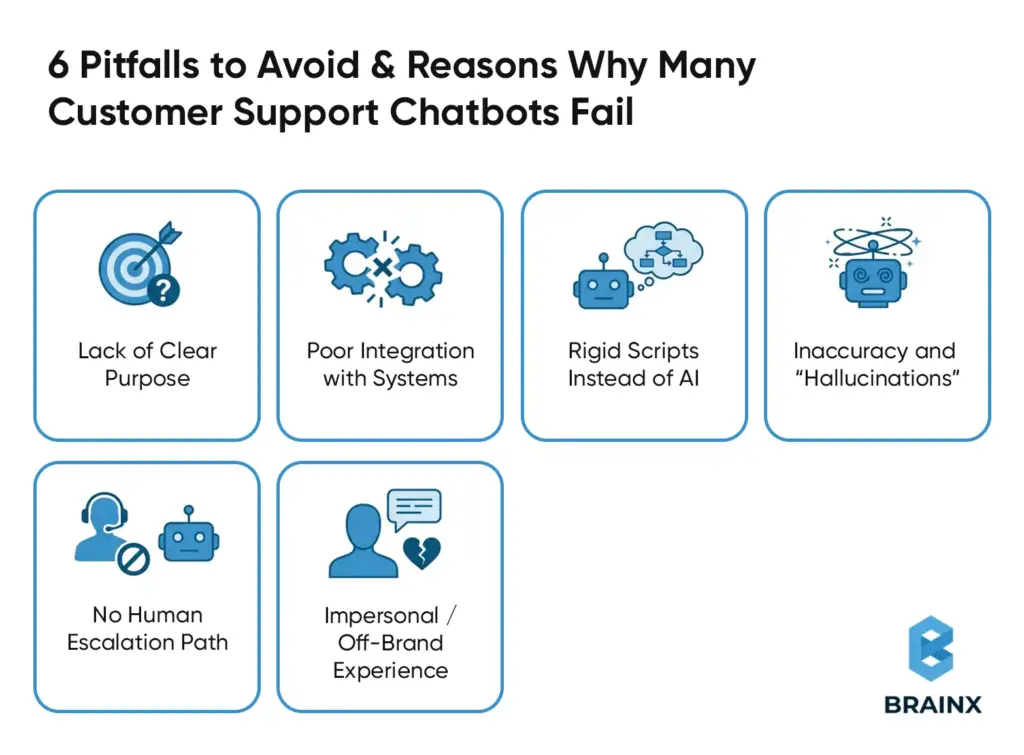
Not all support bots are as good as they are hyped to be. Actually, the poorly developed chatbots will do more damage than benefit to your customer experience. The 2024 survey carried out by PwC reported that 59 percent of consumers have dropped a purchase due to negative chatbots experience.
In order to make your AI chatbot a working product, you should be aware of the following common mistakes and pitfalls:
1. Lack of Clear Purpose
Many bots are launched without a defined scope or goal. If your chatbot tries to do everything out of the gate (or conversely, has no clear capabilities), it will confuse users.
Successful chatbots are goal-driven – for instance, primarily handling FAQs, order tracking, password resets, etc., with well-defined boundaries.
Always define what problems you want the bot to solve first, then design around that.
2. Poor Integration with Systems
A top reason bots fail is they can’t access the information needed to answer questions. Imagine a customer asks “Where’s my order?” and the bot can’t check the order status – that’s a dead end.
In fact, experts note that 80% of AI customer service tools fail in real use due to poor integration or accuracy issues.
Avoid “blind” chatbots by integrating yours with databases, order management, CRM, knowledge bases, etc. An AI support agent must be wired into your data so it can give useful, up-to-date answers (like pulling account details or updating a ticket).
3. Rigid Scripts Instead of AI
Older rule-based chatbots followed strict decision trees and broke as soon as a user went off-script. Their common reply is that they are sorry and they did not get it since they do not understand the language.
Customers today demand a Conversational AI that would be able to deal with natural language and unforeseen inputs. Having a simple decision-tree robot on your support page is bound to annoy the users.
Instead, you need NLP and machine learning so the chatbot interprets intent, even if phrased in various ways, and responds flexibly.
4. Inaccuracy and “Hallucinations”
If an AI chatbot gives incorrect answers or makes up information, customer trust plummets. In one Gartner study, 42% of customers feared getting inaccurate answers from AI support – a valid concern if the bot isn’t properly trained or limited.
Large language model chatbots sometimes confidently spew out fake facts (commonly called hallucinations). In order to avoid this, integrate fact-checking and validation. For example, use a Retrieval-Augmented Generation (RAG) approach where the bot cites from your knowledge base, or implement business rules for critical info (like return policies or pricing).
Some platforms report that adding a fact-validation layer can cut AI false answers by up to 70%, vastly improving reliability.
5. No Human Escalation Path
A major design mistake is creating a “chatbot dead-end” with no option to reach a human agent.
There are always questions that the AI will not be able to answer. When the bot apologises or repeats itself, it irritates the users. Always provide a seamless way to hand off to a human – such as the bot saying “Let me connect you to a support specialist for that.” This safety net is critical:
According to Gartner research, 60 percent of customers are afraid that an AI chatbot will not allow them to contact a human being when necessary, which contributes to distrust. Offering them an option of a quick transfer to live chat or generate a ticket presents your bot as something to assist rather than disrupt, and your customers will not feel confined.
6. Impersonal / Off-Brand Experience
Although it is automated, your chatbot must be in line with the tone and quality of service of your brand. One of the most obvious mistakes is to resort to generic answers that are cold or robotic. Your bot must be a friendly and helpful one, in line with the tone (formal or casual) in which customers expect your company to act. Assign it a character in line with your brand values, and add some polite notices or sympathy to responses (e.g. I feel bad you are having that problem, I can help you).
Moreover, incorporate the chatbot in your webpage design or application as it should seem like an extension of your support team. This cohesion increases customer comfort with the AI. Remember, the goal is a bot that comes across as a knowledgeable virtual assistant, not a glitchy robot.
With all of these pitfalls bypassed and your chatbot structured around purpose, solid integration & NLP, factuality, human fallback and a friendly style, you have preconditioned for success.
Here are some of the best practices that can be sustained and expanded on to ensure the success of your chatbot.
7 Best Practices of an Effective AI Customer Support Chatbot
Building the bot is half of the battle, the other half is to ensure that the bot provides great service in the long-run. Keep these best practices in mind to maximize your chatbot’s effectiveness and user satisfaction:
1. Ensure Accuracy with Real Data
Your chatbot should never guess. Use authoritative sources like your knowledge base, frequently asked questions and product documentation to base its responses on them.
Apply retrieval augmented generation or structured Q&A retrieval in such a way that the answers are based on verified information.
Maintain content with the change of products, prices, or policies. Accuracy, when backed by verified data, minimizes errors and establishes a long term trust in the user.
2. Maintain a Human Touch (Escalate As Needed)
Customer support should be facilitated by a chatbot instead of being hindered. Create it in such a way that it is able to detect frustration or confusion with the help of keywords or sentiment indicators.
When the bot does not assist or when the user requests a human agent repetitively, then the conversation should be escalated.
A fast access to a live agent should always be available. Combination of AI and human model will avoid frustration and boost confidence.
3. Personalize the Experience
Make conversations relevant and useful with customer data.
Greet them by name, call on past orders and use context of similar interactions when and where possible.
The personalization should stay relevant throughout the different channels, and customers should not repeat their words. It can be achieved through CRM and integrations of customer data, which greatly enhances engagement and loyalty.
4. Keep the Tone Friendly and On Brand
Your chatbot becomes the face of your brand. It should be in line with your voice, be it friendly, casual or professional.
It should always be empathetic, patient and use simple language.
Small gestures such as using polite language, apologizing and easy to read formatting make exchanges human-like and friendly.
A consistent tone helps in building comfort and trust.
5. Provide Omnichannel Consistency
The customers can interact through websites, mobile apps, and messaging. The same quality experience should be provided everywhere by your customer support chatbot.
Support multi-channel implementation and provide cross platform conversation context.
Consistent knowledge, tone and feedback helps avoid confusion and offers a smooth support process.
6. Monitor Metrics and Optimize Continuously
You need to believe your chatbot is a living thing before you can make your customers believe that.
Keep track of resolution rates, escalations, customer satisfaction (CSAT), and cost impact. Identify weak responses, retrain the model using analytics and increase its capabilities with answering new questions.
The continuous improvement is what makes a good chatbot, a great chatbot.
7. Ensure Privacy and Compliance
The level of customer trust hinges on your ability to handle their data responsibly..
Secure confidential data through encryption and hardly any logs. Meet the requirements of regulation like GDPR and adhere to industry-specific requirements under all circumstances. Be open regarding AI applications.
A secure, compliant chatbot makes users feel safe engaging with automation.
These best practices, like accuracy, human fallback, personalization, brand-aligned tone, omnichannel presence, continuous optimization, and security, will provide you with an AI chatbot that earns the trust and delivers value to customers.
The payoff is great. When properly implemented, AI chatbots can make your support department competitive, faster, much more efficient, and unprecedentedly popular with customers.
Competitive Advantage Through AI‑Powered Support
In customer service, experience is king. 64% of customers say service quality is the single most important factor that sets a company apart. AI chatbots give support teams a powerful way to excel on this front. Indeed, AI is not merely a tool of efficiency, but it has now become one of the major competitive advantages of businesses that have adopted it.
The companies with the aid of AI chatbots are able to differentiate themselves by providing faster, more precise, and highly scalable support that satisfies the growing customer expectations. They can better be in a better position to remain ahead of other competitors who are still relying on manual processes, as an AI virtual agent can give answers instantly 24/7, eradicate wait times, and give a consistent response to enhance customer satisfaction. It is an always available reliability-based service where every customer receives support when it is needed, which enables the trust to develop without any efforts.
Another crucial benefit is that AI-based support enhances agility in operations. Chatbots allow support teams to grow without significant head count increases, manage ticket volume surges or business expansions without compromising quality. Even a business that is mid-sized can provide enterprise-level service without the cost of adding overhead of agents, which evens the playing field in terms of customer experience.
Early AI adopters are in a way future-proofing their support strategy, as AI technology advances, such businesses will keep satisfying customers in new ways and stay competitive in a world where automation and personalized service become synonymous.
In a nutshell, the introduction of an AI chatbot is not a simple tech enhancement but rather a strategic decision that turns customer service into a clear advantage.
Cost-Benefit Analysis to Find Out ROI of AI Chatbots in Support

In the analysis of AI chatbots, the use of a cost-benefit perspective helps understand the payback (or the return on investment). These systems drive down operating costs while elevating customer satisfaction – a powerful combination for any support organization.
Following are the reported ROI highlights by companies that use AI for customer support:
- Reduce Support Costs: AI chatbots have the potential to save the customer support costs by 30-40 percent in the first year. Teams that spend more than half a million dollars a year can save $150,000 to $200,000. Large enterprises report even greater efficiency, with cost-per-chat reductions and massive savings by automating high volumes of routine interactions.
- Less Ticket Volume: AI chatbots lower the ticket volume since the chatbots will automatically answer repetitive questions. They turn away about 45 percent of incoming queries on average and in certain industries over 50 percent. Even in more advanced applications, chatbots can answer most of the questions without human intervention so workload is reduced on the part of the agents.
- Better Customer Satisfaction: The customer satisfaction is increased through quick responses and 24/7 availability. The positive CSAT results following the implementation of AI chat support can be measured in many companies. Shorter turnaround times and a consistent service delivery will always minimize frustration, enhance first-contact resolution, and reinforce customer loyalty in the long term.
- High ROI and Efficiency Gains: AI chatbots can provide high ROI as they are able to combine cost savings and efficiency gains. After initial setup, benefits scale quickly. There are companies that illustrate returns in the triple-digit range within 12 months, and this goes to show that well-designed chatbots can make customer care a profit making operation.
In sum, the financial benefits and quality results of investing in AI-powered support have both quantifiable and qualitative results. Gartner analysts even project that conversational AI will save about $80 billion in contact-center labor costs by 2026.
For support leaders, the message is clear: AI chatbots not only reduce costs and workloads – they also improve customer experience in ways that set your business apart. Implementation of this technology will vastly increase the productivity of your team and the satisfaction of your customers giving you an edge over your competitors that continues to pay off in the years to come.
After determining the business value and ROI of AI-powered customer support, the next thing would be to comprehend maturity. Not every chatbot is equal and the success does not always occur overnight. The majority of the organizations develop their chatbot capabilities in phases, progressively transitioning to full-fledged intelligent AI support over simple automation.
The AI Chatbot Maturity Model Evolution From Automation to Strategic Advantage
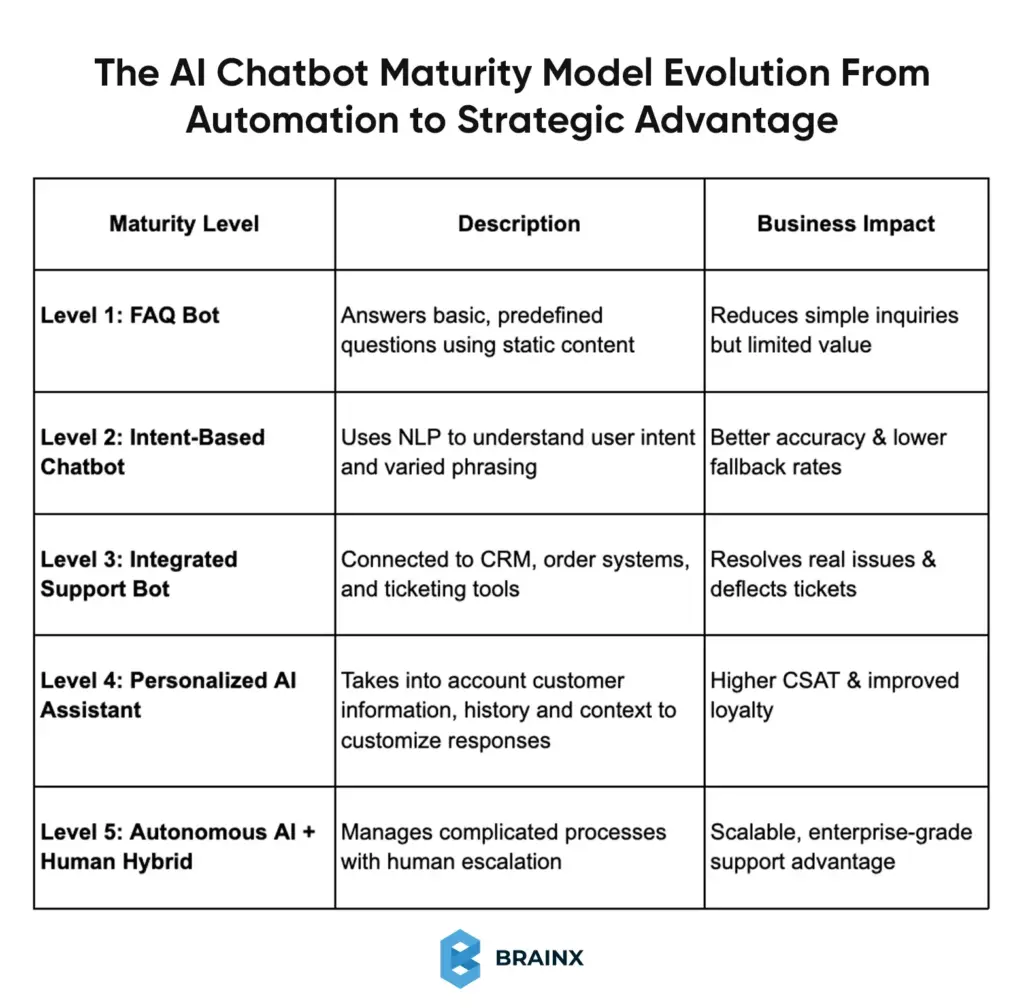
AI chatbots evolve over time. The only difference between high-performing support teams and those trapped in simple automation is their ability to treat them as a long-term capability and not a one-time feature.
The following is a realistic maturity model demonstrating the way customer support chatbots normally progress.
Why This Model Matters
The failure of most chatbots occurs due to the companies having Level 4 or 5 expectations with a Level 1 implementation. The maturity model assists the teams:
- Set realistic expectations
- Prioritize the right investments
- Scale capabilities over time without overwhelming users or teams
There is no need to begin at the top. A lot of companies start with a narrow Level 2 or Level 3 chatbot and develop it through data on usage and customer responses.
Strategic Takeaway
The goal is not to replace human agents. It is to climb up the maturity curve without losing trust, accuracy and quality of experience.
An AI chatbot can be more than a support tool when approached in such a manner. It turns into a strategic asset which expands as your business does.
Therefore, having a clear picture of chatbot maturity development, the businesses can make wiser choices regarding when and how to invest in AI-driven support.
Conclusion
Automation of customer support is now a necessity and not a luxury in an on demand economy. The obvious distinction between a poorly created chatbot and one that customers like is in its smart design and implementation.
When an AI chatbot is built on the basis of true needs of customers and armed with the appropriate data and access to systems, it will be a trustworthy extension of your support staff. It provides round-the-clock customer service, real time support, answers repetitive questions effectively and enhances customer satisfaction by eliminating waiting time.
All these results are achievable by having clear use cases, powerful integrations, constant training, and human conversation design. Properly employed AI chatbots increase CSAT, generate beneficial insights, and generate customer loyalty.
BrainX Powers Smarter Customer Support with AI That Truly Delivers
Ready to make your customer service a competitive advantage?
BrainX designs and develops AI chatbots, exceeding simple automation, providing the correct answer, smooth system connectivity, and natural human dialogue at scale.
We support you in the implementation of AI-based customer support since it reduces costs, increases CSAT, and scales as your business expands, starting with strategy and training up to actual deployment and optimization.
Top Questions Businesses Ask Before Building an AI Support Chatbot
1. How long does it take to build an AI chatbot for customer support?
The timeline depends on complexity. A basic AI chatbot handling FAQs and simple intents can be launched in 2–4 weeks. More advanced chatbots with CRM integrations, personalization, and workflow automation typically take 6–12 weeks. Ongoing optimization continues after launch.
2. Do AI chatbots replace human customer support agents?
No. AI chatbots are designed to support human agents, not replace them. They handle repetitive and high-volume queries, while human agents focus on complex, emotional, or sensitive issues. The most effective customer support teams use a hybrid AI-plus-human approach.
3. How accurate are AI customer support chatbots?
When trained on real support data and connected to verified knowledge sources, AI chatbots can achieve high accuracy. Using retrieval-based responses and regular updates prevents hallucinations. Accuracy improves over time as the chatbot learns from real customer interactions and feedback.
4. What systems should an AI chatbot integrate with?
A customer support chatbot should integrate with your CRM, ticketing system, order management, and knowledge base. These integrations allow the bot to retrieve customer context, check order status, create tickets, and provide personalized, real-time support instead of generic answers.
5. How do you measure the success of an AI chatbot?
Key metrics include deflection rate, first-contact resolution, escalation rate, CSAT, and cost savings. Monitoring these metrics helps teams understand performance, identify gaps, and continuously optimize the chatbot to improve customer experience and operational efficiency.