
But is this framework the right choice for your project?
In this comprehensive guide, we explore Flutter app development pros and cons and compare it with other frameworks. By the end, you'll understand all of its advantages, drawbacks, real-world use cases, and when it makes sense to use Flutter for your product.
A Brief History of Flutter
Flutter is an open-source software development kit developed by Google. It originated as an experiment named "Project Sky" in 2015 with the goal of facilitating high-performance rendering on mobiles.
Google officially released Flutter 1.0 in December 2018 at the Flutter Live event in London, marking its first stable release for building cross-platform mobile apps.
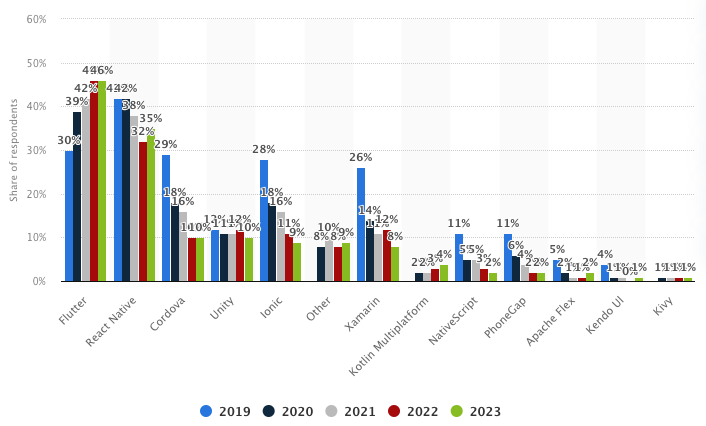
Google expanded it beyond mobile with Flutter 2 (2021), adding stable support for web and desktop applications. The developer community has also grown explosively; by 2021, Flutter had even surpassed React Native to become the number one cross-platform mobile app development framework.
Backed by Google’s long-term support (and even used for Google’s own projects), Flutter quickly became a popular choice for developing modern mobile apps. Its rise in popularity is attributed to the promise of a single codebase for multiple platforms, fast development cycles, and a rich set of customizable UI elements.
Flutter isn’t a programming language; it’s a Google-maintained SDK designed to build and compile apps. With its rendering engine, widgets, testing APIs, and developer tools, it provides everything needed for modern app development. Its architecture is built on three core layers: Framework, Engine, and Embedder.
Let’s dive deeper into each layer to understand how Flutter works.
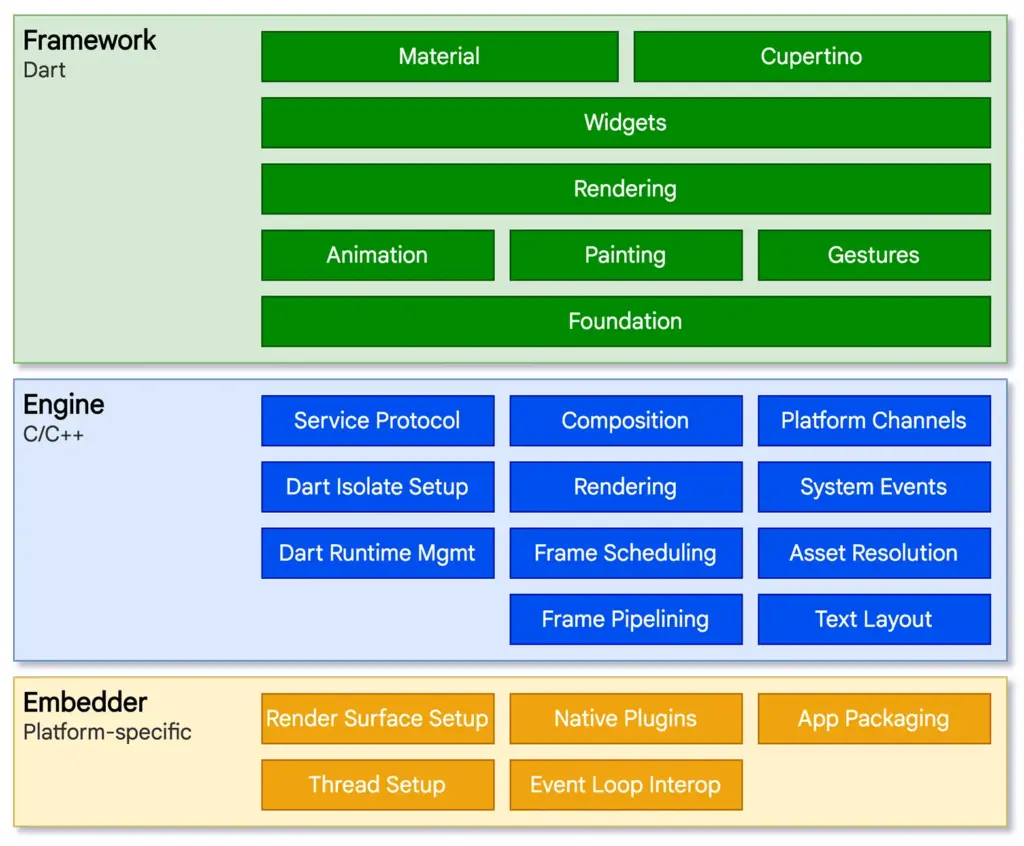
Source: Flutter
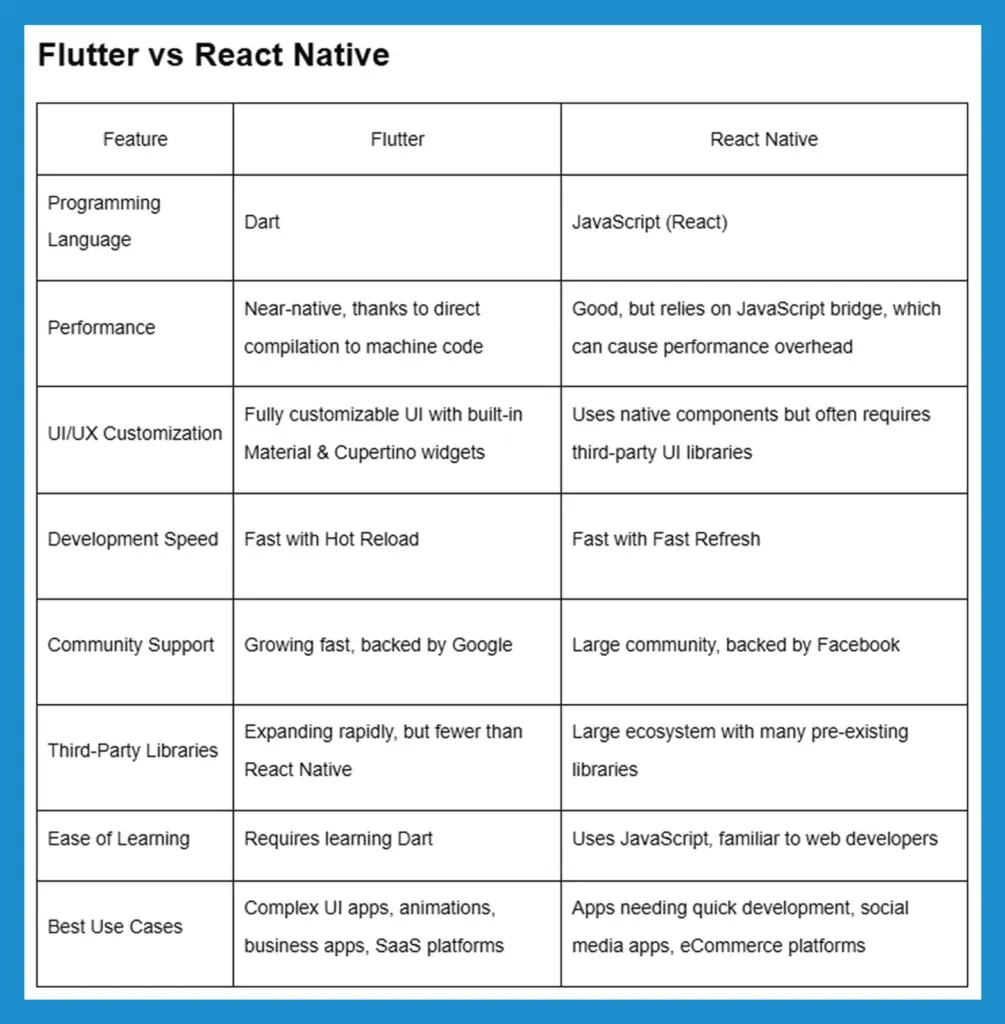
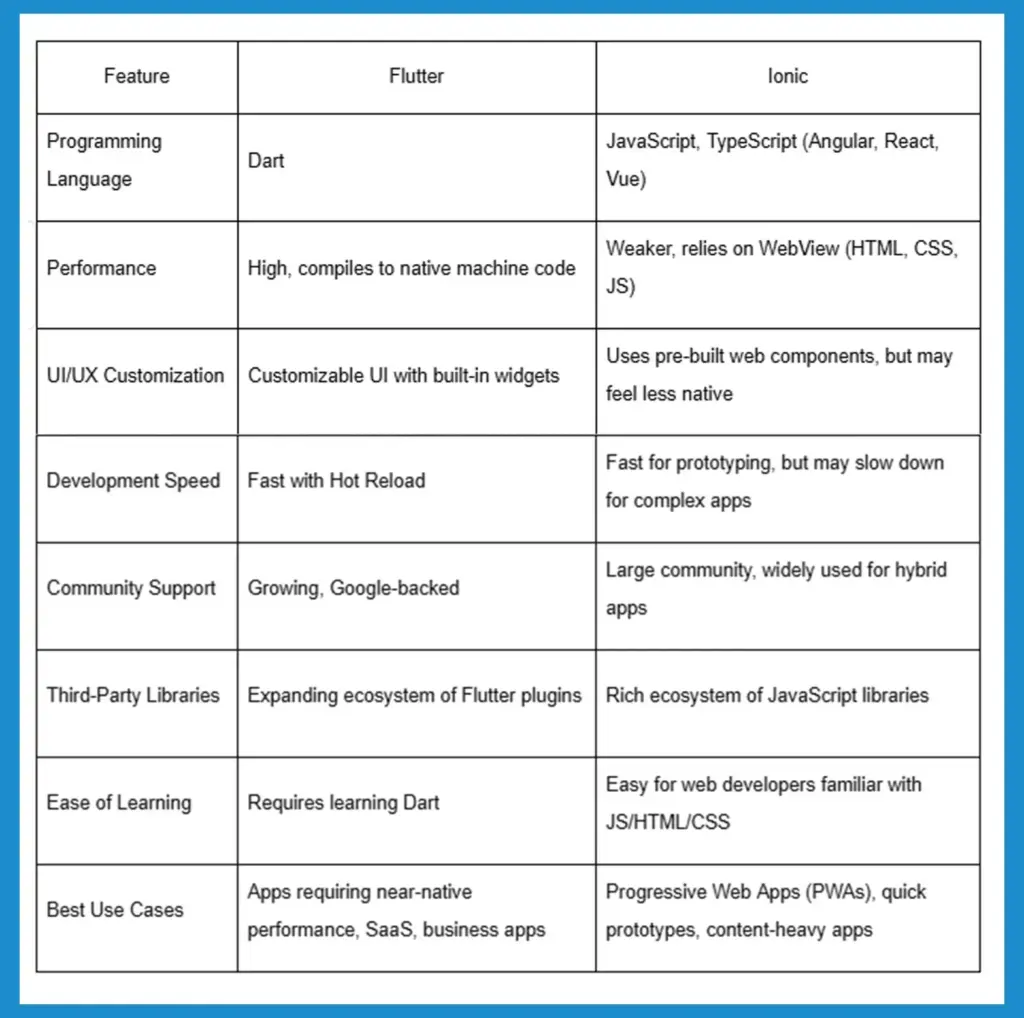
Flutter is not the only cross-platform app development framework. Other widely used alternatives are React Native, Xamarin, and Ionic, each having a varying strategy. These tables present a clear side-by-side comparison of Flutter with popular cross-platform frameworks, enabling businesses and developers to make a well-informed choice based on project requirements.
Flutter vs React Native
Flutter vs Xamarin (.NET MAUI)
Programming Language
-
Flutter: Dart
-
Xamarin (.NET MAUI): C# (.NET)
Performance
-
Flutter: Near-native with direct compilation
-
Xamarin (.NET MAUI): Near-native but can have performance overhead due to .NET runtime
UI/UX Customization
-
Flutter: Highly flexible, custom UI via widgets
-
Xamarin (.NET MAUI): Native UI via Xamarin.Forms, but may need platform-specific code
Development Speed
-
Flutter: Faster with single UI and logic codebase
-
Xamarin (.NET MAUI): Slower, as UI code may differ for iOS & Android
Community Support
-
Flutter: Growing, backed by Google
-
Xamarin (.NET MAUI): Stable, backed by Microsoft
Third-Party Libraries
-
Flutter: Expanding, 25,000+ plugins available
-
Xamarin (.NET MAUI): Large library ecosystem for .NET but fewer mobile-specific packages
Ease of Learning
-
Flutter: Requires learning Dart
-
Xamarin (.NET MAUI): Familiar for .NET/C# developers
Best Use Cases
-
Flutter: SaaS apps, business apps, mobile-first platforms, startups
-
Xamarin (.NET MAUI): Enterprise solutions, apps requiring integration with Microsoft services
Flutter vs Ionic
Recommended: Flutter vs Native App Development: Choosing the Right Technology
Flutter App Development Pros and Cons
Pros of Flutter
The Flutter development toolkit provides numerous attractive advantages which benefit both businesses and developers. The following points represent the major benefits that Flutter provides for applications development:

1. Single Codebase for Multiple Platforms
Developers using Flutter need to create a single codebase which they can deploy on purposes ranging from Android to iOS and web applications alongside desktop platforms. Businesses cut development time along with future maintenance expenses as well as development efforts by using Flutter's single codebase platform feature.
2. Faster Development with Hot Reload
Programmers benefit from instant updates in their apps through Hot Reload, which allows them to see changes without requiring a restart. The application performs faster debugging along with the development of features and User Interface enhancements and additions.
3. Near-Native Performance
Unicode applications produced through Flutter automatically translate to native ARM machine code, which delivers native app performance, including smooth animations, quick execution, and low lag time.
4. Customizable & Adaptive UI
Pre-built Material and Cupertino widgets offer a consistent and visually stunning user experience. Its flexible UI system allows for custom designs and animations, which makesmaking it ideal for branding.
5. Cost-Effective Development
The elimination of distinct Android and iOS development teams by Flutter enables businesses to cut spending on hiring developers as well as development expenses and routine maintenance costs.
6. Strong Google Support & Growing Ecosystem
The Google-backed support facilitates Flutter to obtain routine software upgrades as well as defect resolutions and improved performance features. The thriving Flutter community both improves the platform through continuous progress and expands its core third-party library collection.
7. Rich Plugin Ecosystem
Offers third-party library packages that exceed 25,000 to help businesses implement features including payments and authentication as well as analytics and maps and push notifications.
8. Seamless Integration with Existing Code
Enables businesses to incorporate its framework into their existing native apps, which helps them convert step by step rather than completely starting afresh.
9. Support for Web & Desktop Applications
Initially built for mobile, Flutter now supports web and desktop platforms, making it an ideal choice for SaaS businesses and cross-platform expansion.
10. High Performance for Complex Apps
The handling capabilities excel at managing both graphics-intensive applications and animated interfaces and data-centric applications, thus providing an excellent user experience.
11. Consistent UI Across Devices
Custom rendering engine (Skia) ensures that the UI looks identical on Android, iOS, web, and desktop, reducing design inconsistencies.
12. Ideal for Startups & MVP Development
With faster development, lower costs, and quick iteration cycles, Flutter is an excellent choice for building Minimum Viable Products (MVPs).
13. Built-in Testing & Debugging Tools
Provides Flutter DevTools, a suite of built-in debugging, profiling, and performance monitoring tools that enhance app stability and optimization.
14. Easier Maintenance & Updates
Since one codebase powers multiple platforms, updates and bug fixes only need to be made once, leading to faster maintenance cycles.
15. Offline Functionality & IoT Support
Supports offline applications and can be used in embedded systems, IoT devices, and smart applications.
16. Support for Third-Party Integrations
The integration of Flutter with Firebase, REST APIs, GraphQL, cloud services and native modules provides enhanced flexibility to improve app capabilities.
17. Strong Security Features
Secure data storage, biometric authentication, and encrypted communication options make it suitable for fintech, healthcare, and enterprise apps.
18. Scalability for Business Growth
Designed for scalability and allows businesses to start with a small app and expand into a full-scale enterprise application without performance issues.
19. Large & Growing Developer Community
Thriving global community contributes to open-source projects, forums, tutorials, and troubleshooting resources, ensuring continued growth and support.
Cons of Flutter
The multitude of benefits associated with Flutter comes with several obstacles to evaluate. The evaluation process of project needs against these negative aspects is crucial.
1. Large App Size
Flutter apps have a larger binary size compared to native apps due to the built-in rendering engine and dependencies, making them less ideal for storage-constrained devices or lightweight applications.
2. Higher CPU & Battery Consumption
Flutter apps consume more CPU and battery compared to native apps, particularly during animations and background processes, requiring additional optimization to improve energy efficiency.
3. Limited Third-Party Libraries
The growth of the Flutter ecosystem remains active but falls behind React Native and native frameworks when it comes to the number of available third-party libraries; thus, developers might need to develop their own integrations.
4. Dart's Learning Curve
The adoption of Flutter gets slower since the development environment demands developers learn Dart, which stands as a less popular programming language instead of the more widespread JavaScript and Kotlin.
5. Delayed Support for New Native Features
New Android and iOS features are not immediately available in Flutter, meaning developers may have to wait for updates or write native code workarounds.
6. Web & SEO Limitations
Flutter Web apps rely on a canvas-based rendering approach, making them less search engine-friendly and leading to longer load times compared to traditional HTML-based web applications.
7. Limited Support for Wearables & Smart TVs
Flutter provides insufficient support to develop apps for platforms including Apple Watch and Wear OS, along with smart TVs, which makes building for these devices complicated.
8. Requires Platform-Specific Code for Some Features
Some features, like Bluetooth and background services, and hardware integrations in Flutter demand native Swift/Kotlin code, which impairs the full codebase unification benefit of this cross-platform tool.
9. Slower Performance on High Refresh Rate Screens
Flutter struggles to consistently support 120Hz refresh rates, leading to stuttering animations on high-end devices, requiring extra performance tuning.
10. Dependency on Google’s Ecosystem
Flutter’s long-term viability depends on Google’s commitment. While heavily backed now, Google has a history of discontinuing projects, creating uncertainty for long-term Flutter investments.
11. Accessibility Features Require Extra Work
Flutter does not fully comply with native accessibility standards, requiring developers to manually optimize screen readers, high-contrast modes, and touch targets for differently-abled users.
12. Requires More RAM for Development
Hot reload and its rendering capabilities demand significant RAM from development computers, which becomes problematic for entry-level PCs and laptops.
13. Limited Augmented Reality (AR), Virtual Reality (VR) & Gaming Support
AR/VR gaming applications require enhanced optimization, due to which developers should select Unity or Unreal Engine over Flutter.
14. Flutter Web Apps Have Large Bundle Sizes
Compared to traditional web frameworks, Flutter Web apps have larger file sizes, leading to slower initial load times and higher bounce rates on slower networks.
15. Complex State Management for Large Apps
The management of app states in massive Flutter applications remains difficult because the combinations of Provider + Bloc and Redux + Riverpod add increased complexities to scalable architectural maintenance.
16. Debugging Can Be Difficult for Deeply Nested Widgets
Flutter’s widget-based architecture creates deeply nested UI trees, making debugging complex UI issues time-consuming without proper tooling and structured component management.
17. Requires Manual Optimization for Enterprise Apps
While excellent for MVPs, enterprise-level apps may require manual optimization to handle massive user loads, API calls, and background tasks efficiently.
Real Use Cases of Flutter
A good way to measure the quality of a technology is to look at who's using it. Flutter has found its way into companies ranging from startups to industry leaders. Here are some real-world apps and use cases that demonstrate what Flutter is capable of:
-
Google Ads
Google’s own advertising platform app (Google Ads) is built with Flutter. It allows users to manage ad campaigns on the go with a polished, intuitive interface. The fact that Google trusted Flutter for a flagship, high-traffic app speaks volumes about its capability and performance.
-
Alibaba (Xianyu)
Alibaba, the ecommerce giant, used Flutter to develop its Xianyu app, a massively popular reselling marketplace. This Flutter-powered app serves over 50 million users in China. It provides a smooth shopping experience on both Android and iOS, proving that Flutter can handle large-scale enterprise applications with millions of active users.
-
eBay Motors
Flutter serves as a fundamental component for eBay Motors, which allows users to purchase and exchange cars and automobile components. Through a native-like interface, the app demonstrates photographic vehicle presentations that function effectively across different platforms. Flutter enabled eBay to speed up application development while maintaining performance standards for their photo-intensive interactive platform.
-
Nubank
Nubank selected Flutter as the development platform for their mobile banking app since they operate as a leading fintech and digital bank across Latin America. The framework demonstrated its robust security capabilities, which led Nubank to rely on Flutter for their critical financial services. The app provides a consistent user experience to millions of customers on Android and iOS, all powered by a single Flutter codebase.
-
Reflectly
Originally created by a small startup, Reflectly is a popular journaling and mental wellness app that was built with Flutter. It features a beautiful, award-winning UI with lots of custom illustrations and animations. A small development team proved that Flutter technology allows them to quickly build and release an impressive application for both stores. The success story serves as inspiration to the startup and tech communities because it demonstrates how Flutter enables rapid development along with creative possibilities.
When to Use Flutter?
Flutter is a powerful tool, but the key is knowing when it is the right tool for the job. Using this open-source framework makes a lot of sense in scenarios when you:
- Need to launch a mobile app on both Android and iOS quickly.
- Have a limited budget or a small development team.
- Want a consistent UI/UX across multiple platforms.
- Require native-like performance from a cross-platform framework.
- Plan to expand to web or desktop in the future.
- Need rapid prototyping and frequent iterations.
AI Integration in Flutter: The Future of Smart Applications
Artificial intelligence (AI) and machine learning (ML) technologies have existed in software development since the past decades yet Flutter app development benefits most from current advancements.
Using TensorFlow Lite and Firebase ML Kit frameworks developers add AI capabilities to their apps through easy implementation even when their knowledge of ML remains limited. The access to AI now extends to both startup and corporate businesses, thus allowing them to improve user experiences through predictive analytics and adaptive user interfaces combined with real-time processing capabilities.
The way Flutter apps operate has transformed due to artificial intelligence through its application in both predictive IoT apps and user-adaptive interface designs. Generation of apps has become possible because developers now create applications that understand user preferences along with performing complex operations without hassle
Top AI Frameworks Compatible with Flutter
AI integration is becoming an integral part of contemporary Flutter apps, and a number of frameworks enable developers to integrate intelligent features seamlessly. Some of the most popular AI frameworks used in Flutter development are:
✅ TensorFlow Lite
An AI framework for mobile with reduced weight that is optimized to enable real-time machine learning processes like image recognition, speech recognition, and natural language processing without burdening device resources.
✅ Firebase ML Kit
Google's plug-and-play AI solution for Flutter apps, with text recognition, face detection, barcode scanning, and object tracking without the need for custom ML models.
✅ Google ML Kit
An independent machine learning API with enhanced AI features such as image labeling, text recognition, and face tracking, optimized for mobile efficiency.
✅ PyTorch Mobile
A flexible AI framework supporting custom machine learning models, ideal for developers who require fine-tuned AI implementations within their Flutter applications.
✅ Google AI Dart SDK
A cutting-edge SDK that enables Google’s generative AI models (like Gemini) in Flutter, supporting text generation, chatbots, and content summarization for intelligent interactions.
How AI is Transforming Flutter Applications
Flutter development achieves remarkable user experience and functionality upgrades through AI integration. AI is changing various key aspects as follows:
1. The adaptive user interfaces in Flutter apps become possible through AI, which analyzes user behavioral patterns to tailor interfaces to individual needs. Online platforms suggest relevant items to their customers through purchase tracking systems, while news aggregation platforms automatically select articles that match user preferences.
2. The combination of artificial intelligence through NLP technology in Flutter apps enables natural dialogues and natural responses from chatbots because of NLP processing capabilities. Clients benefit from easier accessibility because voice assistant technology combines with real-time translation functions that pair with hands-free controls.
3. Visual intelligence and image recognition functions from AI enable applications to perform real-time identification of objects as well as products, landmarks, and facial features. The scanning feature of retail applications makes use of this capability, and AR applications gain better customer engagement through AI-based features.
4. The integration of facial recognition with AI-driven biometric authentication implements better authentication security, which makes Flutter applications more secure while becoming more friendly for users.
5. AI-Powered Optical Character Recognition (OCR) converts documents into digital text.. It This results in automated entry of data and verification of authentication alongside document management for Flutter business applications.
Why partner with BrainX for Flutter development?
Selecting the correct technology is only the starting point; a correct development team is what is needed to see success. BrainX is dedicated to Flutter application development, and we offer premium solutions for startups, SaaS companies, and enterprises.
Our skilled Flutter developers ensure optimal performance, scalability, and UI as they deal with platform-specific integration. BrainX operates as a full-service provider that delivers UX/UI design alongside development and testing together with maintenance services.
Our strategic expertise in creating MVPs and implementing enterprise applications and third-party interface solutions guarantees complete implementation success. BrainX is your go-to partner, ensuring transparent communication, timely delivery, and ongoing assistance to keep your application current with the latest from Flutter and the best practices.