
By 2025, the mobile application market will reach over 935 billion due to the number of more than 6.8 billion users around the globe and the blistering development of AI, 5G, AR/VR, and cross-platform frameworks. Android controls the largest share of the world market, but iOS controls the high-end users market. In this space, special attention should be paid to planning, designing as a user, high-performance, and optimization of the space after launch. The collaboration with BrainX Technologies guarantees that your app is up to date and fits all modern standards scalable, safe, and with the highest impact in various platforms.
Mobile apps rule the world today, and tomorrow they are only going to become smarter. Today, we already have over 500 million mobile apps downloaded each day. There is just nothing else that could be better in future.
Complex is what rapidly changes the demands of tech demand from businesses, developers, and users, making decisions on which platforms to use-the iOS vs. Android debate-very complex.
Is the debate between iOS vs. Android overwhelming?
Well, do not worry! Our guide breaks it all down step by step. It explains best practices, technologies, and techniques to successful app development in 2025.
So, let us get started with making 2025 your year for building extraordinary apps.
Overview of the Mobile App Market in 2026
The global app market is expected to reach revenues of more than $935 billion by 2025. Key growth drivers include:
- More than 6.8 billion users worldwide use mobile apps for work, leisure, and connection.
- 5G Connectivity: Faster speeds enable better performance for data-heavy applications, like streaming and gaming.
- Users demand personalized, secure, and immersive apps.
Key 2026 Statistics
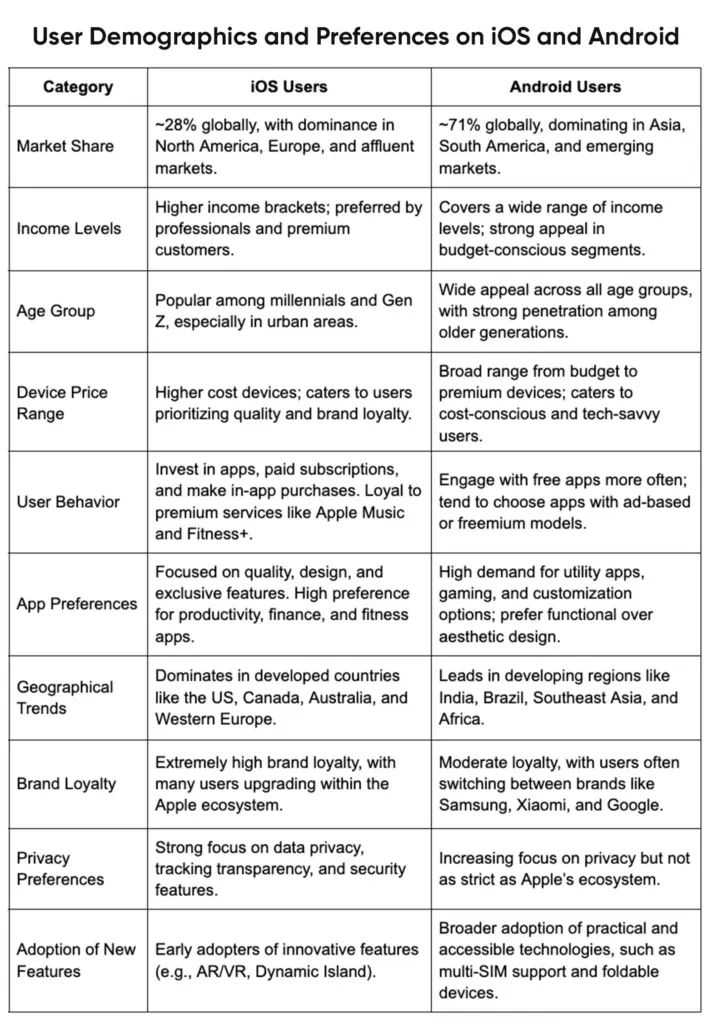
- Android leads with 71%, while iOS dominates the premium segment.
- More than 250 billion app downloads are expected this year.
- Users spend an average of 4 hours 20 minutes daily on apps.
How to Plan Your App Development Journey
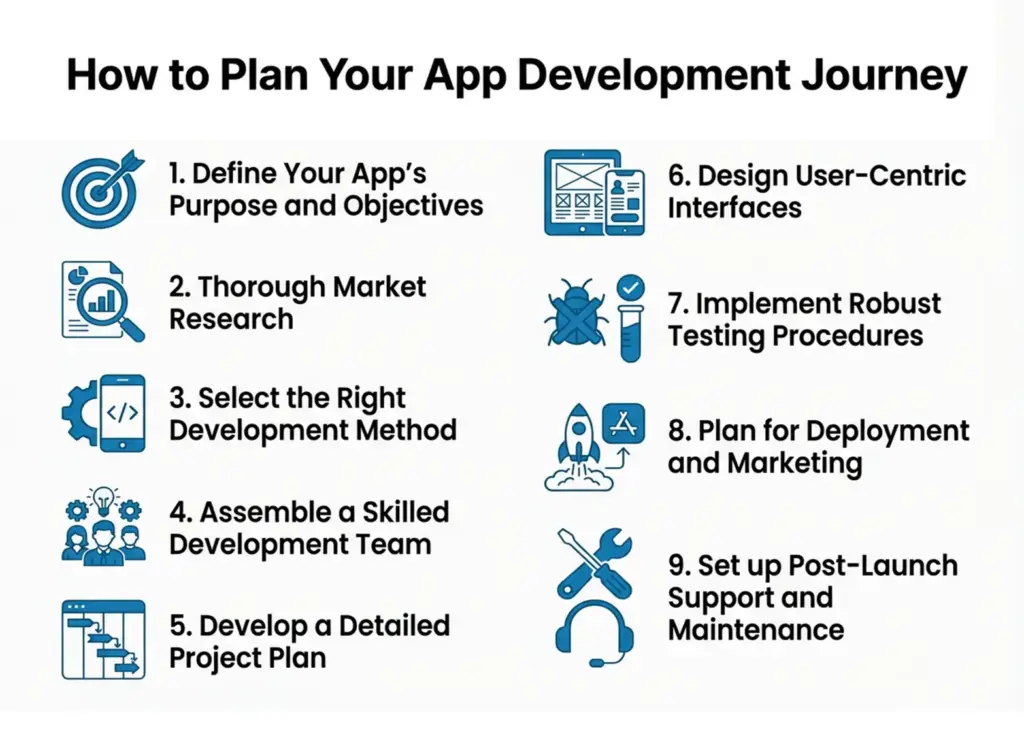
App development requires careful planning for success. Follow this approach to excel with the process.
1. Define Your App's Purpose and Objectives
The app will first focus on the definition of the problem it solves or the need that it addresses. From here, one will define very clear and measurable objectives guiding the development process and how the outcome will be measured after launching.
2. Thorough Market Research
Understand the current market scenario, who is the target audience, the competition, and gaps that might exist in the market. It will be beneficial for choosing which features and what aspects your app has that stands apart from all that other people's apps.
3. Select the Right Development Method
Decide between native and cross-platform development based on the target audience and resource availability. Native development ensures optimal performance tailored to a particular platform, whereas cross-platform development allows for the same code base across multiple platforms, which may also save time and cost.
4. Assemble a Skilled Development Team
Gather a team with expertise in your chosen development approach. For native development, this includes proficiency in Swift for iOS and Kotlin for Android. For cross-platform development, experience with frameworks like Flutter or React Native is essential.
5. Develop a Detailed Project Plan
Establish a detailed roadmap which defines each development phase, timelines, milestones, and deliverables. This roadmap shall be used as a guide for checking what is in progress and leading on to the same target.
6. Design User-Centric Interfaces
Create intuitive and engaging user interfaces (UI) which give and render a seamless user experience (UX). Take into consideration platform-specific guidelines to meet what users expect on your application on iOS and Android.
7. Implement Robust Testing Procedures
Conduct thorough testing, including functional, usability, and performance checks to ensure smooth operation across devices.
8. Plan for Deployment and Marketing
Acknowledge the submission guidelines of Apple App Store and Google Play Store before launching your app. Device a marketing plan accordingly to promote your app and attract users for targeted number of downloads.
9. Set up Post-Launch Support and Maintenance
Set up ongoing support to address feedback and release updates. Continuous improvement is vital to maintain user satisfaction and app relevance in a dynamic market.
Design and UI/UX Best Practices
Intuitive UI and seamless UX are critical to app success. Adherence to platform-specific guidelines and best practices aids usability and user experience.
The following represent the main points in effective UI/UX design:
1. Compliance with Platform-Specific Design Guidelines
Adhere to Apple's HIG for iOS and Google's Material Design guidelines for Android to enforce consistency and enhance user trust .
2. Simplification and Clarity as First Priority
Clean and simple designs help in navigation and interaction. White space, clear typography, and intuitive icons guide the user to the important functions.
3. Consistent Navigation
Maintain uniform navigation patterns by standardizing bars, tabs, and gestures that each platform is familiar with, which makes the experience much simpler for the user.
4. Responsive Layout
Design a responsive layout that can seamlessly adapt to multiple screen sizes and resolutions. This will help attain a uniform look and feel across multiple devices.
5. Design Touch-Friendly Interfaces
Apply appropriately sized interactive elements with adequate spacing to avoid tapping errors and increase accessibility.
6. Apply Color and Typography Thoughtfully
Use brand-aligned color schemes and readable typography. Make sure that contrast and font sizes are adequate to be readable for all users, including visually impaired ones.
7. Provide Feedback and Affordances
Provide instant visual or haptic feedback for any interaction, such as button press or form submission, to assist users effectively.
8. Performance and Speed
Optimize design for fast loading and smooth transitions to improve user satisfaction and engagement.
9. Test and Refine Designs
Test prototypes with users regularly to identify and correct issues. Use feedback to align the design with user expectations.
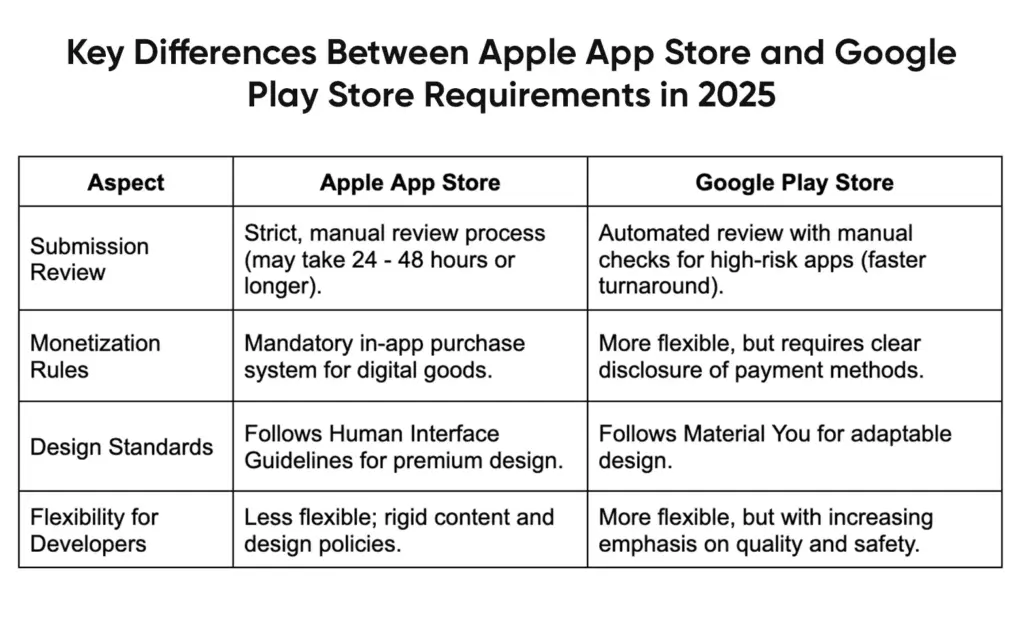
Key Differences Between Apple App Store and Google Play Store Requirements in 2026
App Store Optimization (ASO) For Discoverability
ASO tools will be necessary to optimize an app's visibility and performance on both the Apple App Store and Google Play Store.
Here are some notable ASO tools tailored for each platform:
ASO Tools for Google Play Store
1. AsoSpy
A Chrome extension that integrates mobile app analytics into the Play Store, offering instant access to installs, release dates, and updates.
2. Best ASO Tools for Google Play Store
A free Chrome extension with features like keyword checks, graphic downloads, reviews tracking, rank tracking, and version update history.
3. ASOTools
A platform providing app ranks, Facebook ad insights, review trends, keyword research, and other tools tailored for Android app markets.
ASO Tools for Apple App Store
1. ASO Tool by appAhead
A Chrome extension that lets users preview any app's Apple App Store page across countries and languages for competitive ASO insights.
2. AppTweak
An all-in-one platform offering ASO, ad, and market intelligence. It uses machine learning for keyword research and actionable insights to boost app rankings.
3. AppFollow
A tool for effective keyword research, text and graphic improvements, and app ranking growth. It tracks keyword trends, conversion rates, and downloads.
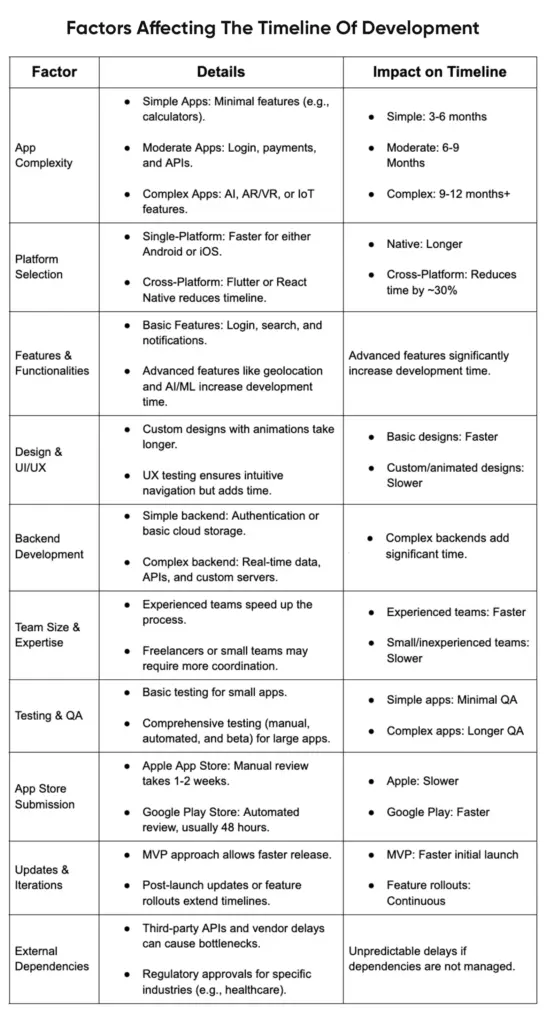
Factors Affecting The Timeline Of Development
Android App Development Trends, Tools, and Innovations
Key Tools for Android Developers
- Kotlin: The preferred language for its simplicity, safety features, and seamless compatibility with Java.
- Jetpack Compose: Continues to revolutionize UI development with its declarative syntax.
- Android Studio Giraffe: The latest version of Android Studio offers features like live updates, better performance monitoring, and enhanced AI-powered code suggestions.
New Trends in Android Development
- Foldable and Multi-Screen Apps
Foldable devices, such as the Samsung Galaxy Fold have become popular over a couple of years. Developers now need to create apps optimized for different screen modes. - Android Automotive OS
With smart vehicles on the rise, Android Automotive is yet another focus for developers targeting the automotive market. - Edge Computing and IoT
Android apps are increasingly incorporating edge computing to power IoT devices. This reduces latency and enhances user experience for connected gadgets like smart speakers and home systems. - AI-Powered Personalization
Android apps now heavily leverage AI for features like predictive analytics, voice recognition, and real-time customization.
Best Practices in Android Development
- Optimize for Battery Life: Use tools like Battery Historian to identify energy-consuming processes.
- Implement Material Design 3: The latest Material Design’s latest version “You “allows more dynamic, color-theming capabilities to personalize app experiences.
- Test for Multiple Devices: Android’s fragmented ecosystem demands thorough testing across devices, using emulators and tools like Firebase Test Lab.
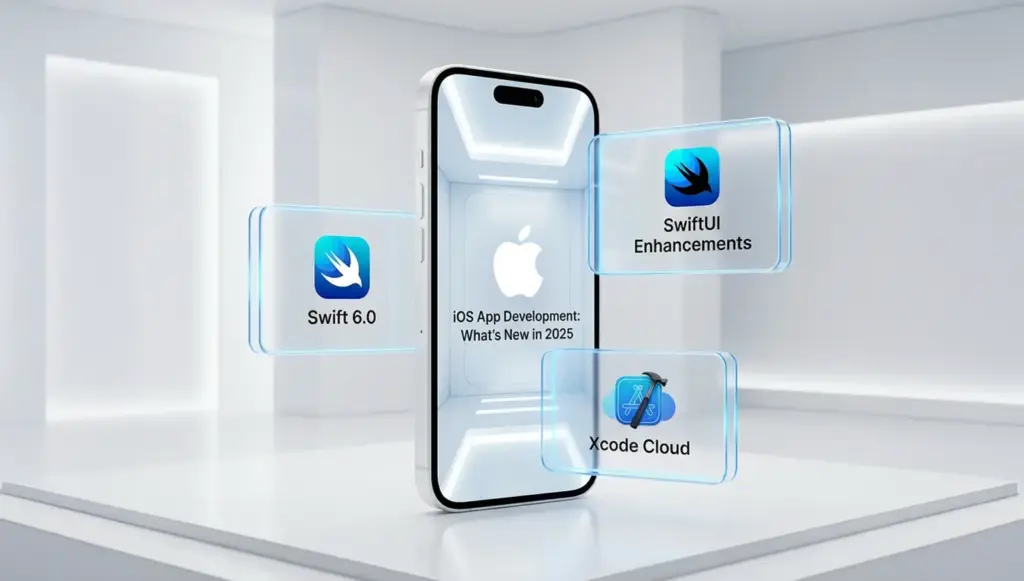
iOS App Development: What’s New in 2026
Tools Dominating iOS App Development
- Swift 6.0: The latest version focuses on improved concurrency and faster runtime, making it a game-changer for performance-critical apps.
- SwiftUI Enhancements: Apple’s declarative UI framework now supports advanced animations and multi-device previews, streamlining the design process.
- Xcode Cloud: Apple’s cloud-based CI/CD platform simplifies collaborative development and automated testing.
Emerging Trends in iOS Development
- Dynamic Island Features
Introduced with the iPhone 14 Pro, the Dynamic Island has inspired developers to create more engaging, interactive notifications and shortcuts. - Focus on Wearables
Developers are expanding apps for Apple’s wearables, like the Apple Watch Ultra, focusing on fitness, health, and productivity tracking. - AR-Powered Apps
With Vision Pro around the corner, iOS developers are preparing for the next wave of AR applications. From immersive games to virtual collaboration tools, ARKit 7 offers improved spatial mapping.
Best Practices for iOS Development
- Optimize for the Apple Ecosystem: Seamless functionality across iPhones, iPads, Apple Watches, and even Apple TVs.
- Adhere to Privacy Guidelines: Strict App Tracking Transparency (ATT) policies from Apple demand full transparency in data collection.
- Leverage Accessibility Features: Apps for differently-abled users are unique and resonate with the core values of Apple.
Cross-Platform Development: Pros/Cons and Best Practices
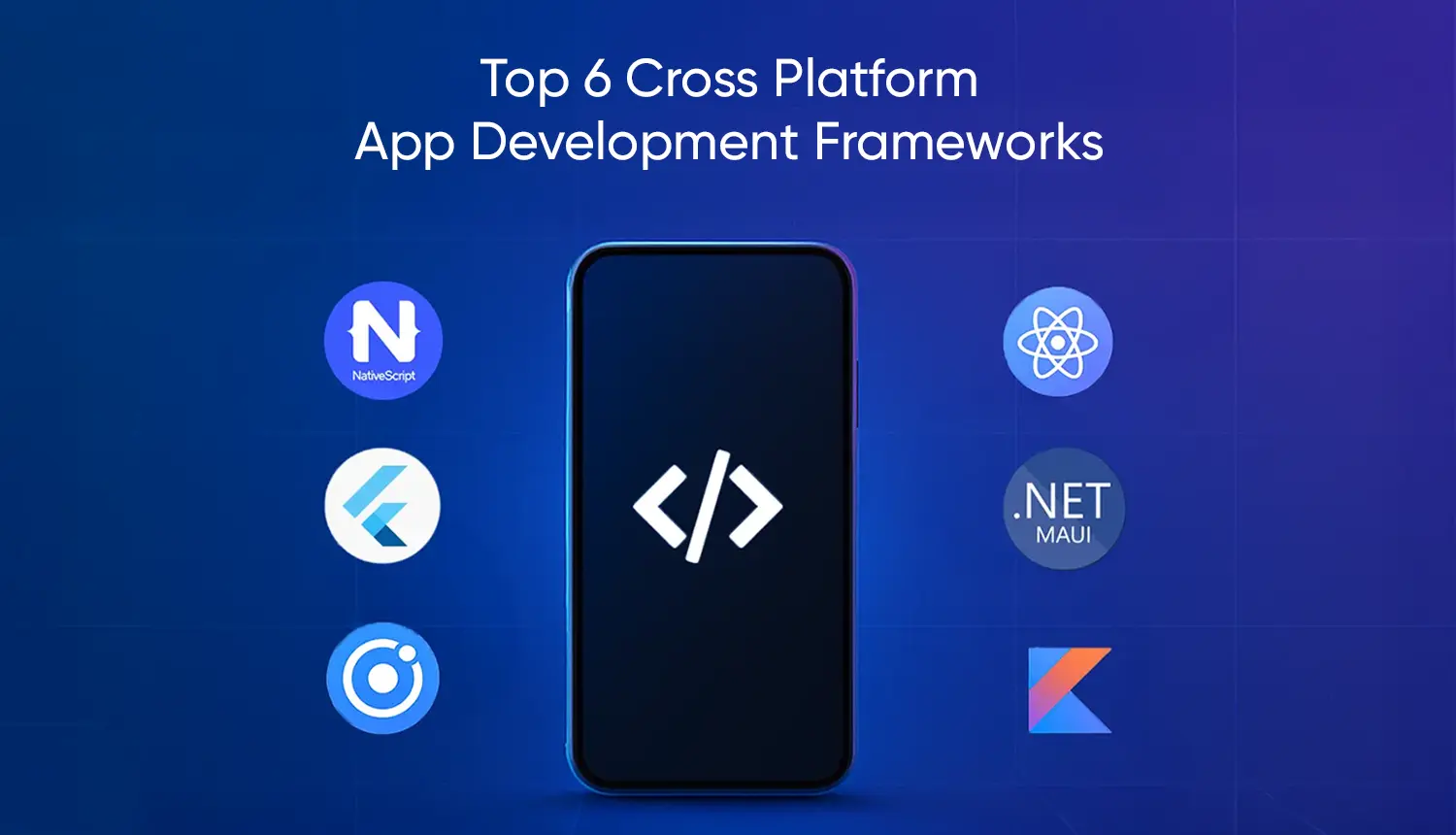
- Cross-platform frameworks have become more advanced. Developers can create apps for both Android and iOS without duplicating efforts.
- Frameworks Set up in 2025
- Flutter: Have near-native performance features; supports web, mobile, as well as desktop apps. The "hot reload" feature it boasts about has become a favorite among developers.
- React Native: Ideal for apps with strong community support, when native performance is a must-have with JavaScript flexibility.
- Unity leads in gaming and AR/VR development due to its powerful 3D rendering features.
Best Practices for Cross-Platform Apps
- Use Platform Specific APIs: Although frameworks abstract a lot, special, platform specific code ensures better user experience.
- Optimize UI for Each OS: Steer clear of the "one-size-fits-all" design and instead tweak your UI to follow the guidelines set by the platform (Material Design for Android, Human Interface Guidelines for iOS).
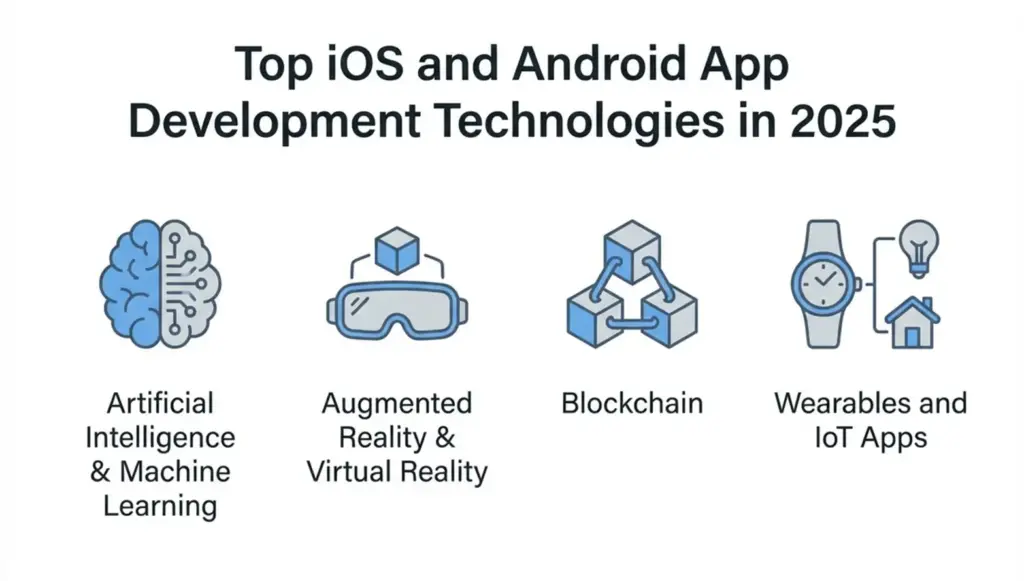
Top iOS and Android App Development Technologies in 2026
1. Artificial Intelligence & Machine Learning
AI and ML are highly used for developing mobile apps in 2025. Features like chatbots, fraud detection and personalized recommendations have made them preferable for all apps. You can leverage TensorFlow Life to seek assistance with ML integrations to your app.
2. Augmented Reality & Virtual Reality
AR and VR are equally dominating healthcare, real estate and EdTech. Using ARKit for iOS and ARCore for Android can help developers create immersive experiences for business apps.
3. Blockchain
Blockchain provides secure app transactions with decentralized data storage. Apps such as mobile wallets and NFT platforms rely heavily on this technology.
4. Wearables and IoT Apps
Apps connected to wearables or internet of things, be it a fitness track, a smart home controller, are revamping user experiences.
Monetization Strategies: How Apps Make Money in 2025?
- Subscriptions: Netflix thrives from subscription-based models.
- Freemium: Provides free access while offering optional paid features.
- In-App Ads: Native and rewarded ads dominate the mobile ad revenue streams.
7 Tips for Developers and Business Owners
Building a successful application is more about integration between sound coding skills and smart business techniques. During app creation, developers may focus primarily on the coding, but business people must ensure the app relates to their brand and offers actual value to users. These useful tips will help you plan your app development effectively.
1. Set Clear Goals
Start with a clear vision of what you want the app to accomplish. Is it to drive sales, enhance engagement with customers, or streamline some internal process? Specific objectives define the path of your app towards success.
2. Understand Your Target Audience
Take the time to understand the user's preferences, pain points, and daily habits. This will help you design an app that resonates with them and meets their needs.
3. Prioritize UX/UI Design
A well-designed app is the difference. The users remain engaged and happy when an application is intuitive and visually appealing. Work closely with designers to ensure that your app not only looks great but also stands user-friendly and reflects your brand identity.
4. Choose the Best Development Partner
Identifying the perfect developer is where success lies for your app. You should collaborate with reliable, experienced developers such as those at BrainX Technologies to guide you through the process from idea generation to releasing your mobile application.
5. Monetization Planning
A monetization plan will help you decide how your app will make money. Should it include advertisements, subscriptions, or in-app purchases? Ensure your monetization model complements your overall business strategy.
6. Maintain the Momentum
Launching the app is the initial step; allocate resources to it for future updates, new features, and the great customer service. This makes your app superior compared to competitors, and its users will continually return.
7. Improving with Analytics
Use the likes of Google Analytics or Firebase to track users interacting with the application. Using such insights improve the performance and quality of your application to suit a better audience experience.
User Demographics and Preferences on iOS and Android
Conclusion
The future of mobile application development in 2025 is everything to be flexible, intelligent and user friendly. With time, changing devices and structures, and user demands, developers and businesses need to create applications that are not only operational but also future ready. It is the combination of innovation and usability that is going to work in either iOS versus Android or cross-platform.
Develop Your iOS and Android Apps with BrainX in 2025
BrainX Technologies is a leading name in SaaS companies. Our seasoned team follows an efficient process for delivering scalable and user-friendly app solutions. We follow this 5 step process to provide transparency, efficiency and innovation from idea till launch.
- We collaborate closely with the client for Requirement Gathering to understand app goals, target audience and features.
- Our creative team builds Designs and Prototypes that highlight your brand identity and enhance user experience.
- The BrainX team uses Agile methodologies for the Development of scalable and secure apps.
- We follow a rigorous Quality Testing process to make your app bug-free for a successful launch.
- Our post launch Deployment and Maintenance services keeps your app upgraded.
Partner with BrainX Technologies to build high-performance mobile apps that scale!
Contact BrainX Technologies today!
Frequently Asked Question (FAQs)
1. What are the key mobile apps trends in 2025?
The future of mobile app development is being influenced by the integration of AI, cross-platform features, AR/VR features, and compatibility of wearable devices. The developers are also considering better privacy, real-time analytics, and optimization of 5G.
2. What platform is the best to select, iOS or Android?
It will be based on what you need. iOS reaches out to high-value customers who are design and monetization oriented, and Android offers coverage worldwide and flexibility to a variety of users. The cross platform development is now being adopted by many businesses to reach both effectively.
3. What influences the schedule of the app development?
Some of the factors are the complexity of the app, features, the expertise of the team, the choice of a platform, and the requirement to test. Simple applications can be developed in 3 to 6 months and complex and feature rich applications can take over 9 to 12 months.
4. What is the effect of UI/UX design on the success of an app?
Responsive and intuitive design makes the interface more usable and enjoyable. Adhering to the Apple Human Interface Guidelines and Google Material Design can provide the guarantee of compatibility and user confidence among the devices.
5. Why should BrainX Technologies be chosen as a mobile app developer?
BrainX Technologies is a provider of secure, scalable, and user-friendly mobile applications based on innovative frameworks such as Flutter, React Native, Swift, and Kotlin. Our process encompasses the ideation and design process as well as the deployment and maintenance of the application all the way to the end to make sure that your application runs perfectly in the digital ecosystem that continues to develop.