Optimization, vertical scaling, and horizontal scaling are all needed to scale a Ruby on Rails application in 2025. First, fix bottlenecks (N+1 queries, caching, background jobs), and then scale vertically (larger instances, DB tuning) to score fast wins. With the increase of the traffic, use horizontal scaling and load balancing, replica readers, and background workers. Lastly, deploy cloud-native applications such as Kubernetes, monitoring services (Datadog, New Relic), and AI-based auto-scaling to make sure that performance, reliability, and cost-efficiency at scale.

Many businesses hit a wall when their Ruby on Rails applications struggle with performance, especially as their user base grows. The success of scaling Ruby on Rails applications comes from knowing each component's vital role in the larger ecosystem. Database optimization, background job processing, and CDN implementation should work harmoniously to achieve the best performance.
Companies that adopt these proven strategies can position themselves for steady growth. This ensures their Ruby on Rails applications stay responsive and quick as user requirements grow. These scaling principles are the foundations for building applications that excel now and in the future.
In this blog, you'll learn how to optimize your architecture and make your database run faster. This detailed guide will show you how to set up microservices, use containerization, and implement caching mechanisms that work. These steps will boost your application's performance while keeping Rails' simplicity and elegance intact.
Let us walk you through the best methods for scaling Ruby on Rails applications.
Common Ruby on Rails Scalability Challenges
Ruby on Rails applications face several critical bottlenecks that emerge as applications scale:
- Database Performance Issues: Database interaction sits at the core of most Rails applications. Teams often encounter the N+1 query problem and poor database scaling. This happens because the application runs one query to fetch records and then executes additional queries for each record. These extra queries affect performance a lot.
- Memory Management: Ruby's elegant syntax comes with a trade-off in performance. The language tends to be memory-intensive. Large Rails applications struggle with high memory usage. Memory leaks can occur in long-running processes.
- Concurrency Limitations: The traditional Rails setup requests sequentially. This approach creates bottlenecks as traffic grows. High-traffic scenarios expose these limitations quickly.
How to identify potential performance issues?
Only a systematic approach helps identify performance issues. Several indicators help spot potential problems effectively.
Application logs provide the most reliable way to detect performance problems. You must focus on database query patterns and can spot N+1 queries if you see repeated, similar queries that differ only by ID.
Key Areas to Monitor:
- Query execution times and patterns
- Memory usage fluctuations
- Response times under varying loads
- Asset pipeline performance
Scalability vs. Performance in Ruby on Rails

Scalability and performance share some common ground, but they mean different things!
Scalability shows how well your application grows with increased load. The performance reveals how fast your application handles its current workload.
Scaling ruby on rails applications requires measuring your application's ability to handle more user requests per minute (RPM).
Success depends on:
1. System Architecture: Your application's core structure that supports growth
2. Resource Utilization: Smart use of available resources
3. Code Modularity: Knowing how to work with database systems of all types
Technology alone doesn't define scaling; your entire system architecture matters. Moreover, smart optimization choices and solid architectural decisions are vital parts for ruby on rails scalability.

Optimizing Ruby on Rails Application Architecture
Optimizing application architecture is essential for supporting the growth of Ruby on Rails applications. Various architectural approaches have been discussed to consistently enhance scalability and performance, delivering reliable results across different use cases.
1. Implementing Microservices
Organizations have moved from monolithic applications to microservices architecture over the last several years. Large and complex applications work better with microservices, especially when you have independent scaling requirements. This approach gives teams better separation of responsibilities and makes maintenance easier.
Microservices implementation focuses on:
- Isolation and Flexibility: Services run independently with dedicated resources and processes.
- Fault Tolerance: Problems in one service stay contained without affecting the whole system.
- Technology Freedom: Teams can pick different tech stacks that match their service needs.
- Scalability: Each service scales based on what users need.
2. Using Service-Oriented Architecture
Service-oriented architecture (SOA) stands as a reliable approach for RoR applications. SOA enables better isolation between different system components and maintains clear communication channels. The architectural style shines through its capability to swap service implementation without interface changes. Teams can deploy independently without causing system-wide downtime.
The communication patterns between services need careful evaluation during SOA implementation. The selection between synchronous and asynchronous communication is a vital aspect of the design. Synchronous calls offer simpler implementation but might keep users waiting during execution. It will be good to implement asynchronous processing for longer-running operations to enhance user experience.
3. Containerization with Docker
Docker has transformed the way one deploys and scales Ruby on Rails applications. It allows teams to accept new ideas around containerization because it delivers amazing consistency in different environments.
It enables businesses to build lightweight containers that launch quickly and save disk space. Clear documentation and maintainable Docker configurations help team members work smoothly without knowing every detail of the infrastructure.
10 Best Methods for Scaling Ruby on Rails Applications
Let's take a closer look at advanced scaling techniques for Ruby on Rails applications. These sophisticated processing methods can substantially boost your application's performance.
1. Asynchronous Processing with Background Jobs
Background jobs are crucial for managing time-consuming tasks without affecting the user experience. Active Job helps manage asynchronous processes in Rails applications effectively.
Our approach to background job implementation includes these key aspects:
Job Configuration Setup
- Job classes inherit from ApplicationJob
- Queue adapters need configuration (Sidekiq, Resque)
- Queue priorities and naming conventions require setup
Implementation Strategy
- Complex processing tasks need isolation
- External service dependencies need handling
- Database transactions require proper management
Background job implementation requires careful attention to avoid common mistakes. To name just one example, passing entire database records to jobs creates problems with outdated information when the job executes. The best practice involves passing minimal identifying information and fetching fresh data during job execution.
2. Implementing Content Delivery Networks (Cdns)
Content delivery networks have become essential for modern Rails applications. They substantially speed up page load times by serving static assets from worldwide servers.
Here are the main advantages we've seen:
- Better Performance: Users get content from the nearest server
- Less Server Load: Application servers can focus on dynamic content
- Better Availability: Traffic spikes are handled smoothly
- Stronger Security: Extra protection against DDoS attacks
Setting up CDNs in Rails applications is straightforward. Just point your config.asset_host variable to the CDN's URL. It’s a simple change that will give all asset tags automatic access to the CDN's URL and optimize content delivery throughout your application.
3. Using Cloud Scaling Solutions
Our team has successfully implemented vertical and horizontal scaling strategies for Rails applications.
The cloud scaling approach focuses on the following:
Horizontal Scaling Implementation:
Multiple application instances spread across different servers form a core strategy. This method works especially well with increased user loads.
We implement this through:
- Web application instances using Rack-based servers
- Load balancing across multiple servers
- Asynchronous programming patterns for I/O operations
Monitoring and Optimization:
Tools like New Relic and Datadog help track application metrics.
It enables us to:
- Spot performance bottlenecks early
- Scale resources proactively
- Make the best use of resources
4. Effective Caching
Caching is a powerful way to boost application performance by avoiding repetitive computations. In essence, caching enables the system to save the results of expensive operations and reuse them, rather than constantly computing the same things.
For example, on a social media platform, if a post goes viral, caching that post can save countless CPU cycles that would otherwise be spent rendering it individually for every user. But that’s just one aspect of what caching can achieve.
Here are some key resources that can be cached in a Ruby on Rails application to enhance scalability and performance:
Caching Views
Rendering views, particularly those with complex data, can be resource-intensive. Caching pre-rendered views allows you to serve them instantly, improving performance significantly when views are requested repeatedly. However, it’s essential to be mindful of cache keys—Rails doesn’t automatically account for nested template content. When caching views with nested content, stale data can be returned if cache keys aren’t managed correctly.
Caching Responses
Beyond caching views, it’s also possible to cache full responses for GET requests. Rails supports this by using HTTP headers like If-None-Match and If-Modified-Since. The browser uses these headers to check whether a resource has changed since the last request.
- If the `If-None-Match` header is presented, the server shall attempt to compare the stored `Etag`, the name of a uniqueness identifier for content change, with the value received.
- If they are identical, it should return `304 Not Modified` using an absolute minimum of bandwidth and processing.
- Similarly, with the `If-Modified-Since` header, Rails would respond with `304 Not Modified` if the content had not changed since that date.
Rails handles these headers natively, allowing it to respond with `304` when appropriate, to save resources by skipping unnecessary view rendering.
Caching Values
Caching individual values can be particularly useful for resource-intensive calculations or frequently requested data. By caching the results of these operations, Rails can avoid recalculating them each time and deliver faster responses.
- Identifying suitable values for caching usually involves analyzing the slowest parts of the application.
- To avoid returning stale data, it's critical to compute a unique cache key that accurately represents all inputs used in the original calculation.
- With a solid understanding of what to cache, the next step is selecting where to store this cached data.
Rails provides several built-in cache store options:
- Redis and Memcached: These are the most popular options for production environments, as they are highly performant and well-suited for distributed systems.
- File Store and Memory Store: Useful for development environments to get caching up and running quickly, but typically not recommended for production, especially in applications with multiple servers.
Choosing the right cache store depends on your application’s specific needs and the scale of your production environment.
5. Optimize Assets with the Asset Pipeline
Minify and Compress Assets
It enables you to merge, minimize, and compress CSS, Javascript, and image files. This reduces the number of HTTP requests needed to load assets and minimizes the file sizes. Tools like Uglifier for JavaScript and Sass for CSS can help with minification.
Precompile Assets
Precompile your assets during production to ensure your application uses optimized, minified stylesheets and scripts. In Rails, the assets: precompile rake task compresses all assets into one file, reducing the number of requests required to load a page.
Lazy Load JavaScript
Use techniques like code splitting or lazy loading to load JavaScript only when needed. This reduces the initial page load time, as only essential scripts are loaded initially while others are loaded asynchronously.
6. Improve Rails Application Configuration
Threading with Puma
Puma is a multithreaded web server that is designed for Rails and is highly efficient for handling concurrent requests. It handles multiple requests in a single process using threads, which reduces memory usage and improves performance.
Database Connection Pooling
Rails maintains support for connection pooling, which means you can reuse database connections instead of opening a new one on each request. It makes database interactions quicker since opening new connections is not a requirement in case of multiple and simultaneous requests.
Timeouts & Rate Limiting
Implementing request timeouts and rate-limiting can protect your application from excessive load and abuse. You can use middleware like Rack::Timeout for request timeouts and configure Throttle to limit the number of requests a user can make within a certain period.
7. Optimize Memory Usage
Garbage Collection Tuning
Ruby's garbage collector can cause jitters to performance at times if it does not perform well. One has to adjust the heap size along with the frequency of garbage collection so that the impact of these pauses can be minimized- especially in high-traffic situations.
Memory Leak Detection
Monitor your application's memory usage with tools such as New Relic or Scout. Memory leaks that do not release their objects would make an application slow gradually as time goes by. Memory leaks usually kill when their performance degrades, and they start crashing.
Object Caching
Store reusable objects, such as API responses or large data sets, in memory (using Rails. cache) to reduce recalculation or re-fetching. As it minimizes the load on the database and other external services, ensuring fast and consistent performance.
8. Enhance Database Efficiency
Database efficiency remains central to our scaling strategy for Ruby on Rails applications. Years of optimizing Rails apps have taught us that proper database management can make or break an application's performance.
Query Optimization Techniques
Query optimization plays a significant role in responsive application maintenance. The biggest problem we face is the N+1 query problem that happens when applications execute multiple database calls instead of a single optimized query. We solve this through several proven techniques:
- Eager Loading Implementation: The system has includes, preload, or eager_load features that reduce query count.
- Selective Column Retrieval: The database fetches only required data which minimizes memory usage.
- Strategic Indexing: Indexes get created on columns accessed frequently.
- Query Caching: Result set caching implementation helps with repeated queries.
Implementing Database Caching
Our applications' response times have substantially improved through implemented caching strategies. Rails offers built-in caching mechanisms that we utilize to store expensive query results. The implementation focuses on these key areas:
- Query Result Caching: Storing frequently accessed data using Rails.cache.
- Cache Invalidation: Implementing proper cache-clearing strategies.
- Cache Key Management: Using conventional naming patterns to organize better.
Database load reduces dramatically and response times improve with effective caching. The system serves cached data faster than repeated database query execution.
9. Using Database Connection Pooling
Connection pooling is a significant optimization technique in our scaling trip. Ruby on Rails, by default, adjusts the maximum pool size to 5 connections. We learned to adjust it based on our application's needs.
Several factors come into play when we think about connection pooling:
- Pool Size Configuration: The pool size depends on our application's concurrent connection requirements.
- Connection Management: Our application code must handle connections properly.
- Resource Optimization: We need the right balance between connection availability and resource usage.
7 Tools for Scaling Ruby on Rails Applications
You must take certain actions to scale up your Ruby on Rails applications. But when should you take that action? It's important to monitor when your traffic peaks. Here are some of the most popular tools used to track performance and metrics during high-traffic periods.
1. Puma
Puma is an open-source web server built to handle Rack applications in Ruby. It efficiently manages requests, connections, and threads, and includes built-in support for HTTPS and HTTP/2, making it a solid choice for scaling Rails applications.
2. Unicorn
Unicorn is a Rack HTTP server for UNIX-like systems, originally developed by Sun Microsystems. Built on the foundation of Mongrel, it delivers superior performance and reliability, especially under high-load conditions.
3. NGINX
NGINX (eNGINe X) is the most downloaded web server in the world, offering added functionality for Rails applications like load balancing, caching, reverse proxying, or running multiple sites on one IP. This is highly compatible with Rails, able to work in high traffic and important application performance.
4. New Relic
New Relic is an application monitoring tool providing real-time metrics and alerts through the application logs. It goes deep into the processing times of the requests, bottlenecks, and error generation, hence importantly identifying and resolving performance issues. New Relic does not have any requirement for additional infrastructure setup; all integration is made hassle-free in this regard.
5. Redis
Redis is a NoSQL in-memory key-value database that acts as a caching server and as an in-memory database. High capabilities for the handling of many simultaneous requests make it quite a popular application of systems that require very fast data retrieval. The other benefit of using Redis is that this is an open-source application, running on Windows, Linux, and macOS operating systems.
6. Sidekiq
Sidekiq is a background job processor designed specifically for Ruby on Rails applications. It enables job processing outside of web requests, reducing the load on active user sessions and improving application responsiveness. Sidekiq integrates seamlessly with Redis and ActiveJob, making it a flexible tool for managing background tasks.
7. Flame Graphs
Flame graphs are a visualization tool that helps developers analyze application performance over time. They show trends in user activity and highlight critical points where the application’s performance starts to degrade or even fail. By examining flame graphs, you can identify specific areas that require optimization to improve scalability.
5 Best Practices to Increase Ruby on Rails App Performance
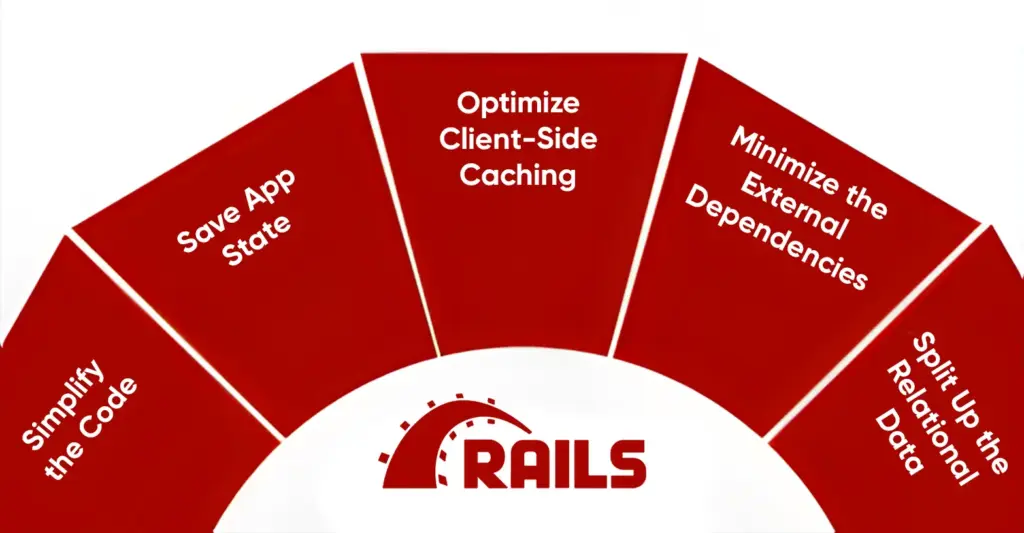
Certain best practices are required to make any framework work best for your purpose and provide good outcomes. Following are some of the Ruby on Rails best practices that will help you scale your apps better.
1. Simplify the Code
Consistent refactoring can be time taking and might result in certain performance optimization issues in the future. However, combining RoR with a minimal and straightforward language for writing tasks can provide more processing capabilities.
2. Save App State
Optimizing code for horizontal scaling becomes more difficult when the state is stored on the server. To avoid optimization issues, it’s best to keep the current state on the client side.
3. Optimize Client-Side Caching
Use client-side caching and Ajax libraries like jQuery to deliver data to the browser only when necessary. Implement expiration policies and tagging to optimize cache management, and take advantage of gateway or reverse proxy caches to store HTTP responses on your website. Make full use of Rails' page, action, and fragment caching for even better performance. Instead of repeatedly querying the database, store frequently accessed results in Memcache to reduce load and speed up your application.
4. Minimize the External Dependencies
Be mindful of dependencies on external services like RSS feeds or ad-serving networks. Having a backup plan ready is one of Ruby on rails best practices for instances when a service becomes unavailable or cannot keep up with your growing needs.
5. Split Up the Relational Data
At high scaling levels, partitioning your MySQL database becomes essential. The sharding process splits datasets into segments using a designated key. Sharding by user ID is a common approach for many consumer-focused Rails applications. However, other sharding strategies—such as organizing data by age or access frequency—can also be effective.
Scale Your Ruby on Rails Apps with BrainX!
Scaling your Ruby on Rails application can be a complex challenge, but Brainx is here to simplify the process.
As a dedicated SaaS provider, we specialize in optimizing architecture, enhancing performance, and managing infrastructure to support your growing business.
Our expert team implements strategies like microservices, database optimization, and robust monitoring. We follow Ruby on rails best practices to ensure your application remains fast and reliable, even under increased load.
With BrainX as your partner, you’ll benefit from tailored scaling solutions that drive efficiency and performance.
Ready to elevate your Ruby on rails app? Contact us today to discuss how we can help you scale successfully!
FAQs
Q1. What are the most used bottlenecks in scaling a Ruby on Rails application?
The most common reasons for scaling problems are database queries (N +1 problems), background job queues, memory leaks, and inadequate caching.
Q2. Which scaling configuration to use, either vertical or horizontal scaling of my Rails?
Begin with vertical scaling (larger servers, DB tuning) and win fast. Shifting to horizontal scaling (load balancing, multiple instance applications) once the traffic increases.
Q3. What is the scaling of the database layer of Rails applications?
Read replicas, connection pooling, query optimization, caching, and, where necessary, sharding or partitioning to large workloads.
Q4. What are the tools that are used to monitor Rails application performance at scale?
The most popular tools are New Relic, Datadog, Prometheus + Grafana, and Skylight. They follow the indicators such as latency, error, and DB performance.
Q5. What is the level of scalability of Rails 7/8 when compared to the older versions?
Modern Rails has enhanced autoloading (Zeitwerk), Hotwire with reduced front-end loads, support of asynchronous queries and framework-level performance optimization.
Q6. Does generative AI affect Rails app scaling in 2025?
Yes. Intelligent scaling software in cloud systems is able to forecast traffic burst and automatically scale resources to minimize downtime and expenditures.