
- Supabase vs Firebase mostly comes down to your data shape:
SQL relational integrity (Supabase) vs NoSQL document flexibility (Firebase). - Firebase’s SDK model is typically faster to ship if offline-first and mobile realtime UX is core.
- Supabase’s Postgres + RLS is often easier to scale safely in case you need multi-tenant roles, reporting, and complex permissions.
- For backend logic, both work yet you should choose based on what your logic wraps:
Firebase-native events (Cloud Functions) vs Database-centric workflows (Supabase Edge Functions). - Cost behavior differs as Firebase’s per-operation billing can spike with heavy reads, while Supabase’s base plan + overages is usually easier to forecast.
Supabase vs Firebase - How to Choose the Right Backend Platform in 2026
Backend-as-a-service isn’t just about “not running servers” anymore. In 2026, product teams and founders require a backend platform that includes authentication, data, file storage, backend logic, and real-time UX, while it must remain secure, scalable, and financially stable.
When considering Supabase vs Firebase with a new product, the best choice is rarely about deciding it through one killer feature. It’s about how the platform’s database model, authorization style, and pricing behavior match your roadmap as you move from MVP to growth.
This guide breaks down the practical tradeoffs between two of the most discussed options: Supabase (Postgres-first) and Firebase (a managed platform owned by Google). When you are choosing what to base your next product on, the goal is to match the platform’s strengths to your data model, team skills, and scaling path.

A Quick Overview of Supabase vs Firebase Comparison
If you need a “boardroom-ready” snapshot, here’s the Firebase vs Supabase view that most decision-makers care about.
This Supabase vs Firebase comparison is intentionally high-level — the deeper sections later in this guide explain what changes in your architecture, security posture, and cost profile.
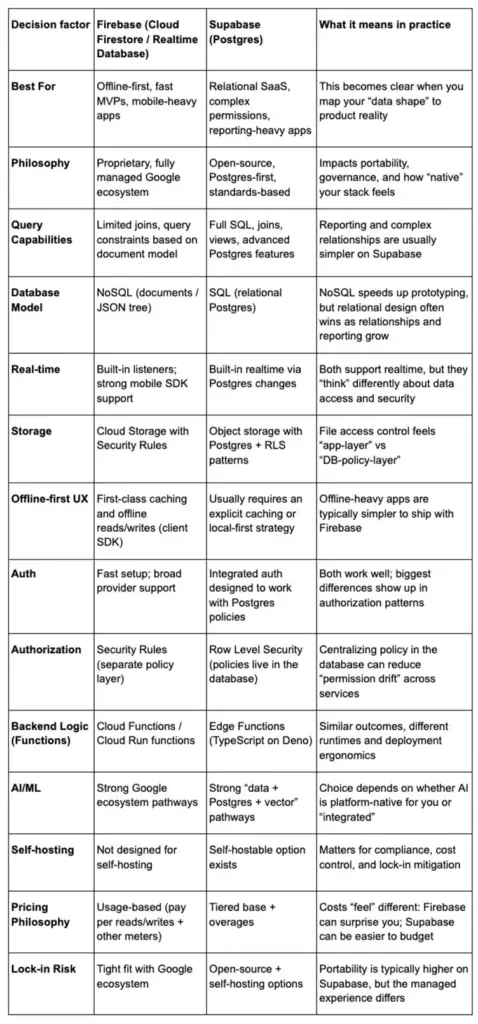
Want the short version? For many teams, Supabase vs Firebase comes down to whether you want your data layer to behave like a conventional SQL database from day one, or whether you prefer Firebase’s client-centric realtime and offline model.
What is Firebase?
Firebase is a managed platform owned by Google that bundles backend capabilities for building and operating web and mobile apps, including databases, authentication, storage, and serverless backend logic.
Two database options sit at the center of Firebase: Cloud Firestore (a document-oriented NoSQL database) and Firebase Realtime Database (a JSON-based realtime database with offline persistence via SDKs).
Around the databases, Firebase includes “app runtime” and “app growth” tooling — such as Authentication, Cloud Storage for files, Analytics, and products like Crashlytics and Remote Config.
For many product teams, the Supabase vs Firebase choice becomes clearer once you list your “future features” (auditing, billing, reporting, role-based access) and ask which data model makes those features cheaper to build and safer to operate.
Firebase also integrates with Google Cloud services — including exporting Firebase product data (like Analytics, Crashlytics, and others) into BigQuery for deeper analysis.
What is Supabase?
Supabase positions itself as a Postgres development platform: start with a Postgres database, then add Authentication, instant APIs, Edge Functions, realtime subscriptions, and storage as needed.
The defining idea is that your “source of truth” is a full Postgres database. Instead of learning a proprietary database model, you build on SQL tables, foreign keys, indexes, and transactions — and Supabase layers developer experience on top (instant APIs, client libraries, and a dashboard).
This Postgres-first base is typically the main determinant of Supabase vs Firebase comparisons when SaaS teams already use SQL as their analytics, support and operational workflow tool.
Supabase is an open-core project and integrates closely with open tools and open-source parts. Its primary project and most of its core services are publicly developed, while self-hosting is available using containers and community stacks. (Its open repos on GitHub are a useful signal of this governance model.)
Key Supabase vs Firebase Differences
Below is the Supabase vs Firebase comparison most teams wish they had before they made an irreversible call. Instead of marketing checklists, these sections focus on how day-to-day engineering changes depending on your choice.
To keep things grounded, we’ll use a simple rule: the more your product resembles “a web app on top of a database,” the more your database model, authorization approach, and cost model will dominate the decision.
Core Architecture & Data Handling
Database Type & Database Model: SQL vs NoSQL
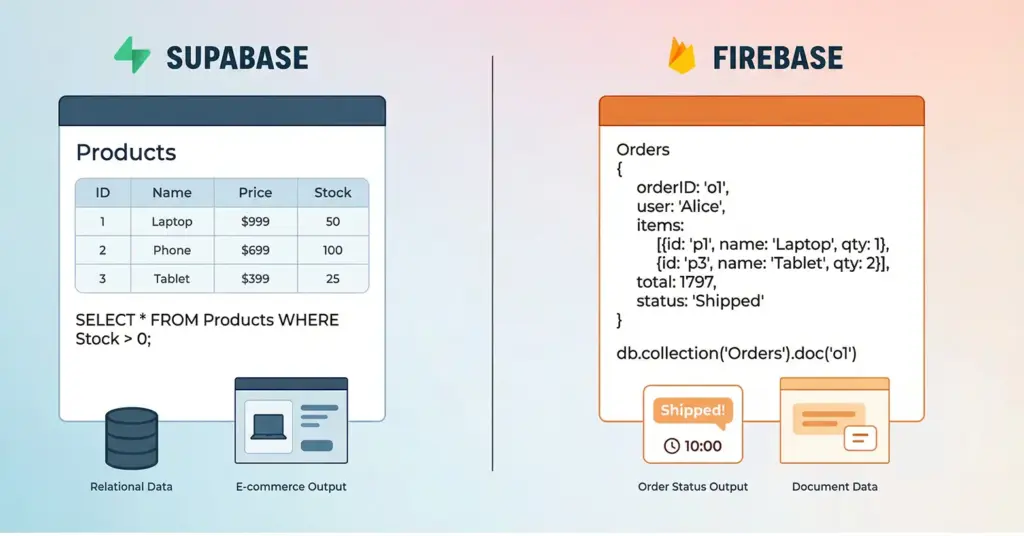
Cloud Firestore is document-oriented, and you can store documents in collections (NoSQL). Firebase Realtime Database is a database that synchronizes the changes in real time to its connected clients and stores data in the form of JSON.
Supabase is the opposite as you start with relational tables in Postgres. Your schema tends to be explicit, and relationships are modeled with foreign keys rather than document nesting.
In Supabase vs Firebase architecture discussions, this is the foundational question: are you optimizing for a flexible document model, or for relational integrity and SQL query power?
Where this difference hits hardest:
- Data relationships: relational joins vs composing related data with multiple reads and app-side logic (Firestore has no native joins, so teams often denormalize or split reads).
- Reporting: revenue dashboards, cohort-style analytics, and admin filtering are often easier to express as SQL queries than as client-assembled documents.
- Data integrity: Postgres-style constraints (foreign keys, uniqueness, transactions) are designed into the relational model.
Performance and Query Capabilities
Performance is not a single number — it’s “how efficiently your platform supports your workload.”
When teams talk about Supabase vs Firebase differences in performance, they usually mean “how hard is it to express the query we need” and “how many paid operations does it generate,” not just raw latency.
Firestore supports expressive querying, but documented restrictions exist for certain compositions (for example, limits around OR/disjunction structures and combinations of operators). In practice, this nudges teams toward careful data modeling and sometimes denormalization when “relational-style” traversal is required.
Supabase inherits the Postgres approach: SQL joins, subqueries, transactions, and indexes are normal tools. Supabase’s own comparison explicitly contrasts “no native joins” in the Firestore data model with Postgres’s ability to do complex joins and transformations in SQL.
If you’re deciding for analytics-heavy workloads, the question is often “how many round-trips and workarounds do we need to ship an accurate answer?” A relational backend can answer complex questions in fewer queries and with database-level constraints that keep results consistent.
Structured vs Unstructured Data
NoSQL fits unstructured or evolving data. If your objects change frequently or you want flexible shapes, Firestore can be easier.
Postgres fits structured data. It performs well when you want predictable schemas, constraints, and strong consistency across related tables.
In practice, SaaS products usually drift toward structure over time.
Transactions & ACID Support
Firestore supports transactions, but it shines most when your operations are document-focused and your constraints fit the NoSQL model.
Postgres is designed for ACID transactions and relational integrity. If you care about strict consistency across multiple entities, it becomes a strong advantage for Supabase.
This matters for billing logic, role changes, and any workflow that cannot tolerate partial updates.
SDK & API Access Patterns
Firebase leans heavily on client SDKs. You often connect apps directly to Firestore with Security Rules controlling access.
Supabase supports client SDKs too, but the mental model tends to be database-first. You can build a clean policy layer with Row Level Security and keep data rules close to the database.
Both approaches can be secure. The difference is where your team prefers to express rules and how much logic you want in the client.
Authentication, Authorization & Security
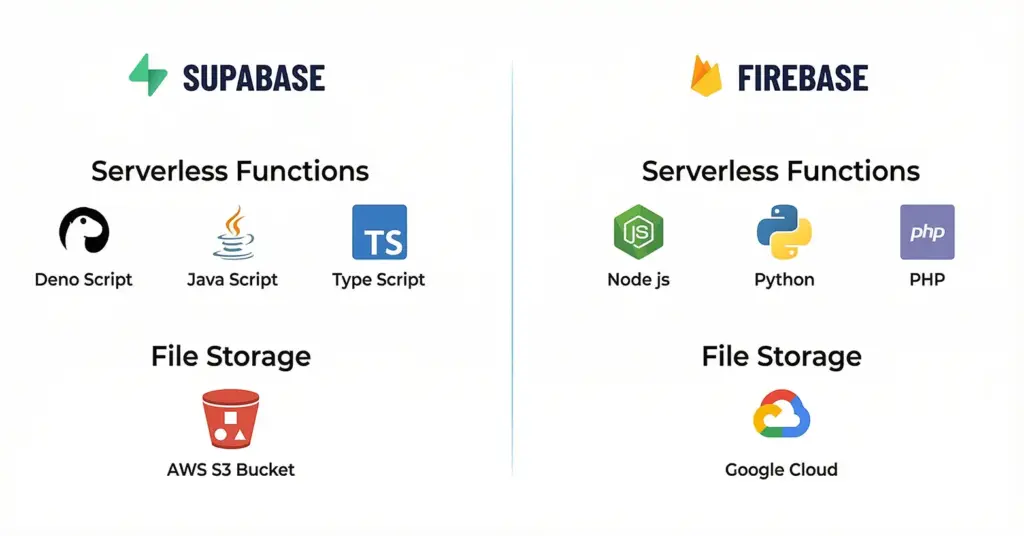
Firebase Authentication provides backend services and SDKs for common sign-in methods (email/password, phone, anonymous auth, and popular federated identity providers) and can be extended via an Identity Platform upgrade for additional enterprise features.
Firebase authorization is commonly enforced via Firebase Security Rules, which determine who can read/write and are evaluated server-side for services like Realtime Database (and similarly for other products). A key operational reality is that rules are a separate policy layer you must design, review, and test.
Supabase’s posture is database-native authorization. Supabase emphasizes Postgres Row Level Security (RLS), where policies are written in SQL and can integrate with Supabase Auth helper functions such as auth.uid() for per-user or per-tenant enforcement.
That “policy location” difference extends into realtime. Supabase documents that client access to Realtime Broadcast and Presence can be controlled with RLS policies on the realtime.messages table, and that permissions are computed when clients connect to a channel.
Backend Logic & Serverless Functions
Cloud Functions vs Edge Functions
Firebase backend code runs as Cloud Functions, and in the modern second-generation world this is closely tied to Cloud Run functions terminology and infrastructure. HTTPS requests along with a large number of background events can trigger functions and the 2nd gen model is described as being powered by Cloud Run and Eventarc.
If your roadmap includes lots of event-driven glue code, Supabase vs Firebase here is mostly about operational preference: Google-managed functions with deep Firebase triggers, or edge-deployed TypeScript functions that sit closer to a Postgres-first backend.
Supabase provides Edge Functions designed to run TypeScript on a Deno-based runtime, with features like global distribution and Node/NPM compatibility when needed.
A practical rule is to anchor your decision on where your logic “lives”:
- If your logic is mostly responding to Firebase-native events (Firestore writes, auth lifecycle, storage triggers), Cloud Functions remain extremely ergonomic.
- If your logic mostly enriches, validates, or orchestrates work around a relational database, Edge Functions + SQL often produce simpler code paths.
Language Support & Runtime Environment
Firebase supports multiple runtimes depending on the service, with strong Node.js support and broad ecosystem compatibility.
Supabase Edge Functions typically align with modern JavaScript and TypeScript workflows. The benefit is speed and simplicity. The tradeoff is fewer runtime options compared to a full cloud platform.
Extensibility & Custom Logic
Firebase is flexible when you already live in the Google ecosystem and want to extend with GCP services.
Supabase is flexible when you want to extend inside Postgres. You can use SQL, extensions, and database functions to keep logic near the data.
Choose the style that matches your team’s strengths and operational comfort.
Real-Time Sync and Offline Support
Firebase’s realtime story is mature. Cloud Firestore uses realtime listeners and caches actively used data so apps can read, write, listen, and even query while offline; Realtime Database also stays responsive offline because its SDK retains data on the disk and resynchronizes when connectivity returns.
In Supabase vs Firebase, this is one of the clearest day-one product UX differences: Firebase gives you offline-friendly sync by default, while Supabase typically asks you to design it deliberately.
Supabase also offers realtime, but it’s built around Postgres change delivery. Under the hood, Supabase Realtime can acquire a Postgres logical replication slot and stream changes (from WAL/logical replication) out to subscribed clients over websockets.
Offline-first behavior is a key divergence. According to Supabase’s own comparison, offline access generally requires your own caching strategy, and the ecosystem often combines Supabase with local-first solutions (such as RxDB) to synchronize client-side databases with Supabase and allow offline work.
Offline Sync Behavior (Cache & Sync Strategy)
With Firebase, offline behavior is often handled through SDK-level caching and sync. It can feel automatic once you set it up correctly.
With Supabase, teams commonly implement a local database and manage sync cycles. This approach is powerful when you need custom conflict resolution, partial sync, or strict data boundaries.
Sync Performance & Reliability
Firebase tends to be reliable for real-time and offline sync at scale when your data model and rules are well designed.
Supabase reliability depends heavily on how you design subscriptions, indexes, and query patterns. When built well, it can be excellent. It simply asks for more database thinking.
Storage & File Management
File Storage Architecture
Firebase Storage is tightly integrated with Firebase apps. It fits well when you want a simple file pipeline with predictable patterns.
Supabase Storage works well when you want file management aligned with database rules and user access models.
Security & Access Controls
Firebase uses Security Rules to control access to files.
Supabase can align file access with Row Level Security patterns and database relationships. This can simplify permission logic for SaaS workflows like team spaces or tenant libraries.
CDN & Scalability
Both can serve files at scale. The key difference is how you manage access control and how closely you want it tied to your data model.
AI/ML & Integrations
Built-in AI Capabilities
Firebase’s advantage often comes from ecosystem alignment. If your team already uses Google services, AI add-ons and workflows can be smoother to adopt.
Supabase’s advantage often comes from data proximity. If your AI use case depends on querying product data, logs, and embeddings together, a Postgres-first base can be very convenient.
AI Tooling & Ecosystem (OpenAI, Gemini, Vertex AI)
Firebase is a natural fit for teams that want to integrate with Google’s AI tooling and managed services.
Supabase integrates well with external AI providers too. Many teams use it as the secure data layer while calling AI APIs from serverless functions.
Pick based on where your AI stack will live long term.
Vector Search & RAG Support
Supabase can support vector search patterns through Postgres options and extensions. This is useful for retrieval workflows and RAG systems that sit close to application data.
Firebase can still power AI apps, but vector workflows often live in additional services. That is fine, but it increases system complexity.
Pricing Structure and Cost Scalability
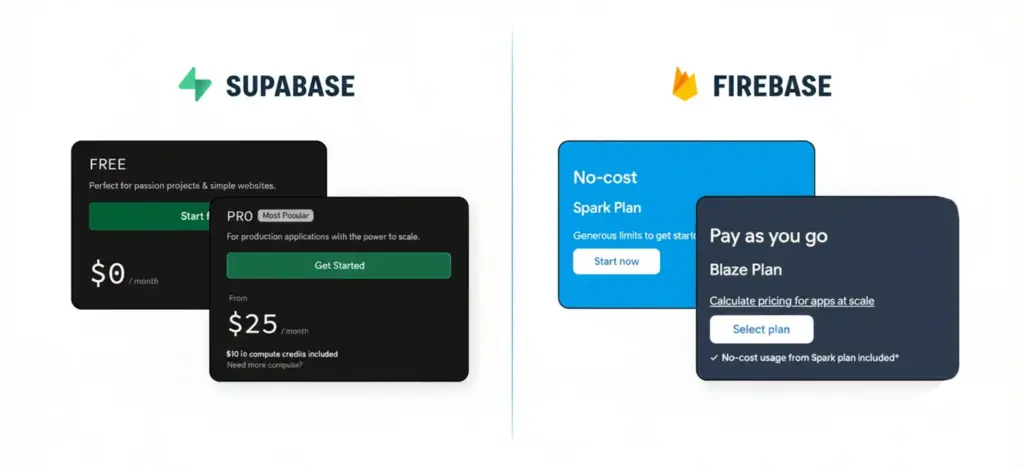
At this point, many teams feel the utmost difference. Firebase offers two billing options, a free version (Spark), and a pay-as-you-go plan (Blaze). Past the free quotas, you pay for usage — including database reads/writes, storage, functions, and network egress depending on the product.
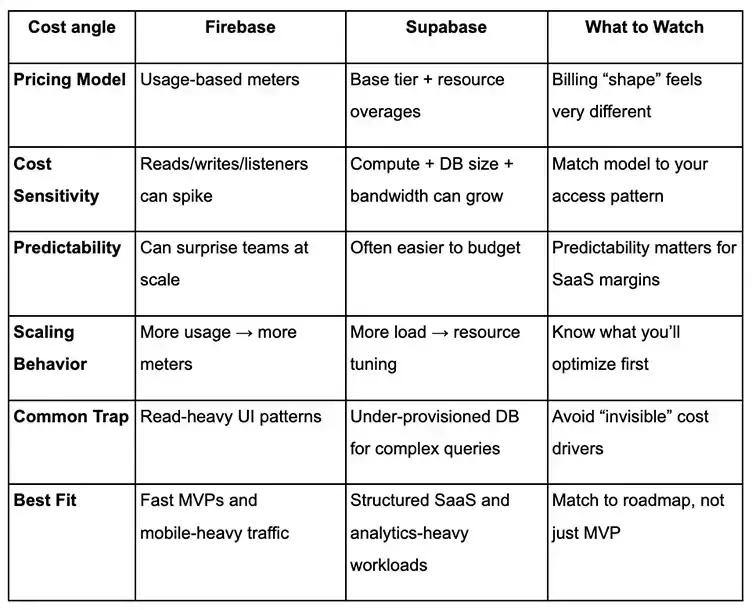
One up-to-date detail worth noting in 2026: In the Supabase vs Firebase cost discussion, storage can be a hidden constraint. Firebase has made changes to Cloud Storage for Firebase default buckets that require projects to be on the Blaze plan to maintain access to certain default buckets after the published cutoff dates (including loss of read/write access if not upgraded by the stated deadline).
Supabase typically feels more like “a base plan + overages.” Supabase’s own comparison describes tiered pricing and notes there are no charges for API requests (while usage is tracked around resources like storage, compute, and bandwidth).
Firebase’s database cost model can be very sensitive to access patterns, because Firestore billing is explicitly based on reads, writes, deletes, and storage, with pricing varying by location.
For most teams, Supabase vs Firebase pricing comes down to whether “per-operation” billing is acceptable for your usage pattern. If every user journey triggers lots of reads and realtime listeners, you can pay more simply because the model charges per document operation.
A simple budgeting framework:
- If your app’s core interaction is “many small document reads on every screen,” costs can climb as you scale.
- If your app’s core interaction is “fewer, richer queries,” a relational model can reduce app-side composition and can shift the cost conversation from “operations” to the predictable resources you provision and tune.
Open-Source Community vs Proprietary Ecosystem
Firebase is a proprietary managed platform. While parts of the ecosystem are open, Firebase’s core managed services are not self-hostable (you run them as cloud services inside the Google ecosystem).
Supabase is explicitly built as a collection of open-source tools and supports running locally and self-hosting via containers. If self-hosting matters, that usually means Docker-based operations and infrastructure choices your team controls.
Note: If your org standardizes containers, the “self-hosting via Docker” story can be a meaningful governance advantage.
Postgres Extensions vs Firebase Ecosystem
Supabase benefits from the Postgres world, including extensions, mature tooling, and decades of database reliability.
Firebase benefits from the Google ecosystem, including integrations across analytics, messaging, and cloud services.
While this is also one of the more underappreciated Supabase vs Firebase differences: “Can we exit if we need to?” is easier to answer when the core of your system is standard Postgres plus open tooling.
So, choose based on which ecosystem you want to bet on for the next few years.
Community Support & Documentation
Firebase has strong documentation and a very large community, especially for mobile developers.
Supabase has fast-growing documentation and community support, plus the advantage of Postgres familiarity across engineering teams.
Deployment, Self-Hosting & Lock-In Risk
Self-Hosting Flexibility
Firebase is not built for self-hosting. If you need strict infrastructure control, it can be limiting.
Supabase can be self-hosted. This can help with compliance, data residency, and long-term portability.
Managed Infrastructure
Firebase is a clean managed experience. It is hard to beat for speed and simplicity.
Supabase managed options can feel more database-centric. If your team is comfortable with Postgres, it can be a strong operational fit.
Vendor Lock-In Considerations
Firebase lock-in usually comes from proprietary data models, rule systems, and platform-specific patterns.
Supabase reduces lock-in risk because Postgres is portable and widely supported. Lock-in can still happen through platform choices, but it is usually easier to unwind.
Integration and Tooling Ecosystem
Firebase’s ecosystem strength is breadth: analytics, crash reporting, feature management, push messaging, and deep integration with Google Cloud. Exporting raw Firebase data into BigQuery is a well-documented path when teams outgrow product dashboards and need SQL-level analytics.
Supabase’s ecosystem strength is adjacency to Postgres tooling. Supabase documents auto-generated REST APIs via PostgREST, and PostgREST itself describes how database constraints and permissions shape API behavior — which is one reason SQL-first teams like it.
Supabase also exposes platform management tooling: Postgres extensions are supported and documented, and Supabase provides a Terraform provider for version-controlling and provisioning platform resources.
From a workflow perspective, it tends to look like:
- Firebase wins when your app needs many “productized” capabilities out of the box and you want them to interoperate inside one console.
- Supabase wins when your team already speaks SQL and wants APIs, auth, and realtime layered on top of Postgres — with standard database tooling close at hand.
Key Supabase vs Firebase Similarities
Even though Supabase and Firebase differ in how they model data and enforce access, they overlap heavily in what you get “out of the box” as a modern backend platform.
In practice, both can take you from prototype to production faster by bundling the core primitives you’d otherwise assemble yourself (database, auth, realtime, functions, and local tooling).
Both Reduce Backend Time-to-Ship
Both platforms remove a lot of backend scaffolding by giving you ready-made client integration paths and an opinionated “happy path” to CRUD and user flows.
Firebase pushes you quickly via SDK-first patterns and straightforward getting-started flows for building and viewing data in the console, while Supabase accelerates shipping by auto-generating a REST API directly from your database schema when you want to move fast without building endpoints.
If your goal is to validate a feature end-to-end in days (not weeks), either works—just make sure you also set up local workflows early so you can test safely before production.
Both Support Auth + Role-Based Access Patterns
Both give you a first-class authentication layer so you can implement common sign-in methods quickly without rolling your own identity system.
Firebase supports role-based strategies by attaching server-defined custom claims to user accounts and checking them in Security Rules, while Supabase bakes auth into the platform with client SDKs and multiple auth methods (including password, magic link/OTP, social login, and SSO).
If your product roadmap includes “roles” or tiered access, treat roles as backend-owned state (not client-owned) and design them as a system you can test and audit, not just UI toggles.
Both Enable Real-Time Experiences
Both can power live-updating UIs where the app reacts instantly to data changes rather than polling.
Firebase supports realtime listeners for documents and queries (e.g., snapshot listeners), and Supabase supports realtime subscriptions driven by database change events delivered over websockets.
If realtime is central to your product, plan for “realtime hygiene” early—limit over-broad subscriptions, model events intentionally, and think through how permissions behave when a client stays connected.
Both Support Serverless Backend Logic
Both platforms let you run backend code without managing servers for the typical “glue work” you need in production: webhooks, background jobs, scheduled tasks, and secure server-side validation.
Firebase’s Cloud Functions run code in response to events and HTTPS requests in a managed environment, while Supabase Edge Functions give you server-side TypeScript functions you can deploy globally and use for integrations and webhooks.
In case your app has non-trivial business logic, keep the core rules centralized in server-side code (or data-layer policy), and use functions as the boundary where you validate inputs and protect sensitive operations.
Both Fit Modern Product Teams (MVP → Scale)
Both ecosystems include the guidance and tooling you need to mature from “it works” to “it’s reliable,” especially once traffic, queries, and permissions become more complex.
Firebase publishes operational best practices (for example around indexes and write patterns), and Supabase ships a production-ready database foundation plus platform observability options (metrics/logs) so you can actually measure what your backend is doing.
If you want smooth scaling, the shared lesson is the same: treat the platform as an accelerator, but invest in the fundamentals—indexes, load patterns, permission testing, and monitoring—before growth forces your hand.
Supabase vs Firebase for Mobile App Development
On mobile, your backend choice shows up quickly in developer workflow, iteration speed, and how smoothly you can ship across platforms. Both ecosystems support common mobile stacks, but the “easy path” is different depending on how you build and release apps.
Next, use the comparisons below to evaluate fit for React Native, Flutter, and native iOS/Android delivery.
Supabase vs Firebase for React Native
Firebase is often the default for React Native apps when offline-first and real-time are core. The tooling and community patterns are mature.
Supabase works well when your app’s data model is relational and you want SQL power behind the scenes. For offline behavior, teams usually implement local storage and sync strategies more deliberately.
Choose Firebase if you want speed and offline maturity. Choose Supabase if your app behaves like a SaaS product with relationships and permissions.
Supabase vs Firebase for Flutter
Firebase has a strong Flutter ecosystem and common templates for auth, messaging, and real-time experiences.
Supabase can be a great choice for Flutter apps that need structured data and role-based access control. It can also help when your team wants the database to stay the source of truth.
If your Flutter app is highly interactive and sync-heavy, Firebase often wins early. If your Flutter app is data-heavy and permission-heavy, Supabase becomes very attractive.
Supabase vs Firebase for iOS & Android Apps
Firebase shines when you need offline-first UX on native platforms and want a polished, well-documented path.
Supabase shines when your native app is one of several clients around the same relational data. This is common for SaaS products with web admin panels and reporting dashboards.
A simple rule works well here. If offline sync is your biggest requirement, start with Firebase. If data rules and relationships are your biggest requirement, start with Supabase.
Supabase vs Firebase for Startups, SaaS, and Enterprise
Your requirements will change as you move from MVP to real customers. The best choice is the one that stays aligned with your growth path, not just your first launch. This section helps you think in stages, speed now, flexibility later, and the operational realities that arrive once multiple teams and stakeholders depend on the platform.
Now, go through the following to compare time-to-market, portability, and long-term scalability pressure points.
Time to Market: Firebase vs Supabase
Firebase is hard to beat for speed. You can ship auth, database, and real-time features quickly with a strong developer experience.
Supabase is also fast, especially when your team already understands SQL and Postgres. The “fast” part often comes from not fighting the data model later.
If you need a prototype tomorrow, Firebase is usually faster. If you need a product that becomes complex quickly, Supabase can save time later.
Vendor Lock-In and Portability
Firebase lock-in risk increases when your data model, rules, and app logic become tightly coupled to Firebase patterns.
Supabase is built on Postgres, which is portable and widely supported. That makes it easier to move if your strategy changes.
If portability is a business requirement, Supabase has a natural advantage.
Long-Term Flexibility and Scalability
Firebase can scale very well when your data model and access patterns are designed correctly. The challenge is that cost and query limits can become more noticeable as complexity grows.
Supabase often scales naturally for SaaS workflows because relational queries, reporting, and permission systems are a native fit. The tradeoff is that you need more database discipline.
For enterprise needs like compliance, auditing, and strict tenant boundaries, Supabase tends to align better. For mobile-first products with offline requirements, Firebase remains a strong choice.
Enterprise Scalability and Workloads
At enterprise scale, the real question is not just traffic. It is how well the platform handles multi-tenant rules, audits, and heavy reporting.
Firebase scales well for real-time, mobile-heavy workloads with predictable access patterns. It gets harder when you need complex joins, advanced reporting, and deeply layered permissions.
Supabase fits enterprise SaaS workloads that depend on relational data and strict access control. PostgreSQL, SQL, and Row Level Security keep governance and scalability cleaner as complexity grows.
Migrating from Firebase to Supabase
Teams often start with Firebase for speed, then reconsider when they hit one of three inflection points: the data model becomes relational, cost becomes harder to forecast because pricing is sensitive to reads/writes, or the organization wants more portability/self-hosting options.
If you’re planning a transition, treat your initial data mapping as a design exercise — a second Supabase vs Firebase comparison, but focused purely on your real entities, relationships, and permission rules.
One of the most common Supabase vs Firebase differences you’ll feel during migration is data modeling: moving from denormalized documents to relational tables is less about “copying data” and more about defining relationships, constraints, and query paths.
A pragmatic migration pattern looks like this:
- Export and map your data: Firestore collections often map to entities/tables; exports can be loaded into analytical systems (like BigQuery) for transformation and auditing during migration.
- Bridge with JSONB: a common strategy is importing documents into JSONB columns first, then normalizing over time as relationships stabilize.
- Replace auth carefully: preserve identity (email/phone/providers) and plan for token/session handling differences.
- Translate authorization: Security Rules logic usually becomes database policies (RLS) plus role-based patterns.
- Run systems side by side: the “two phases” approach (side-by-side, then incremental swapping) is explicitly recommended in Supabase’s migration-oriented guidance.
Use Cases and Recommendations for Firebase vs Supabase
If you only remember one thing from the Firebase vs Supabase decision, let it be this: the “best” backend is the one that matches your product’s data shape and your team’s operational reality.
Applications of Supabase and Firebase
Both platforms can power a wide range of apps, but certain archetypes tend to favor one over the other. In general, mobile apps with heavy offline or real‑time needs often lean Firebase, whereas relational, data‐driven backends usually lean Supabase. The bullets below outline common app categories and which platform typically fits best, with simple “If X → Y” heuristics to guide you.
Real-time Chat & Collaboration Apps
Apps like chat systems, live dashboards or collaborative editors need instant sync. Firebase’s real‑time database and offline features make it a popular choice. If instant updates and built‑in presence are key, choose Firebase (it handles real-time sync and offline caching out of the box). Supabase can do real-time too, but if every user’s view must update without extra effort, Firebase usually feels more “plug-and-play.”
Data-Driven SaaS & Dashboards
Think admin panels, analytics dashboards or CRM tools that heavily query data. Supabase’s PostgreSQL shines here because you can run complex SQL queries and joins directly. If your app needs lots of data analysis, filters, or cross-table joins, choose Supabase. The structured SQL database will make reporting and analytics much simpler. (Firebase can work, but you’d end up building extra data pipelines or Cloud Functions to compensate.)
Multi-Tenant Enterprise Software
If you’re building an app that serves multiple organizations or roles (project management, ERP, multi-tenant CRM), security and data isolation are critical. Supabase offers row-level security (RLS) and full SQL, which makes per-tenant access rules and cross-tenant reporting straightforward. If you need strict data separation and complex transactional workflows for each customer, choose Supabase. Firebase can support multi-tenancy (e.g. tagging docs by org), but enforcing it with rules and queries is more work. Supabase’s SQL policies and ACID transactions make enterprise workflows (like audits and bulk updates) cleaner to implement.
E-commerce & Transactional Apps
Online stores, marketplaces or any app with orders and payments need reliable transactions. Supabase’s PostgreSQL is designed for atomic operations, so you can update inventory and create orders in one transaction. If your app must maintain consistency across related tables (products, orders, inventory), choose Supabase. It handles ACID transactions natively. Firebase can power a simple shop, but as business logic grows (promotions, inventory constraints, refunds, etc.), the limits of NoSQL become apparent. Supabase’s SQL model will save you from many workarounds down the line.
Mobile Games & Live Consumer Apps
Games, social mobile apps or any consumer app that benefits from built‑in analytics and real-time features often do well on Firebase. For example, many mobile games use Firebase for leaderboards, chat, push notifications and crash reporting. If your app needs quick realtime sync and you want managed analytics/crash tools, choose Firebase. Its SDKs make it easy to sync game state or send notifications. Supabase can support these too, but you’d be assembling more pieces (you’d need separate analytics services, etc.). Firebase’s first-party mobile services give it an edge for live consumer experiences.
Content & Social Platforms (CMS, Blogs, Social Apps)
Websites or platforms that manage user‑generated content—blogs, news sites, social feeds—benefit from a relational model for comments, likes, tags, etc. Supabase’s SQL database and storage are a good match. If you’re building a CMS, forum or social media app with structured posts and user profiles, choose Supabase. Its relational schemas make it easy to query content (e.g. “show me all posts by user X with tag Y”), and its object storage can serve media alongside the DB. (Firebase hosting can serve static content well, but for complex content queries or multi-table data models, Supabase simplifies the logic.
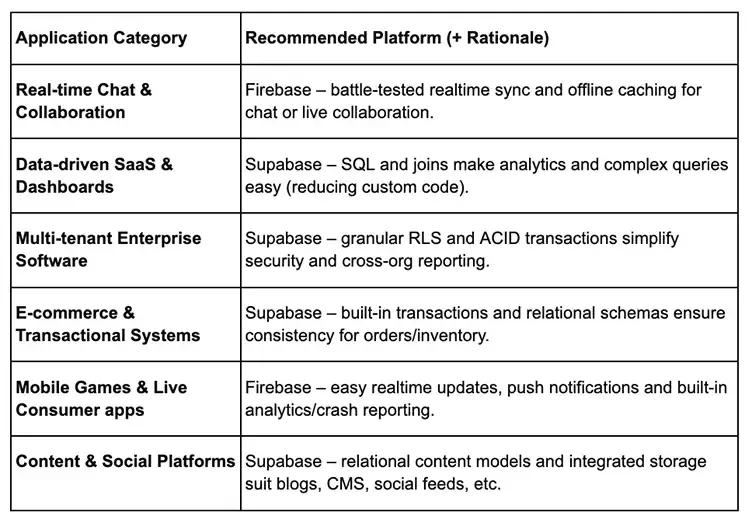
In each case, these are guidelines rather than hard rules. You can build almost any app on either platform, but your engineering effort will differ. If instant sync or rich mobile toolchains are your top priority, Firebase often accelerates delivery. If complex data relationships, strict consistency or portability are top concerns, Supabase usually pays off in the long run. Tailor your choice to your app’s core needs, and you’ll maximize development speed and avoid surprises later.
When to Choose Firebase (Ideal Scenarios)
Firebase shines when you want to ship quickly with minimal backend surface area and your core experience benefits from realtime + offline support.
Firebase is often a great fit for:
- Consumer mobile apps where offline caching and fast realtime UX are central.
- MVPs in which the data model is still not completely defined and you want to avoid designing a strict schema early on.
- Teams that enjoy the advantage of having app-quality tooling (Crashlytics) and product analytics within a single console.
- Products that anticipate exporting data for warehouse-grade analysis (BigQuery export flows are well documented).
If your product’s early success story depends on “we shipped in weeks, not months,” Firebase can be hard to beat.
When to Choose Supabase
Ideal Scenarios
Supabase tends to be the better fit when you’re building a database-centric product and your future features will demand relational modeling, complex authorization, and reporting.
Supabase is often a great fit for:
- B2B SaaS products with workspaces, roles, permissions, and multi-tenant isolation enforced close to the data (RLS).
- Apps that need relational queries, transactions, and strong integrity constraints.
- Teams that want SQL tooling, Postgres extensions, and infrastructure-as-code workflows (for example, Terraform).
- Products where budgeting and portability matter, including the option to self-host when regulatory or cost constraints demand it.
If your roadmap includes serious reporting, compliance, or “enterprise-ish” data controls, a Postgres-first platform usually aligns better.
Conclusion: Final Thoughts on Supabase vs Firebase
Supabase vs Firebase isn’t a “winner takes all” debate — it’s a choice about tradeoffs. Firebase is optimized for client-friendly realtime and offline-first development with a wide set of app services. Supabase is optimized for Postgres-first development where your database, policies, and query power become a long-term asset.
A well-informed decision comes down to a few questions: Is your product offline-first? Is your data model relational by nature? Do you need database-native authorization? Will costs be sensitive to per-operation pricing? And do you want the option to self-host later?
Choose the Right Backend Platform With BrainX
At BrainX, we help teams make the right backend decision before they commit. When comparing Supabase vs Firebase, we will map your product roadmap with the data model, security strategy, real time requirements, and cost-profile. Once done with that we propose a platform that will scale without issues. After you take your pick, we design and develop your app from one end to the other, including architecture, auth, database design, migrations, and performance tuning. It allows you to ship faster and avoid expensive rewrites later.
FAQs on the Firebase vs Supabase Debate
Q1: Which platform is safer for multi-tenant authorization?
A: In Supabase vs Firebase, multi-tenant authorization is typically easier to reason about when policies live close to the data (for example, database Row Level Security), but Firebase Security Rules can be equally strong when your rules model is well designed and reviewed.
Here’s a practical tip: no matter which platform you pick, define your “non-negotiables” early like data residency, auditability, predictable costs, offline UX, and how fast you need to ship. Such limitations will guide the right technical choice more effectively than feature checklists.
Q2: Can Supabase support offline mode like Firestore?
A: Firestore supports offline persistence in its client SDKs, caching data and syncing changes when the device reconnects, while Supabase offline behavior usually requires an explicit caching or local first sync layer in your app.
Q3: Why do Firebase bills spike with real time listeners?
A: Firestore charges by document reads and listening to a query can bill a read when documents in the result set are added, updated, or removed due to changes, so chatty screens can get expensive at scale.
Q4: How do costs scale differently on Supabase vs Firestore?
A: Firestore billing is driven by document reads, writes, deletes plus storage and bandwidth, while Supabase charges for compute hours per project and applies plan quotas with overages for usage items like egress.
Q5: Can I self host Supabase, and what does it take?
A: Yes, Supabase documents a Docker based self hosting setup, but you should plan for running Postgres plus the enabled services, and handling updates, security, and backups like any production stack.