 November 11, 2026 -
 19 minutes read


AI in incident management helps IT teams connect related alerts, investigate service problems, and prepare incident updates. It can reduce time spent gathering information, while people remain responsible for high-impact production decisions. Start with one task whose output your team can check, then expand only when the results justify it.
Picture the first ten minutes of an outage. Alerts fire from three monitoring tools. Someone pastes an error into Slack. A release went out twenty minutes ago, but nobody has connected the dots yet. Everything you need to fix the problem exists. It’s just scattered.
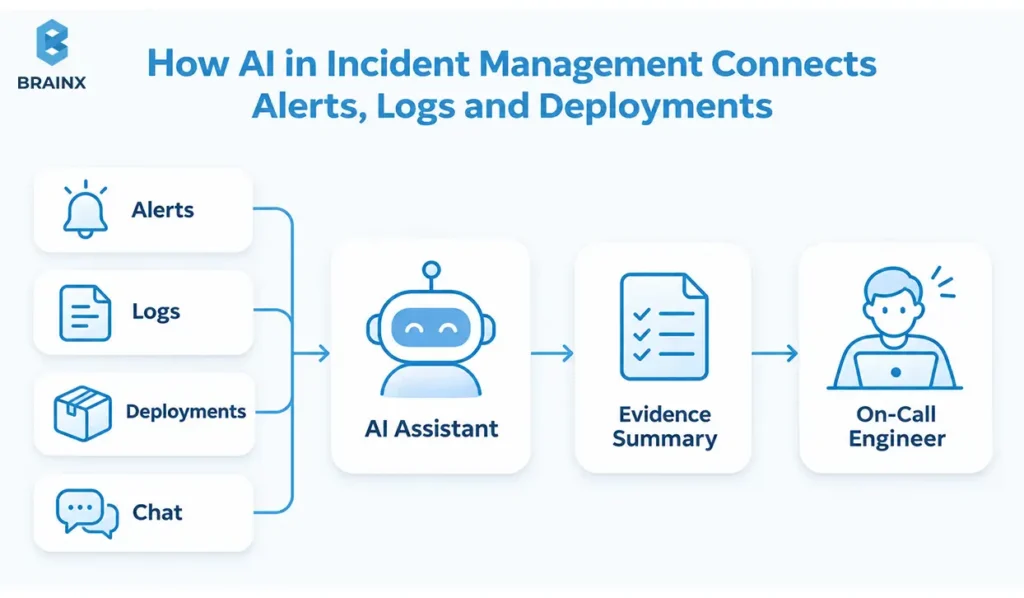
That’s the job AI does best during an incident: it pulls the pieces together, so your team spends less time searching and more time fixing.
Not to be confused with AI incident response: This guide is about using AI to handle IT incidents, like outages and slowdowns. AI incident response is a different topic: managing failures of AI systems themselves.
Key Takeaways
- AI helps most when it finds information and drafts updates, while people make the big production decisions.
- The easiest wins are alert grouping, runbook lookup, incident summaries, and postmortem drafts.
- Decide up front what AI may do on its own, what it may only suggest, and what a person must approve.
- Before you let an AI agent change a live system, test its permissions, its failure handling, and how you’ll know the fix worked.
- Judge results on similar incidents, and count the time people spend checking AI output, not just the time it saves.
What Is AI in Incident Management?
AI in incident management means using machine learning and large language models to help your team spot, understand and fix problems in live IT services faster. It finds patterns in alerts, pulls up the right information, and writes summaries. It doesn’t automatically get permission to change your systems. You decide that.
First, What Is Incident Management?
Incident management is how your team responds when something breaks or slows down: a website goes down, payments fail, or an app gets slow. The goal is to get the service working again as fast as possible, keep everyone informed, and learn from it afterwards so it doesn’t happen again.
Google’s incident-management guidance makes a useful split: fixing the technical problem is one job, and coordinating the people is another. AI can help with both, but someone still needs to be clearly in charge.
How Is AI Different From Regular Automation?
Regular automation follows fixed rules: “if errors go above 5%, page the payments team.” It’s reliable, but it can’t think. AI can look at messy, incomplete information and suggest what might be going on.
The best setups use both. A rule pages the right team. Then AI checks what changed recently and suggests a likely cause. An engineer confirms it before anyone touches production.
A simple way to decide who does what:
- AI acts: does a task on its own, within limits you set (for example, looking up a runbook).
- AI suggests: drafts something for a person to review (for example, a likely cause).
- Human decides: a person approves anything with real impact (for example, rolling back a release).
One more tip: if a simple rule already does the job well, don’t replace it with AI. You’ll only add uncertainty.
AI Incident Management vs. AIOps vs. ITSM
These terms get mixed up a lot. Here’s the short version:
- ITSM (IT service management): the process side: tickets, escalations, change approvals. Tools like ServiceNow and Jira Service Management live here.
- AIOps (AI for IT operations): AI across all of IT operations, including spotting unusual behavior before anything breaks.
- AI incident management: AI applied to one live incident, from the first alert to the postmortem.
So an AI summary tool doesn’t replace your ITSM process, and an AIOps platform doesn’t remove the need for someone to own the incident.
Key terms
Machine learning (ML): finds patterns in data, like which alerts usually fire together.
Natural language processing (NLP): understands text in tickets, chat and logs.
Large language models (LLMs): write summaries, explanations and draft updates.
Predictive analytics: spots warning signs that often come before a failure.
Retrieval-augmented generation (RAG): lets the AI look up your own runbooks and past incidents before it answers, so it isn’t guessing.
MTTR: how long it takes to get a service working again.
Runbook: a step-by-step guide for a known problem.
AI SRE: an AI agent that investigates incidents like a site reliability engineer would.
Shadow mode: the AI makes suggestions, but nobody acts on them yet, so you can test it safely.
Why Use AI in Incident Management? Key Benefits
Most of the time in an incident isn’t spent fixing things. It’s spent finding things: which service broke, what changed, who owns it. That’s where AI-powered incident management helps most.
The main benefits of AI in incident management are:
- Faster answers: AI gathers logs, recent changes and similar past incidents in seconds, so engineers start investigating sooner.
- Less alert fatigue: grouping duplicate alerts means fewer pages at 3 a.m. and fewer false positives to chase.
- Easier handoffs: someone joining halfway through gets a short summary instead of scrolling through hundreds of chat messages.
- Better records: timelines, updates and postmortems get written consistently, even when everyone is exhausted.
The research backs this up. In a 2024 study of more than 100,000 production cloud incidents, Microsoft researchers found that GPT-4 with in-context learning improved root cause analysis (RCA) results by 49.7% over a zero-shot approach. Incident owners also rated its root causes 43.5% more correct than a fine-tuned model’s.
And the stakes are high: in Uptime Institute’s 2026 Annual Outage Analysis, 57% of operators said their most recent major outage cost more than $100,000, and one in five said it cost over $1 million.
One honest caveat: faster recovery is something you need to prove, not assume. If your engineers spend more time correcting the AI than it saves them, the setup needs work.
How to Use AI in Incident Management: 8 Practical Use Cases
Here are the most practical uses, starting with the safest. Each one shows what the AI does, a quick example, and the main thing to watch out for.
From our DevOps work: The examples below use a common monitoring stack: Prometheus for metrics and alerts, Grafana for dashboards, and the ELK Stack (Elasticsearch, Logstash, Kibana) for logs. It’s the stack BrainX’s DevOps team works with every day, and AI tools can connect to all three.
1. Spot Problems Early
What it does: AI learns what “normal” looks like for your services and flags unusual behavior, such as rising error rates or slow responses, before customers notice. This is called anomaly detection.
Example: In Grafana, checkout response times creep up 40% over an hour. No Prometheus alert has fired yet, but AI flags the trend as an early warning.
Watch out: Prediction isn’t guaranteed. Brand-new problems often give no warning, so keep your normal monitoring running.
2. Cut Alert Noise by Grouping Related Alerts
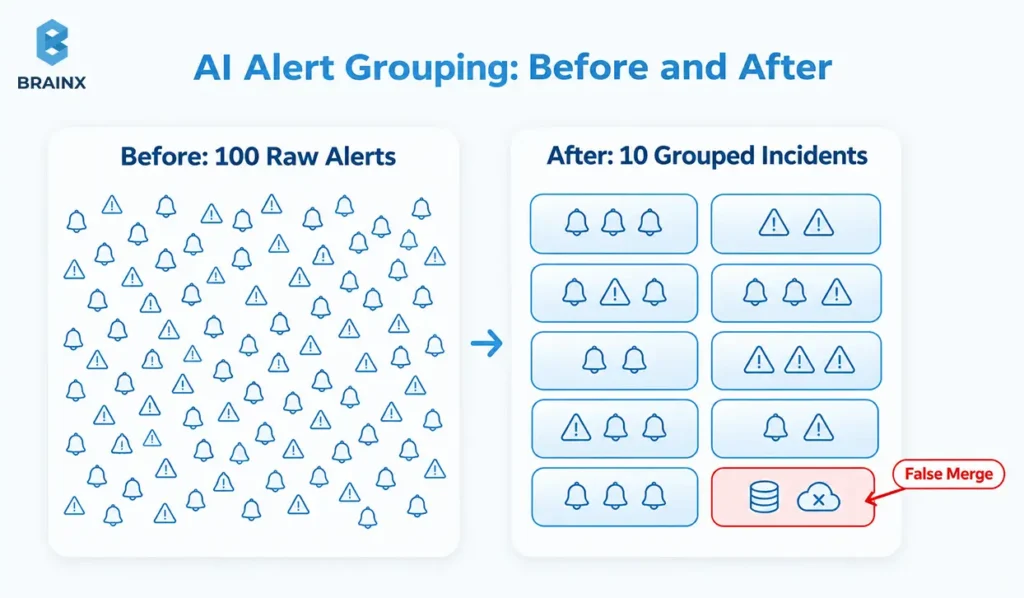
What it does: AI groups alerts that describe the same failure, so your on-call engineer gets one incident instead of fifty notifications. This is where automated issue detection with AI usually starts.
Example: A database slows down and Prometheus fires 23 alerts across 6 services. AI groups them into one incident and points to the database.
Monitoring tells you something is wrong. Observability, built from metrics, logs and traces, helps you work out why. AI needs both: monitoring to raise the alert, and observability data to investigate it.
This only works if every service uses the same names and timestamps across metrics, logs and traces. If they don’t, fix your service telemetry and infrastructure dependencies first.
Watch out: Fewer alerts isn’t automatically better. AI could merge two separate outages into one group. Always keep the original alerts, and let engineers split a group.
Pro tip: Before you test any tool, export last month’s alerts and count how many described the same failure. That number is your noise-reduction baseline.
3. Triage, Create Tickets and Route to the Right Team
What it does: AI reads the symptoms, suggests a severity, creates the ticket with details filled in, and routes it to the team that owns the affected service.
Example: Login errors spike for mobile users. AI opens a P2 ticket, tags the identity service, and pages the team that owns it, instead of the ticket bouncing between three queues.
Watch out: AI can misjudge business impact. An incident lead should confirm the priority and owner.
4. Find the Root Cause Faster
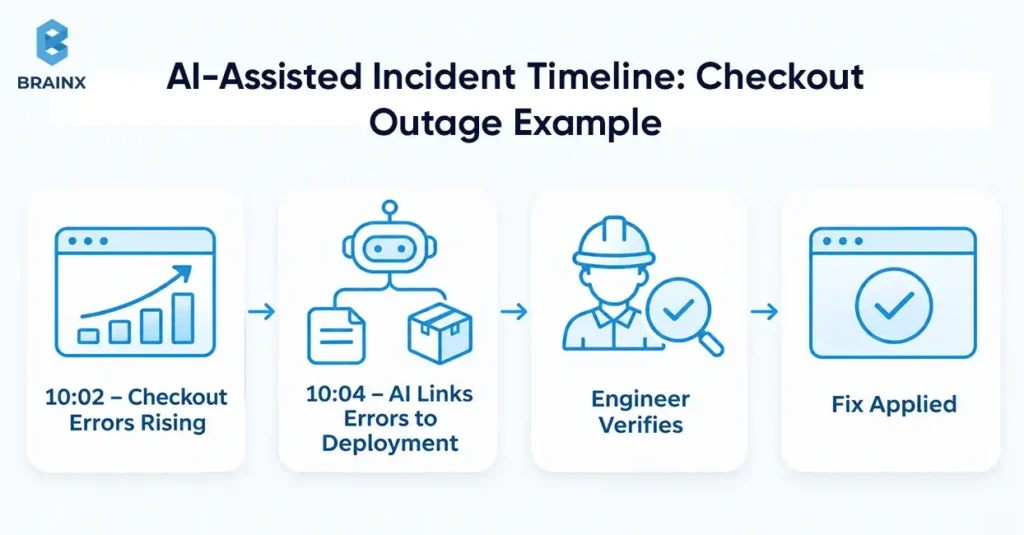
What it does: AI compares the timing of errors with recent deployments, config changes and traces, then ranks the most likely causes.
Example: Errors start at 10:02. Two minutes later, AI reads the matching ELK logs, spots payment timeouts and a deployment that finished just before, and points to the payments team.
Try this on your own stack: Load 20–30 past incidents and your runbooks into a retrieval-based assistant, then replay them in shadow mode with only what was known at the time. Measure how often it finds the right cause and how many minutes it saves per incident. Two weeks is usually enough.
Watch out: Two things happening at the same time doesn’t prove one caused the other. Good AI tools separate “confirmed” from “possible.” An engineer should check before acting.
5. Pull Up Runbooks, Past Incidents, and Expert Knowledge
What it does: AI finds the right runbook (a step-by-step guide for a known problem), similar past incidents, and relevant pages in your knowledge base. Your team can also ask questions in plain English, like “what fixed this last time?”
Example: A new on-call engineer asks, “Have we seen Redis memory errors before?” AI returns last March’s incident, the fix that worked, and the runbook link.
Watch out: Old runbooks can do damage. A procedure written before a migration may no longer be safe, so keep runbooks dated and reviewed.
6. Keep Stakeholders Updated
What it does: AI drafts status updates from what’s confirmed: impact, what the team is checking, and when the next update is due. During a major incident, it can summarize the bridge call and the Slack or Microsoft Teams channel, so everyone gets the same picture.
Example: Every 30 minutes, AI drafts an update for leadership in plain language. The incident commander edits it and sends it.
“The incident commander’s most important responsibility is to keep a living incident document.”
— Andrew Stribblehill, Site Reliability Engineering (Google)
Watch out: AI should flag missing information, not fill gaps with guesses. A person approves every customer-facing message.
7. Write the Postmortem and Spot Trends
What it does: After the fix, AI organizes the timeline, decisions and follow-up tasks into a postmortem draft. Across many incidents, it can spot repeat problems and suggest new knowledge base articles where answers were missing.
Example: AI notices that 4 of the last 10 incidents involved expired certificates and suggests an automated renewal check.
Google’s postmortem guidance stresses documenting impact, fixes, causes and follow-up actions. It also makes a point every AI draft needs:
“An unreviewed postmortem might as well never have existed.”
— John Lunney and Sue Lueder, Site Reliability Engineering (Google)
Watch out: The incident owner must check the findings and assign the work. A draft is a starting point, not the answer.
8. Fix Known Issues Automatically, With Approval
What it does: Some AI tools don’t just suggest a fix. They can run it, like restarting a service or rolling back a release. This is called agentic remediation, or automated remediation. Vendors often call these AI agents for incident management an “AI SRE.”
Example: A known memory leak causes a service to crash. With approval, the AI restarts the affected pods, then checks that error rates return to normal.
Watch out: This is the most powerful use, and the riskiest. Read “How to Stay in Control” below before you try it. For a deeper look at what agents can do, see our guide to AI agents. If you plan a custom agent, start with agentic AI development that builds approval gates in from day one.
How AI Changes Each Stage of an Incident
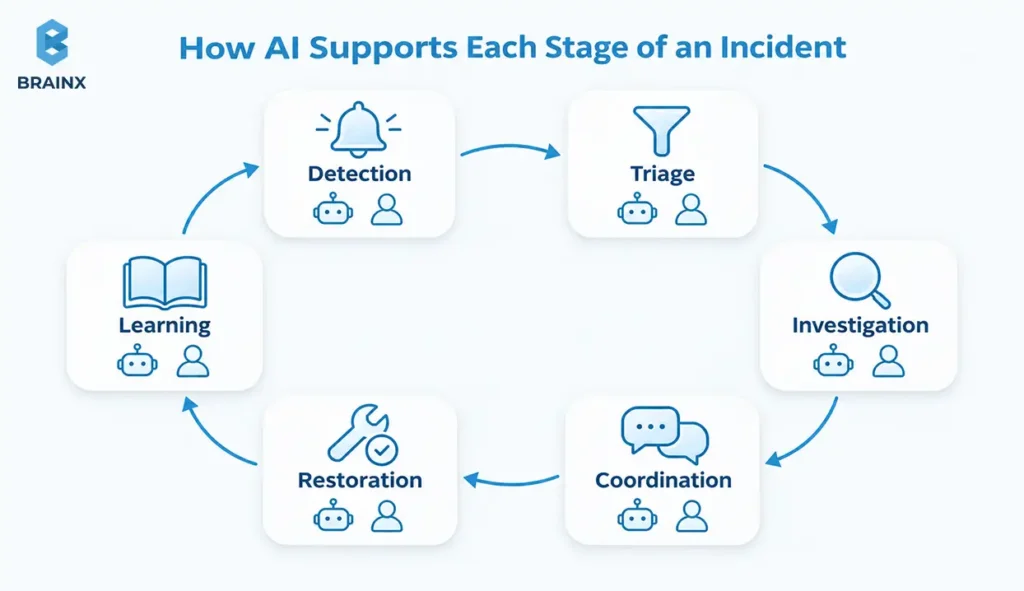
Here’s how AI fits into each stage, and who checks its work. Using AI for incident management works best when every stage has a named person who reviews the output.
In ITIL terms, Detection and Triage cover identify to prioritize, Investigation to Restoration cover respond and resolve, and Learning follows closure.
| Stage | What AI does | Who checks it |
| Detection | Groups related alerts by time and service. | On-call engineer; original alerts stay visible. |
| Triage | Suggests severity and owner from symptoms and impact. | Incident lead confirms priority and owner. |
| Investigation | Compares logs, traces, deployments and runbooks; ranks likely causes. | Service expert tests the explanation. |
| Coordination | Drafts updates from confirmed facts. | Incident commander approves them. |
| Restoration | Suggests fixes; runs only pre-approved actions. | Operator confirms recovery and side effects. |
| Learning | Drafts the timeline, decisions and follow-ups. | Incident owner reviews and assigns actions. |
Manual vs. AI-Assisted: Side by Side
| Task | Manual | With AI |
| Spotting problems | Wait for a threshold alert or a customer complaint | Unusual trends flagged early |
| Alert handling | Dozens of separate pages | Related alerts grouped into one incident |
| Triage and routing | Guess the owner; tickets bounce between teams | Severity and owner suggested; ticket pre-filled |
| Root cause | Search dashboards and chat by hand | Recent changes linked to errors; likely causes ranked |
| Updates | Written from scratch under pressure | Drafted from confirmed facts, then approved |
| Postmortem | Days later, from memory | Draft timeline ready right after recovery |
How to Measure the Impact
AI can shorten the time it takes to detect, acknowledge and fix a problem, but only if your monitoring data is good and someone clearly owns the incident. Agree on these measures before you start:
- MTTD, mean time to detect: how long until you notice the problem.
- MTTA, mean time to acknowledge: how long until someone responds to the alert.
- MTTR, mean time to restore: how long until the service is verified as working again. Some teams read MTTR as mean time to resolve, so agree on one meaning.
Be precise about “restored.” Closing a ticket, customers being able to log in again, and the root cause being permanently fixed can happen at very different times.
What AI Can’t Do Yet
AI is a strong assistant, but it has real limits. Knowing them up front saves you from bad surprises:
- It can’t fix bad data. If services are named differently across tools, AI will miss connections or merge unrelated problems.
- It can’t predict everything. New kinds of failures often give no warning at all.
- It can mistake timing for cause. Errors after a deployment don’t prove the deployment caused them.
- It can sound confident when it’s wrong. Without enough evidence, some tools still produce a convincing answer.
- It can’t replace the incident commander. Major outages need people to weigh customer impact, priorities and risk.
- It raises real security questions. In Atlassian’s 2025 US study of more than 500 developers and IT leaders, 74% named security risks as a top barrier to using more AI. That’s a measure of concern, not of how often AI actually fails.
How to Stay in Control: Automate, Suggest, or Decide
The question isn’t “should we use AI?” It’s “what should AI be allowed to do on its own?” Here’s a sensible starting point. Adjust it to your own change-management process.
| Task | Who’s responsible | What to check first |
| Look up logs or runbooks | AI acts, using read-only tools. | Access rights, query limits, and how fresh the source is. |
| Group alerts or suggest routing | AI acts within set limits. | Original alerts are kept, and there’s a fallback owner. |
| Suggest a likely cause | AI suggests. | An engineer tests the evidence. |
| Draft a customer update | AI suggests. | The communications owner approves facts and wording. |
| Restart a live component | A person decides, by default. | Target, disruption risk, and how to recover. |
| Roll back a release or change production data | A person decides. | Change approval, plus recovery or data-integrity checks. |
Which Tasks Are Safe to Automate?
A task is safe to automate when its blast radius is small: few services, customers or records affected if it goes wrong. How often your team runs it doesn’t matter.
Read-only isn’t automatically safe. A heavy query can slow a database, logs can expose sensitive data, and a restart can drop live transactions. Check data access, load, permissions and the compensating action before any task runs unattended.
Rules for AI Agents in Production
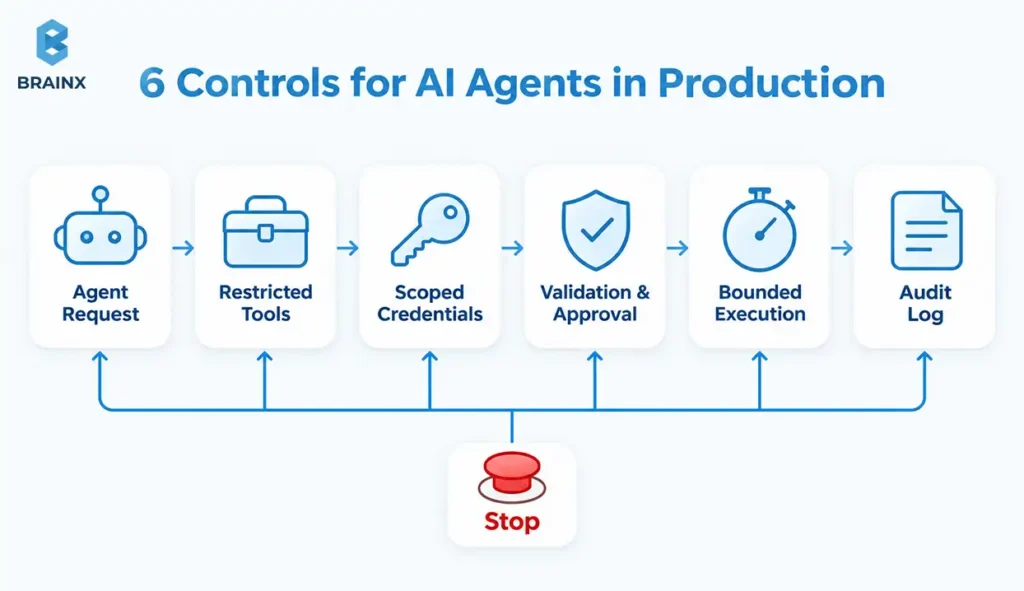
A prompt telling the AI to “ask permission first” is not a security control. Authorization must be enforced in downstream systems, not by the model. OWASP’s Excessive Agency guidance recommends minimal tools and permissions, plus human approval for high-impact actions.
Before AI agents for incident management get production access, put six controls in place:
- Restrict tools. Give the agent specific actions, not open shell access.
- Limit credentials. Separate read access from write access, and scope it to what’s needed.
- Check every request. Validate the target, settings, permissions and approval before anything runs.
- Cap retries. Set timeouts, so one failed action doesn’t repeat ten times.
- Log everything. Link the evidence, the approval, the action and the result in an audit trail.
- Keep a stop button. Operators must be able to switch off automation and take over instantly.
Scope each approval to one action, one target and a short time window. If conditions change, require a new approval. Urgency should never widen permissions.
Treat logs and documents as evidence, never as instructions, and redact sensitive data before it reaches the model. Test with requests that should be blocked, not only ones that should succeed. BrainX’s generative AI governance framework shows how to turn these rules into enforceable policy.
Prove the Fix Actually Worked
A successful command doesn’t mean the service recovered. If an approved restart times out, the AI should check the actual service state, not retry blindly.
Healthy servers don’t prove customers can check out. Verify real transactions and error rates, and escalate if the picture is unclear. Define the compensating action for each automated step before you grant write access.
How to Roll Out AI for Incidents in 90 Days
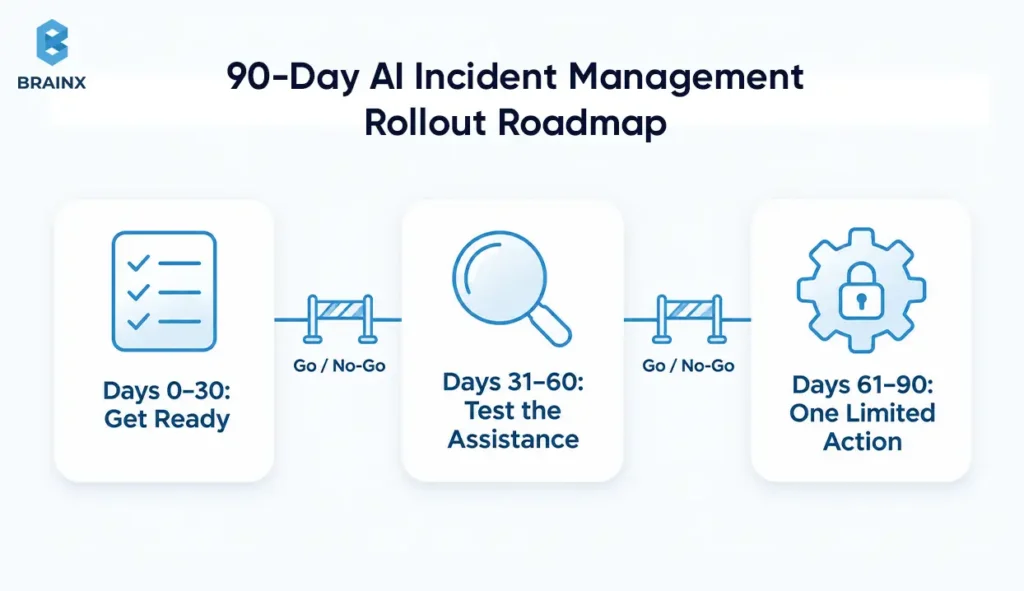
Start with one service and one task you can measure. Only give the AI more authority once it passes the checks you agreed on. Ninety days is a sensible planning window, not a promise, and a pilot that stays read-only can still be a big win.
Before You Start: A Readiness Checklist
- Services have consistent names and timestamps across your monitoring tools.
- Deployment records and on-call owners are up to date.
- Runbooks match how systems work today, not before the last migration.
- You know where incident data will be processed, who can see AI output, and how long it’s kept.
- Secrets and unnecessary personal data are removed before anything reaches the AI.
- The AI only sees documents the engineer asking could see anyway.
Days 0–30: Get ready. Pick the use case, identify the data sources, and record how incidents perform today. You should finish with a clear owner for each service, approved access, and a baseline to compare against.
Days 31–60: Test the assistance. On-call engineers try summaries, lookups or suggestions on real past incidents. Record mistakes, missing context, and how long corrections take. Move on only when you understand the main failure points.
Days 61–90: Try one limited action, if it’s justified. The service owner and a security reviewer can approve one narrow action after testing its limits, its checks and its undo plan. Review the results before adding anything else.
[IMAGE 8] 90-day roadmap graphic: three phases (Get ready, Test the assistance, One limited action) with owners, deliverables and a go/no-go gate between each. | Alt text: “90-day AI incident management rollout roadmap”
Not sure where to start? An AI automation readiness assessment helps you decide whether to pilot now, fix some gaps first, or wait.
Test in Shadow Mode First
In shadow mode, the AI makes suggestions, but nobody acts on them. It doesn’t page anyone, publish updates or change production. Your team simply compares what the AI suggested with what actually happened.
Use past incidents (with sensitive data removed) and practice drills, and give the AI only what was known at the time. Include messy conditions too: missing data, outdated runbooks and expired credentials. You want to see whether it admits uncertainty or bluffs.
AI Incident Management Tools and Software Compared
Most teams start with one of these AI incident management platforms, because their alerts, tickets and chat already live there. A custom layer only makes sense for gaps a platform can’t cover. Whichever AI tools for faster incident resolution you shortlist, test them against a real incident scenario, not a feature list. For background, see how PagerDuty separates AI, AIOps and automation and Atlassian’s incident-management guide.
| Platform | AI capabilities for incidents | Best fit |
| PagerDuty | SRE Agent acts as a virtual responder in Slack, Teams and PagerDuty: gathers logs, metrics, changes and incident history, suggests likely causes and next steps, keeps a timeline, and can run predefined actions when authorized. AIOps reduces alert noise. | Teams already using PagerDuty for on-call and alerting |
| ServiceNow ITSM | Generative AI skills (Now Assist, branded Otto in current ServiceNow docs) for incident summaries, resolution notes, suggested steps and major-incident communications. | Enterprises running ITSM processes in ServiceNow |
| Jira Service Management | Rovo-powered alert grouping, AI-recommended mitigation steps based on telemetry and change history, and automatic post-incident review summaries. | Atlassian-centric teams linking incidents to Jira work |
| incident.io | AI SRE Investigations gather past incidents, runbooks, telemetry and code changes, then post a likely root cause with evidence and next steps in the incident channel. | Slack-first engineering teams |
| Rootly | AI incident summaries, related-incident detection, troubleshooting suggestions, status page drafts and AI-generated retrospectives. | Fast-moving teams that want Slack-native workflows |
| BigPanda | AIOps event correlation plus agentic ITOps agents for major-incident coordination, communications, troubleshooting and post-incident documentation. | Large enterprises with high alert volumes across many tools |
Last reviewed: November 2026.
Features change fast. Confirm capabilities, pricing and availability with each vendor, and test what happens when a connector loses access mid-incident.
Buy a Platform or Build Your Own?
Buy when a platform already fits your workflow, integrations and controls. Build a custom layer only for a specific gap, such as pulling evidence from several disconnected systems or enforcing unusual approval rules. Either way, it should support your main incident system, not compete with it as a second source of truth. The same test applies whether you buy a platform or build your own automated incident management system.
| Decision area | A platform may fit when | A custom layer may fit when |
| Workflow | Existing incident steps are supported. | Essential steps span disconnected systems. |
| Evidence | Supported connectors supply enough context. | Proprietary sources need tailored retrieval. |
| Approval | Native controls enforce your policy. | Required authorization logic is unsupported. |
| Recovery | Built-in execution handles your failure cases. | You need specialized verification or recovery. |
| Ownership | Vendor support reduces maintenance work. | Your team can maintain integrations and evaluations. |
| Cost | Subscription and usage costs are acceptable. | Added value covers ongoing engineering costs. |
Count the full cost: licenses, AI usage, integration upkeep, testing and on-call support. Cheap AI calls don’t make the whole system cheap. Our breakdown of AI agent development costs can help you estimate a custom build.
Questions to Ask Vendors About Their AI
“AI-powered” can mean anything from a model with proper access to your data to a thin wrapper around a public chatbot. Ask directly:
- Which model does it use, and can you choose or restrict it?
- What data does it see, and does it respect existing access permissions?
- Does it show the evidence behind a suggestion, not just the conclusion?
- How is accuracy measured, and can you see error rates on your own incidents?
- Which actions can it take, and can you limit them by service and environment?
- Where is incident data processed, and how long is it kept?
How to Prove Value and Decide What’s Next
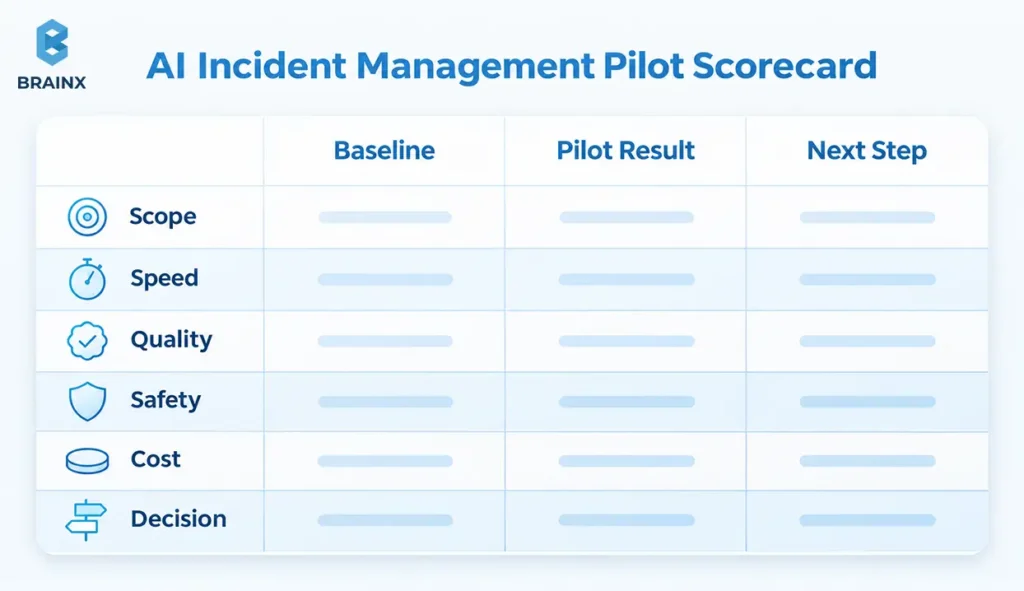
Write down what success means before the pilot starts, and get the service owner to sign it. Then compare like with like: similar services, severities, traffic and staffing.
Track these in a simple scorecard:
- Scope: services, dates, severity mix, and how many incidents.
- Speed: detection, acknowledgment, restoration, and engineer time.
- Quality: wrongly merged alerts, missed incidents, reopened cases, and corrections.
- Safety: blocked unauthorized attempts, failed actions, and verified recoveries.
- Cost: platform, AI usage, engineering, review, and support.
- Decision: expand, keep testing, pause, or switch off.
Look at outliers, not just averages. A small sample means “keep testing,” not a confident ROI claim, and engineer time saved is not the same as cost saved.
When to expand, pause or stop: expand when quality and value meet your targets. Pause when the evidence is thin or corrections take longer than the AI saves. Switch off any automated actions if approvals fail or you can’t verify recovery.
Finally, name an owner for connectors, AI model updates, testing and escalation. Our DevOps implementation roadmap covers the monitoring, runbooks and handover needed to keep a workflow healthy after launch.
What Good Looks Like: An AI Incident Management Maturity Model
Most teams move through four levels. You don’t need to reach level 4 to get real value; many teams get most of the benefit at level 2 or 3.
| Level | What it looks like | What you need to move up |
| 1. Manual | Alerts, triage and postmortems are all done by hand. | Consistent service names, clean monitoring data, clear owners. |
| 2. Assisted | AI groups alerts, finds runbooks and drafts summaries. Read-only. | A baseline, a shadow-mode test, and a review habit. |
| 3. Guided | AI suggests causes and fixes; people approve every action. | Approval gates, audit logs, and measured accuracy. |
| 4. Autonomous for known issues | AI fixes a short list of well-understood, low-risk problems on its own, then verifies recovery. | Proven controls, a stop button, and regular reviews of every automated action. |
What’s Next for AI in Incident Management
Here’s where the future of AI in incident management is heading. A few trends are already visible in 2026:
- AI SREs are moving from suggesting to doing. In October 2025, PagerDuty launched an end-to-end AI agent suite whose SRE Agent recommends and runs diagnostics and remediations, so teams now have to decide which of those steps need approval.
- Multiple agents working together. BigPanda’s 2026 guide to agentic AI in major incidents describes specialized agents for coordination, communications, troubleshooting and documentation that pass work between them.
- Governance is catching up. OWASP’s 2025 Top 10 for LLM applications lists Excessive Agency (LLM06:2025) as a core risk, which shapes how much freedom AI agents get in production.
The direction is clear: more automation for known, low-risk problems, and more human judgment focused on the incidents that are truly new.
Build Safer Incident Automation With BrainX
Start with the incident task that eats the most of your team’s time. Define the information it needs, the output a person will review, and the actions the AI must never take without approval.
BrainX Technologies helps teams design and build AI-assisted incident workflows, from DevOps and monitoring foundations to custom AI development and integration. Explore our enterprise AI solutions to discuss your current tools, your gaps, and a focused pilot with measurable success criteria.
Discuss Your Workflow
FAQ Section
What Is AI Incident Management?
AI incident management is the use of machine learning and large language models to help IT teams detect, investigate and resolve service disruptions. It groups related alerts, finds logs and runbooks, drafts updates and postmortems, and can run approved fixes, while people stay accountable for high-impact production decisions.
How Does AI Improve Incident Prioritization?
AI looks at symptoms, affected services and customer impact, compares them with similar past incidents, and suggests a severity and owner. That gets the right team working sooner. An incident lead should still confirm the priority, because AI can misjudge business impact.
How Does AI Reduce Mean Time to Resolve (MTTR)?
Most incident time goes into finding information: what broke, what changed, and who owns it. AI shortens that search by grouping alerts, linking recent changes and pulling up runbooks. It only cuts MTTR if your monitoring data is reliable and someone checks its suggestions.
What Are the Best AI Incident Management Tools?
Common options include PagerDuty, ServiceNow ITSM, Jira Service Management, incident.io, Rootly and BigPanda. The best choice depends on where your alerts, tickets and chat already live. Test each one against a real incident scenario, including permissions, approvals and failure handling, rather than comparing feature lists.
Is AI in Incident Management Practical Without Years of Incident History?
Yes. Lookups and summaries can use your current monitoring data, up-to-date runbooks and ownership records. History matters more for spotting repeat patterns. If you have few past incidents, use practice drills, and be honest that the evidence is limited.
Can AI Reliably Predict a Service Outage Before Users Notice?
Not reliably. AI can flag early warning signals for some failures, but brand-new problems often give no warning. Track missed outages and false alarms, and keep normal monitoring running alongside it.
Will an AI Assistant Replace the Incident Commander During a Major Outage?
No. An assistant should support the incident commander, not replace them. Major outages need people to weigh customer impact, priorities, escalation and risk. AI can keep the timeline and surface evidence while designated people run the response.
What Should Teams Do if an AI-Driven Incident Pilot Increases False Alerts?
Pause expansion and find the cause: data quality, thresholds or grouping rules. If response quality drops, return to the old workflow, fix the setup and retest.
Sources
Primary sources referenced in this guide:
- Google, Site Reliability Engineering: Managing Incidents
- Google, Site Reliability Engineering: Postmortem Culture
- Microsoft researchers (2024), Automated Root Causing of Cloud Incidents using In-Context Learning with GPT-4 (arXiv 2401.13810)
- Uptime Institute (2026), Annual Outage Analysis Report
- Atlassian (2025), State of Incident Management
- OWASP GenAI Security Project, LLM06:2025 Excessive Agency
- OpenTelemetry, Signals documentation
- PagerDuty (October 2025), End-to-end AI agent suite announcement
- PagerDuty, SRE Agent
- PagerDuty, AI and automation documentation
- ServiceNow, Generative AI for ITSM documentation
- Atlassian, Jira Service Management AIOps
- Atlassian, Incident management and AIOps guide
- incident.io, AI SRE Investigations documentation
- Rootly, AI features
- BigPanda, Use cases for agentic AI in major IT incident management