
Key Takeaways
- A disciplined web application development process keeps the teams focused with distinct stages, articulated outputs and quality gates that minimize rework and delivery risk.
- Lock critical decisions early, such as the security requirements, compliance requirements, scalability requirements, and architecture direction, to ensure that you do not find expensive gaps when you start building.
- A scalable application development process starts with production readiness, production level goals, observability, performance budgets, and resilience planning for real traffic.
- Build a secure application development process into every phase with threat modeling, automated security checks in CI, API security controls, and software supply chain hygiene such as SBOMs.
- An enterprise application development process introduces governance and operational rigor, such as single sign on, role based access control, audit logs, integration standards and disciplined release management.
What is a Web Application?
A web application is browser based software that allows users to do more than just view information. It lets them log in, enter data, complete tasks, and interact with the system in real time. In a strong web application development process, this distinction matters early because web applications require deeper planning around architecture, data handling, security, and performance.
Unlike static websites, web applications are built around workflows. They often include user accounts, business logic, databases, APIs, and integrations that support dynamic user actions.
To Further Reading On- How to Scale a Web Application: A Complete Guide
Web Application vs. Website: What’s the Difference?
A website is mainly designed to present information. A web application is designed to let users take actions and get results based on those actions. That difference affects everything from backend logic to testing requirements.
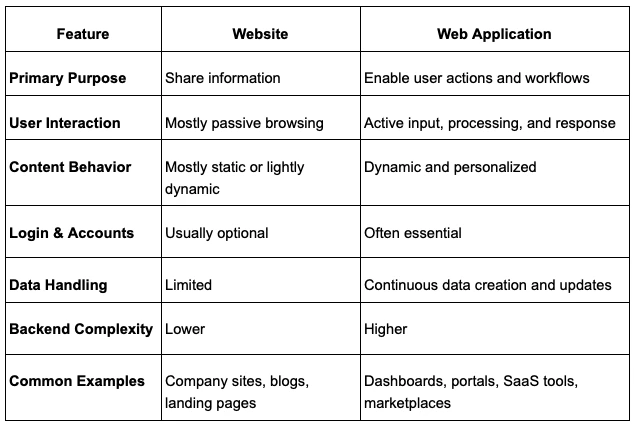
If users only need to read content, a website is usually enough. If they need to sign in, manage data, collaborate, track progress, or complete tasks, a web application is usually the better fit.
Why Do You Need a Web Application?
A web application is required when the users need to perform tasks online, such as entering data, interacting, or accessing personalized information. A standard website may be simpler and more adequate in case the end product is to simply display some text or information.
Additionally, think about limitations: in case the app should be available offline on mobile devices, a PWA may be required (which complicates the matter). Scalable infrastructure should be considered if high performance under load is a requirement.
In short, the full web app development process should only be undertaken if such requirements are warranted, otherwise, you’re better off sticking to a simplified website or content platform.
Benefits of Web Application
One major advantage of a web application is accessibility. Users can open it in a browser across devices without needing to install updates manually. That makes rollout easier and lowers friction for both users and internal teams.
Web applications also support centralized maintenance. Teams can deploy fixes, improvements, and new features in one place instead of managing separate installations. They also scale well when designed correctly, especially when the product needs shared access, role based permissions, integrations, and ongoing feature growth.
Types of Web Applications
Web applications come in many forms, while each has its architectural trade-offs:
- Single-Page Applications (SPAs) (e.g. React, Angular) load one HTML page and update content dynamically. Depending on client-side state management, they fetch data from backend APIs. It implies a robust REST/GraphQL API layer and careful oversight of client state.
- Progressive Web Apps (PWAs) build on SPAs through offline support and push notifications. A PWA uses service workers to store assets and data locally, so the app continues to work even when offline. This necessitates additional considerations in the design to have data sync and cache invalidation.
- Server-rendered dynamic apps, built using Node.js, Ruby on Rails, PHP, etc., generate pages on the server. These can be easier for SEO optimization (as the content is instantly visible to the search engines) and be performance enhanced with server-side caching.
- E-commerce platforms deal with some heavy data (product catalogs, transactions). They require robust inventory systems, databases that are ACID compliant, and in many cases, micro services to handle payments, search etc.
In the end, the nature of the app determines the technology stack and developmental pattern. For example, a highly interactive SPA can be based on rich JavaScript frontends and stateless APIs, but a website with a lot of content may have a monolithic framework with in-built templates and caching. Each choice has trade-offs in complexity, performance, and developer skill requirements.
Examples of Web Applications
Web applications show up in almost every part of modern business. Once a product needs logins, workflows, real time updates, or user specific data, it usually moves beyond a simple website and into the web application development process.
Some of the most common examples are SaaS platforms. These include project management tools, CRM systems, HR portals, invoicing systems, and analytics dashboards. Users sign in, manage records, and complete tasks inside a browser based environment.
Another common category is customer facing transactional apps. These include ecommerce portals, subscription dashboards, online banking interfaces, booking systems, and order tracking platforms. In these cases, the app must process requests, store data, and return personalized results quickly and securely.
Businesses also rely on internal web applications to run operations. These include inventory tools, approval systems, employee admin panels, reporting portals, and support dashboards. They are often built to improve speed, accuracy, and visibility across teams.
You also see web applications in marketplaces and collaboration products. Examples include vendor portals, scheduling platforms, messaging workspaces, learning systems, and document sharing platforms. These products often need strong permissions, live updates, and deeper backend logic, which is why the architecture and delivery process matter from the start.
Elements of Web Application Development
A web application is not just a user interface on a browser. It is a connected system made up of user facing screens, backend logic, data storage, APIs, and the infrastructure that keeps everything running. In the web application development process, clarity around these elements helps teams scope correctly and avoid weak architectural decisions early.
Frontend Layer and User Experience
The frontend is the part users see and interact with. It handles layout, forms, navigation, validation feedback, and the overall experience inside the browser. This layer needs to be fast, clear, and consistent because even a strong backend cannot rescue a confusing interface.
Backend Services and Business Logic
The backend processes requests, applies business rules, manages authentication, and coordinates how data moves through the system. This is where actions like account creation, payments, approvals, and reporting logic usually live. In practice, the backend is what turns user input into meaningful system behavior.
Data Storage and State Management
Most web applications depend on structured data storage. Databases hold records such as users, transactions, content, and activity logs, while caches and session layers help the app respond quickly under load. Good data design matters early because it affects reporting, performance, and long term scalability.
APIs, Integrations, and External Services
APIs connect the frontend to the backend and often connect the product to outside systems too. A web app may rely on payment providers, identity platforms, CRMs, email services, analytics tools, or internal business systems. These integrations should be treated as core architecture decisions, not last minute add ons.
Hosting, Infrastructure, and Runtime Environment
A web application also depends on the environment where it runs. That includes cloud hosting, deployment pipelines, caching layers, monitoring, background workers, and scaling controls. A strong application development process treats infrastructure as part of the product, because reliability, speed, and uptime all depend on it.
Common Web App Design Patterns and Architecture
Once the core elements are clear, the next step is deciding how they should be organized. Architecture patterns define how parts of the system are grouped, deployed, scaled, and maintained. The right pattern depends on product complexity, team maturity, and how much flexibility the system will need over time.
Monolithic Architecture
A monolithic architecture keeps the application in one main codebase and usually deploys it as one unit. This model is often easier to start with, especially for smaller teams or early products, because development and testing are more centralized. It becomes harder to manage as the codebase grows and different parts of the system need to scale independently.
Microservices Architecture
Microservices split the system into smaller services that handle separate business capabilities. This can improve scalability, deployment independence, and fault isolation, but it also adds complexity in communication, monitoring, and debugging. For most teams, microservices make sense only when the product and organization are ready for that extra operational load.
Single Page and Server Rendered Patterns
Some web apps are designed as single page applications, where one shell loads in the browser and content updates dynamically through APIs. Others use server rendered patterns, where pages are generated on the server before being delivered to the browser. The right choice depends on interaction depth, SEO needs, frontend complexity, and performance goals.
Queue Based and Event Driven Workflows
When a system handles long running or resource heavy tasks, queue based patterns can reduce pressure on the main user experience. A web front end can accept the request quickly, pass work to a queue, and let background workers process it asynchronously. This pattern is useful for uploads, notifications, reports, and other tasks that should not block the user.
Single Tenant and Multi Tenant Models
Tenancy affects how customers are isolated inside the product. Single tenant models offer stronger separation but can increase cost and operational overhead. Multi tenant models share parts of the system across customers, which is common in SaaS, but they require careful design around access control, data isolation, and performance fairness.
Web Application Development Process Guide for 2026
The web application development process refers to a methodical approach towards planning, developing, testing and maintaining a software product in such a manner that it fulfills user requirements, while remaining secure and scalable.
Unlike a simple website (mostly static content), a web app is dynamic software that users interact with in real time.
A structured process keeps teams aligned and avoids guesswork: as one expert notes, sticking to a predefined plan “reduces risk, makes collaboration smoother, and dramatically boosts the chances of creating a product that people actually love to use”.
How to Start the Web App Development Process
The majority of the delays in the web application development process are due to the fact that decisions were never made with clarity. It is costly to fix architecture once it is launched. Lock the fundamentals early.
Requirements That Include Risk and Compliance
Specify your security and compliance needs clearly before starting the coding process.
- Identify any data classifications (e.g. public vs. sensitive) and all regulations (GDPR, HIPAA, PCI-DSS) that apply.
As an example, an application that manages medical records needs to comply with HIPAA, i.e., data must be encrypted at rest and in transit and must have extensive audit logs. - Research ahead of time and decide how users will authenticate (e.g. corporate Single Sign-On) and what authorization model to use.
- Plan identity and access policies right away as implementing these early prevents massive rework.
For example, when you require a strict Role-Based Access Control and SSO, you should design the user directory and user-login flow during the planning phase and not after coding.
Scalability Targets You Can Measure
Set concrete performance goals before building.
- Estimate expected traffic, e.g. peak concurrent users, request volumes per day, and data growth rates.
- Define Service Level Objectives (SLOs) (e.g. “99.9% of requests under 200ms” or “99.95% uptime.”)
- Derive performance budgets (e.g. maximum API response size or page load time) from earlier mentioned metrics.
- Know your targets because they guide architecture choices (stateless services, autoscaling, caching).
- Plan load tests that simulate projected peak load as it will depend on your chosen architecture.
Documenting these metrics in requirements guarantees that the team develops to meet them, instead of finding out about performance issues at the last moment.
Architecture Choices That Shape Everything
Lock in your high-level architecture decisions at the start. Will you launch with a monolithic application (all code in one deployable unit) or a microservices architecture (multiple independent services)? Monoliths can be faster to develop initially but may bottleneck scale. Microservices split functionality, allowing independent scaling and deployment, but they introduce complexity (service discovery, network handling). Choose based on team expertise and project phase. Also decide on tenancy: single-tenant (each customer has an isolated database) vs multi-tenant (shared schema). Finally, pick core technologies (programming language, framework, database, cloud provider). These choices have lasting impact: a sound web application development process will document the rationale for each in an architecture decision log to avoid confusion later.
Key Technologies and Tools
The technology stack you choose has a direct impact on delivery speed, scalability, maintenance effort, and hiring flexibility. In the web application development process, these decisions should support the product’s real needs instead of following trends without clear justification.
The goal is not to pick the most popular stack. The goal is to choose technologies that fit your product requirements, team capability, integration needs, and long term roadmap.
Programming Languages for Web App Development
Programming language choice affects backend performance, development speed, ecosystem maturity, and how easily your team can maintain the codebase over time. There is no single best option for every product.
JavaScript and TypeScript are widely used for full stack development, especially when teams want to share language familiarity across frontend and backend environments. They work well for interactive products and API driven systems.
Python is often chosen for fast development, clean syntax, and strong support for automation, data workflows, and AI connected features. It is common in SaaS products, internal tools, and platforms that need rapid iteration.
Java remains a strong option for large scale systems that need stability, strong typing, and mature enterprise support. It is often used in regulated environments and long life business platforms.
PHP, C#, and Ruby also remain relevant depending on the product context, existing systems, and team expertise. A practical application development process should evaluate language choice based on maintainability, ecosystem support, and operational fit, not just personal preference.
Web App Development Frameworks
Frameworks shape how quickly teams can build features, enforce standards, and manage complexity as the product grows. They also influence testing strategy, deployment patterns, and long term maintainability.
On the frontend, common choices include React, Angular, and Vue. React works well for highly interactive interfaces and flexible component based design. Angular is often preferred in structured enterprise environments. Vue is a strong choice for teams that want simplicity and a lighter learning curve.
On the backend, teams often use frameworks such as Node.js with Express or NestJS, Django or FastAPI, Spring Boot, Ruby on Rails, or Laravel. These frameworks help standardize routing, authentication, validation, and service structure, which reduces setup time and improves consistency.
The right framework depends on the product’s complexity, expected traffic, security requirements, and the experience level of the team. A strong framework should help the team move faster without locking the product into avoidable complexity.
Best Practices for Choosing the Right Stack
Good stack decisions are usually simple, intentional, and aligned with business goals. Overcomplicating the stack too early can slow delivery and increase maintenance cost before the product has even found traction.
Start with proven technologies that your team can support confidently. Match frontend and backend choices to the product’s actual needs, not imagined future scale. If your roadmap includes high compliance, deep integrations, or complex permissions, choose frameworks and platforms that support those requirements early.
It also helps to standardize core tools early in the project. Shared conventions for structure, testing, deployment, and documentation make handoff easier and reduce friction as the team grows. When possible, record major stack decisions in a lightweight architecture log so future changes stay grounded in clear reasoning.
Web Application Development Process (Phases, Deliverables, and Quality Gates)
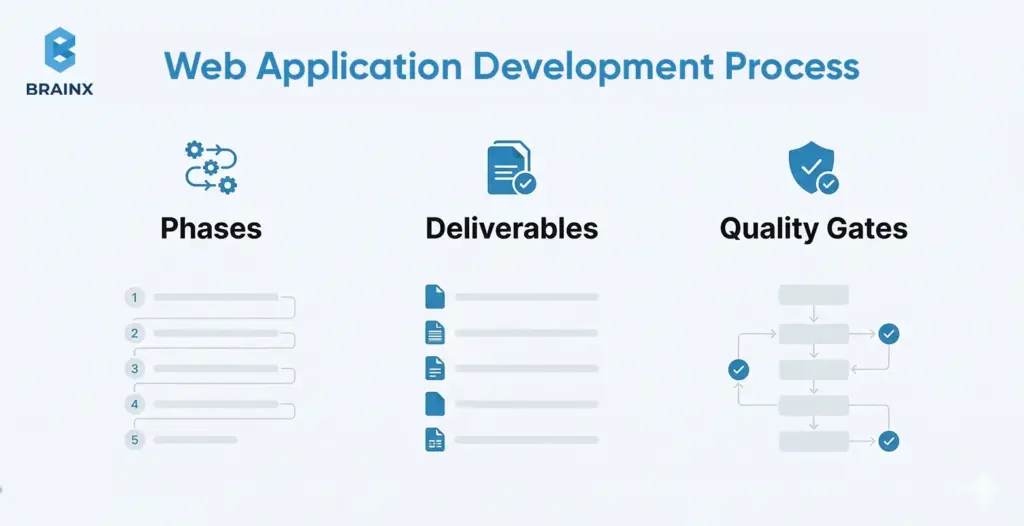
The web application development process typically breaks into defined phases, each with its own deliverables and review checkpoints. Common phases are Discovery, Design, Development, Testing, Deployment, and Maintenance. At each phase’s end, teams should verify specific artifacts (a “phase gate”). For example, in the web application development process the Discovery phase yields a problem statement, user personas, business requirements, and an MVP feature list. The Design phase produces architecture diagrams, data models, and UI mockups. These deliverables become a checklist for the phase gate to ensure nothing is missed before moving on.
Choosing a Delivery Model (Agile, Kanban, Waterfall)
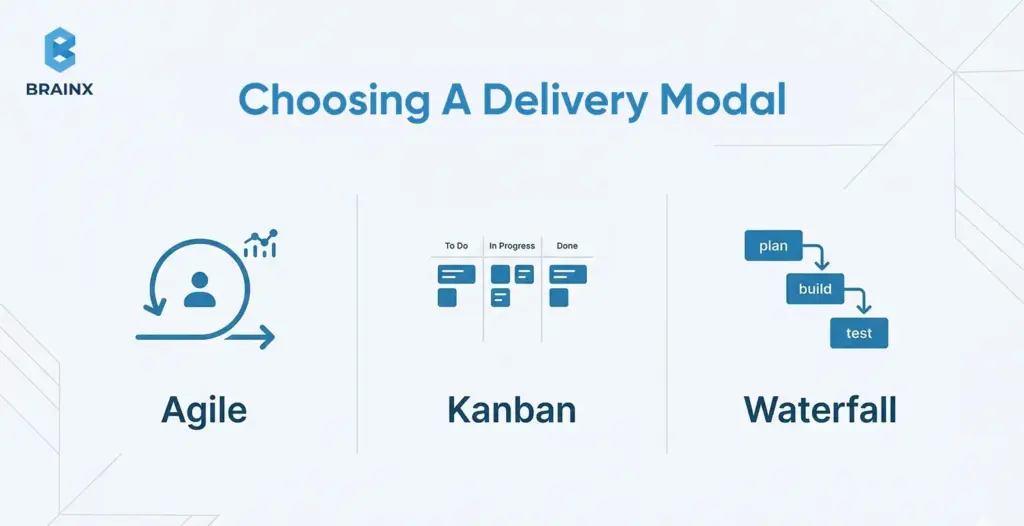
Your team should pick a development rhythm (Agile, Kanban, etc.) that fits the project. The phases (requirements, design, code, test, etc.) remain the same in any model. Agile (Scrum) divides work into short sprints with frequent releases; as one expert notes, Agile teams often deliver faster time-to-market than traditional waterfall projects. Kanban is a continuous flow model without fixed sprints, ideal for maintenance or support. A staged (waterfall) process executes each phase sequentially, which might suit projects with fixed requirements. In practice, many teams (~63%) use Agile because iterative cycles help catch issues early.
Tips for Choosing a Delivery Model
- Pick the model that matches how your team actually works, not the one that only sounds good on paper.
- Use an iterative model when priorities change often.
- Use a staged model when scope is fixed and approvals are stricter.
- The goal is to keep design, engineering, QA, and stakeholders aligned.
Discovery and Validation

In the web application development process, the Discovery phase aims to validate the project idea. Deliverables typically include a detailed requirements document, user personas, and an MVP scope or feature list.
Teams conduct stakeholder interviews, market research, and competitor analysis to define success criteria (for example, target user activation rate or performance goals). Capturing these upfront ensures every proposed feature ties to a real user need or business goal.
A vision or problem-definition document is often signed off here. This phase also produces a priority list of features, so that the team can focus on building the most valuable parts first.
Research Your Market
Before building anything, validate the market around the problem you are solving. This includes understanding user pain points, reviewing competing products, identifying feature gaps, and studying how similar solutions position themselves. The goal is not to copy what already exists, but to understand what users expect and where your product can create a clearer advantage.
Good market research also helps teams avoid building features that sound useful but do not solve a real need. In a disciplined web application development process, this step gives product and technical teams better context before requirements are finalized.
Some Tips on Discovery and Validation
- Do not treat discovery like a quick kickoff activity.
- Use it to validate the problem, narrow the MVP, and challenge assumptions early.
- Define clear user needs and measurable success criteria.
- Be equally clear about what should not be built yet.
Planning and Architecture

In the planning phase of the web application development process, engineers flesh out how the system will work under the hood. Key outputs include a system architecture diagram (showing modules, services, and data stores), a data model/schema (ER diagrams or database design), and API contract specifications (defined endpoints, request/response formats). Create a risk and dependencies register that lists any technical uncertainties (new technology, third-party integrations) and compliance checks.
For instance, you might draft a diagram showing web/mobile clients, backend services, and databases, plus note items like “need PCI-DSS certification” or “unknown throughput of legacy API.” These artifacts guide the team during implementation and serve as references for reviewers.
Create a Software Requirements Specification (SRS) Document
An SRS document turns ideas into clear implementation guidance. It outlines what the product should do, who it is for, what features are included, what constraints exist, and how success will be measured. This gives designers, developers, testers, and stakeholders a shared reference point before deeper execution begins.
A strong SRS also reduces confusion during delivery. It helps teams define scope, clarify edge cases, document dependencies, and align on technical expectations early. In practice, this is one of the most useful assets for keeping the application development process structured and predictable.
Define Technical Risks and Dependencies
Planning should also surface the unknowns before they become blockers. This includes third party integrations, compliance requirements, legacy systems, performance limits, and infrastructure constraints. A refined development process gets these risks on paper early so the team can make better decisions before build starts.
Key Tips for Planning & Architecture
- Document decisions while they are still small and easy to adjust.
- Capture architecture trade offs, risks, dependencies, and technical assumptions early.
- Pressure test integrations, compliance requirements, and scalability needs before development starts.
- Strong planning reduces confusion and expensive rework later.
UI/UX Design and Prototyping

In the design phase of the web application development process, UX/UI designers create the user experience blueprint. Deliverables include user flow diagrams and wireframes for each key screen.
A style guide or design system (detailing colors, typography, and component library) is often produced to ensure consistency. Prototypes (sometimes interactive) are built to validate workflows before code.
For example, designers might hand off clickable mockups of the login and dashboard pages. These assets help developers implement features accurately and provide a usability checkpoint. Getting design deliverables reviewed and approved is a critical gate before heavy coding begins.
Few Tips for UI/UX Design & Prototyping
- Use design to reduce delivery risk, not just improve visuals.
- Focus on user flows, edge cases, and interaction clarity.
- Make sure prototypes are easy for engineering to interpret.
- If a workflow is confusing in design, it will usually be harder to build well.
Building and Integrating

In the implementation phase of the web application development process, developers write the application code. Deliverables include the codebase itself (hosted in version control) and documents of coding standards (lint rules, style guides).
The team should also define a branching/release strategy (e.g. Gitflow or trunk-based development with feature branches). For example, you might decide that all feature work merges into a develop branch after passing code review.
This phase also produces ongoing artifacts like unit tests and libraries/components. The Definition of Done for features is agreed here: typically this includes code review sign-off and passing automated tests. Maintaining high code quality now saves rework later.
Tips for Building and Integrating
- Build in small, reviewable increments instead of large batches.
- Validate integrations early instead of leaving them for the end.
- Standardize code review, branching, and definition of what’s done.
(All of this helps maintain quality as delivery speed increases.)
Testing and Quality Assurance
In the testing phase of the web application development process, teams ensure the app is reliable and meets requirements. Deliverables include a comprehensive test plan and test cases covering unit tests, integration tests, end-to-end tests, performance tests, and security tests. Automated test suites are built and integrated into CI/CD.
For instance, developers might write automated Selenium scripts for user login and checkout workflows. Performance engineers create load tests (using tools like JMeter or k6) to simulate peak traffic. Security QA (e.g. SAST/DAST scans) is also run against the build.
The phase gate requires that major test cases have passed and any high-severity bugs are resolved before release.
Define Acceptance Criteria and Test Scenarios
Testing gets stronger when quality expectations are written before features are completed. Define acceptance criteria for each core workflow and map test scenarios for normal use, edge cases, and failure states. This makes reviews more objective and helps QA catch issues earlier.

Summarized Tips for Testing & Quality Assurance
- Start testing earlier than most teams expect.
- Use testing to validate real usage, edge cases, and failure scenarios.
- Treat automated tests, manual QA, security checks, and performance testing as one quality system.
- The goal should not only be to find bugs but to confirm release readiness.
Deployment and Release
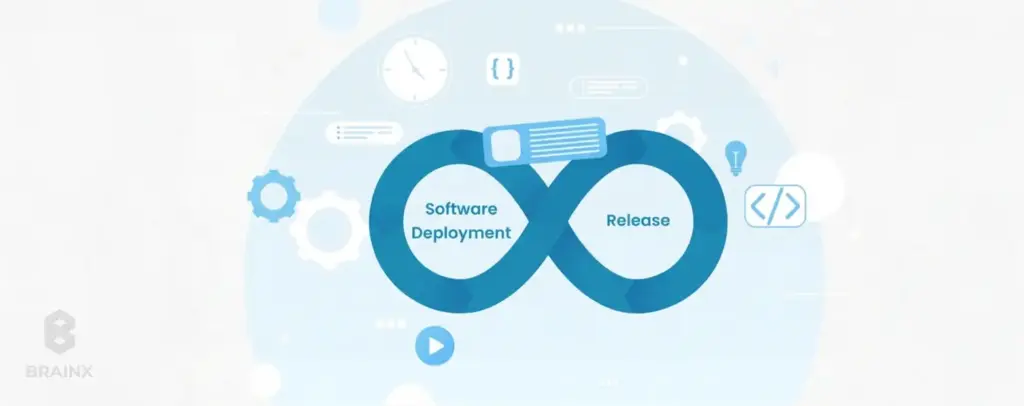
In a modern web application development process, the deployment phase focuses on automation and infrastructure. Deliverables include CI/CD pipeline definitions (e.g. Jenkinsfiles, GitHub Actions workflows) and infrastructure-as-code scripts (Terraform, Kubernetes manifests) for each environment (dev, staging, prod).
Define how code is promoted (blue-green deployment, canary, or straight rollout) and document rollback procedures. For example, provide a script that can redeploy the previous version if a release fails.
This phase also finalizes release checklists: user acceptance sign-offs, production configuration settings, and an announcement plan.
Once everything is automated and documented, pushing new code to production should be repeatable and low-risk.
Prepare Release and Rollback Plans
A release should include more than deployment steps. Teams should know what gets released, how success will be checked, who signs off, and what happens if something breaks. Clear rollback planning reduces launch risk and makes the release process easier to repeat.
Tips for Smooth Deployment & Release
- Treat every release like an operational event, not just a code push.
- Define what success looks like immediately after launch.
- Decide what needs monitoring first and how rollback will work if needed.
- A repeatable release process lowers risk every time you ship.
Maintenance and Continuous Improvement

In the maintenance phase of the web application development process, focus shifts to keeping the app running smoothly and evolving it. Deliverables include setting up monitoring dashboards and alerts (for metrics like error rate, latency), a schedule for patching or upgrades, and an ongoing product backlog.
Teams often create a “runbook” for operations or rotate on-call engineers to respond to incidents. For example, you might deliver a Grafana dashboard with live API latency and a plan to review analytics monthly. The idea is to continually use feedback and monitoring to improve the app. The development process continues iteratively: each issue found in production feeds back into planning the next sprint or release.
Tips for Maintenance & Continuous Improvement
- Do not let maintenance become only reactive.
- Use production data, support feedback, and release learnings to guide improvements.
- Keep refining reliability, usability, and performance after launch.
- Ensure long term product quality is being sustained.
Deliverables Checklist (Phase Exit Criteria)
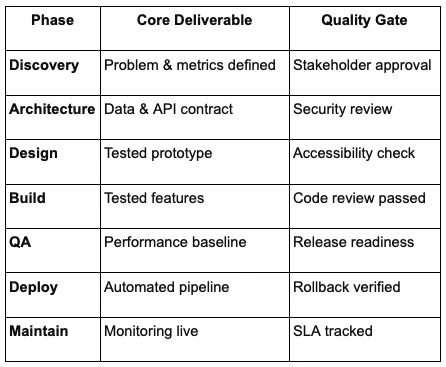
Many teams formalize a one-page deliverables checklist. For example, a typical web application development process might include the following phase-exit items: in Discovery, “Vision doc reviewed” and “User flows defined”; in Design, “Architecture diagram completed”; in Implementation, “All unit tests passing”; in Testing, “Performance test signed off”; in Deployment, “Rollout plan approved.”
The checklist in question is a practical asset. Before moving on, the team marks off each item. Only when every line is checked does the process proceed. This discipline (often just a simple shared table or doc) is how the team guarantees that all quality gates are satisfied.
One Page Deliverables Checklist for Every Phase
A Practical Application Development Process for Scaling in Production
If you expect growth, treat production readiness as part of the application development process and not a post launch scramble. Start by defining SLIs like latency and error rate, then set SLOs, for example 99.9% of requests under 300ms, in the web application development process. It gives you an error budget to guide smart trade offs between speed and stability.
Observability is the engine behind those decisions. Instrument the product with metrics, logs, and traces so issues are explainable, not mysterious. A tracing setup, for example, helps you connect a slow screen to an API call, then to a database query, and finally to the exact log line that explains why it happened. This data also tells you when you are burning through error budget.
Next, design for horizontal scale early. Keep services stateless where possible, store sessions in a shared cache, or use JWT based sessions. Push long running tasks into background workers and queues so traffic spikes do not overload your database. Build load testing and capacity planning into your release cycle, and set clear performance budgets so teams know what “fast enough” means before launch.
Finally, bake in resilience patterns as standard practice. Add rate limiting on critical endpoints, use circuit breakers on external dependencies, and implement retries with exponential backoff and jitter. Plan graceful degradation, such as serving cached data or fallback responses, so users still get value during partial outages.
Secure Application Development Process Checklist
Security works best when it is built in from the start, not added at the end. This secure application development process checklist keeps each phase tied to real risks, so teams can ship faster without creating avoidable exposure. Use a risk first mindset and align controls to known threats, such as the OWASP Top 10 2025.
1) Requirements and Design
Start by making risk visible.
- Draw data flow diagrams so everyone can see how sensitive data moves
- Mark trust boundaries and entry points where attackers usually test first
- Run a structured threat modeling session using STRIDE or a similar method
- Turn the output into security requirements, not just notes
2) Development and Verification
Treat security like a must have item at all steps, not a separate workstream. Use OWASP ASVS as a practical control list and match the level to your product risk.
- Enforce secure coding standards and peer review for security sensitive code
- Validate inputs and sanitize outputs to reduce injection and XSS risk
- Add automated SAST checks in your CI pipeline on every commit
- Block merges when critical findings fail, so issues do not reach staging
3) API Specific Gates
APIs often become the fastest path to data exposure, so put strong guardrails around them.
- Use strong authentication, for example OAuth tokens or API keys
- Apply fine grained authorization per endpoint and per object
- Add rate limiting and abuse detection aligned with OWASP API Security Top 10
- Maintain an API catalog or gateway so endpoints stay documented and monitored
- Run targeted penetration tests on critical routes and high impact actions
4) Software Supply Chain Controls
Third party dependencies are now a major risk category, so track what you ship.
- Generate an SBOM for every release and store it with build artifacts
- Run dependency scanning to catch known CVEs early
- Use code signing and trusted registries to reduce tampering risk
- Automate dependency updates with testing so production stays current
5) Lightweight Framework Cross Check
To keep coverage consistent, map practices to NIST SSDF across Prepare, Protect, Produce, and Respond. In this manner, reviews become routine instead of a last minute blocker, and it reinforces that security is part of delivery, not a separate event.
Enterprise Application Development Process Governance Model
Enterprise builds add governance, not just features. A strong enterprise application development process sets clear ownership, formal checkpoints, and operational guardrails so the product can scale across teams, systems, and compliance needs.
1) Decision Gates and Accountability
In an enterprise grade build, decisions need owners. Add lightweight gates before major milestones.
- Use a RACI matrix so every deliverable has a clear approver
- Require sign off on architecture, security review outcomes, and compliance checklists
- Define what must be approved before build, before beta, and before launch
- Align teams through planned release cycles like milestone reviews
2) Identity, Access, and Audit Readiness
Identity and traceability are baseline requirements, not add ons.
- Implement corporate SSO early, such as SAML, OAuth, or LDAP
- Apply role based access control across UI, APIs, and admin actions
- Add audit logging from day one, including who did what and when
- Map app roles to directory groups so access stays manageable at scale
3) Integration and Platform Fit
Enterprise apps rarely live alone, so integration is part of the initial plan.
- Define how the product connects to CRM, ERP, and data warehouses upfront
- Choose patterns that match the environment, such as REST, SOAP, or event driven messaging
- Use webhooks or middleware where legacy systems require buffering and translation
- Plan API versioning and backward compatibility for slower upgrade cycles
4) Operational Governance and Release Management
Governance also means how you run the system after launch.
- Decide release cadence early, continuous delivery or scheduled releases
- Set incident response basics, on call rotation, escalation paths, and ownership
- Tie SLOs to teams so reliability is owned, not assumed
- Use change management with logged and reviewed production changes
When you embed these controls into your web application development process, enterprise delivery becomes predictable, auditable, and easier to scale across stakeholders.
Tooling and Team Blueprint to Execute the Process Efficiently
Even the best web application development process fails without role clarity and proper tooling.
Core Roles and Responsibilities (By Phases)
A capable team should cover all key functions. Typical roles include: Product Manager/Owner (owns vision and backlog), UX Designer/Business Analyst (crafts user journeys), Frontend and Backend Developers (implement features), QA/Test Engineer (ensures quality), DevOps/Platform Engineer (manages CI/CD and infrastructure), and Security Engineer/Architect (oversees compliance and secure design). In smaller teams, individuals may wear multiple hats. What’s critical is that everyone knows who owns what: for instance, who is accountable for approving test plans or monitoring SLOs. Clear responsibilities (sometimes documented in a RACI chart) prevent tasks from slipping through the cracks.
Tool Stack by Stage
For each stage of the web application development process, use tools that enhance productivity. During planning and design, tools like Jira or Azure Boards can track requirements, while Confluence or Miro can capture architecture diagrams and user flows. For coding, use a version control system (GitHub, GitLab) with an automated build (Jenkins, GitHub Actions). Linters and formatters (ESLint, Prettier) enforce code consistency. In testing, frameworks like Jest or pytest handle unit tests, Selenium or Playwright automate UI tests, and k6 or Gatling perform load tests. Security and dependency scanners (SonarQube, Snyk) catch issues early. For deployment, container registries and Kubernetes/Docker can standardize environments. Finally, observability tools (Prometheus, Grafana, ELK/EFK stacks) monitor the live app. Choosing the right tool at each phase makes the process smoother and reduces manual work.
When Low Code Web App Development Fits
Low code web app development can speed up delivery when the product is simple, form driven, or heavily workflow based. It is often a practical option for internal tools, admin panels, dashboards, approval systems, and early prototypes where speed matters more than deep custom engineering.
That said, low code does not remove the need for discipline. In a reliable web application development process, low code solutions still need clear ownership, testing standards, security review, and deployment controls. The platform may reduce manual coding, but the product still has to meet the same expectations around reliability, access control, and maintainability.
Low code works best when the use case is well defined and the logic is not overly complex. It becomes less suitable when the application needs advanced performance tuning, custom architecture, deep integrations, or very specific user experiences that go beyond what the platform supports well.
If you choose this route, treat platform configuration like production software. Keep version history where possible, document workflows, review permissions carefully, and test generated logic the same way you would test hand written features. A mature application development process does not lower standards just because the delivery method is faster.
For teams that need quick execution without losing operational control, low code can be a useful part of the delivery strategy. The key is knowing where it fits and where custom development will give you more flexibility in the long run.
5 Web Application Development Trends in 2026
The biggest shift in 2026 is that teams are no longer treating modern delivery practices as optional. The web application development process is becoming more AI aware, more typed, more observable, and more security focused from the start. Even if it does not change the core phases of delivery, it does change what strong teams now consider a baseline.
1. AI Driven Web App Development and AI Native Web Apps
AI is now influencing both how web apps are built and what users expect inside them. GitHub reports that more than 1.1 million public repositories now use an LLM SDK, with 693,867 of those created in the last 12 months, which signals that AI assisted workflows are no longer experimental. CNCF also reports that production AI use reached 82 percent in its 2025 annual cloud native survey, which shows how quickly AI features are moving into real systems.
For product teams, this means two things. First, developers are using AI to speed up scaffolding, testing, and iteration. Second, more web apps now need to support AI powered search, recommendations, copilots, or workflow automation inside the product itself. In 2026, planning for AI is becoming part of product architecture, not just a future add on.
2. Type Safe Full Stack Development
Typed systems are becoming the default for serious web application work. GitHub says TypeScript overtook both Python and JavaScript in August 2025 to become the most used language on GitHub, which reflects a wider move toward safer, more maintainable full stack development. GitHub also ties that rise to agent assisted coding, where typed contracts help catch mistakes earlier in production workflows.
For teams building web products, that trend matters because typed APIs, schemas, and frontend contracts reduce ambiguity across the stack. It makes collaboration easier, improves refactoring confidence, and helps keep larger codebases stable as products grow. In practice, type safety is becoming less of a preference and more of a delivery advantage.
3. Platform Engineering and Self Service Delivery
As systems grow, teams need more than raw infrastructure access. They need shared delivery standards, reusable environments, and self service workflows that make shipping easier. CNCF launched the CNPA and then the CNPE certifications to formalize platform engineering skills, which is a strong signal that platform thinking is becoming more central in modern software delivery.
This trend matters because platform engineering reduces friction across teams. Instead of every squad rebuilding the same CI, security, deployment, and observability setup, organizations are standardizing those capabilities into internal platforms. That helps teams move faster without giving up consistency or governance.
4. Observability as a Product Requirement
Observability is no longer just an operations concern. CNCF says OpenTelemetry is now the second highest velocity CNCF project, and nearly 20 percent of survey respondents report using profiling as part of their observability stack. That points to a broader shift, observability is becoming part of how teams design, not just how they troubleshoot.
For web teams, this changes expectations early in the application development process. Metrics, logs, traces, and profiling now support release confidence, incident response, and performance tuning from the start. In 2026, if a system cannot explain its own behavior clearly, it is much harder to scale it with confidence.
5. Security and Software Supply Chain Hardening
Security expectations are also rising. OWASP Top 10:2025 now lists Software Supply Chain Failures as A03, and OWASP says this category ranked first in the community survey and had the highest average incidence rate in contributed data. At the same time, NIST is actively updating SSDF guidance and advancing software supply chain and DevOps security practices through NCCoE projects and draft publications.
That matters because secure delivery in 2026 is broader than scanning for a few known issues. Teams are expected to manage dependencies, improve build integrity, document components, and harden access controls as part of a secure application development process. The result is a stronger default posture, especially for products that operate at scale or serve enterprise buyers.
Common Failure Modes and How to Prevent Them
Skipping any critical steps in the web application development process can lead to pitfalls. Common failure modes include:
- Security Retrofits That Explode Scope
One classic mistake is treating security as an afterthought. If threat modeling and secure design are skipped, fixing issues later “can cost up to 100 times more”. For example, retrofitting encryption or a new authentication flow late may force massive rework of data storage and code. OWASP warns that vulnerabilities introduced in design are extremely costly to remediate. To prevent this, perform threat modeling and security reviews early so that safety is built in from the outset. - Scaling Bottlenecks Caused by Stateful Design
Another pitfall is choosing patterns that don’t scale. For instance, storing user sessions only in one server’s memory or using an unsharded database means you’ll hit limits quickly. Late-stage load tests may show these bottlenecks, but by then refactoring is hard. Architect for distribution from the start: use external session stores (Redis, JWTs), design stateless services, and plan your database schema to support scaling (indexes, sharding). Performance testing early in the process helps catch these issues in time. - Reliability Suffers Due to “No Observability” Trap
Operating blind without observability dooms reliability. Teams that skimp on logging and metrics often only discover issues when users complain. As one SRE expert puts it, “no observability → no reliability”. Make observability a requirement: instrument your app to emit meaningful logs, metrics, and request traces. For example, include request IDs in logs so you can trace user actions across microservices. Monitor health and alert on error rates/latency. This way, the team can detect and diagnose problems before they impact customers. - Supply Chain Blind Spots (Unmanaged Dependencies, Missing SBOM)
Ignoring your software dependencies is increasingly dangerous. If you don’t keep track of third-party libraries, you might include components with critical vulnerabilities or license issues unknowingly. OWASP now lists “Software Supply Chain Failures” as a top threat. For example, using an outdated front-end library with a known cross-site scripting bug could expose your users. To prevent this, maintain a Software Bill of Materials (SBOM) of every component. Automate dependency scanning (SCA) so you’re alerted to vulnerabilities. Treat updates as part of the process, not a one-off task.
Conclusion
A robust web application development process aligns product vision with technical execution and built-in safeguards.
By following a clear sequence of phases (Discovery, Design, Development, Testing, Deployment, Maintenance) and embedding performance and security best practices at every step, teams can deliver applications that scale reliably and stay secure.
Leveraging industry best practices (like OWASP’s guidelines and NIST’s SSDF) and learning from real-world failure modes ensures you cover all bases.
For startups and enterprises alike, following a disciplined web application development process can make the difference between success and costly failures. Ultimately, this structured approach is what underpins the reliability and quality of any web application.
Overcome Common Web Application Development Challenges with BrainX
At BrainX Technologies, we help businesses tackle the complexities of the web application development process, from ensuring seamless scalability to embedding security from the start.
We specialize in helping teams overcome common challenges like slow delivery times, security vulnerabilities, and integration roadblocks. Whether you need to accelerate MVP delivery or navigate the intricate demands of enterprise solutions, we ensure your app is built for growth, reliability, and security.
Let us help you streamline your development process—reach out to us today for tailored solutions.
Frequently Asked Questions About the Web Application Development Process
How long does the lifecycle typically take for an MVP vs. enterprise?
An MVP often lands in 2 to 6 months with a small, focused team and a tight scope. Enterprise builds usually run 6 to 12 months or longer because they add formal reviews, deeper testing, and compliance steps. Team size, integrations, and risk level can shift timelines a lot. Strong scoping inside the web application development process is usually the biggest lever to speed delivery.
How do I decide which process to use (Agile vs. Kanban vs. Staged)?
Pick based on how predictable your work is. Agile fits best when requirements evolve and you want iterative releases. Kanban works well for continuous flow, support, and maintenance where priorities change often. Staged approaches fit fixed requirements or regulated environments, as long as you keep feedback loops.
What’s the minimum security baseline I shouldn’t skip?
Cover the OWASP Top 10 categories and make security checks part of daily delivery. Enforce HTTPS, strong authentication, secure configuration, and dependency hygiene. Add automated scanning in CI so high risk issues are blocked early. If you need a simple bar, use OWASP ASVS Level 1 as a baseline.
What changes when building the web app for enterprise buyers?
Expect more governance, documentation, and formal approvals across teams. SSO integration, role based access control, and audit logs usually become mandatory from day one. Enterprises also care about reliability commitments, support readiness, and clear operational processes. The payoff is higher trust, smoother procurement, and fewer surprises after launch.
How much does web app development cost?
Web app development cost depends on scope, complexity, integrations, team size, security needs, and how much custom functionality the product requires. A simple MVP will cost far less than a platform with real time features, role based access, third party integrations, and enterprise level controls. The best way to estimate budget is to define the core features first, then map effort across design, development, QA, infrastructure, and post launch support. A disciplined web app development process helps control cost by reducing rework and keeping scope decisions clear.
What are the disadvantages of web applications?
Web applications can be more complex to build and maintain than simple websites because they rely on backend logic, databases, integrations, and ongoing security controls. They also depend on internet access unless offline capabilities are designed in deliberately. Performance can suffer if the architecture is weak or the app is not optimized for scale. That is why a structured web application development process matters early.
When should I choose a web app over a website?
Choose a web app when users need to do more than read content. If they need accounts, dashboards, workflows, transactions, approvals, or personalized data, a website usually is not enough. A web app is the better fit when the product must process actions and return dynamic results in real time. While this is usually the point where the application development process becomes more architecture and operations focused.
What is the most important phase of web application development?
There is no single phase that works in isolation, but discovery and planning usually have the biggest long term impact. This is where teams define requirements, user needs, technical risks, security expectations, and scalability targets before build starts. If those decisions are weak, every later phase becomes slower, more expensive, and harder to stabilize. In a strong app development process, early clarity is what makes design, development, testing, and release move smoothly.