
Key Takeaways
- Web scraping for beginners starts with a clear “data contract” (i.e. fields, unique ID, freshness, output format) so your output stays consistent.
- Use a repeatable 5-step workflow. Inspect → Retrieve → Parse/Extract → Normalize → Save. Your scraper doesn’t break easily this way.
- Run the “View Source vs Inspect” test to quickly spot JavaScript-rendered pages and choose the right approach.
- Scale safely with pagination (URL patterns or next links), plus deduping and polite pacing.
- Apply proven patterns when pages get tricky (list→detail scraping, Network tab JSON endpoints, simple forms/interactions).
- Choose tools based on website type, then scrape responsibly (check robots.txt rules, review ToS, avoid sensitive data).
Introduction To Web Scraping for Beginners
Web scraping for beginners involves using code to automatically collect data from websites, turning hours of manual copying into seconds of scripted processing. In this step-by-step tutorial, you will inspect a web page to find data patterns, write a simple scraper to retrieve content, and then scale up to handle many pages. We’ll cover how to detect JavaScript-heavy sites, pick suitable tools (including no-code options), and save results in clean CSV or JSON format. At each step, we emphasize doing this responsibly – for example, by respecting robots.txt rules and site terms of service – to extract data in an ethical and reliable way. By the end, you’ll have a practical workflow for extracting web data.
What “Web Scraping” Really Means (and What it Doesn’t)
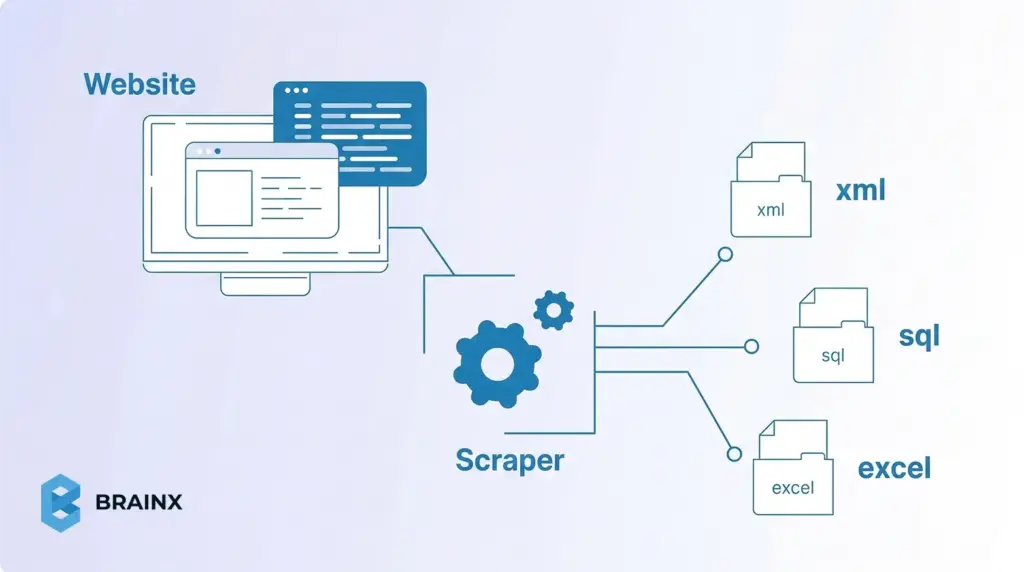
Web scraping refers to the process of extracting web page data using a program. Practically, you load the HTML (or the DOM) of a page and grab the desired content (such as product names, price, or text of an article). It is a substitute for manual copy-pasting. Unlike web crawling (which indexes pages across a site or the whole internet) or searching via an API, scraping targets specific data on each page. In other words, “web crawling is data indexing while web scraping is data extraction”. Scraping is the right approach when you need particular fields from pages, especially if no official API exists.
What Is Web Scraping Used For? (Web Data Scraping Use Cases)
Companies and researchers use scraping for all kinds of data. For example, retailers monitoring their competitors’ prices on hundreds of products, analysts scraping off real estate or job listings, and researchers accessing publicly available information on news websites or government portals.
A famous anecdote: Airbnb originally jump-started its database after scraping listings from Craigslist.
Web Scraping vs Crawling vs API
Crawlers (like Googlebot) follow links to discover pages; scrapers pull data from known pages. In case a site has an official API that provides all the information necessary, it is usually the easiest option. However, not all sites have API, and those that do can be limited or require payment.
As one guide notes, firms often turn to scraping “when no suitable API is available”. So, scraping is the act of grabbing whatever is visible in the HTML/DOM when you require it, which effectively fills gaps left by missing or restrictive APIs.
How Does a Web Scraper Function?
Web scrapers function by following a basic pipeline: Request → Parse → Extract → Store. For each page, a scraper first sends an HTTP request, or opens a browser session, to fetch the content. It then parses the HTML into a searchable structure, extracts the fields it needs using selectors or paths, and saves the result as CSV, JSON, or in a database.
The Two Core Steps of Web Scraping
For beginners, it helps to simplify that workflow into two core steps: fetching the page content and pulling the relevant data from it. Everything else, such as pagination, normalization, validation, storage, and monitoring, builds on top of these fundamentals.
Requesting the HTML Content
The first step is retrieving the page content from the target URL. On a simple site, this usually means sending an HTTP request and receiving the raw HTML in response. In Python, for example, that often starts with a request made through requests.get(). In browser based workflows, the same goal is achieved by loading the page and capturing the rendered DOM.
This step matters because your scraper can only extract what it successfully receives. If the page is static, the HTML response may already contain the data you need. If the site relies on JavaScript, the initial response may only return a partial shell, which means you may need a browser automation tool or another method to access the final content.
Parsing the Relevant Data
Once the content is retrieved, the next step is parsing it into a structure you can search. This is where HTML parsers such as BeautifulSoup, lxml, or Cheerio become useful. They let you navigate the page structure and target specific elements using selectors or paths.
The goal here is not to parse everything on the page. It is to isolate only the fields that matter, such as names, prices, dates, links, or descriptions. For example, a scraper might load the HTML into BeautifulSoup, locate each product card, and extract the title and price from those repeated elements. Once that works on one page, the same logic can usually be repeated across similar URLs.
What Kinds of Data Can You Scrape from the Web?
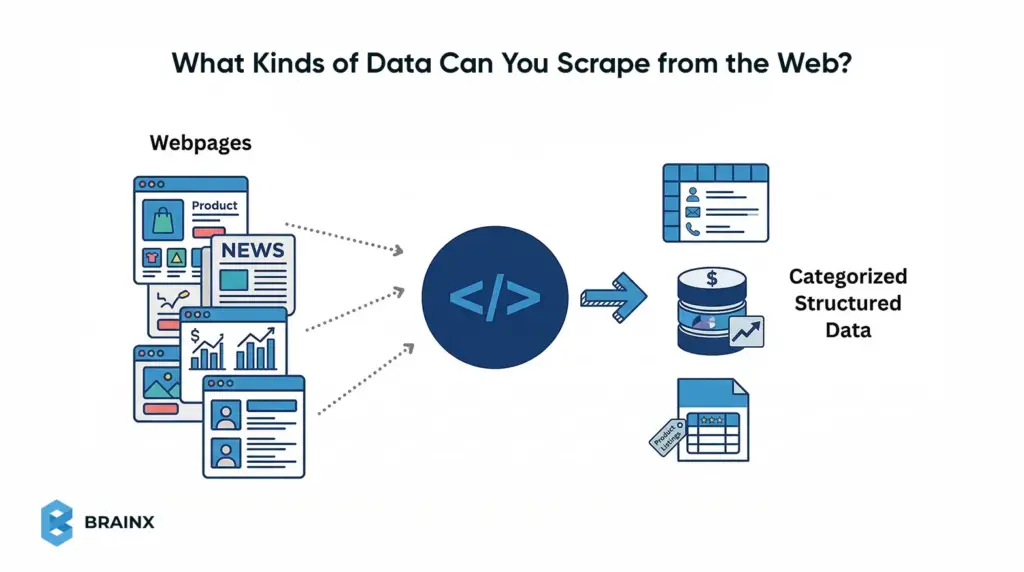
Web pages can contain many kinds of scrapeable data, but some formats are much easier for beginners than others. In general, the easiest targets are public pages with repeated elements and predictable fields, such as listings, tables, and item cards. The goal is to identify content that appears in a consistent structure so it can be extracted cleanly.
Structured Data on List Pages
Structured page data usually appears in repeating formats such as tables, search results, category grids, and public directories. These pages are ideal for beginners because each row or card often contains the same set of fields.
Examples include:
- Names and titles
- Prices and discounts
- Dates and locations
- Ratings and counts
- Page and image URLs
Detail Page Data and Metadata
You can also scrape deeper data from individual pages. The data can include longer descriptions, specifications, tags, breadcrumbs, publish dates, and other metadata attached to a single record.
It is common when you first collect links from a list page, then visit each detail page to extract richer attributes.
Static, Dynamic, and Hidden Data Sources
Not all visible data is delivered the same way. Some pages return data directly in HTML, while others load it through JavaScript or background JSON requests. That changes the scraping method, but not the overall goal.
For beginners, the best starting point is public, low-complexity data that is:
- visible without login
- repeated in a stable format
- easy to inspect in the browser
- spread across simple list or detail pages
Common Types of Web Scraping Beginners Should Know
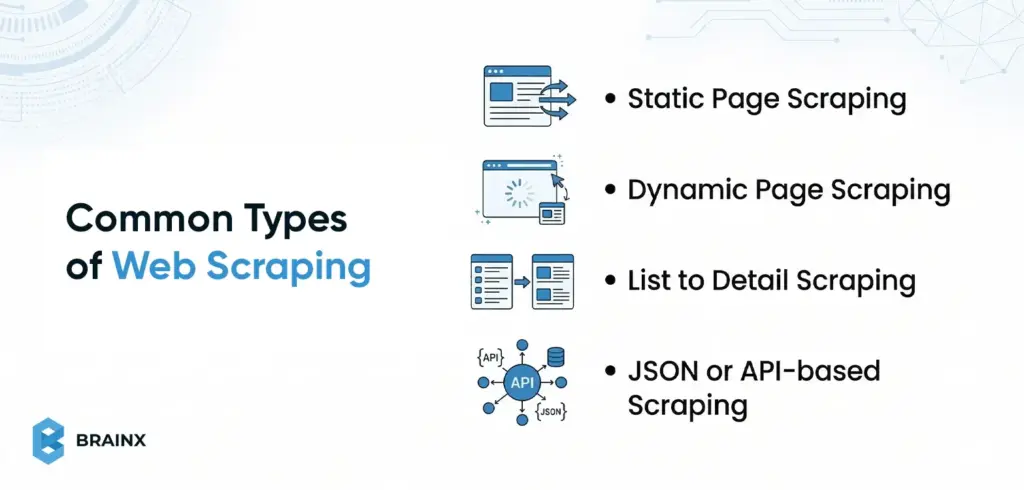
Not all web scraping jobs work the same way. Some pages return clean HTML that is easy to parse, while others load content dynamically, split data across detail pages, or expose structured data through background requests. Understanding these common types helps beginners choose the right method before they start coding.
Static Page Scraping
Static scraping is the simplest type and the best starting point for beginners. The page content is already present in the raw HTML returned by the server, so a basic HTTP request and HTML parser are often enough.
This works well for:
- Blog archives
- Category pages
- Public directories
- Simple product pages
- Listing pages
If the data appears in “View Source,” the page is usually a good candidate for static scraping.
Dynamic Page Scraping
Dynamic scraping is needed when the content is loaded by JavaScript after the initial page request. In these cases, a normal request may return only a basic HTML shell, while the real data appears later in the live DOM.
With this type of scraping you often require:
- a headless browser
- browser automation
- direct access to the background requests powering the page
A quick beginner test is to compare “View Source” with the browser inspector. If the data only appears in the inspected page, it is likely dynamic.
List to Detail Scraping
Some websites show summary data on one page and full information on another. In this type, you scrape a list page first, collect the item URLs, and then visit each detail page to extract additional fields.
Such a pattern is common in:
- E-commerce catalogs
- Job boards
- Real estate listings
- Directories
- Research repositories
It is one of the most practical scraping patterns because important attributes are often spread across multiple page levels.
JSON or API Based Scraping
Sometimes the easiest scraping target is not the visible HTML at all. Many sites load structured data through background requests that return JSON. If you can find that endpoint in the browser’s Network tab, you may be able to collect cleaner data by calling it directly.
For beginners, this can be easier than parsing messy HTML because:
- the field names are clearer
- the structure is more predictable
- nested data is easier to preserve
It is especially useful on modern apps and JavaScript-heavy websites.
Pick a Target Site and Define Your Data Contract Before You Start
Before writing any code, plan what you want to collect. Define a data contract that specifies exactly which fields to extract, what will uniquely identify each record, how often to update the data, and the output format. For instance, if you’re scraping products, your contract might list fields like product_id, title, price, and availability, with product_id as the unique key. Normalizing to this schema (each row has the same columns) prevents confusion later. This upfront schema gives your scraper a clear goal and ensures your output is consistent.
The “Data Contract” Template
- Fields: List the exact data columns you need (e.g. name, price, rating, url). Decide each field’s format (string, number, date).
- Unique ID: Choose a field or combination (like a product ID or URL) that is unique for each item. This lets you detect duplicates and merge updates.
- Freshness (frequency): How often does this data change? If prices update daily, plan a daily scrape. If stock levels change constantly, you might need hourly updates.
- Output format: Decide how to save the data. For example, use CSV if your data is flat (rows and columns) and you want easy spreadsheet compatibility. Use JSON if your data is nested or you need a flexible format for an API. (You can always convert later, but pick one to start.)
Quick Feasibility Checks
- Pagination: Does the site have multiple pages of results? If so, how are they accessed? Look for a ?page= URL or a “Next” button. These patterns determine how you’ll loop through pages.
- Login or paywall: If the data requires logging in, check whether it’s feasible (some scrapers handle login forms; others don’t). If content is behind a paywall or user account, you may need credentials or skip that site.
- JavaScript: Check if the data loads dynamically. A quick test is “View Page Source” vs “Inspect Element.” If the desired data isn’t in the raw HTML source but appears in the browser DOM, it’s inserted by JS. In that case you’ll need a headless browser or JS-enabled method (see steps below).
Lightweight Compliance Check
- Robots.txt: Look at example.com/robots.txt. This file tells well-behaved bots which URLs can’t be fetched. It’s mainly intended to prevent overloading the site. Adhering to it is good etiquette (e.g. don’t scrape disallowed paths), even though it’s not legally binding. (Robots.txt is not a “weird alien language” – it’s just a text file with allow/disallow rules.)
- Terms of Service: Briefly scan the site’s terms of use for any scraping or data-use restrictions. In many places, scraping publicly available data is legal, but breaching a site’s TOS (or collecting private user data) can lead to legal trouble. As one source notes, scraping public content is usually fine, unless you violate the site’s rules or privacy/security measures. In short, only scrape what you’re allowed to use.
Web Scraping for Beginners: the Step-by-Step Workflow
Below is a repeatable workflow for scraping a page. Treat this as a template for your own scraper:
Step 1: Inspect the Page (Identify the Repeating Pattern and Selectors)
First, use your browser’s Developer Tools (F12 or right-click → Inspect) to examine the HTML of the page. Hover over elements on the page to see which tags contain the data you need. Identify the container that repeats for each item (for example, each product might be in a <div class="product-item">). Note the CSS class or id of that container and of the child elements holding fields (like .price or #title). These selectors will tell your code where to extract text. In short: Find the HTML pattern.
Step 2: Retrieve Content (HTML Request vs Browser-rendered DOM)
Next, fetch the page content. For a simple site, an HTTP GET request (e.g. using requests.get() in Python) may suffice. However, if the content is loaded by JavaScript, a plain request will only return a bare HTML skeleton. As Firecrawl notes, “Most websites today use JavaScript to load content after the initial page loads... you miss everything that JavaScript creates or modifies”. If your initial fetch is empty or missing data, switch to a browser-rendering approach. Tools like Selenium, Playwright, or Puppeteer launch a headless browser, let the JS run, and then give you the final HTML/DOM. Use a static fetch for static pages, and a browser engine for dynamic pages.
Step 3: Parse and Extract (CSS Selectors, XPath, and When to Avoid Regex)
Now parse the fetched HTML into a queryable structure. For example, in Python you might use BeautifulSoup or lxml; in JavaScript, Cheerio or DOMParser. Then apply CSS selectors or XPath to find the elements you identified in Step 1. CSS selectors are very handy: for instance, soup.select('div.price') finds all <div> tags with class “price”. XPath can achieve similar results with expressions. Use whichever you’re comfortable with.
A key rule: don’t parse HTML with regex. HTML isn’t a regular language, so regex parsing is brittle and error-prone. Instead, rely on the DOM-based methods above. For each element you select, extract the text content. For example:
- title = soup.select_one('h1').text to get a product title.
- price = soup.select_one('p.price').text to get the price text.
Step 4: Normalize Data (Clean Text, Types, and Missing Fields)
Clean the scraped text into uniform data. Strip excess whitespace, remove currency symbols or commas, and convert strings to numbers or dates as needed. For example, one site might show a price as “$1,299.00” and another as “USD 1299”; normalize both to the numeric value 1299.00. Standardize formats for dates, phone numbers, etc. Also decide how to handle missing or malformed fields (e.g. fill with NULL or skip). As one data engineering guide explains, “websites present information in inconsistent formats” and you must normalize everything into a consistent schema. For instance, ensure that numeric columns end up as numbers (not strings) and text columns are encoded uniformly.
Step 5: Save Results – CSV vs JSON vs Database (Choose Based on Use Case)
Choose where to store the data. A common beginner choice is CSV, because it’s simple and works with spreadsheets or tools like Pandas. CSV is great for flat, tabular data. If your data has nested structure (e.g. a field that is itself a list or object), consider JSON instead – it naturally preserves hierarchy and works well with NoSQL or web APIs. For large-scale or relational needs, you might write directly to a database (SQL or NoSQL). In summary: use CSV when you need a simple table, and JSON when you need flexible, structured output.
Pagination and List Pages (How Beginners Go from 1 Page to 100+)
After you succeed on one page, you’ll often need to scrape many pages. Common techniques include:
- URL patterns and “next page” links: Look at the URL when you click to the next page of results. Often there’s a parameter (like ?page=2) you can increment. If not, find the “Next” button’s link in the HTML and follow it. For example, a page might have <a href="/products?page=3">Next</a>. You can write a loop that fetches each page until no “Next” link is found. One guide recommends either looping by known last page, or continuously clicking the next link until it disappears. Always test manually to confirm you’ve captured the pattern.
- Deduplication: When paging through lists, you might encounter duplicate entries (for example, an item appears on the overlap between page 1 and page 2). To avoid repeated rows, filter by the unique ID or a composite key. For instance, keep a Python set of seen IDs and skip any repeats. As a data cleaning strategy notes, you should identify duplicates (exact matches easily, and fuzzy matches for slight variations) and consolidate them. In practice, using the unique field (like product ID or URL) is a straightforward way to drop repeats.
- Polite rate limits: As you iterate, throttle your requests so as not to overload the site. Insert a short delay (e.g. 1–2 seconds) between page requests. If you receive an HTTP 429 (“Too Many Requests”), it means the server’s rate limit has been reached. The solution is to back off: wait for some time (possibly exponentially increasing waits) and retry. Check the Retry-After response header too, which indicates how long to pause. Additionally, rotate IP addresses or proxies if you plan very high-volume scraping. Overall, a gentle pace and retry logic help avoid blocks and capture all pages.
Web Scraping Techniques for Beginners
Beyond the basic workflow, here are some practical techniques for common situations:
- List → Detail pattern: Often a site shows summaries (table rows, cards, list items) each linking to a detail page. Scrape the list page first to get summary fields and links, then loop through each link to fetch additional details. For example, first grab all product names and URLs from the category page, then visit each product URL to get full specs. This two-step approach ensures you don’t miss data hidden on detail pages. (See also the [list-to-detail scraping pattern] for examples.)
- Extracting JSON from the Network: Many modern sites load data via AJAX requests that return JSON. Open your browser’s Developer Tools Network tab and look for requests that return JSON when the page loads. If you find one (for instance, an endpoint with /api/products?page=2 returning JSON), you can call that URL directly instead of parsing HTML. This often yields structured data more cleanly and avoids parsing overhead. This technique is especially useful if your target site is a single-page app or heavily JS-driven. (See [inspect network requests] for more on this method.)
- Handling forms and interactions: If data is behind a search form or filter, you may need to simulate those actions. For simple cases, discover the form submission URL and parameters (via devtools), then issue a POST/GET with those parameters. For complex interactions (clicks, logins), use a browser automation tool (Selenium/Playwright) to fill the form and submit it programmatically. Once the form is submitted, scrape the resulting page as usual.
- Dynamic vs static pages (“View Source vs Inspect” test): A quick way to tell if a page is dynamic is to compare “View Page Source” with the live DOM in Inspect mode. If the data you want isn’t present in the raw source but appears in Inspect, it’s being loaded by JavaScript. In that case, use a JS-enabled scraper (step 2 above). If the content is already in the source HTML, a simple request is enough.
Best Web Scraping Tools For Beginners
Choosing a tool depends on your comfort level and needs. Here are some categories:
- Beginner-friendly code stacks (Python vs JavaScript): Python is a classic choice: libraries like requests + BeautifulSoup (or frameworks like Scrapy) make scraping straightforward, and Python’s data tools (Pandas, CSV, JSON) handle output easily. JavaScript can also work: Node.js with Puppeteer (or Cheerio) lets you write scrapers if you prefer JS. Use Python if you value readability and data analysis libraries; use JavaScript if you are comfortable with it or need native browser automation (Puppeteer). We’ll break down Python, JavaScript, and Ruby in more detail after this section.
- Browser automation tools: When a site relies heavily on JavaScript, use a real browser under the hood. Selenium WebDriver (available in Python, Java, etc.) and Playwright/Puppeteer (Node.js) automate a full browser (Chrome, Firefox, etc.). They can click, scroll, and wait for scripts to finish. This ensures your scraper sees the page exactly as a user would. The trade-off is these tools are heavier and slower than raw requests, but they handle any JS-generated content.
- No-code/low-code scrapers: If you prefer a graphical interface, consider no-code tools. Examples include Octoparse, ParseHub, or browser extensions like Data Miner. These let you define scrape targets by clicking elements and configure pagination or filters through a UI. They often run in the cloud or your browser and export to CSV/JSON without writing code. This is great for quick, simple projects (or non-programmers) – though you may hit limits on customization or usage for very complex sites. (For service-oriented scraping, see also [no-code web scraping] guides.)
- Scraping APIs: For large-scale or mission-critical scraping, consider specialized scraping APIs (e.g. ScraperAPI, BrightData, or cloud browser tools). With these, you send a request to their API specifying the target page, and they return the content (handling proxies, browsers, CAPTCHAs, etc.). It’s the most robust solution, but these services typically charge by usage. Use a scraping API when you need scale and reliability; for a small beginner project, your own script is usually enough. (Learn more on [web scraping API] pages.)
Web Scraping Using Python
Python’s clear syntax and powerful libraries make it a popular choice for scraping. Its ecosystem includes requests (HTTP), BeautifulSoup/lxml (HTML parsing), and frameworks like Scrapy for larger projects. These are beginner-friendly with extensive documentation.
Recommended tools:
- Requests: Simple HTTP GET/POST (concise API). Pros: Easy, synchronous. Cons: No JS rendering, must combine with parser.
- BeautifulSoup or lxml: HTML parser with CSS selectors. Pros: Intuitive DOM navigation. Cons: Slower on large pages.
- Scrapy: Full framework for large crawls. Pros: Built-in async, pipelines. Cons: Steeper learning curve.
- Selenium/Playwright: Full browser automation. Pros: Handles any JS-heavy site. Cons: Heavy, slower.
Code example (Python): Fetch a static page, extract repeating items (e.g. titles and prices), save CSV (using Requests + BeautifulSoup).
import requests
from bs4 import BeautifulSoup
import csv
url = "https://example.com/products"
res = requests.get(url)
soup = BeautifulSoup(res.text, 'html.parser')
rows = [["Title","Price"]]
for item in soup.select("div.product"):
title = item.select_one("h2").get_text(strip=True)
price = item.select_one("span.price").get_text(strip=True)
rows.append([title, price])
with open("output.csv","w",newline='') as f:
writer = csv.writer(f)
writer.writerows(rows)
This script shows the core pattern: request → parse (CSS selectors) → extract → save (CSV).
Pitfalls & tips: Be careful with selector drift (sites changing HTML) and missing data. Use soup.select_one(...) to catch missing elements safely. Debug by printing res.status_code and sample soup output. Watch out for JavaScript-driven content: if res.text lacks expected elements, the page likely needs a headless browser instead.
Performance: Python is slower per request than Node.js, but comfortable for medium-scale scrapes. Use sessions or retries with requests.Session() to reuse connections. For high volume, Scrapy’s asynchronous engine or a scraping API can scale. Python’s strength is in post-processing; pair it with Pandas for cleaning structured data.
Internal anchors: Use [CSS selectors vs XPath] to explain element selection, [browser automation] for JS-heavy pages, and [CSV vs JSON] for output formats.
Suggested image: A flowchart showing requests.get() → BeautifulSoup.parse → CSV write (alt: “Python code fetching web page content and writing to CSV”).
Web Scraping Using Javascript
Node.js offers JavaScript on the server, letting you use the same language as in-browser. Its async model (callbacks/promises) can make parallel fetches easy. Tools like Axios (or node-fetch) handle HTTP, and Cheerio parses HTML with a jQuery-like API. For JS-driven sites, Puppeteer or Playwright drive real browsers.
Recommended tools:
- Axios (or node-fetch): Promise-based HTTP requests. Pros: Simple syntax (await axios.get(url)), built-in JSON handling. Cons: No built-in parsing.
- Cheerio: Fast server-side jQuery-like HTML parser. Pros: Familiar CSS selectors, lightweight. Cons: No JS execution.
- Puppeteer/Playwright: Headless Chromium/Firefox. Pros: Full browser support, great for React/Vue pages. Cons: Heavy, requires async/await.
- Selenium (JS bindings): Alternative browser automation.
Code example (JavaScript): Fetch a page and extract repeating items using Axios + Cheerio, then save CSV with a basic writeFile.
const axios = require('axios');
const cheerio = require('cheerio');
const fs = require('fs');
async function scrape() {
const res = await axios.get('https://example.com/products');
const $ = cheerio.load(res.data);
let csv = 'Title,Price\n';
$('div.product').each((i, el) => {
const title = $(el).find('h2').text().trim();
const price = $(el).find('span.price').text().trim();
csv += `"${title}","${price}"\n`;
});
fs.writeFileSync('output.csv', csv);
}
scrape();
The above given async code uses await axios.get to retrieve HTML, then Cheerio to select elements (similar to browser-based jQuery).
Pitfalls & tips: Remember Node.js is case-sensitive and async – handle promises carefully (use async/await). Cheerio isn’t a full DOM – avoid using browser-only APIs. If data is loaded dynamically, use Puppeteer: e.g. const page = await browser.newPage(); await page.goto(url); const html = await page.content();. Debug by logging the fetched HTML or element counts.
Performance: Node’s event loop can fetch many pages concurrently. However, excessive parallelism can trigger rate limits. Use libraries like p-limit to throttle. When scraping many pages, consider stream-writing CSV to avoid memory bloat. JavaScript’s Chrome engines are fast; use headless browsers sparingly.
Web Scraping Using Ruby
Ruby is concise and has a long tradition in text processing. The Nokogiri gem (built on libxml) is the go-to HTML/XML parser and uses CSS/XPath selectors. Mechanize provides an easy browser-like interface. Ruby code tends to be very readable.
Recommended tools:
- Nokogiri: Powerful HTML/XML parser. Pros: Fast, supports both CSS and XPath. Cons: Must combine with open-uri or Net::HTTP to fetch.
- Open-URI (or Net::HTTP): Easy way to get a page: Nokogiri::HTML(URI.open(url)). Pros: Simple. Cons: May need require 'open-uri'.
- Mechanize: High-level scraping library (follows links, handles cookies). Pros: Simulates a browser, easy to fill forms. Cons: More overhead for simple tasks.
- Watir: Browser automation (wraps Selenium). Pros: For JS pages. Cons: Heavy.
Code example (Ruby): Fetch a page and extract items with Nokogiri, save to CSV.
require 'nokogiri'
require 'open-uri'
require 'csv'
doc = Nokogiri::HTML(URI.open("https://example.com/products"))
CSV.open("output.csv", "w") do |csv|
csv << ["Title", "Price"]
doc.css("div.product").each do |item|
title = item.at_css("h2").text.strip
price = item.at_css("span.price").text.strip
csv << [title, price]
end
end
This uses URI.open to fetch the page and Nokogiri’s CSS selectors to find elements. The results are written to a CSV.
Pitfalls & tips: A common mistake is forgetting: require 'open-uri'. Also Nokogiri parsing can be memory-heavy for very large pages. For JS content, use Mechanize or Watir. Always check res.status or rescue exceptions on URI.open to handle 404s/timeouts. Use binding.pry or puts to debug selectors in IRB if needed.
Performance: Ruby is slower than Node and Python for many requests, but fine for small-medium scrapes. For large crawls, Mechanize’s synchronous nature can bottleneck; you might use threads (Thread.new) or call external tools. Ruby excels at string manipulation if you need to process results.
Language Comparison Table
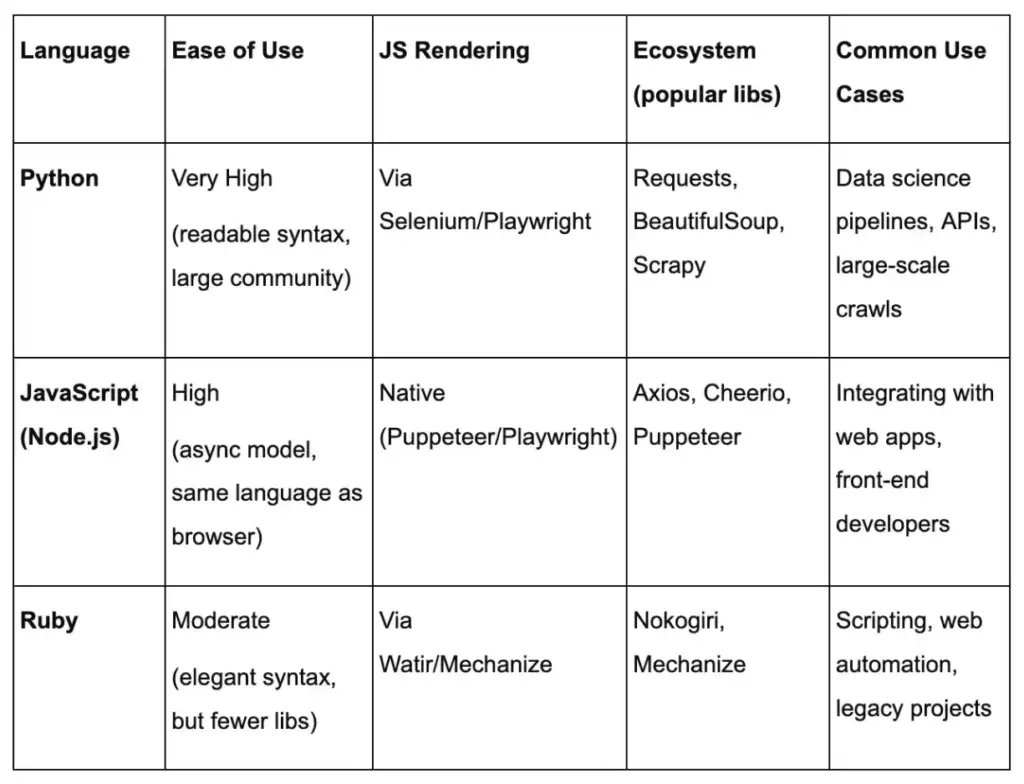
Each language can reach sites that require JavaScript via browser automation or API access, but Python and Node have broader ecosystems.
Common Challenges in Web Scraping and How to Solve Them
Even a well planned scraper can fail once it meets a real website. Pages change, selectors stop matching, content loads through JavaScript, and servers may slow down or block repeated requests. The good news is that most scraping problems follow a small set of patterns. Once you know what to look for, debugging becomes much faster and less frustrating.
For beginners, the key is to treat scraping issues as system signals, not random errors. If results are empty, duplicated, incomplete, or blocked, the problem usually comes from page structure, request timing, rendering method, or missing safeguards in your workflow.
Empty Results: Selector Drift, Wrong HTML, or JavaScript Rendered Content
One of the most common scraping problems is getting no data back even though the page looks correct in the browser. In most cases, this happens because the scraper is reading different HTML from what you see on screen. A selector may also stop working after the site changes its layout or class names.
Start with these checks:
- Confirm the request actually returned the expected page
- Inspect the saved HTML, not just the live browser view
- Verify that your selector still matches the current structure
- Compare View Source with Inspect Element to spot JavaScript loaded content
If the data appears only after the page finishes rendering in the browser, a simple HTTP request may not be enough. In that case, you may need browser automation or a JSON endpoint from the Network tab.
Blocks and Errors: 403, 429, CAPTCHAs, and Rate Limits
Another common challenge is being blocked before you can collect useful data. Websites may respond with status codes like 403 or 429, show a CAPTCHA, or return incomplete pages when they detect too many repeated requests.
At a high level, these signals usually mean:
- 403 means access is denied
- 429 means you are sending requests too quickly
- CAPTCHA means the site wants to verify human activity
- Repeated redirects or strange page content may indicate soft blocking
The safest response is to slow down and reduce pressure on the site. Add delays between requests, use backoff after failed attempts, and avoid sending unnecessary traffic. This is where internal guidance like rate limiting and retries can be helpful. A scraper that behaves politely is more stable and easier to maintain.
Logging Basics: What to Print or Save So You Can Reproduce Issues
When a scraper breaks, debugging is much easier if you have enough context to reproduce the problem. Many beginners only print the final extracted values, but that is rarely enough when something goes wrong.
Useful things to log include:
- Target URL
- HTTP status code
- Timestamp
- Number of records extracted
- Selector used for key fields
- Output of failed or suspicious requests
- A saved copy of the response HTML for broken pages
This gives you a trail you can inspect later instead of guessing what happened. It also helps separate parser issues from request issues. If the request succeeded but extraction failed, the problem is probably your selectors or assumptions about page structure. If the request itself failed, focus on access, timing, or rendering.
Maintenance Habits: Monitoring Changes and Updating Selectors Safely
Web scraping is rarely a one time setup. Websites evolve, class names change, pagination shifts, and data fields move into new containers. A scraper that works today may quietly degrade next week unless you monitor it.
Good maintenance habits include:
- Validating a small sample of output regularly
- Checking for sudden drops in row count
- Watching for missing key fields
- Keeping selectors simple and readable
- Avoiding selectors that depend on fragile visual classes only
It also helps to separate your extraction rules from the rest of your code so updates are faster and safer. If a site changes one product card layout, you should not have to rewrite the whole scraper. This is also a good place to use a data validation checklist so you can catch silent failures before bad data spreads downstream.
A practical mindset for beginners is this: scraping does not break because the internet is random. It breaks because pages, delivery methods, and access rules change. If you expect that from the start, you will build workflows that are easier to debug, maintain, and trust.
Responsible Scraping: Etiquette, Compliance, and Privacy Basics
Scraping responsibly is key. Follow these guidelines to stay on the right side of ethics and law:
How robots.txt Works (and Its Limits)
The robots.txt file at a website’s root tells web crawlers which pages they’re allowed or disallowed to fetch. It’s there primarily to prevent overloading a site. For example, a robots.txt might disallow /checkout or /admin. Remember, robots.txt is voluntary – it doesn’t legally grant permissions or set copyright. It’s good practice for scrapers to avoid disallowed paths (as a courtesy). In plain terms: think of robots.txt as the site owner saying “please don’t crawl these pages.” Respect it, but also know it’s mainly about polite behavior, not a permission slip for using data.
Respecting Site Performance: Concurrency, Caching, and Request Pacing
Don’t hammer the site. Keep parallel requests low (especially on smaller servers). Insert delays between requests (even a random 0.5–2 seconds can drastically reduce load). Use caching for static pages if you re-run scrapes frequently. If you update daily, there’s no need to re-download data that never changes (you can use HTTP headers or local caching to skip unchanged pages). The goal is to leave the site in basically the same state as before you scraped. Concurrency and request pacing are your best tools – more workers or speed are usually unnecessary for a beginner’s scrape.
Terms of Service and Data Rights: What to Review Before Scraping
Always check the site’s Terms of Service. Some sites explicitly forbid scraping or data reuse. For example, news or social sites often restrict automated copying of content. Even if data is public, copying copyrighted material without permission is problematic. Also, avoid scraping personal data (user emails, private profiles, etc.), as privacy laws may apply. In short: use only data that the site intends for public viewing. If you see a clause like “You may not use bots,” take it seriously. As noted, scraping public data is generally fine, but violating terms of use can have legal consequences.
Sensitive Data: Red Flags (personal data, gated content, copyrighted datasets)
A few red flags to watch out for:
- Personal information: Don’t scrape anything that isn’t explicitly public. Names, emails, or account data behind a login are off-limits (and may violate privacy laws).
- Login/paywall content: If content requires a login, credentials, or payment, you should have permission to scrape it. Otherwise skip it.
- Copyrighted content: Be cautious with large copyrighted texts, images, or proprietary databases. Unless you’re scraping for legitimate fair use (like research) or the site’s terms allow it, avoid bulk copying of copyright material.
When in doubt, err on the side of caution or seek legal advice. The aim is to respect privacy and copyright: gather only public, intended-to-be-shared data.
Conclusion
Web scraping for beginners is easiest when you treat it like a repeatable workflow, not a one-time script. Start by defining your data contract, inspect the page for a stable pattern, then retrieve, parse, normalize, and store your results in a format your team can actually use.
Once your first scraper works on a single page, the real value comes from scaling it safely. Add pagination, dedupe your rows, and implement pacing with backoff so you stay reliable over time (see: rate limiting and retries). If pages are dynamic, use the “view source vs inspect” test to decide when browser automation is worth it.
Before you ship anything into production, build in the basics: logging, selector maintenance habits, and a simple data validation checklist. And always keep compliance and privacy in scope by reviewing robots.txt rules and the site’s terms, especially when data could be sensitive.
BrainX Helps Build Reliable Web Scraping Pipelines
If you’re past the first script and want production-ready scraping, we can help. BrainX builds scalable scrapers for listings, pricing, and research datasets with clean CSV/JSON outputs, rate limiting, retries, and monitoring. Share your target site and data contract, and we’ll recommend the right approach, tools, and architecture.
FAQs for Web Scraping Beginners
Is web scraping legal?
Scraping publicly accessible websites is usually legal in many countries, especially when the data is non-sensitive (like product prices or publicly posted statistics). It can become illegal if it violates copyright law or a site’s terms of service. For example, copying large copyrighted text verbatim can be infringement, and bypassing a login wall can be unauthorized. Most disputes depend on how you scrape and what you do with the data.
Safest rule: scrape only clearly public, allowed data and avoid personal or confidential information.
What’s the difference between web scraping and web crawling?
Web crawling and scraping are related but distinct. Web crawling involves systematically browsing the web or a site to discover and index pages (like search engines do). Web scraping specifically means extracting data from individual pages. In short, crawling is about finding pages; scraping is about pulling data from pages. Think of crawling as building a map of URLs, and scraping as extracting answers from those URLs.
As summarized earlier: “web crawling is data indexing, while web scraping is data extraction”.
How do I know if a site is JavaScript-heavy?
A quick test: use your browser to “View Page Source” (which shows the original HTML). Then “Inspect Element” (which shows the live DOM after scripts run). If the information you want is missing in the raw source but appears in the live page, the site is JavaScript-heavy. For example, if View Source shows a mostly empty <div> but Inspect shows that same <div> filled with text, it’s being populated by JS. Also check the Network tab for API calls.
In short, if a basic HTTP fetch returns little content, plan to use a headless browser in your scraper.
Can I do web scraping for beginners without coding?
Yes – there are many no-code or low-code tools for scraping. For example, browser extensions or SaaS platforms (like Octoparse, ParseHub, or web data connectors) let you extract tables and lists by clicking on them. Google Sheets even has functions (IMPORTXML, IMPORTHTML) to pull data into a spreadsheet. These tools handle the crawling and parsing under the hood, so beginners can start scraping without writing code. They often include tutorials geared toward novices.
Once you’re comfortable, you can learn to script your own scrapers for more flexibility.
How do you scrape a web page in Python?
At a basic level, scraping a web page in Python usually involves four steps: sending a request to the page, parsing the HTML, selecting the elements you want, and saving the extracted data. A common beginner stack is requests for fetching the page and BeautifulSoup for parsing it.
In simple cases, the workflow looks like this:
- Use requests.get() to retrieve the page HTML
- Load that HTML into BeautifulSoup
- Find the target elements with CSS selectors or tag paths
- Extract the text, links, or attributes you need
- Save the result as CSV, JSON, or in a database
Python is often the easiest language for beginners because its scraping libraries are mature, readable, and well supported. If the site loads content with JavaScript, you may need tools like Playwright or Selenium instead of a basic HTTP request.
What should I store first: CSV or JSON?
It depends on your use case. CSV is best for spreadsheets, Pandas, or SQL because it’s simple and tabular.
JSON is better for nested fields (like lists of features or images) and works well for web apps or APIs.
You can usually convert between them later, so start with how you’ll use the data.
By following this guide, web scraping for beginners becomes systematic: plan, extract, clean, scale, and stay ethical.