 August 21, 2026 -
 16 minutes read


Key Takeaways
- AI-assisted enterprise app development uses AI across the software delivery lifecycle to reduce repetitive work while keeping architecture, security, and release decisions under human control.
- The main delivery approaches are coding assistants, agentic coding tools, prompt-to-app builders, and AI-powered low-code platforms, each with different tradeoffs around speed, control, and governance.
- The strongest enterprise use cases are bounded projects with clear requirements, reliable integrations, measurable delivery baselines, and reviewable outputs.
- AI can accelerate coding, testing, documentation, and modernization, but weak engineering practices can also be amplified, creating more rework or technical debt.
- Enterprise adoption needs approved tooling, source-code and data policies, automated quality gates, human review, auditability, and an ownership model before teams scale usage.
- Measure success through delivery outcomes such as lead time, rework, defect rates, backlog reduction, review effort, and developer experience rather than lines of AI-generated code.
AI-assisted enterprise app development uses generative AI, machine learning, and automation to help teams plan, design, code, test, document, modernize, and deliver business software. The goal is not to remove engineering judgment. It is to reduce repetitive work and shorten feedback loops while experienced teams continue to own architecture, security, integration, and release decisions.
The shift is becoming mainstream. Gartner's 2025 software engineering trends predict that 90% of enterprise software engineers will use AI code assistants by 2028. Google DORA also reports that almost 90% of surveyed technology professionals use AI, while emphasizing that AI acts as an amplifier: strong platforms, workflows, and engineering practices improve its value, while weak systems can amplify existing friction.
That distinction matters because broad enterprise AI adoption has not automatically translated into scaled business value. McKinsey's 2025 State of AI survey found widespread AI use but a continuing gap between experimentation and enterprise-level impact. This guide focuses specifically on using AI to improve the enterprise application development process. If the goal is instead to add AI to an existing CRM, ERP, data platform, or legacy product, see our AI integration services guide.
What Is AI-Assisted Enterprise App Development?
AI-assisted enterprise app development is the use of AI tools and AI-enabled development platforms to support activities across the software development lifecycle. Depending on the project, AI may help turn requirements into prototypes, suggest architecture patterns, generate or refactor code, create tests, explain unfamiliar modules, produce documentation, or accelerate migration work. Zoho's 2026 guide frames the category around coding assistants, prompt-to-app builders, and AI-powered low-code platforms.
For enterprises, the important word is assisted. Generated output still has to fit the organization's architecture, security requirements, coding standards, deployment pipeline, and ownership model. The right objective is not maximum code generation. It is faster delivery of software that remains maintainable, secure, testable, and understandable by the team that owns it.
Traditional Development vs. AI-Assisted Development
The underlying engineering lifecycle remains familiar. The difference is that AI can compress or automate parts of each phase, allowing developers to spend more time on ambiguous, high-impact work.
| Development Area | Traditional Approach | AI-Assisted Approach | Human Responsibility |
| Requirements | Manual synthesis of interviews, tickets, and documents | AI summarizes inputs, drafts stories, and surfaces gaps | Validate business intent, priorities, and constraints |
| Design | Architecture and interface drafts created manually | AI proposes patterns, diagrams, schemas, or UI variants | Choose architecture and enforce enterprise standards |
| Coding | Developers write and refactor code directly | Assistants generate, explain, refactor, or scaffold code | Review correctness, maintainability, and security |
| Testing | Teams design test cases and scripts manually | AI drafts unit, integration, and edge-case tests | Define acceptance criteria and verify coverage |
| Documentation | Documentation is written after or alongside development | AI drafts API notes, runbooks, and change summaries | Confirm accuracy and operational usefulness |
| Modernization | Engineers analyze legacy code and plan migrations manually | AI explains code, proposes mappings, and accelerates repetitive transformations | Own migration strategy, validation, and rollback |
AI-Assisted Development vs. AI-Enabled Applications
AI-assisted development describes how software is built. AI-enabled applications describe what the finished product does. A team may use a coding assistant to build a conventional warehouse application with no AI feature at runtime. Conversely, a customer-support application may contain retrieval, generation, or agent capabilities that users interact with after deployment.
When the product itself contains AI, runtime controls become a separate concern. For example, Microsoft documents document-level access control for Azure AI Search, Amazon Bedrock Guardrails provides model-level controls, and the OWASP Top 10 for LLM Applications covers risks such as prompt injection and sensitive information disclosure. These are important when an enterprise application includes AI, but they should not be confused with the controls needed for AI-assisted software delivery itself.
Different Approaches to AI-Assisted App Development
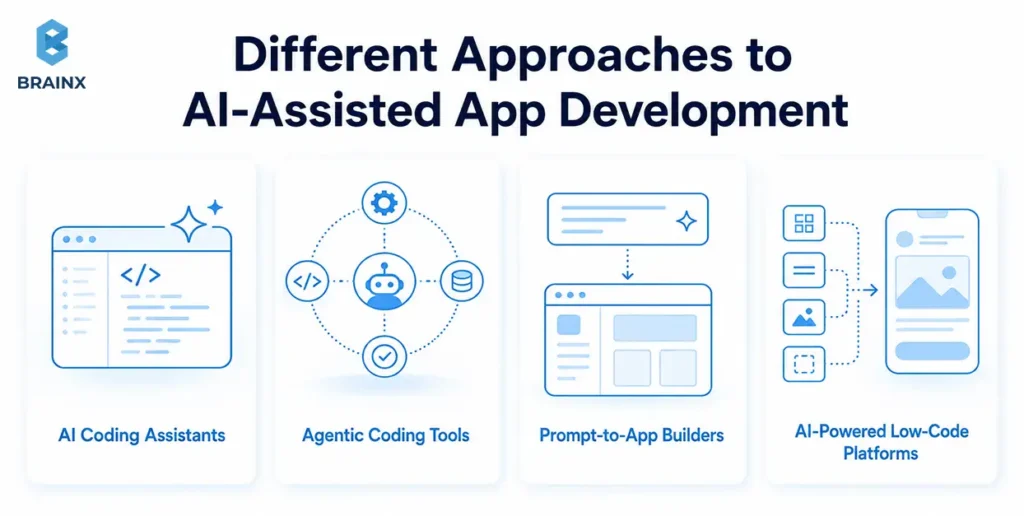
Enterprises can adopt AI-assisted development in several ways. The best choice depends on code ownership, application complexity, integration depth, governance requirements, and how much control the engineering team needs over the final product.
AI Coding Assistants
Coding assistants work inside IDEs, repositories, or developer workflows. They help engineers autocomplete code, explain unfamiliar modules, draft functions, write tests, refactor repetitive logic, and generate documentation. This approach suits teams that already have mature engineering practices and want to increase developer flow without changing their core stack.
Agentic Coding Tools
Agentic tools move beyond inline suggestions. They can accept a bounded task, inspect a repository, modify multiple files, run tests, and prepare a pull request for review. GitHub describes its Copilot coding agent as capable of implementing features, fixing bugs, improving tests, addressing technical debt, and updating documentation. Enterprise teams should treat these agents like delegated contributors: give them scoped permissions, clear repository instructions, automated checks, and mandatory human review.
Prompt-to-App Builders
Prompt-to-app builders can generate interfaces, data models, and basic application logic from natural-language instructions. They are useful for prototypes, proofs of concept, internal utilities, and early workflow validation. They become less attractive when the system requires unusual UX, complex integrations, strict portability, or long-term ownership outside the platform.
AI-Powered Low-Code Platforms
AI-powered low-code platforms combine visual development with AI assistance. They can accelerate forms, dashboards, approvals, workflows, and CRUD-heavy internal applications while providing platform-level governance. The tradeoff is platform dependency, so teams should test integration limits, data residency, extension points, deployment options, and exit paths before using one for a strategic system.
| Approach | Best For | Speed | Engineering Control | Enterprise Governance | Main Limitation |
| AI coding assistants | Custom development in existing codebases | High for coding tasks | High | Depends on organization | Still requires full engineering lifecycle |
| Agentic coding tools | Bounded repository tasks and backlog work | High | High with review | Needs strong repository and policy controls | Can create review volume or unintended changes |
| Prompt-to-app builders | Prototypes and bounded tools | Very high initially | Low to medium | Platform-dependent | Complex refinement and maintainability |
| AI-powered low-code | Governed internal workflows | High end to end | Medium | Often stronger out of the box | Vendor constraints and portability |
Where Can AI Assist Across the Enterprise App Development Lifecycle?
AI creates the most value when it supports specific delivery bottlenecks rather than being added everywhere. A mature team can use different tools at different stages while keeping one engineering standard for the final application.
Requirements and Product Discovery
AI can summarize stakeholder interviews, support tickets, legacy documentation, and process notes into draft requirements. It can also identify contradictions, group similar requests, and generate acceptance-criteria candidates. Product owners still need to decide what problem is worth solving, which constraints are real, and how success will be measured.
Architecture and Technical Design
Teams can use AI to compare architecture options, draft API contracts, propose data models, map dependencies, or create first-pass diagrams. The useful output is a starting point for review. Architecture decisions involving security boundaries, data ownership, scalability, compliance, and long-term maintainability should remain explicit human decisions.
Code Generation, Refactoring, and Debugging
AI is particularly effective at repetitive transformations: scaffolding handlers, converting patterns, explaining errors, drafting adapters, generating serialization logic, and suggesting refactors. The speed gain is real only when developers can verify the result quickly. Large generated changes with weak tests may shift effort from writing code to reviewing and repairing it.
Testing and Quality Assurance
AI can draft unit tests, edge cases, mocks, API tests, and exploratory scenarios from requirements or code. It can also help explain failed tests and identify missing branches. Test generation should be anchored to business acceptance criteria because a model can generate many tests that exercise implementation details without proving the workflow actually works.
Documentation and Knowledge Transfer
AI can turn code, tickets, pull requests, and architecture notes into first-pass documentation. This is useful for API descriptions, release notes, onboarding material, runbooks, and module explanations. Teams should keep documentation in version-controlled or approved knowledge systems and review it whenever the underlying implementation changes.
Legacy Modernization and Migration
Legacy systems often contain repetitive patterns, sparse documentation, and large volumes of code that must be understood before migration. AI can help explain old modules, generate dependency summaries, draft test coverage before refactoring, and accelerate mechanical transformations between frameworks or APIs. Migration decisions, data validation, performance testing, and rollback planning still require experienced engineers.
Benefits of AI-Assisted Enterprise App Development
The strongest benefits come from reducing waiting, repetitive work, and context switching across the delivery lifecycle. Google DORA's 2025 AI Capabilities Model reports widespread AI use and emphasizes that the greatest returns come from strong underlying systems, clear AI policies, healthy data ecosystems, user focus, and internal platforms. In other words, AI can accelerate a capable delivery system, but it does not replace one.
Faster Iteration and Shorter Delivery Backlogs
AI can shorten the time spent on boilerplate, repetitive setup, documentation, and first-pass testing. Example: a team building an internal procurement workflow can use AI to scaffold forms, API contracts, validation logic, and test cases, then spend more of the sprint on approval rules, ERP integration, and exception handling.
More Developer Time for Architecture and Business Logic
Developers can delegate low-context work such as repetitive mappings, test scaffolding, code explanations, and basic documentation. Example: instead of manually translating the same data-transfer patterns across dozens of endpoints, an engineer can review AI-generated mappings and focus on domain rules and integration failures.
Faster Prototyping and Requirement Validation
Prompt-to-app and low-code tools can turn a process description into a clickable workflow quickly. Example: an operations team can validate screens, roles, and approval steps before a custom engineering team commits to production architecture. This reduces the risk of building the wrong workflow in polished code.
Improved Testing and Documentation Coverage
AI makes it cheaper to create first drafts of tests and documentation, especially in codebases where these activities are routinely postponed. Example: during a legacy modernization project, AI can help generate characterization tests around existing behavior before refactoring begins. Human review remains necessary because generated tests can repeat the same incorrect assumption as the generated code.
More Accessible Modernization and Knowledge Transfer
AI can help teams understand older code, unfamiliar frameworks, and undocumented modules. Example: when a senior engineer is preparing a handover, AI can draft module summaries and dependency maps that the engineer validates before they become onboarding material. This turns tacit knowledge into reusable context without treating generated explanations as authoritative by default.
Types of intelligent app development tools for enterprises
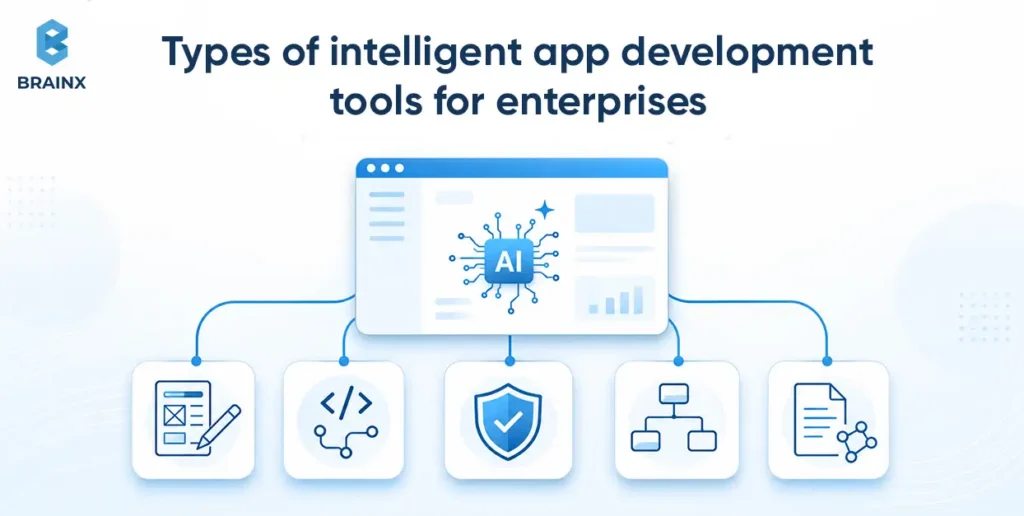
The development approach describes how a team works. Tool categories describe which part of the lifecycle is being assisted. Most enterprises will use a combination rather than one platform for every task.
Requirements and Design Assistants
These tools help summarize research, draft user stories, create acceptance criteria, generate interface concepts, compare architecture options, or convert design inputs into implementation-ready artifacts. They are most useful when outputs feed into an established product and design review process.
Developer-Native Coding and Repository Assistants
These tools work close to the codebase through IDEs, pull requests, repositories, or terminals. Capabilities include code completion, explanation, refactoring, test generation, issue resolution, and delegated agent tasks. Enterprises should prioritize tools that support administrative policies, access controls, auditability, and integration with existing source-control workflows.
Testing, Review, and Security Tools
AI-enhanced testing and review tools can propose test cases, explain failures, flag suspicious changes, prioritize findings, and help developers remediate vulnerabilities. They should complement, not replace, deterministic controls such as static analysis, dependency scanning, secret scanning, policy checks, and required approvals.
Low-Code, Workflow, and App-Builder Platforms
These platforms assist with full application assembly rather than only code generation. They are a strong fit for internal workflows, approvals, forms, dashboards, and data-centric tools where platform conventions are acceptable. Enterprises should evaluate governance, data residency, connector coverage, custom-code escape hatches, and lifecycle management before adoption.
Modernization, Documentation, and Knowledge Tools
These tools focus on understanding and transforming existing systems. Typical capabilities include code explanation, dependency mapping, migration planning, documentation generation, test creation, and repetitive framework conversion. They can reduce the discovery burden in large legacy estates, but teams still need validation against real production behavior.
Common Enterprise Use Cases for AI-Assisted Development
AI assistance is most useful where the application need is clear but delivery is constrained by backlog, repetitive engineering, legacy complexity, or limited time for prototyping. The following project types benefit without requiring AI to be a feature of the finished product.
Internal Workflow and Operations Applications
Approval systems, asset trackers, service workflows, scheduling tools, reporting applications, and administrative portals often contain predictable screens and integration patterns. AI can accelerate scaffolding and testing while engineers focus on business rules, permissions, exception handling, and source-of-truth integrations.
Customer and Partner Portals
Portal projects combine authentication, account data, workflows, content, and integrations. AI assistance can speed up repetitive frontend and API work, generate test coverage, and help document integration contracts. Because these systems face external users, accessibility, performance, security, and UX still require deliberate engineering rather than prompt-only generation.
Legacy Application Modernization
Modernization teams can use AI to understand unfamiliar code, generate missing tests, map modules to new services, and automate repetitive transformations. The safest pattern is to establish behavioral tests first, migrate in bounded increments, and compare outputs before decommissioning the original path.
Integration-Heavy Enterprise Systems
Enterprise applications often spend more effort integrating with ERP, CRM, identity, payments, messaging, or data platforms than building screens. AI can accelerate connector scaffolding and data mapping, but teams still need to confirm API behavior, error semantics, authentication, rate limits, retries, idempotency, and operational ownership.
Enterprise Mobile and Field Applications
Mobile projects can use AI assistance for UI scaffolding, API clients, test generation, localization, and repetitive platform code. The hard problems remain offline behavior, synchronization, device permissions, local data protection, background processing, and real-world network conditions. If the project depends heavily on these constraints, evaluating an experienced enterprise mobile app development company can be more important than choosing the AI tool itself.
Overcoming Challenges in AI-Assisted App Building
AI-assisted delivery introduces a new source of software output into the engineering system. The goal is not to block it, but to make its use observable, reviewable, and compatible with the same standards applied to human-written changes.
Incorrect or Insecure Generated Code
Generated code can compile and still be wrong, insecure, inefficient, or inconsistent with domain rules. Treat AI output as an untrusted draft until it passes code review, tests, static analysis, dependency checks, and the same acceptance criteria as any other change. High-risk modules should have stricter review requirements than low-impact scaffolding.
Source Code, Credentials, and Data Exposure
Teams need clear rules for what code, logs, customer data, credentials, and production context may be sent to external AI services. NIST AI 600-1 provides a useful trustworthiness and risk-management lens for generative AI use. IBM's 2026 Cost of a Data Breach findings reported a $4.99 million global average breach cost. That figure is not a cost estimate for AI-assisted development, but it reinforces why sensitive enterprise context should not be shared casually.
Technical Debt and Inconsistent Architecture
AI can generate locally plausible solutions that ignore broader architecture. Without repository guidance and review, teams may accumulate duplicated utilities, inconsistent patterns, oversized dependencies, or code nobody understands. Maintain architecture decision records, shared templates, repository instructions, and refactoring standards so faster generation does not create slower maintenance.
Review Bottlenecks and False Productivity Signals
More code does not necessarily mean more value. If AI increases pull-request volume faster than senior reviewers can validate it, cycle time and defect risk can worsen. Track accepted changes, rework, review time, change failure, and user outcomes rather than generated lines of code or prompt counts.
Tool Sprawl, Vendor Dependency, and Governance Gaps
Allowing every team to adopt a different assistant can create inconsistent policies, duplicated cost, shadow AI, and unclear data handling. Define an approved toolset, identity and access rules, retention expectations, procurement ownership, and an exception process. Keep critical build and deployment logic portable enough that one vendor change does not stop delivery.
Skills, Training, and Change Management
Developers need to learn when to delegate, when to inspect deeply, and how to provide useful repository context. Reviewers need to recognize AI-generated failure patterns. Product and security teams need a shared policy for acceptable use. Adoption improves when teams are trained on real workflows and measured on outcomes, not simply told to use an AI tool.
How to Implement AI-Assisted Enterprise App Development Step by Step
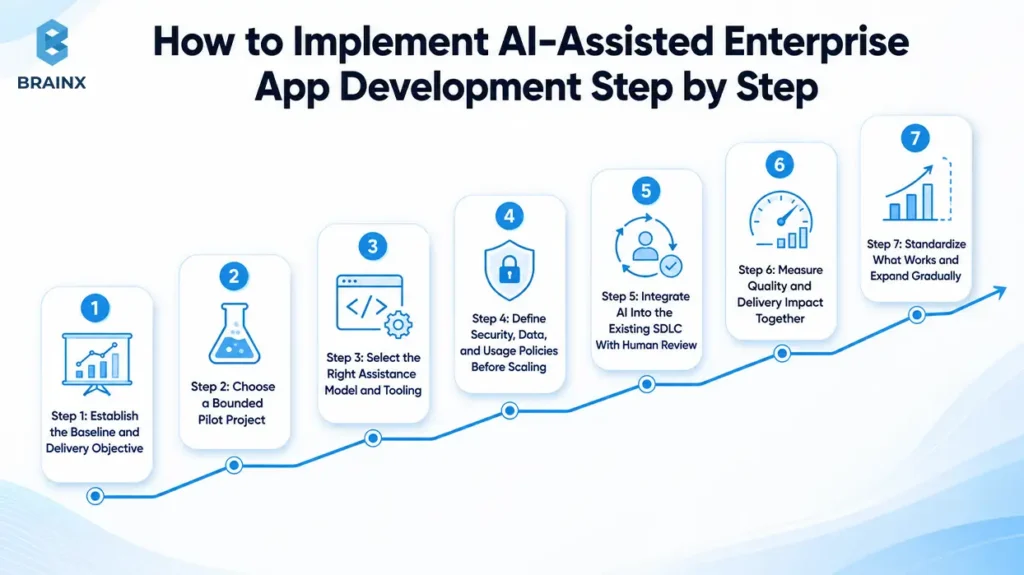
Start with one delivery problem you can measure, not an organization-wide mandate to use AI. The implementation process should prove where assistance saves time without lowering quality, then scale the practices that survive real engineering work.
Step 1: Establish the Baseline and Delivery Objective
Measure the current workflow before introducing new tools. Useful baselines include lead time for changes, pull-request cycle time, time spent on repetitive coding, escaped defects, rework, backlog size, documentation effort, and developer satisfaction. Choose one or two outcomes the pilot should improve.
Step 2: Choose a Bounded Pilot Project
Select a real project with business value but manageable risk. Good pilots include an internal workflow, a non-critical portal module, test-coverage improvement, a legacy documentation effort, or a repetitive migration task. Avoid beginning with a high-risk financial, safety-critical, or compliance-heavy system before governance and review patterns are proven.
Step 3: Select the Right Assistance Model and Tooling
Match the tool to the bottleneck. Coding assistants fit custom engineering teams. Agentic tools fit bounded repository tasks with strong tests. Prompt-to-app tools fit prototypes. Low-code platforms fit governed workflow applications. Evaluate enterprise controls, data handling, repository access, integration with your IDE and CI/CD, administrative policies, and total licensing cost.
Step 4: Define Security, Data, and Usage Policies Before Scaling
Document what developers may share with AI tools, which repositories are permitted, how secrets are protected, whether customer or production data can be used, who approves new tools, and which actions require human review. Align the policy with existing secure-development, privacy, procurement, and incident-response practices rather than creating a disconnected AI policy.
Step 5: Integrate AI Into the Existing SDLC With Human Review
AI should enter the same repository, testing, review, and deployment pipeline as other engineering work. Require pull requests, code-owner review where appropriate, automated tests, linting, security scanning, dependency checks, and deployment approvals. Agentic tools should operate with the minimum repository and environment permissions needed for the task.
Step 6: Measure Quality and Delivery Impact Together
Compare the pilot with the baseline. A faster coding task is not a win if review time, defects, or rework increase. Measure end-to-end lead time, accepted output, review burden, defect rates, task completion, and developer experience. Capture qualitative feedback about where AI saves effort and where it creates friction.
Step 7: Standardize What Works and Expand Gradually
Turn proven practices into reusable repository instructions, templates, approved tools, review checklists, platform capabilities, and training. Expand by use case and risk tier instead of enabling every capability at once. Revisit policies as tools gain more autonomy or access to broader enterprise context.
What Controls Keep AI-Assisted Development Enterprise-Ready?
Enterprise readiness comes from the delivery system around the AI tool. Red Hat's enterprise guidance on AI-assisted application development emphasizes platform engineering as a way to give developers common, repeatable paths to production. That principle is useful here: AI assistance should operate inside paved roads, not around them.
Human Review and Clear Code Ownership
Every production change needs an accountable owner. Define when ordinary peer review is enough, when a specialist must review security or data logic, and when agent-generated changes require additional scrutiny. The developer who accepts the change owns the result, regardless of who or what drafted it.
Automated Testing and Security Gates
Run generated code through deterministic controls: unit and integration tests, type checking, linting, static application security testing, software composition analysis, secret scanning, policy checks, and deployment tests. AI can help interpret failures, but it should not be able to waive the controls that are supposed to catch them.
Repository, Environment, and Secret Boundaries
Limit assistants and agents to the repositories, branches, environments, tools, and credentials they genuinely need. Production access should be exceptional. Keep secrets out of prompts and source files, use short-lived credentials where possible, and log sensitive automated actions so incidents can be reconstructed.
Maintainability, Documentation, and Architectural Consistency
Use repository instructions, architecture decision records, shared libraries, coding standards, and definition-of-done checklists to keep generated changes consistent. Require documentation for new services, integrations, operational behavior, and non-obvious decisions. If the team cannot explain or maintain a generated component, it is not production-ready.
Versioning, Auditability, and Rollback
Keep AI-assisted changes inside normal source control with review history, test results, release metadata, and rollback paths. Record major tool or policy changes when they could affect generated output. This makes it possible to compare quality over time and return to a known-good release if a new workflow introduces regressions.
| Release Gate | What to Verify Before Production |
| Business acceptance | Does the change solve the intended workflow and meet acceptance criteria? |
| Code review | Has an accountable engineer reviewed the generated or AI-modified code? |
| Automated quality | Do tests, linting, type checks, and build checks pass? |
| Security | Have secrets, dependencies, static analysis, and permission boundaries been checked? |
| Architecture | Does the change follow approved patterns and avoid unnecessary duplication? |
| Maintainability | Are complex changes understandable, documented, and supportable by the team? |
| Deployment / rollback | Can the release be monitored, rolled back, and traced to a reviewed change? |
How Do You Measure the ROI of AI-Assisted Development?
Measure AI-assisted development as a delivery-system investment, not a code-generation contest. Gartner recommends broadening ROI discussions for AI code assistants beyond narrow cost reduction. Time savings matter, but so do developer experience, delivery capacity, quality, and the business value of shipping the right changes sooner.
Track End-to-End Lead Time
Compare the time from an approved requirement to a production release. This prevents a team from celebrating faster code generation while review, QA, or deployment queues remain unchanged. Break the timeline into stages to see where AI actually removes waiting.
Measure Review, Rework, and Defect Rates
Track how often AI-assisted changes require substantial rework, how long pull requests wait for review, and whether escaped defects or change failures increase. If generation becomes faster but senior-review burden doubles, the operating model needs adjustment.
Measure Backlog Throughput and Developer Experience
Look at completed work, not raw commits. Useful indicators include backlog age, tickets completed, time spent on repetitive tasks, onboarding time, and developer satisfaction. These metrics reveal whether AI is freeing capacity for more valuable engineering or merely creating more output to inspect.
Calculate Unit Economics at the Workflow Level
Include tool licensing, platform costs, integration work, governance effort, training, and review time. Compare those costs with time saved, faster delivery, reduced contractor dependence, lower migration effort, or avoided backlog. Use several months of data before treating early productivity impressions as a stable ROI estimate.
| Metric | What It Reveals | Watch For |
| Lead time for changes | Whether delivery is faster end to end | Coding gains hidden by review or deployment queues |
| PR cycle / review time | Impact on collaboration and senior-review capacity | Large AI-generated changes that are hard to validate |
| Rework / defect rate | Whether speed is harming quality | Repeated fixes to plausible but incorrect output |
| Backlog age / throughput | Whether business demand is being served faster | More low-value work rather than higher-value delivery |
| Developer experience | Whether AI reduces toil and context switching | Mandated usage that creates friction |
| Cost per accepted change | Whether the economics improve at scale | Licensing and review cost excluded from the calculation |
How Do You Choose the Right AI-Assisted Enterprise App Development Partner?
The right partner should be able to explain both the application architecture and the delivery system used to create it. Ask how AI assistance is governed, how generated output is reviewed, and how the team prevents faster development from turning into faster technical debt.
Ask How AI Is Used Across the Development Lifecycle
A credible partner should distinguish between AI used for discovery, coding, testing, documentation, modernization, and AI embedded inside the product. Ask which activities are assisted, which decisions remain human-owned, and how the process changes for sensitive or regulated systems.
Review Security, Testing, and Human Review Practices
Ask what code and context may be sent to AI tools, how repositories are protected, how secrets are handled, what automated checks run on every change, and who reviews generated output. The answer should describe a repeatable engineering process rather than depending on individual developer caution.
Verify Enterprise Integration, Web, Mobile, Cloud, and Data Engineering Depth
AI assistance cannot compensate for missing engineering depth. Enterprise apps still depend on frontend and mobile UX, APIs, backend services, identity, cloud architecture, data pipelines, testing, DevOps, and integration reliability. Review the partner's ability to own these system boundaries end to end.
What Should AI-Assisted Enterprise App Development Services Include?
AI-assisted enterprise app development services should cover product discovery, UX, solution architecture, application engineering, AI-assisted workflow design, data and integration work, QA, security, DevOps, documentation, deployment, and post-launch support. If the product itself also contains AI capabilities, the engagement may additionally require model evaluation, retrieval design, guardrails, observability, and AI operations. BrainX outlines that broader capability set in its AI development services.
When Should You Work With an Enterprise Mobile App Development Company?
Use a specialized mobile partner when device behavior is central to the workflow: offline access, background sync, camera or voice capture, local encryption, push notifications, Bluetooth or hardware integration, battery constraints, and store or device-management requirements. AI can accelerate implementation, but it does not remove mobile-specific architecture and testing.
Clarify IP Ownership, Tool Portability, Documentation, and Handover
Confirm who owns source code, generated code, prompts or repository instructions, design assets, infrastructure, test suites, documentation, and cloud accounts. Ask whether the project can continue if a preferred AI tool or provider changes. Handover should include architecture decisions, deployment procedures, operational runbooks, and known limitations.
How BrainX Helps With AI-Assisted Enterprise App Development
BrainX supports enterprise application projects across product discovery, UX, architecture, web and mobile engineering, backend services, integrations, data, QA, cloud deployment, and post-launch optimization. For teams adopting AI-assisted development, the engagement can also define where AI belongs in the delivery workflow, what governance is required, and how generated output moves through review and release controls.
BrainX also develops AI-enabled products when intelligence belongs inside the application itself. The Ponder case study is a public example of GPT-powered recommendations, voice and text interaction, and structured mobile experiences delivered as part of a complete product. It demonstrates end-to-end application and AI delivery, but it is not presented here as proof of a specific internal AI coding-tool workflow.
If you have an enterprise workflow, modernization initiative, or application backlog in mind, talk with BrainX experts to define the delivery approach, technical scope, governance requirements, and implementation plan before committing to a platform or toolchain.
How Much Does AI-Assisted Enterprise App Development Cost?
There is no single AI-assisted development price because two cost layers are involved: the underlying enterprise application project and the tooling or operating model used to assist delivery. A simple internal workflow, a legacy modernization program, and a multi-system customer platform will have very different budgets even if the same coding assistant is used.
Application Scope Still Drives Most of the Build Cost
Integrations, data migration, identity, mobile requirements, UX complexity, compliance, testing, deployment, and support remain major cost drivers. AI assistance may reduce effort in some activities, but it does not make these requirements disappear. Estimate the application first, then model where assistance can reduce cycle time or repetitive work.
Tooling, Governance, and Training Add Adoption Costs
Budget for developer licenses or platform subscriptions, security review, identity integration, approved-model configuration, repository policies, training, internal enablement, and time spent creating reusable instructions or templates. Agentic workflows may also consume CI resources and require stronger review or observability.
Separate AI-Assisted Delivery Cost From AI-Enabled Product Cost
If the finished application also contains AI features, model those runtime costs separately. Our AI app development cost guide uses planning ranges from roughly $30,000 for a focused AI MVP to more than $500,000 for an advanced enterprise AI solution. Those figures describe AI-enabled application builds, not the license cost of adopting AI-assisted development. For AI-assisted delivery, the better business case is based on the project baseline, tool and governance cost, quality, and the value of shorter delivery cycles.
Frequently Asked Questions
What Is AI-Assisted Enterprise App Development?
AI-assisted enterprise app development uses AI tools to support software planning, design, coding, testing, documentation, modernization, and delivery. Developers and product teams remain responsible for requirements, architecture, security, review, and production outcomes.
Is AI-Assisted Development the Same as Building an AI-Enabled App?
No. AI-assisted development describes how the team builds software. An AI-enabled application exposes AI capabilities to users at runtime. You can use AI assistance to build a conventional enterprise system, or build an AI-enabled product using a mostly traditional engineering workflow.
Can AI-Assisted Development Replace Enterprise Software Engineers?
It can automate or accelerate parts of engineering work, but enterprise delivery still requires judgment around architecture, security, business rules, integrations, testing, operations, and accountability. As tools become more agentic, engineers spend more time orchestrating, reviewing, and validating work rather than simply typing implementation code.
Which Tools Are Used for AI-Assisted App Development?
Common categories include IDE coding assistants, repository agents, prompt-to-app builders, AI-powered low-code platforms, testing and review tools, documentation assistants, and modernization tools. The best choice depends on code ownership, project risk, integration depth, governance, and the existing engineering stack.
How Do Enterprises Secure AI-Assisted Development?
Start with approved tools, identity controls, repository permissions, rules for sensitive data and source code, secret protection, human review, automated testing, dependency checks, security scanning, and auditable CI/CD. Agentic tools should receive only the minimum permissions needed for the delegated task.
How Long Does It Take to Adopt AI-Assisted Development?
A bounded pilot can often be evaluated in several weeks, but enterprise-wide adoption takes longer because teams need governance, tool integration, training, baselines, quality gates, and reusable practices. Scale after the pilot demonstrates better end-to-end delivery without increasing defects, rework, or review burden.
When Should You Choose Custom Development Instead of an AI App Builder?
Choose custom development when the workflow is differentiated, integrations are complex, data or security controls are strict, UX is specialized, or long-term ownership and portability matter. AI app builders are better suited to prototypes and bounded tools. A hybrid approach can combine platform speed with custom engineering where control is critical.