 May 18, 2026 -
  30 minutes read

Key Takeaways
- AI integration services help businesses add AI to existing CRMs, ERPs, data systems, and workflows without rebuilding their tech stack.
- Start with one measurable workflow, validate data readiness, and prove ROI before scaling AI across the business.
- The right AI architecture depends on your constraints, including speed, latency, sensitive data, legacy systems, compliance, and budget.
- Production AI needs strong data quality, permission-aware retrieval, governance, evaluation, monitoring, and human review paths.
- A 30–90 day phased rollout helps teams move from pilot to production safely through discovery, pilot integration, hardening, and controlled release.
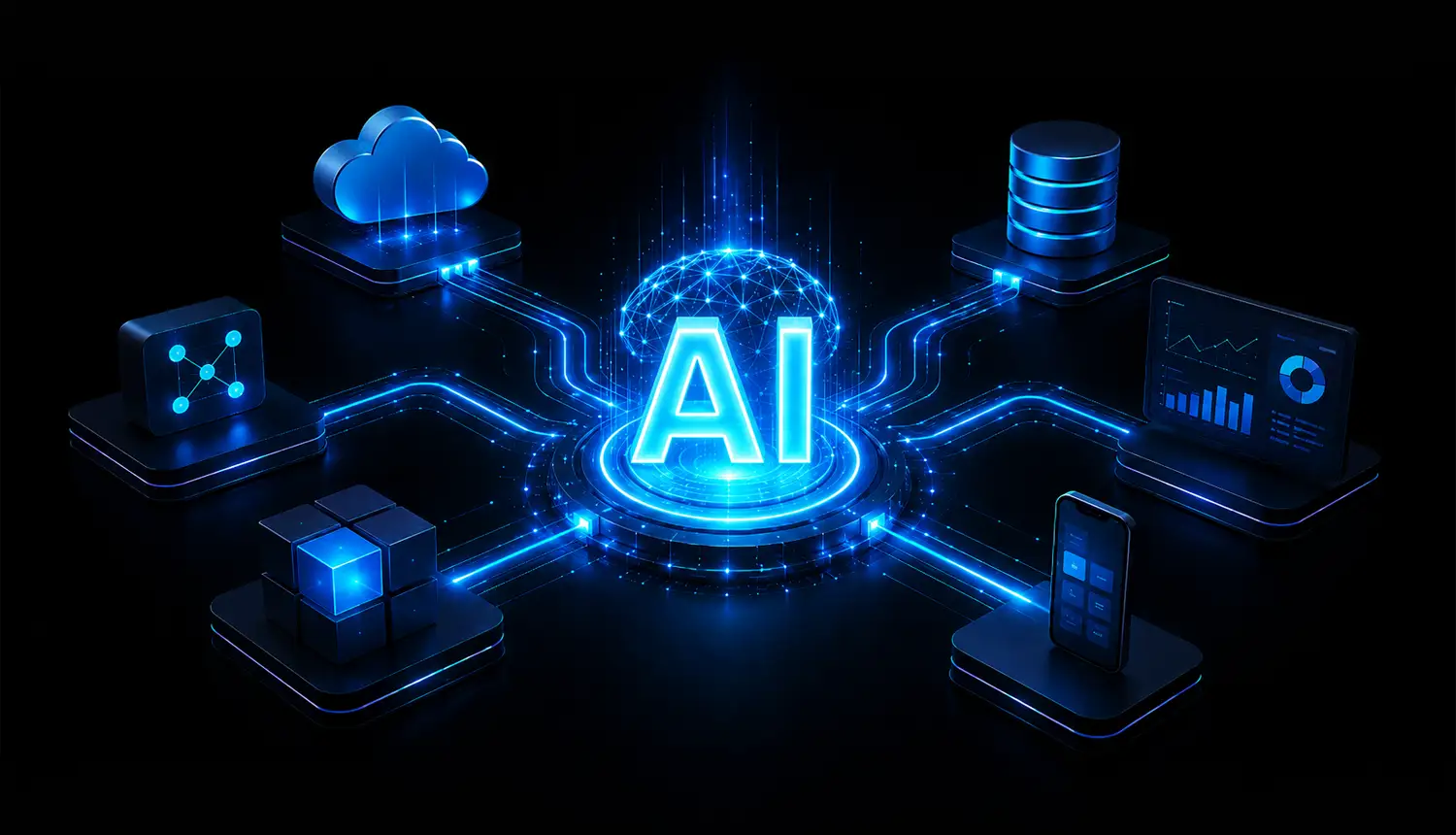
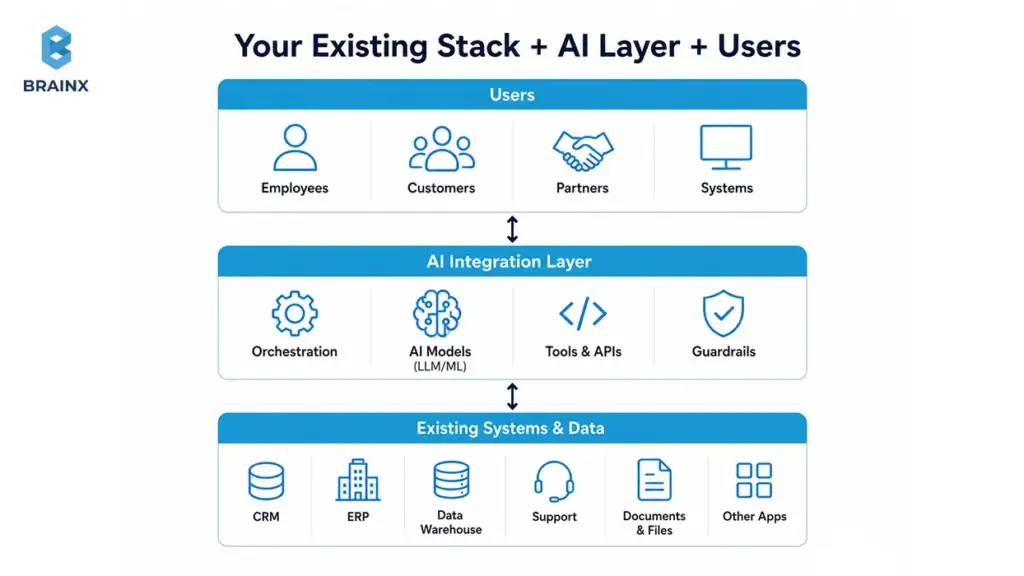
Your CRM already has the customer context. Your ERP already has the operational truth. Your data warehouse already has the metrics your leadership trusts. The hard part isn’t “getting AI”—it’s connecting AI to what you already run without destabilizing core systems, breaking permissions, or creating yet another silo.
That’s exactly what AI integration services are built for: adding practical AI capabilities to an existing tech stack through secure architecture, data plumbing, evaluation, and rollout controls—without forcing a rewrite of your app or a risky replatforming project.
The timing matters. McKinsey’s 2025 global AI survey found that 88% of organizations now use AI in at least one business function, but only a smaller share report clear enterprise-level EBIT impact. That gap shows the real challenge. AI adoption is no longer the bottleneck; operational fit is. The teams getting better results are redesigning workflows, defining where human validation is needed, and connecting AI to the systems people already use.
The opportunity is real, but so are the constraints: data access, latency, compliance, ownership, and the human review paths that keep automation safe. McKinsey’s 2025 AI research repeatedly points to workflow redesign and human validation as common traits of successful deployments.
That is why the real question is no longer “Can we use AI?” It is “Can AI fit our workflow, data, security model, and success metrics without creating new operational debt?”
If you’re trying to move from “we tested a model” to “this works in production,” this guide breaks down the patterns, pitfalls, and a 30–90 day plan to ship value without starting over.
Who Should Consider AI Integration Services?
If you already have systems people rely on daily—and you want AI to help those systems produce outcomes faster—this is for you. The best candidates aren’t “AI-native” companies. They’re organizations with real workflows, real users, and real constraints that can’t be ignored.
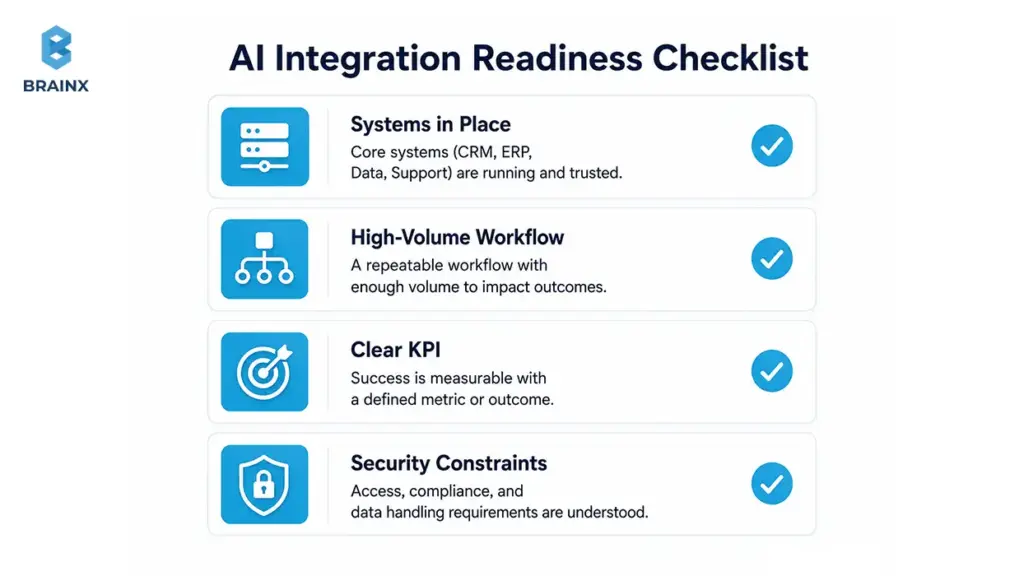
Most teams considering this approach have one or more of the following in place:
- A CRM (Salesforce, HubSpot) with sales and customer history
- An ERP (NetSuite, SAP, Dynamics) with financial/ops data
- Support platforms (Zendesk, Intercom, ServiceNow) with ticket volume and knowledge bases
- Product databases, event logs, analytics stacks, and dashboards people already trust
- Document-heavy repositories (contracts, claims, clinical notes, policies)
- Internal tools and approval workflows that are slow, manual, or inconsistent
You’re also a fit if leadership is pushing for AI outcomes—but engineering is (rightly) pushing back on “let’s rebuild everything.” A pragmatic path is to integrate AI capabilities into the workflows you already run, with measurable KPIs and safety rails.
If you want help scoping what’s realistic without overcommitting, start with a short discovery call.
Best-Fit Scenarios
Teams tend to get strong ROI when AI is applied to a repeatable workflow with clear inputs, clear outputs, and a measurable definition of “better.”
Common best-fit scenarios include:
- SaaS platforms: in-product copilots, intelligent onboarding, knowledge search, and admin automation
- Ecommerce systems: product enrichment, customer support deflection, returns triage, and fraud review
- Customer support teams: summarization, intent routing, suggested replies, and ticket quality checks
- Healthcare workflows: documentation assistance, coding support, prior auth support (with strong compliance)
- Internal operations: procurement, finance ops, HR case handling, and policy Q&A
- Document-heavy businesses: contract review, claims processing, compliance checks, and extraction pipelines
- Data-heavy products: forecasting, anomaly detection, and personalization (with governance and monitoring)
The more your workflow already has structure and history, the easier it is to connect AI and measure improvement.
When AI Integration Services May Not Be The Right First Step
Sometimes the best “AI” decision is to pause and fix prerequisites first. Integration work can fail when the organization can’t support production ownership.
Hold off if you have:
- No clear use case beyond “we should use AI”
- Poor data ownership (nobody can approve access, definitions, or quality standards)
- No technical owner who can maintain integrations post-launch
- No success metrics (no baseline, no KPI, no acceptance criteria)
- No budget for monitoring and security (critical for LLMs and automation)
In those cases, start with use-case discovery and data readiness—then integrate.
What Are AI Integration Services?
AI integration services are the delivery work required to connect AI capabilities—LLMs, ML models, search/retrieval, and automation—into your existing applications and workflows. The goal is not a demo. The goal is production behavior that’s secure, observable, and measurable.
In practical terms, this includes:
- Designing how AI fits into your architecture (not just “calling an API”)
- Connecting models to your data sources (with permissions intact)
- Building integrations with CRMs/ERPs/support tools/internal apps
- Evaluating quality before rollout and monitoring after launch
- Implementing security controls, governance, and operational ownership
Unlike generic “AI strategy,” integration is where constraints show up: latency budgets, rate limits, approval paths, compliance requirements, and cost per task. Done well, it becomes a repeatable pattern your team can reuse across workflows.
For related approaches to model building and productization, see:
AI Integration Services vs AI Development vs AI Consulting
These categories overlap, but they’re not interchangeable. Here’s a practical way to compare them based on outcomes and deliverables.
| Service Type | What It Means | Best For | Example Deliverables |
| AI Consulting | Business and technical guidance to pick use cases and plan execution. | Early-stage AI decisions, strategy, and feasibility. | Use-case shortlist, ROI hypotheses, risk assessment, and roadmap. |
| AI Development | Building models or AI features as net-new capabilities. | Custom models, proprietary IP, and new product features. | Training pipelines, model endpoints, evaluation suite, and product features. |
| AI Integration Services | Shipping AI into existing systems safely and measurably. | Adding AI to workflows without replatforming. | Integration architecture, connectors/APIs, rollout plan, monitoring, and governance. |
| AI/ML Data Integration Services | Unifying and operationalizing data so models and RAG are reliable. | When data fragmentation blocks quality. | Data pipelines, contracts, lineage, quality checks, and feature/vector layers. |
If your product already exists and the business needs outcomes fast, integration-focused delivery is usually the shortest path to production value.
Typical Deliverables You Should Expect
A serious integration engagement should produce artifacts your team can operate long after launch. Look for a partner who commits to specific deliverables, not vague “implementation support.”
Typical deliverables include:
- Architecture plan: patterns, components, security boundaries, and data flows
- Integration roadmap: phased rollout with decision gates and KPIs
- Data readiness audit: sources, owners, access paths, quality, and freshness
- APIs/connectors: to your CRM, ERP, data warehouse, ticketing, or internal tools
- PoC and pilot: thin-slice workflow integrated into staging with evaluation harness
- Production rollout: feature flags, release strategy, and user enablement
- Monitoring and observability: logs, metrics, tracing, cost dashboards, error tracking
- Security controls: SSO/RBAC, secrets management, redaction, policy enforcement
- Governance: audit logs, approval flows, model/prompt versioning, incident playbooks
- Enablement: handover, runbooks, training, and documentation
Common Misconceptions That Derail Integrations
A few misunderstandings reliably turn “AI project” into “AI mess.” Avoid these early:
- “Just add ChatGPT.” If you can’t control data access, evaluation, and UX, the result is unpredictable.
- “The model is the product.” Most value comes from workflow fit, permissions, and delivery mechanics.
- “We can fix the data later.” Data issues show up as inconsistent outputs, broken trust, and support load.
- “We need to migrate everything.” Often you can integrate incrementally using APIs and event streams.
- “AI works without workflow redesign.” If the process is broken, AI makes failures faster and harder to debug.
Why Adding AI Usually Breaks Existing Systems And How to Avoid It
AI features touch more surfaces than teams expect: customer data, internal permissions, third-party APIs, latency-sensitive workflows, and compliance obligations. When those surfaces aren’t mapped, the first production rollout becomes the test environment—and users pay the price.
The most common breakages fall into three categories:
- Data and permissions issues (wrong access, wrong context, wrong freshness)
- Operational issues (latency spikes, outages, unexpected costs)
- Governance issues (no auditability, unsafe automation, unclear accountability)
IBM consistently highlights that poor data quality leads to factual errors, bias, and uneven performance—exactly the failure modes that destroy stakeholder trust. McKinsey emphasizes that high-performing AI deployments redesign workflows and define human validation points.
If you treat integration as “just wiring,” you’ll miss these systemic constraints.
The 6 Integration Friction Points
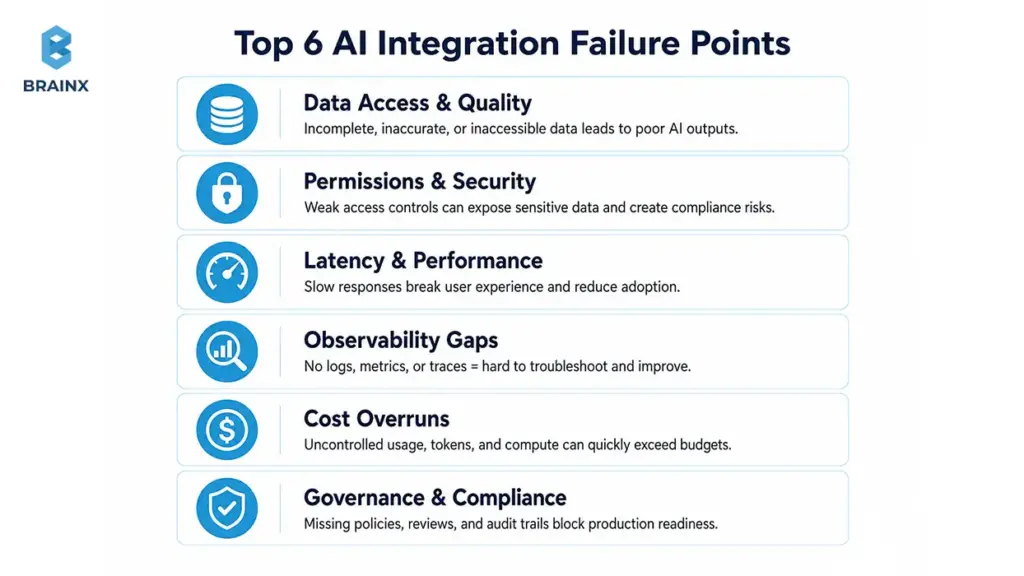
These six areas account for most production failures:
- Data access
You can’t answer user questions or automate decisions if your AI layer can’t reliably reach the right data sources (or if it reaches too much). - Identity and permissions
If users have role-based access in your app, your AI must enforce the same rules—especially for RAG and internal copilots. - Reliability and latency
A support agent can tolerate a few seconds. A checkout flow cannot. Latency budgets must match the workflow. - Observability
Without logging, tracing, and quality metrics, issues become “AI is random,” and the team can’t debug confidently. - Cost controls
Token usage, retrieval calls, retries, and tool invocations can balloon. You need budgets, caps, and dashboards. - Governance
Production AI needs defined owners, review workflows, and audit trails. Otherwise, risk becomes everyone’s problem—and nobody’s job.
Why AI Needs Workflow Design, Not Just API Access
Calling a model endpoint is easy. Building a system that produces consistent outcomes is not.
Workflow design includes:
- Where AI is allowed to act vs where it can only recommend
- What context is injected (and what must be excluded)
- How users review outputs and correct them
- How exceptions route to humans or safe defaults
- What success looks like (fewer escalations, faster handling, higher accuracy)
If your current process is unclear, adding AI usually creates faster confusion. The best deployments start by mapping the workflow and adding AI only where it reduces real friction.
When Not to Integrate AI Yet
Integration becomes risky when foundational controls don’t exist. Delay rollout if you can’t answer these:
- Who owns each data source and approves access?
- What’s the baseline process performance today?
- Do we have logs and a way to reproduce failures?
- Has compliance reviewed the data flow and retention?
- Is there a human review path for edge cases and high-risk actions?
If the answer is “not yet,” you’ll move faster by fixing prerequisites first.
How to Choose the Right AI Use Case Before Integration
Many teams start with the most exciting AI idea instead of the most operationally viable one. That’s why pilots often stall: the workflow is ambiguous, the data isn’t accessible, and success can’t be measured.
A better approach is to treat use-case selection like product discovery:
- Define the workflow boundary
- Define “good” vs “bad” outcomes
- Confirm the data exists and is accessible
- Estimate risk and compliance requirements
- Choose a thin slice with a measurable KPI
Also Read: Generative AI in Finance: Automating Risk, Compliance, and Customer Service
McKinsey’s 2025 research supports this: high-performing teams pair technical capability with workflow redesign and clear definitions of when human validation is required.
Before architecture work begins, decide whether the use case is worth integrating at all. The best AI integration roadmap starts with one question: where can AI improve a workflow enough to justify orchestration, evaluation, governance, and change management? The goal is not to deploy AI everywhere. The goal is to improve one measurable workflow first.
If you need help facilitating this step, a short strategy sprint pays off quickly.
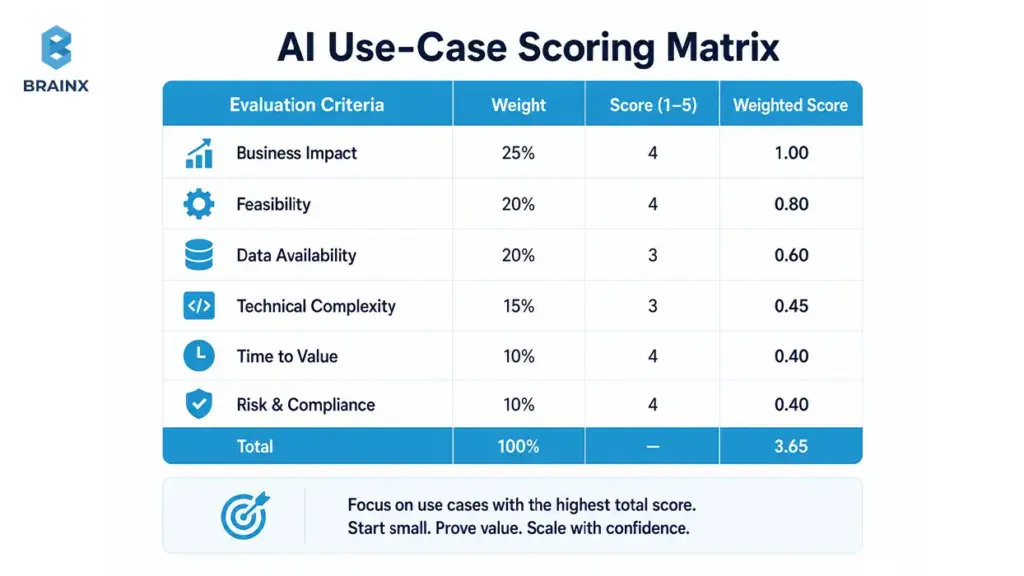
Score Each Use Case Before You Build
Use a simple scoring model to avoid “cool demo” traps. Score each candidate 1–5 (low to high):
- Business value: time saved, revenue impact, risk reduction
- Data readiness: availability, quality, ownership, freshness
- Technical complexity: number of systems touched, integration effort, latency constraints
- Risk and compliance: PII, regulated data, decision criticality
- Measurable ROI: KPIs you can track within weeks, not quarters
Pick the top 1–2 candidates that are high value and high readiness—even if they aren’t the flashiest.
Start With One Workflow, Not the Whole Company
Company-wide AI rollout is where integration debt grows. Thin-slice integration reduces risk by limiting scope while providing end-to-end operability.
A thin slice typically includes:
- One user group (e.g., Tier-1 support)
- One data boundary (e.g., knowledge base + tickets)
- One measurable KPI (e.g., resolution time or deflection rate)
- One fallback path (e.g., escalate to human)
Once you can measure improvement reliably, scaling becomes a decision—not a hope.
High-Value AI Integration Use Cases
These workflows often deliver ROI quickly because they’re repetitive, measurable, and data-rich:
- Customer support copilots: suggested replies, summaries, intent routing
- Internal knowledge search: RAG over policies, docs, wikis, tickets
- Document processing: extraction, classification, compliance checks
- Sales automation: call summaries, follow-ups, CRM updates with approval
- Fraud review: triage and analyst assistance (not fully automated decisions)
- Personalization: recommendations, content ranking, offer selection
- Forecasting: demand, churn risk, capacity planning
- Workflow automation: approvals, ticket routing, exception handling
AI Integration Patterns That Let You Keep Your Current Stack
The strongest AI integration services engagements are not defined by a generic checklist. They are defined by choosing the right architecture pattern for your constraints. If you choose the wrong pattern, you either overbuild, under-secure, or create latency and cost problems that were avoidable.
There isn’t one “correct” architecture. The right pattern depends on latency, data sensitivity, compliance, scale, and how deeply AI needs to interact with your systems.
Most production deployments fall into a small set of integration patterns. The advantage of naming them is that you can make decisions faster—and avoid re-architecting mid-project.
It is also where AI integration services create leverage: you pick the smallest pattern that meets your constraints, then evolve the architecture safely as usage grows.
For deeper understanding of related components, also read: AI Development Partner vs In-House Team: What’s Best for Your Business?
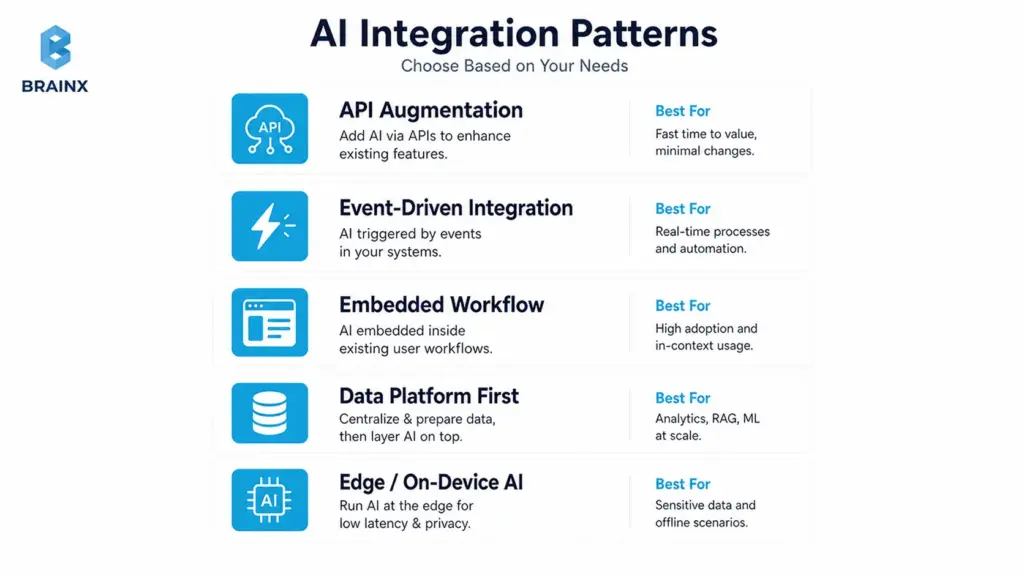
Pattern 1 — API-Based Augmentation
This is the fastest path for many SaaS teams: keep your app as the system of record, and call AI capabilities behind your existing endpoints.
Best for:
- Copilots and assistants inside the UI
- Classification, summarization, extraction
- Knowledge search and Q&A (often with RAG)
- Support automation with human review
Key implementation notes:
- Put AI behind a service boundary (an “AI gateway” or orchestration service) rather than calling providers directly from the front end.
- Enforce permission-aware retrieval if you’re using internal content.
- Add timeouts, retries, and fallbacks so your core workflow stays stable.
Pattern 2 — Event-Driven AI
If you need real-time automation at scale, event-driven patterns help you avoid synchronous bottlenecks. Systems like Kafka, Pub/Sub, or SQS let you trigger AI workflows when something happens.
Best for:
- Fraud detection signals and alerts
- Personalization updates based on behavior streams
- Monitoring, anomaly detection, and incident triage
- High-volume classification pipelines
Key implementation notes:
- Design for idempotency (events can arrive twice).
- Keep AI work in a separate consumer group so it doesn’t block operational events.
- Track costs and throughput, especially when events spike.
Pattern 3 — Embedded AI in Workflows
Sometimes the right answer is embedding AI where work already happens: BPM tools, CRM automations, ERP approvals, support platforms, and internal admin portals.
Best for:
- Guided agent workflows (support, ops, finance)
- Approval-centric processes
- Data entry assistance and enrichment
Key implementation notes:
- Maintain a clear division between suggest vs act.
- Ensure every action is logged with user identity and context.
- Avoid “shadow automations” that bypass business controls.
Pattern 4 — Data-Platform-First Integration
If your AI use case depends on many data sources, a data-platform-first approach reduces repeated integration work. Your warehouse/lakehouse, feature store, or vector database becomes the foundation for multiple AI features.
Best for:
- Organization-wide knowledge retrieval
- Analytics-driven copilots
- Forecasting and personalization
- Reusable data products for multiple teams
Key implementation notes:
- Data contracts and freshness matter more than model tuning in early stages.
- Centralize sensitive-field tagging and permission mapping to reduce risk.
- Plan for evaluation and monitoring at the platform layer, not per feature.
Pattern 5 — Edge or On-Device Integration
For certain products, sending data to the cloud is not acceptable (privacy), or the latency is too high (real-time). Edge/on-device inference can be a strong fit.
Best for:
- Mobile apps with offline needs
- IoT environments
- Regulated workflows requiring data minimization
- Ultra-low-latency interactions
Key implementation notes:
- Choose smaller models and optimize for device constraints.
- Plan for updates, drift handling, and rollback mechanisms.
- Keep sensitive data local where possible, but still log non-sensitive telemetry for monitoring.
Where AI Agents Fit in Existing Workflows
Agentic systems can plan steps and use tools (APIs) to complete tasks. That’s powerful—and risky—if you don’t control identity, permissions, and auditability.
In production, safe agent patterns usually include:
- Unique agent identity (not “shared system user”)
- Role-based access control (RBAC) and least privilege for tool access
- Human approval for high-risk actions (refunds, account changes, compliance actions)
- Audit trails: every tool call, input, and output captured
- Limited action permissions: start with read-only, then graduate to write actions
Microsoft guidance for agentic systems emphasizes unique identity, RBAC, least privilege, and human review for high-risk actions.
Quick Chooser: Which Pattern Fits Your Constraints?
Use this as a quick mapping tool during architecture discovery:
| Constraint | Best Pattern | Why It Fits | Watch-Outs |
| Low Latency | Edge/on-device or API-based augmentation | Minimizes round trips and blocking calls. | Model size limits; careful caching. |
| Sensitive Data | Data-platform-first or embedded workflows | Centralizes controls and permission mapping. | Governance overhead; data contracts. |
| Fast MVP | API-based augmentation | Smallest surface area, quickest integration. | Latency/cost spikes if unmanaged. |
| High Scale | Event-driven AI | Decouples workloads and handles spikes. | Observability and backpressure required. |
| Legacy Systems | API augmentation + strangler releases | Integrates around constraints without rewrites. | Connector reliability and maintenance. |
| Heavy Compliance | Embedded + data-platform-first | Better auditability and policy enforcement. | More upfront security review. |
| Low budget | API augmentation + narrow scope | Minimal infrastructure at first. | Risk of hidden costs without evaluation. |
The Data Integration Layer: What Leading AI/ML Data Integration Services Actually Do
The difference between “AI that demos well” and “AI that works in production” is often the data layer. In real organizations, the necessary context is scattered across CRMs, ticketing systems, databases, document stores, and analytics logs.
Leading AI/ML data integration services do not just move data from one place to another. They identify which sources matter, clean and map them, tag sensitive fields, define ownership, monitor quality, and make the right context retrievable for the model. That is what turns scattered business data into usable AI context.
IBM links weak data quality to incorrect and biased outputs that vary unpredictably across segments and time. For LLM use cases, Google Cloud explains Retrieval-Augmented Generation (RAG) as combining LLMs with external knowledge sources to improve output grounding.
If your AI depends on internal knowledge, your data integration work is not optional—it is the product’s foundation.
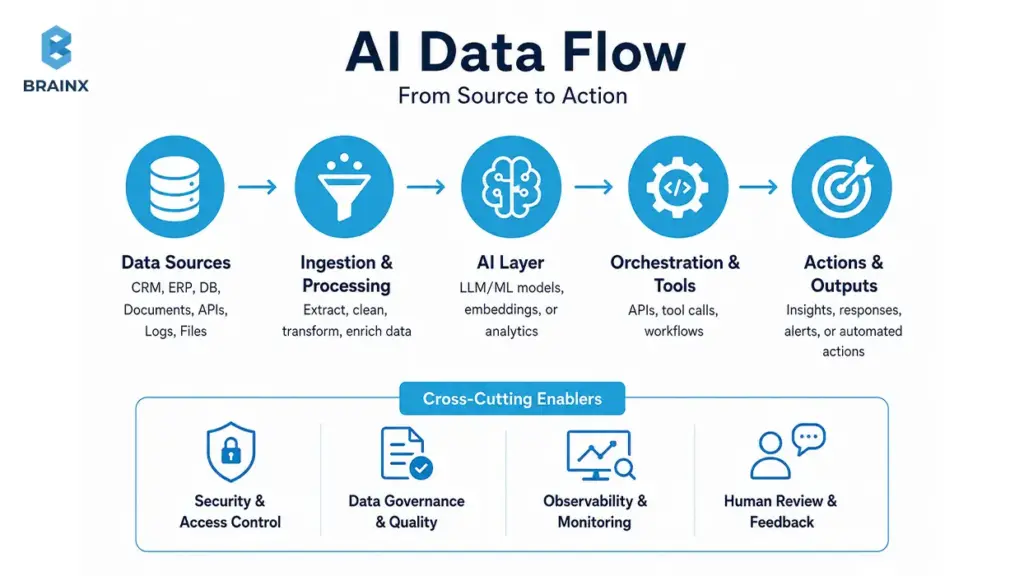
Data Sources You May Need to Unify
Most integration projects end up needing more sources than expected. Common inputs include:
- Product databases (transactions, catalog, orders, subscriptions)
- CRM (accounts, deals, notes, lifecycle stages)
- Support tickets and chat transcripts
- Application logs and event streams
- Documents (policies, contracts, claims, manuals)
- Analytics (funnels, cohorts, attribution)
- ERP (invoicing, inventory, procurement)
- Warehouses/lakehouses (central metrics and reporting)
- Knowledge bases (Confluence, Notion, SharePoint, wikis)
- User behavior data (clickstream, feature usage)
Unification doesn’t always mean centralization. Often it means consistent access paths, contracts, and permission-aware retrieval.
Data Readiness Scorecard Before AI Integration
Before you invest in RAG, copilots, or automation, validate readiness with a simple checklist:
- [ ] Data sources identified
- [ ] Data owner assigned
- [ ] APIs available (or extraction path confirmed)
- [ ] Data quality checked (missingness, duplicates, drift risk)
- [ ] Permissions mapped (roles, entitlements, tenant boundaries)
- [ ] Sensitive fields tagged (PII/PHI/PCI where applicable)
- [ ] Logs available for troubleshooting and audits
- [ ] Freshness defined (how current must data be?)
- [ ] Feedback loop planned (how corrections improve the system)
If you can’t check most of these, prioritize data foundations before expanding features.
Data Contracts, Lineage, and Quality Checks
AI systems amplify weak assumptions. Data contracts help you make those assumptions explicit and enforceable.
What this looks like in practice:
- Validation rules: schema checks, null constraints, allowed values, uniqueness
- Schema evolution: safe changes without breaking downstream embeddings/features
- Ownership and SLAs: who fixes issues, how fast, and what “fresh” means
- Metadata and lineage: where data came from, how it was transformed, what depends on it
- Data quality monitoring: automated alerts for drift, missingness spikes, and anomalies
These controls reduce “silent failures,” where output quality degrades without obvious errors.
RAG Readiness Checklist for LLM Integration
RAG succeeds when retrieval is relevant, permission-aware, and measurable.
Checklist for production-grade RAG:
- Document ingestion pipeline (batch + incremental updates)
- Chunking strategy aligned to your content types
- Embeddings selected and versioned
- Vector search configured and benchmarked
- Permission-aware retrieval (per user/tenant/role)
- Evaluation: retrieval relevance + answer groundedness
- Freshness: update SLAs for high-change docs
- Source citations in the UI (links back to original docs)
Without these, users quickly lose trust—even if the model is strong.
Security, Compliance, and Governance for AI in Production
Security is where AI projects stop being exciting experiments and start becoming real production systems. Once a model can read internal data, recommend actions, retrieve documents, or trigger tools, you need identity controls, logging, review paths, privacy boundaries, and policy enforcement before rollout.
This section isn’t “enterprise paranoia.” It’s how you avoid the two most common outcomes of rushed AI launches:
- Security teams block expansion after the first pilot
- Users circumvent the system with shadow tools because they don’t trust it
A practical governance approach references known frameworks. NIST’s AI Risk Management Framework helps structure AI risks across the lifecycle. OWASP’s LLM Top 10 documents common GenAI app vulnerabilities like prompt injection and data leakage. Microsoft Responsible AI guidance adds operational practices for accountability and safety.
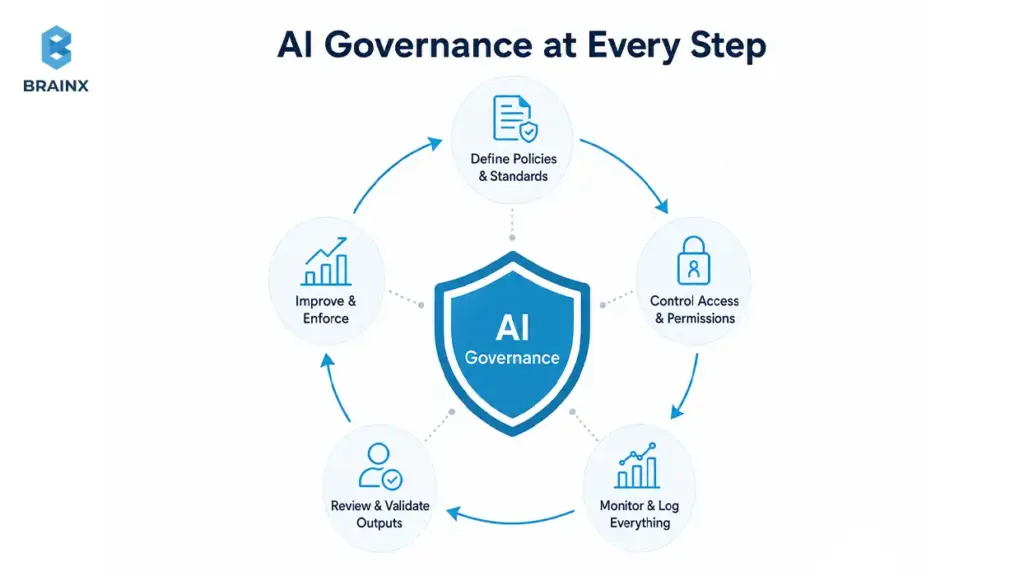
Identity and Access
Access control is the backbone of secure AI.
Key controls to implement:
- SSO integration so users inherit corporate identity
- RBAC for roles like agent, supervisor, admin, auditor
- ABAC when access depends on attributes (region, customer tier, data classification)
- Tenant isolation for multi-tenant SaaS
- Least privilege for every tool the AI can call
- Secrets management for API keys and connector credentials
A good test: “Can the AI ever see something the user cannot?” If yes, redesign before launch.
Data Privacy and Retention
Privacy failures often come from “harmless” logs, prompt histories, or copied documents used for embeddings.
Production controls include:
- PII handling rules and redaction where needed
- Encryption in transit and at rest
- Consent and purpose limitation (especially for regulated industries)
- Data residency controls if your org has regional requirements
- Retention policies for prompts, outputs, and retrieved documents
Define retention early; retrofitting it later is painful.
AI-Specific Risks
LLM apps and agents create distinct risks beyond traditional software:
- Prompt injection (users or docs manipulate the model into unsafe actions)
- Data exfiltration via retrieval or tool calls
- Hallucinations presented as facts
- Unsafe outputs (toxicity, regulated content, harmful guidance)
- IP leakage (sensitive internal content exposed)
- Model abuse (automation used to spam, scrape, or brute force)
- Tool misuse (agents taking unintended actions)
OWASP LLM Top 10 is a useful checklist for threat modeling these systems.
Auditability and Human-In-The-Loop
Auditability is how you turn “AI did something” into “we can explain and correct it.”
Implement:
- Approvals for high-risk actions (refunds, account changes, compliance decisions)
- Traceability from output back to retrieved sources, prompts, and tool calls
- Decision logs that capture who approved what and why
- Escalation rules for uncertain outputs or policy violations
- Review workflows for supervisors and auditors
Human-in-the-loop is not a weakness. It’s how you ship safely while learning.
Governance Frameworks to Reference
Use recognized frameworks to reduce ambiguity and align stakeholders:
- NIST AI RMF for risk governance and lifecycle controls
- OWASP LLM Top 10 for GenAI app threats
- Microsoft Responsible AI for accountability and operational practices
- SOC 2 controls for security, availability, confidentiality
- GDPR for privacy and lawful processing
- HIPAA if healthcare data is involved
- Internal security policies and vendor risk requirements
How to Evaluate AI Integration Before Full Rollout
If you don’t measure quality, users will—by escalating tickets, bypassing the tool, or losing trust in outputs. Evaluation needs to be designed into the integration, not stapled on after launch.
For LLM workflows, evaluation should check more than basic accuracy. It should measure correctness, relevance, safety, coherence, groundedness, and whether the system completes the intended task. For agentic workflows, evaluation also needs to test tool selection, multi-step reasoning, and whether the system stops for human approval when needed.
A practical approach uses two loops:
- Offline evaluation to catch failures before users see them
- Online evaluation to monitor real-world performance, cost, and drift
MLflow describes LLM evaluation as measuring correctness, relevance, safety, and coherence—and notes that agent evaluation adds checks for multi-step task completion.
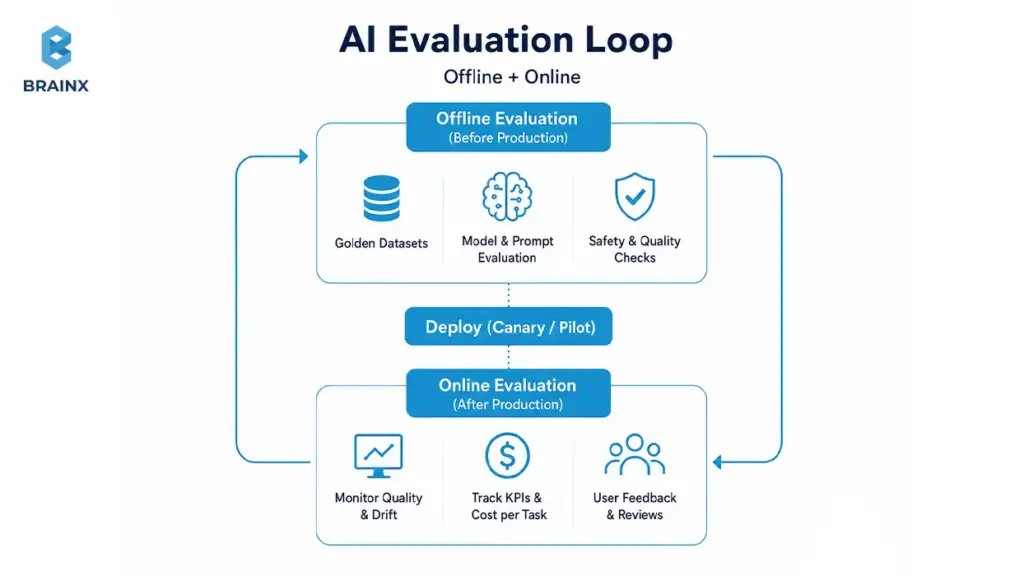
Offline Evaluation Before User Rollout
Offline testing reduces embarrassing failures and unsafe behavior.
Core components:
- Golden datasets: curated examples of real cases with expected outcomes
- Test prompts: standardized prompt sets for your core tasks
- Expected answers: rubric-based scoring, not just exact matches
- Edge cases: ambiguous requests, adversarial inputs, missing data
- Regression tests: ensure improvements don’t break previously working behavior
For RAG, test retrieval separately from generation: if retrieval is wrong, generation quality will follow.
Online Evaluation After Rollout
Once users are involved, evaluation becomes product analytics plus safety monitoring.
Track:
- User feedback (thumbs up/down, corrections, reason tags)
- Response quality (rubric sampling and human review queues)
- Conversion impact (e.g., deflection rate, lead-to-meeting conversion)
- Escalation rate (how often AI hands off to humans)
- Latency and failure rate (timeouts, retries, tool failures)
Online evaluation is also how you identify where the workflow needs redesign—not just where the model needs tuning.
Metrics That Matter
Choose metrics that map to business outcomes and operational safety:
- Accuracy (task-specific correctness)
- Groundedness (answers supported by sources)
- Hallucination rate (unsupported claims)
- Response time (p50/p95 latency)
- Cost per task (tokens + retrieval + tool calls)
- Fallback rate (how often you route away from AI)
- User satisfaction (CSAT, internal ratings)
- Business KPI impact (AHT, resolution time, revenue lift, risk reduction)
Tie these to a dashboard owned by both product and engineering.
Fallback Rules When AI Confidence Is Low
Fallbacks are how you keep reliability high while still shipping AI.
Common fallback strategies:
- Human review for uncertain or high-risk outputs
- Safe defaults (provide sources, ask clarifying questions)
- Routing to support when data is missing or user intent is unclear
- Manual approval for any write actions (especially in finance/healthcare)
- Disable automation for risky actions until confidence is proven
A good system treats AI as a probabilistic component—so it must degrade safely.
Implementation Roadmap: 30–90 Days Without Replatforming
A workable rollout plan is what turns ambition into production adoption. Most teams can ship meaningful AI features in 30–90 days if they constrain scope, choose the right pattern, and treat evaluation and security as first-class deliverables.
This is where AI integration services are most valuable: you get an execution plan designed for your stack, your constraints, and your governance needs—without triggering a replatforming effort.
If you want examples of what this looks like in practice, review outcomes and architectures in our case studies.
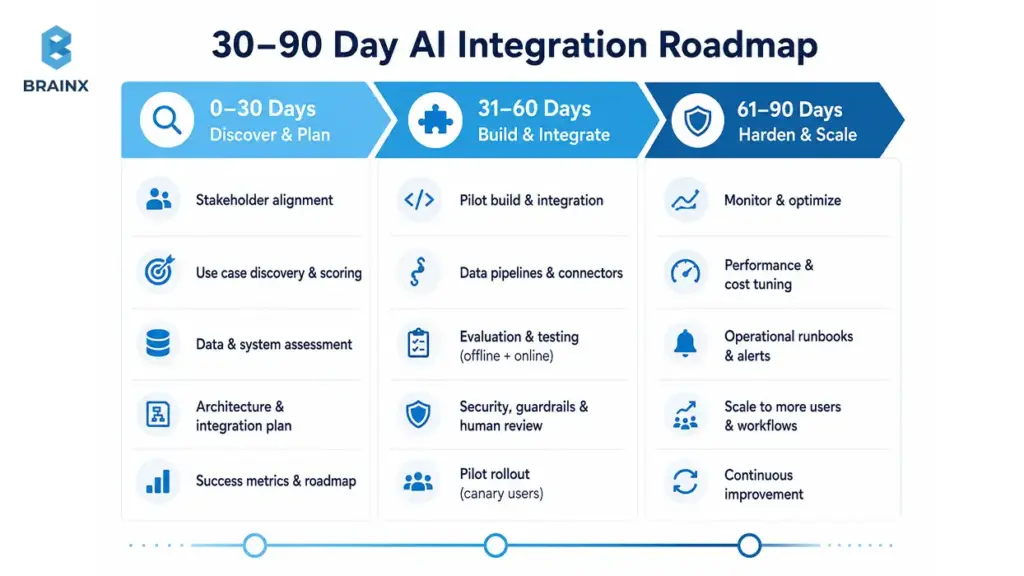
Phase 1 — Discovery and Architecture
Goal: pick the right workflow and design an integration that can be operated safely.
Deliverables typically include:
- Use-case selection and workflow mapping
- Constraints capture (latency, compliance, data access, scale)
- Success metrics and acceptance criteria
- Data audit and readiness scorecard
- Architecture plan and integration pattern selection
- Security review: identities, permissions, retention, threat model
- Roadmap with phases and decision gates
This phase prevents “surprise complexity” in week six.
Phase 2 — Pilot Integration
Goal: ship a thin slice into staging (and then a controlled production cohort) with evaluation.
Pilot deliverables include:
- Thin-slice integration with real systems (not mock data)
- Sandbox/staging environment configuration
- Evaluation harness (offline tests + online telemetry hooks)
- Initial RAG or model orchestration (if needed)
- Test user rollout and feedback loop
- First workflow live with feature flags and fallback paths
The pilot should prove one thing: the workflow improves and can be supported operationally.
Phase 3 — Production Hardening
Goal: make the feature reliable, secure, and maintainable at scale.
Hardening deliverables:
- Observability (logs, traces, dashboards, alerting)
- Cost controls (caps, budgets, caching, batching)
- Security review and fixes (redaction, RBAC, secrets, retention)
- Incident playbooks and on-call expectations
- Monitoring for drift and quality degradation
- Documentation and team enablement (runbooks, training, handover)
This is the difference between “pilot success” and “production reliability.”
Release Tactics That Prevent Starting Over
Safe rollout tactics reduce risk while you learn:
- Shadow mode: run AI in parallel without affecting users to measure quality
- Canary releases: roll out to a small cohort, then expand
- Feature flags: turn behaviors on/off without redeploying
- Strangler pattern: wrap legacy functionality and incrementally replace pieces
- Rollback plans: explicit kill-switch and fallback UX
- Phased rollout: expand by workflow, team, or tenant—not all at once
These tactics protect core systems while you iterate.
Cost, Timeline, and Team: What to Budget for AI Integration Consulting Services
Budgeting is easier when you understand what actually drives cost. Most organizations underestimate the “non-model” work: data cleanup, connectors, evaluation, and security controls.
If you’re evaluating AI integration consulting services, expect cost and timeline to vary based on how many systems are involved, how sensitive the data is, and how strict the latency requirements are.
For a typical SaaS workflow (one primary workflow, 2–4 data sources, moderate compliance), a pilot can often be delivered in weeks, with production hardening taking additional time depending on governance and monitoring needs. Exact numbers depend on your constraints and acceptance criteria.
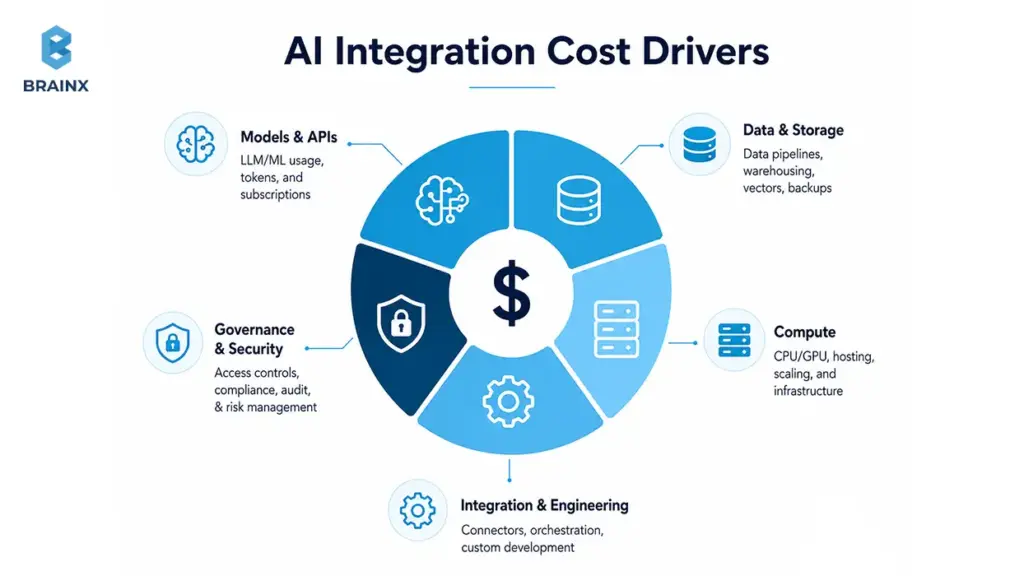
Main Cost Drivers
Most cost comes from these areas:
- Data cleanup (duplicates, missing fields, inconsistent definitions)
- Integration complexity (number of systems, connector maturity, API limits)
- Legacy systems (limited APIs, fragile workflows, manual steps)
- Compliance needs (PII/PHI handling, auditability, vendor review)
- Latency requirements (need caching, batching, async patterns)
- Evaluation (golden datasets, rubrics, regression testing)
- Monitoring (dashboards, alerts, quality drift detection)
- Vendor/tooling (LLM APIs, vector DBs, MLOps tools)
- Ongoing support (incident response, improvements, retraining)
A useful budgeting question: “What will it take to operate this feature like any other production service?”
Build vs Buy vs Partner
A practical stack often combines all three:
- Buy (iPaaS/automation tools): faster connectors for common systems
- Buy (MLOps/LLMOps platforms): evaluation and deployment scaffolding
- Buy (vector databases/search): strong retrieval and scaling capabilities
- Build (custom orchestration): your specific workflow logic, permissions, and UI
- Partner: accelerate architecture, security, and rollout patterns
The wrong choice is rebuilding commodity tooling from scratch. The right choice is building only what differentiates your workflow.
Model Selection: Proprietary, Open-Source, or Domain-Specific AI
Model choice should follow constraints, not trends.
Common options:
- Proprietary APIs (OpenAI/Gemini/Claude-style): fast start, strong general performance
- Watch-outs: data handling policies, residency, cost at scale, vendor dependency
- Open-source models: more control and potential cost advantages at scale
- Watch-outs: hosting/ops burden, evaluation and safety work
- Private deployment: for sensitive data and strict governance
- Watch-outs: infra cost, model updates, security ownership
- Smaller models: lower latency and lower cost for narrow tasks
- Domain-specific models: better performance in constrained domains (legal, medical, finance)
- Multi-model routing: route tasks to the best model by risk/cost/complexity
The best practice is to keep model choice modular, so you can swap or route without rewriting the workflow.
Who You Need Involved
Successful delivery requires shared ownership across product, engineering, and risk.
Typical roles:
- Product owner (workflow definition, acceptance criteria, KPI ownership)
- Data engineer (pipelines, contracts, quality monitoring)
- Backend engineer (APIs, orchestration, integrations)
- Security lead (threat model, permissions, retention, audits)
- DevOps/MLOps engineer (deployment, monitoring, cost controls)
- Domain expert (what “correct” means in the real workflow)
- QA (test plans, regression suites, edge case validation)
- Business stakeholder (priorities, adoption, change management)
Without a clear owner, production AI becomes “everyone’s side project.”
Common Mistakes to Avoid When Adding AI to an Existing Tech Stack
Most failures aren’t caused by the model being “not smart enough.” They’re caused by teams treating AI like a plug-in instead of a production system with probabilistic behavior.
Below are the mistakes that repeatedly create rework—and the fixes that keep rollout safe and steady.
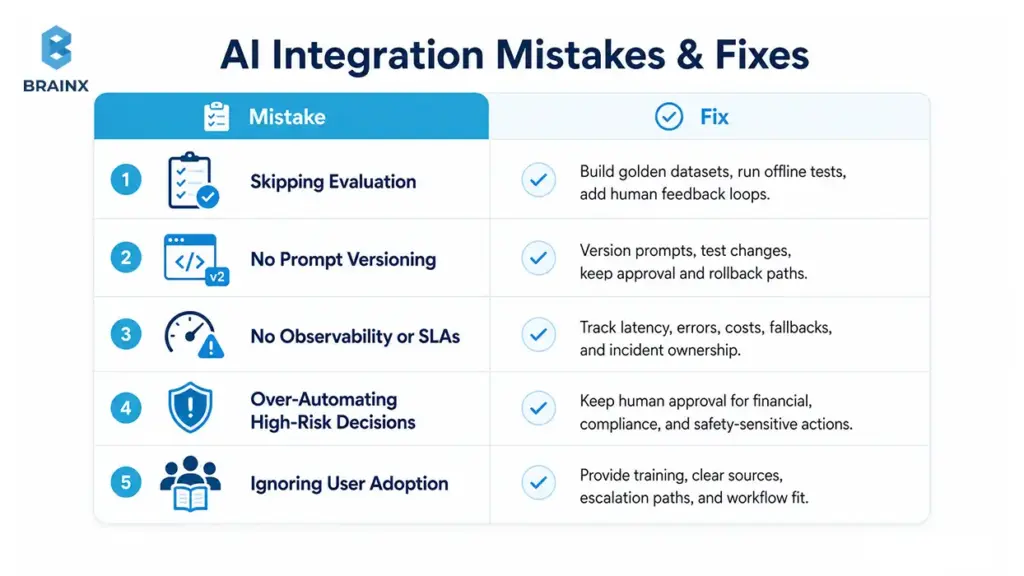
Skipping Evaluation
If you don’t evaluate, you’ll ship surprises.
What to do instead:
- Build golden datasets early
- Run offline evaluation before any user sees outputs
- Add online testing and sampling-based human review
- Track drift checks and quality regressions over time
- Implement human feedback loops so improvements are systematic
Evaluation is not bureaucracy—it’s how you build trust.
Treating Prompts as Code but Not Versioning Them
Prompts change behavior. Untracked prompt changes create “it worked yesterday” incidents.
Fixes:
- Prompt versioning (like code releases)
- Review workflow with approvals for high-impact changes
- Prompt testing against golden datasets
- Approval logs and rollback capability
- Separation of system prompts vs user prompts vs retrieved context
Even if you don’t call it “prompt engineering,” you still need prompt operations.
No Observability or SLAs
Without observability, production AI becomes impossible to support.
Minimum bar:
- Latency SLOs (p50/p95) and alert thresholds
- Clear fallback behavior when providers fail
- Queueing and backpressure strategies for spikes
- Error tracking tied to correlation IDs
- Cost monitoring (token usage, retries, retrieval calls)
- Incident response playbooks and ownership
Treat AI like any other critical service in your stack.
Over-Automating High-Risk Decisions
Not every workflow should be automated end-to-end. High-risk domains need staged control.
Keep humans in the loop for:
- Financial actions (refunds, credits, chargebacks)
- Access control changes and identity workflows
- Compliance decisions and regulated disclosures
- Clinical or safety-related guidance
- Anything with irreversible impact
Start with “recommend and draft,” then graduate to “act” only when confidence and auditability are proven.
Ignoring User Adoption
Even strong AI fails if it doesn’t fit how people work.
Adoption drivers:
- Training and enablement for teams
- Internal documentation and “how to use it safely” guidelines
- UI/UX that shows sources and confidence (especially for RAG)
- Clear escalation and correction paths
- Incentives aligned to the workflow (e.g., faster handling, fewer clicks)
If users can’t trust outputs, they won’t use the tool—no matter how good the demo is.
How to Choose an AI Integration Services Partner
Choosing a partner is less about brand names and more about execution maturity. You’re not buying a model. You’re buying the ability to ship reliable behavior into your systems and keep it running.
A good partner will be opinionated about evaluation, security boundaries, and rollout controls—and will ask for your workflow, your constraints, and your success metrics before recommending tools.
If you want a quick assessment of fit, start with a structured discovery call.
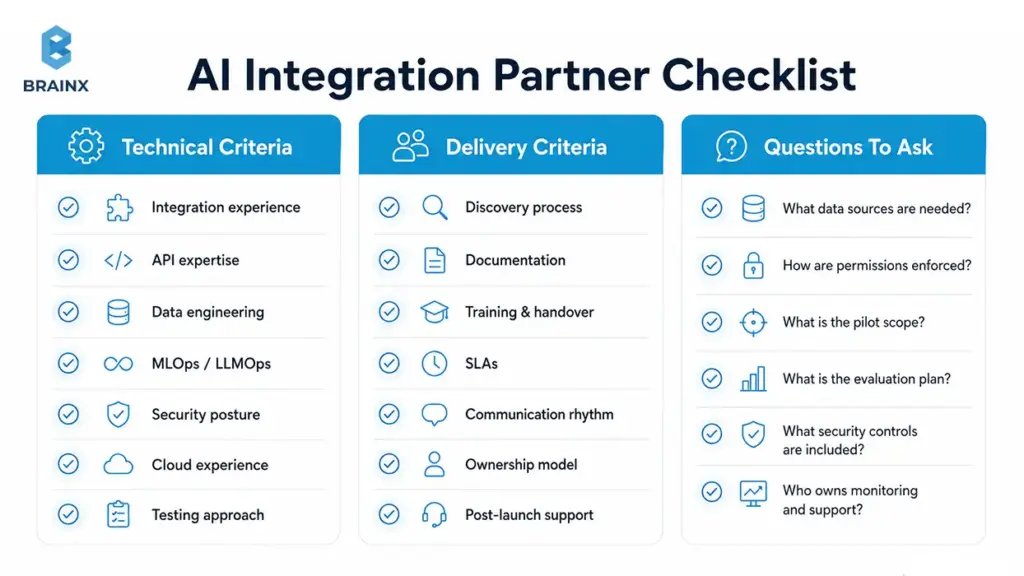
Technical Criteria
Look for demonstrated capability across the full stack of integration work:
- Integration experience across common SaaS and enterprise systems
- Reference architectures for RAG, copilots, and automation
- Strong API expertise (auth, rate limits, retries, idempotency)
- Data engineering depth (contracts, lineage, quality checks)
- MLOps/LLMOps capability (evaluation, monitoring, drift handling)
- Security posture (RBAC, tenant isolation, retention, threat modeling)
- Cloud experience relevant to your environment
- Testing approach that includes offline + online evaluation
You want builders who can operate production systems—not just prototype.
Delivery Criteria
Execution quality is as important as technical skill.
Assess:
- Discovery process that clarifies scope and acceptance criteria
- Documentation quality (architecture, runbooks, playbooks)
- Training and handover approach
- SLAs and support expectations post-launch
- Communication rhythm and stakeholder alignment
- Ownership model (who maintains what after delivery)
- Post-launch improvement plan (feedback, iterations, governance)
A partner should leave your team stronger, not dependent.
Questions to Ask in the First Call
Use these questions to force clarity early:
- What data sources will the AI need, and who approves access?
- How will you enforce role-based permissions in retrieval and tools?
- What are the success metrics and baseline?
- What’s the smallest pilot scope that proves value end-to-end?
- What evaluation plan will you implement before rollout?
- What security controls and retention policies do you recommend?
- How will you choose models, and how do you avoid lock-in?
- What’s the timeline to reach production hardening, not just a demo?
- Who owns monitoring, incident response, and ongoing improvements?
Good partners answer with specifics and trade-offs.
Red Flags to Watch For
Avoid teams that:
- Have no evaluation plan beyond “we’ll test it”
- Don’t discuss security until late in the project
- Offer vague pricing without scoping constraints
- Have no handover or documentation process
- Overpromise automation in high-risk workflows
- Push a model choice before understanding your workflow and data
If they treat AI like a widget, you’ll inherit the operational debt.
How BrainX Helps With AI Integration Services
BrainX Technologies helps teams implement AI in real systems—without forcing a rewrite. The focus is practical delivery: architecture decisions that fit your constraints, data flows that keep outputs reliable, and rollout controls that keep production stable.
When teams engage BrainX for AI integration services, the goal is clear: move from experimentation to production outcomes with measurable KPIs, proper security boundaries, and an integration plan your team can maintain.
What You Get In an AI Integration Assessment
A good assessment should produce clarity, not a slide deck that evaporates after the meeting.
Typical assessment outputs:
- Stack review (apps, data sources, auth, workflows, constraints)
- Use case prioritization with scoring and ROI hypotheses
- Data readiness check and gap list
- Integration architecture recommendation (pattern selection)
- Security considerations (permissions, retention, governance)
- A phased roadmap with decision gates
- Rough effort estimate and team plan
This gives stakeholders a realistic path forward—without committing to a rebuild.
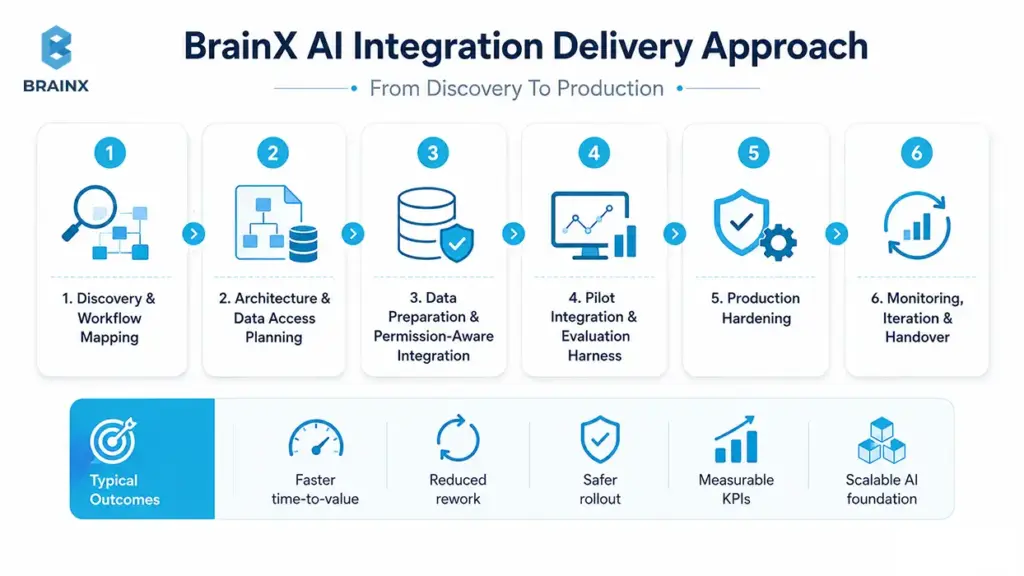
How BrainX Approaches AI Integration
BrainX uses a phased delivery approach designed to reduce risk:
- Discovery and workflow mapping
- Architecture and data access planning
- Data preparation and permission-aware integration
- Pilot integration with evaluation harness
- Production hardening (observability, cost controls, governance)
- Monitoring, iteration, and handover
This approach is designed to keep the business moving while protecting core systems.
Typical Outcomes
Teams that execute integration correctly typically see:
- Faster time-to-value (thin-slice delivery in weeks, not quarters)
- Reduced rework through upfront evaluation and architecture clarity
- Safer rollout with clear human review paths
- Better workflow automation and user adoption
- Measurable KPIs tied to business outcomes
- A scalable foundation to extend AI across more workflows
FAQs Section
What are AI integration services, and how are they different from AI development?
AI integration services focus on connecting AI capabilities to your existing applications, data sources, and workflows so they work reliably in production. AI development is broader and often includes building new models or net-new AI features from scratch.
Integration work typically emphasizes connectors, permissions, evaluation, monitoring, and rollout controls. In many real projects you’ll use both, but integration is what makes the system usable day-to-day.
How long does it take to integrate AI into an existing tech stack?
A focused pilot can often be delivered in a few weeks when the use case is narrow, data access is straightforward, and security requirements are clear. Production hardening—monitoring, governance, performance, and incident readiness—usually adds additional time.
The biggest schedule variables are data readiness, number of systems involved, and compliance reviews. A phased plan helps you ship value early while reducing rollout risk.
Do I need to migrate my data warehouse or rebuild my app to add AI?
Usually, no. Many teams start by integrating AI via APIs, event streams, or embedded workflow steps while keeping the warehouse and app architecture intact. You may need targeted data improvements (contracts, quality checks, or a vector layer for retrieval), but that’s different from a full migration. The safest approach is incremental rollout with feature flags and clear fallbacks.
Can AI integration services work with legacy systems?
Yes, as long as there’s a reliable integration path—APIs, database access with controls, file exports, RPA (carefully), or middleware that can bridge the gap. Legacy constraints mainly affect latency, observability, and connector reliability, so architecture needs to account for that.
Many teams use a strangler-style approach to wrap legacy flows and add AI capabilities in isolated steps. The key is to avoid letting legacy limitations force unsafe shortcuts in security or auditability.
What data do I need before integrating AI?
You need the data that drives your target workflow: the inputs users rely on, the context needed for decisions, and the historical examples that define “good outcomes.” You also need owners, permissions mapping, and a definition of freshness—how current the data must be for the workflow to work.
For LLM/RAG use cases, you’ll typically need curated documents plus metadata and access rules. It’s less about having “big data” and more about having usable, governed, and measurable data.
What are the biggest security risks when integrating LLMs into internal tools?
The biggest risks include prompt injection, leaking sensitive data through retrieval, unauthorized tool actions by agents, and retaining prompts/outputs longer than policy allows. Another common risk is broken permission boundaries—where the AI can access data the user shouldn’t see.
Mitigations usually include RBAC/least privilege, permission-aware retrieval, redaction, audit logs, and human approval steps for high-risk actions. Threat modeling against OWASP LLM risks is a good baseline.
What should I look for in AI integration consulting services?
Look for a provider that can demonstrate production experience across integrations, data engineering, evaluation, and security. They should propose a phased rollout with decision gates, include offline and online evaluation, and be clear about monitoring and incident response.
You should ask how they enforce permissions, how they manage retention and auditability, and what the handover looks like. Strong AI integration consulting services will also help you pick the smallest viable pilot that proves value end-to-end.
How do leading AI/ML data integration services improve model accuracy and reliability?
They improve reliability by making sure the model receives consistent, permission-correct, high-quality context, every time. That includes unifying sources, implementing data contracts, monitoring quality, and maintaining lineage so failures can be traced and fixed.
For LLMs, they also build RAG-ready pipelines: ingestion, chunking, embeddings, and retrieval evaluation so answers are grounded in trusted sources. In practice, leading AI/ML data integration services reduce hallucinations, stabilize performance across segments, and make outputs auditable.
How do AI integration services reduce the risk of failed AI pilots?
They reduce pilot failure by forcing clarity on workflow boundaries, success metrics, data access, and operational constraints before rollout. Integration work also includes evaluation harnesses, release controls (feature flags, canaries), and security reviews that prevent late-stage blockers.
Instead of shipping a demo, the pilot is designed as a production candidate with observability and fallbacks. That makes it easier to scale the feature without rewriting it later.