 May 7, 2026 -
  27 minutes read

TL;DR / Key Takeaways
- Tasks are carried out by AI agents; Chatbot primarily talks. Agents combine LLM reasoning with tool use (APIs, workflows, databases) to complete tasks end-to-end.
- The shift is powered by agentic workflows: plan → act → observe → refine, plus safer function execution and better monitoring.
- Adopt agents when you need multi-step execution, cross-system actions, and measurable cycle-time reduction—not just Q&A.
- A hybrid is common: a chat interface with an agent back-end that can take actions only when allowed.
- Start with one workflow, design permissions and approvals, and ship a pilot with evaluation from day one.

Your current chatbot might answer questions well—but the moment a user asks it to reset an account, refund an invoice, open a ticket, or change a subscription, the experience often breaks. That gap is exactly where the AI agents chatbot model shows up: not as “a smarter bot,” but as software that can reason through a goal and take actions in real systems (with the right controls).
This guide explains what agents are (in plain language), what changed recently, and how to decide whether you need a chatbot, an agent, or a hybrid. You’ll also get a reference architecture, a maturity model, and an implementation playbook you can use to scope a pilot confidently.
What “AI Agents” Mean (and How They Differ From a Chatbot)
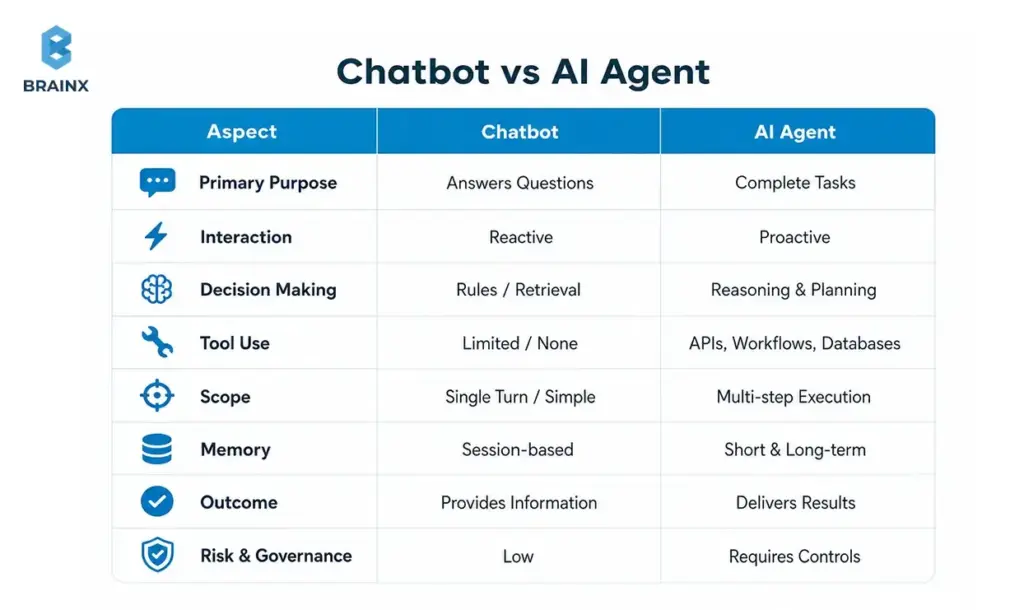
An AI “agent” is best understood as a system that can pursue a goal, choose steps, and use tools to produce an outcome—not just generate text. In practice, many teams implement this as an LLM + orchestration layer + tool integrations + guardrails. When you hear people describe AI agents chatbot, they usually mean a chat experience backed by an agentic system that can take actions (create tickets, update records, trigger workflows) with governance.
A classic chatbot is often deterministic (rules/flows) or retrieval-driven (RAG) and focuses on responding. Agents focus on deciding + executing. That difference matters for scope, risk, and architecture: agents need permissions, audit trails, approvals, and evaluation in ways basic bots often don’t.
Industry definitions vary, but most reputable references converge on the idea that agents combine reasoning with tool use and feedback loops rather than one-shot answers.
If you’re exploring AI chatbot agents, treat the term as a practical category: “conversational UI” + “agent back-end.” The UI can look identical to a normal assistant; the difference is what happens after the user message—whether the system can safely do something.
Chatbots: Rules, Flows, and Retrieval (Where They Shine)
Rule-based chatbots are still excellent when the path is known upfront. Think: shipping policies, password reset instructions, store hours, onboarding steps, or structured triage forms. With a well-designed flow, you get predictable outcomes, easier QA, and lower operational risk.
Modern “FAQ bots” often improve accuracy with retrieval: a RAG chatbot searches a knowledge base (help center, docs, SOPs) and answers with citations. When the task is “find and explain,” retrieval-based designs can deliver high utility without connecting to sensitive systems.
Where chatbots struggle is when requests become procedural: “change plan,” “approve access,” “apply discount,” “open ticket with these logs,” or “schedule a renewal call and update CRM.” You can bolt on integrations—but once the bot must select tools, manage state, and confirm actions, you’re no longer in simple chatbot territory.
The key takeaway: chatbots shine when success is primarily information delivery with constrained branching, not multi-step execution.
AI Agents: Goals, Tools, and Multi-Step Execution
Agents introduce an execution loop: interpret the goal, plan steps, call tools, observe results, and refine. Many implementations are variations of “plan → act → observe,” sometimes with explicit reasoning traces, sometimes with hidden planning but visible actions and confirmations.
Tool use is the inflection point. Instead of generating “Here’s how to do it,” the system can call functions like:
- create_ticket(summary, priority, user_id)
- lookup_invoice(invoice_id)
- apply_credit(account_id, amount)
- reset_mfa(user_id)
- update_crm_opportunity(stage, next_step)
That said, the agent isn’t “the model.” Production systems add an orchestrator (state + policy), tool gateways (auth + rate limits), and monitoring. References on tool use and agent patterns emphasize that reliability comes from system design, not prompting alone.
When teams build AI chatbot agents, they typically combine:
- A conversational front-end for intent capture and user trust
- An orchestration layer to decide when tools are allowed
- Verified tool execution with approvals, logging, and rollback patterns
The Real Shift: From Responding to Doing
The practical shift is simple: instead of optimizing for “answer quality,” you optimize for task completion.
A responding system is judged by correctness and tone. A doing system is judged by:
- Did it complete the workflow?
- Did it use the right system of record?
- Did it ask for approval at the right time?
- Can we audit what happened and why?
This is why agent projects feel different from chatbot projects. You’re designing a digital operator with constraints, not just a conversational layer. That’s also why governance, evaluation, and permissions become first-class requirements—not add-ons.
Why AI Agents Are the Next Step After Chatbots (What Changed Recently)
Agents didn’t become interesting because businesses suddenly wanted more automation—they always did. They became feasible because the ecosystem matured: models got better at following structured outputs, tool calling became standardized, inference got cheaper, and evaluation/monitoring practices improved.
For many teams, the AI agents chatbot approach is the first time a conversational experience can reliably connect to operational systems without turning into a brittle flowchart. The difference is not “more AI,” but more engineering patterns that make LLMs usable as components in software.
A few macro changes drove this:
- Model capability: better instruction-following and structured generation
- Tool calling: safer and more deterministic integrations
- Operational maturity: monitoring, regression testing, and red-teaming for agent behavior
- Cost curves: lower latency/cost for running assistants at scale
[IMAGE: Timeline/maturity model visual — alt text suggestion: “Evolution from chatbots to tool-using agents and multi-agent workflows”]
LLM Tool Calling + Function Execution
Function calling made LLM outputs more predictable for software. Instead of parsing free-form text (“I think you should create a ticket…”), the model can emit a structured call with validated parameters—then your system executes it.
This is where many automation wins come from:
- Reliable routing to the correct internal workflow
- Fewer brittle regex parsers
- Better separation of responsibilities (LLM decides what, code controls how)
Even with function calling, production teams still enforce schemas, rate limits, and allowlists. The LLM proposes an action; the system decides whether it’s permitted.
RAG + Enterprise Knowledge Access (Without Training on Your Data)
RAG gives agents a grounded way to answer with current, company-specific context—without training the base model on private data. Done properly, it reduces hallucinations and improves compliance posture because you can control exactly what content is retrieved.
This is especially important for AI chatbot agents operating in support, IT, or sales ops:
- They need accurate policy and account context
- They must cite sources (internal SOPs, KB articles, CRM fields)
- They must avoid leaking sensitive information across tenants
A strong RAG layer includes document chunking strategy, relevance ranking, access control filters, and citation rendering.
Better Guardrails, Monitoring, and Evaluations
Early “agent demos” often failed in production because nobody measured reliability. What changed is the rise of practical evaluation methods:
- Offline test sets (golden conversations + tool traces)
- Automated checks for policy violations and PII leakage
- Online monitoring of tool calls, fallbacks, and human escalations
Guardrails also got more actionable: from simple content filters to policy engines that enforce allowed tools, required confirmations, and safe completion criteria.
Also Read: How a Custom AI Agent Development Company Brings Your Ideas to Life
AI Agents Chatbot Maturity Model (Rules → Reasoning → Autonomy)
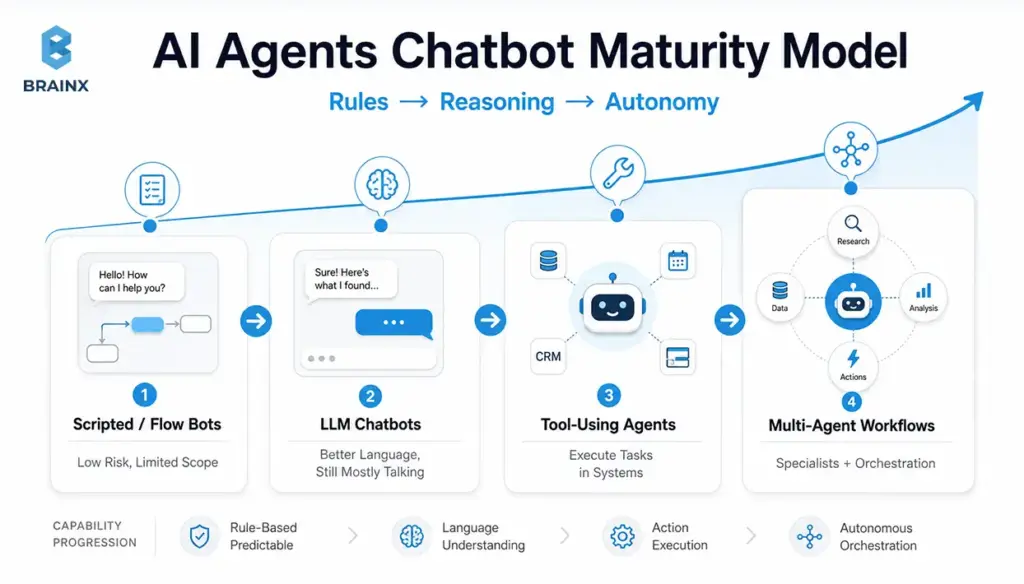
Most organizations aren’t choosing between “no agent” and “full autonomy.” They’re moving along a maturity path. This AI agent's chatbot maturity model helps you map where you are today and what the next stage should look like, based on risk tolerance and integration needs.
Use it as a planning tool:
- Align stakeholders on scope (“we’re targeting Stage 3, not Stage 4”)
- Set architecture requirements (audit logs start at Stage 3)
- Budget realistically (integrations and evaluation expand with maturity)
Stage 1 — Scripted/Flow Bots (Low Risk, Limited Scope)
Stage 1 is deterministic: decision trees, menus, forms, and handoffs. It’s still the best fit when:
- Compliance requirements are strict
- Inputs are predictable
- You need highly consistent language and outcomes
The upside is operational simplicity: QA is straightforward, and failure modes are known. The downside is coverage: edge cases explode, maintenance costs rise, and the experience feels rigid.
Stage 1 often remains a component even in advanced systems—for example, for identity verification steps or regulated disclosures.
Stage 2 — LLM Chatbots (Better Language, Still Mostly “Talking”)
Stage 2 replaces rigid conversation with natural language understanding and generation. It can summarize, explain, and route more smoothly—often with retrieval augmentation for accuracy.
Constraints still matter:
- Without tool execution, you’re limited to advice and instructions
- Errors manifest as confident-but-wrong answers if retrieval and policies aren’t strong
- The UX can degrade when users assume it can “do” things it can’t
Stage 2 is a strong upgrade when your highest ROI is deflection and documentation navigation, not automation.
Stage 3 — Tool-Using Agents (Execute Tasks in Systems)
Stage 3 is where automation becomes real: the agent can perform actions in business systems through approved tools. This is the “threshold” where you’ll invest in:
- Permissioning and scoped credentials
- Approval flows for high-impact actions
- Tool-call logging and traceability
- Test harnesses for regression
This is also where the product becomes meaningfully differentiated: users stop copying answers into other systems and instead complete work in one place.
Stage 3 tends to deliver measurable gains in cycle time and handle time—if you pick the right workflow and instrument it properly.
Stage 4 — Multi-Agent Workflows (Specialists + Orchestration)
Stage 4 introduces multiple specialized agents coordinated by an orchestrator (or a supervisor pattern). You might have:
- A “triage” agent that classifies requests and gathers missing info
- A “policy” agent that checks compliance and required approvals
- A “tool runner” agent restricted to execution
- A “QA” agent that validates outputs and citations before user delivery
Stage 4 is useful when workflows span departments, require higher reliability, or need separation of duties. It also increases complexity, so you typically justify it only after Stage 3 is stable in production.
When a Chatbot Is Enough vs When You Need AI Chatbot Agents (Decision Checklist)
The simplest way to choose is to look at workflow complexity and system access. If your assistant only needs to answer and guide, keep it simple. If it needs to execute and coordinate, you’re in AI chatbot agents territory—and you should plan for permissions, evaluation, and operational ownership from day one.
Use the checklist below in planning meetings. It helps founders, PMs, and IT leaders avoid the two common extremes: “agents everywhere” vs “never connect it to anything.”
Choose a Chatbot If…
A chatbot is enough when most of these are true:
- The task is Q&A or document navigation (“What’s your refund policy?”)
- You can solve it with retrieval and clear citations
- No write access is needed (read-only context is sufficient)
- Escalation to a human is the normal endpoint for complex cases
- The cost of a wrong answer is low to moderate (and you can constrain responses)
This is a great fit for:
- Help centers and internal knowledge portals
- Product FAQs and onboarding guidance
- Basic triage that ends in ticket creation by a human
Choose an AI Agent If…
You likely need an agent when several of these are true:
- The workflow requires multiple steps (collect info → validate → execute → confirm)
- You must take actions across systems (CRM + billing + ticketing)
- The user expects an outcome, not an explanation (“cancel subscription,” not “here’s how”)
- Personalization depends on account state, entitlements, or history
- You need measurable reductions in handle time, backlog, or cycle time
Common examples:
- Refund/credit workflows
- Access provisioning requests with approvals
- Sales ops updates after calls (notes → CRM → follow-up tasks)
Hybrid Approach (Chat UI + Agent Back-End)
In many products, the best design is hybrid:
- The UI stays conversational for discovery and clarification
- The back-end agent runs tool calls and confirms actions
- High-risk steps require approval; low-risk steps can be automatic
This approach improves adoption because users don’t need to learn a new interface. It also improves safety because you can progressively enable tool access as confidence grows, rather than granting broad autonomy on day one.
How AI Agents Work
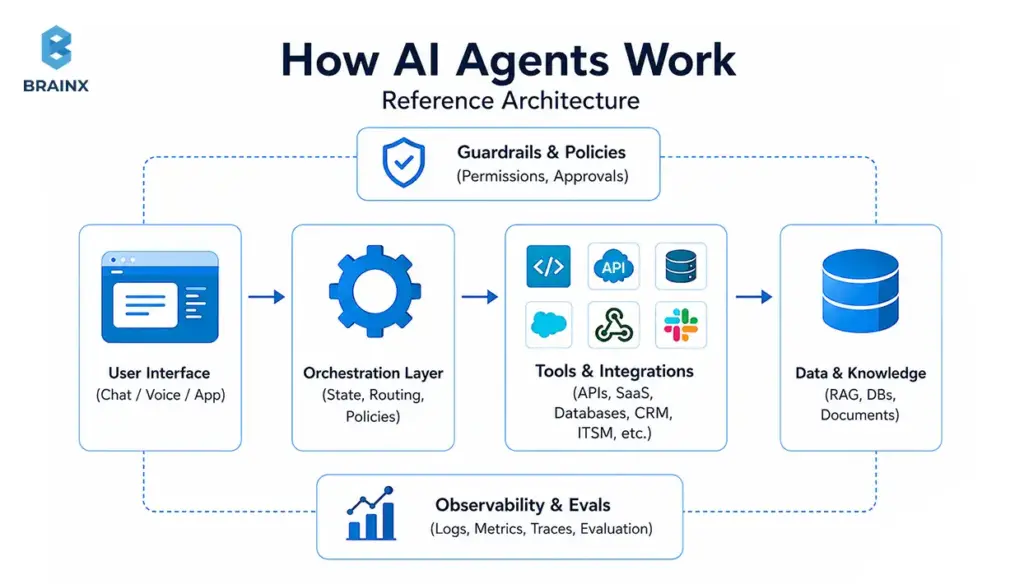
A production-ready agent is a system, not a single model call. The AI agents chatbot architecture most teams end up with includes: a UI layer, an orchestrator, retrieval, tool gateways, policy enforcement, and observability/evaluation.
This section is written so you can sketch your own architecture and identify what you’re missing before you pilot. It also highlights enterprise-grade components that many “demo architectures” skip—especially around auditability and permissions.
Orchestration Layer (State, Routing, Policies)
The orchestrator is the control plane. It manages:
- Conversation state (what’s already known, what’s pending)
- Routing (which tool, which workflow, which specialist agent)
- Policies (what is allowed, what requires confirmation, when to escalate)
Without orchestration, teams often ship a “single prompt” system that becomes unmaintainable: fragile logic, unclear failure modes, and inconsistent tool usage. With orchestration, you can evolve safely—adding tools, tightening policies, and improving evaluation without rewriting everything.
A practical orchestration layer typically includes:
- A state store (for session context and task status)
- A policy engine (allowlists, approvals, content constraints)
- A fallback strategy (human handoff, safe refusal, ask-clarifying-questions)
Tools & Integrations (APIs, SaaS, Databases, Ticketing, CRM)
Tools are how agents create business outcomes. But every integration expands the blast radius, so treat tool design like product API design.
Best practices:
- Prefer purpose-built tools over “raw database access”
- Use scoped credentials (least privilege), short-lived tokens, and strict allowlists
- Validate inputs (schemas, rate limits, business rules)
- Separate read tools from write tools
- Add idempotency keys for write actions to prevent duplicates
Common tool categories:
- Ticketing/ITSM (ServiceNow, Jira, Zendesk)
- CRM and sales ops (Salesforce, HubSpot)
- Billing/subscriptions (Stripe, Chargebee)
- Data platforms (Snowflake, Postgres read replicas)
- Identity and access (Okta, Azure AD) with approvals
Memory & Context (Short-Term vs Long-Term; What to Store)
“Memory” is overloaded. In practice, separate it into:
- Short-term context: what the agent needs right now to complete the task (current conversation, retrieved docs, tool results). Keep it minimal and time-bounded.
- Long-term memory: stable preferences or recurring facts (user’s timezone, preferred escalation channel). Store only what you can justify and govern.
Guidelines that prevent privacy and compliance issues:
- Don’t store sensitive data “because it might help later”
- Store pointers/IDs instead of raw content where possible
- Apply retention policies and deletion workflows
- Clearly label what comes from the user vs tools vs retrieval
If you operate in regulated environments, treat memory like any other data product: define owners, access controls, and audits.
Safety: Permissions, Approval Flows, and Audit Logs
Safety for tool-using agents is mostly about control and traceability:
- Who requested the action?
- What data did the agent use?
- What tool calls were executed?
- Was there approval, and by whom?
- Can we revert or compensate if it was wrong?
Enterprise patterns include:
- Approval gates for refunds, access changes, and billing actions
- Audit logs that capture tool inputs/outputs and policy decisions
- Role-based access control (RBAC) and separation of duties
- Redaction of secrets/PII in logs
These controls are aligned with broader security frameworks (access control, auditability, change management).
Business Value: What AI Agents Unlock That Chatbots Typically Can’t
The value story changes when assistants can execute. Instead of measuring “engagement,” you can measure operational outcomes: deflection with completion, cycle-time reduction, fewer touches per case, faster quoting, and fewer manual updates.
This is where AI chatbot agents can outperform a standard assistant: they reduce work, not just questions. The best business cases are workflows with high frequency, clear success criteria, and expensive human time in the loop.
Below are value patterns that show up repeatedly—along with KPIs you can instrument.
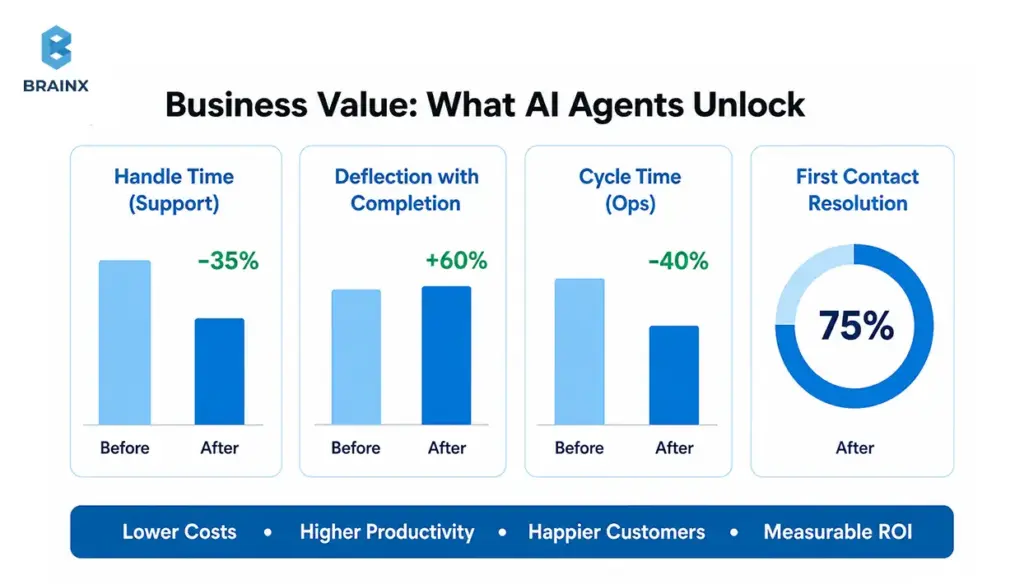
Faster Resolution and Higher Deflection (Support)
A chatbot can deflect “how-to” questions. An agent can resolve cases by:
- Collecting required details automatically
- Running diagnostics (logs, account status, feature flags)
- Applying approved fixes (reset, re-provision, resend invoice)
- Creating a ticket only when necessary—with context already attached
KPIs to track:
- First-contact resolution rate
- Average handle time (AHT)
- Time to resolution
- Deflection with completion (not just deflection)
The nuance: “deflection” is only a win if users actually get the outcome they wanted. Agent designs should explicitly measure completion.
Shorter Lead-to-Quote / Sales Ops Automation
Sales workflows are often slow because they’re fragmented: notes in one place, pricing in another, approvals in email, CRM updates later (or never). Agents can compress this by:
- Summarizing discovery calls into structured fields
- Creating/updating opportunities and tasks automatically
- Generating draft quotes based on rules and product catalog tools
- Scheduling follow-ups and attaching relevant collateral
KPIs:
- Lead-to-quote time
- Data completeness in CRM
- Rep time spent on admin tasks
- Conversion rate changes (when measured carefully)
Internal IT and Employee Service Desk Acceleration
Internal service desks are full of repeatable tasks that require system actions:
- Password/MFA resets (with identity verification)
- Access requests with approvals
- Software provisioning
- Knowledge + execution (“here’s the policy and I’ve initiated the request”)
Agents can reduce backlog and improve employee experience, but only if you enforce strict permissions, approvals, and logging.
KPIs:
- Mean time to resolve (MTTR)
- Ticket reopen rate
- Escalation rate to tier-2
- SLA compliance improvements
Product Experiences: In-App “Doer” Assistants (Not Just Help Text)
In-app assistants often fail when they only explain features. A “doer” can:
- Configure settings on the user’s behalf (with confirmation)
- Create objects (projects, tickets, dashboards)
- Generate reports or summaries from usage data
- Trigger workflows (“invite teammate,” “set up SSO,” “create alert”)
This is where agent experiences can become a product feature, not a support add-on—especially in SaaS platforms with complex configuration.
KPIs:
- Time-to-value for new users
- Setup completion rate
- Feature adoption lift
- Reduction in “how do I…” tickets
Top Use Cases for AI Agents Chatbot Experiences (By Team)
Different teams benefit from agentic systems in different ways. The fastest path is to pick use cases with:
- Clear inputs and outputs
- Bounded tool access
- Observable success metrics
- A real human cost today
In the section below, you’ll see practical examples of an AI agents chatbot experience by persona, including what systems it typically touches and where to start safely.
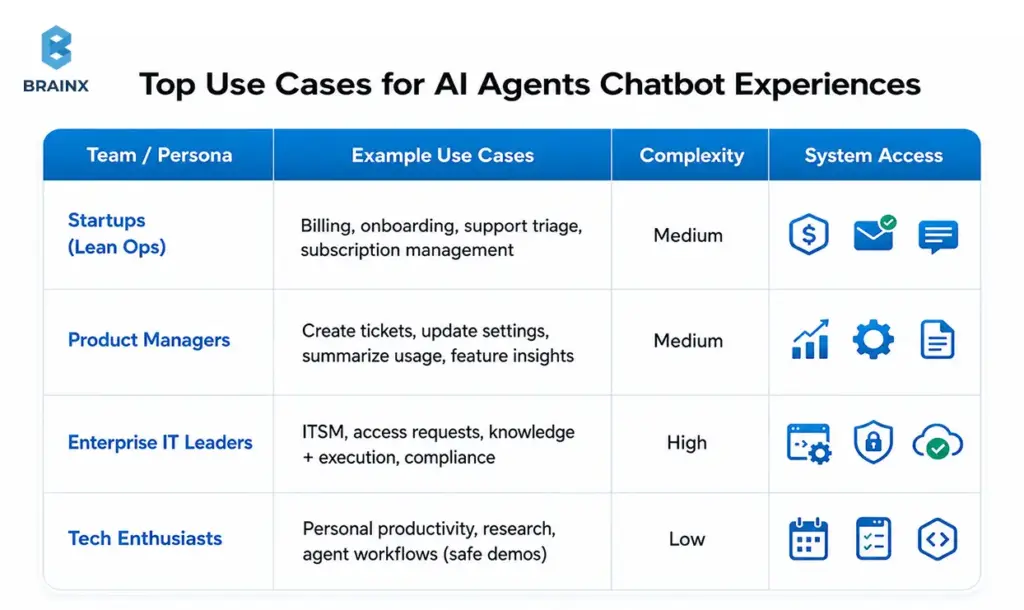
Startups: Lean Ops (Billing, Onboarding, Customer Support Triage)
Startups usually want leverage without hiring ahead of revenue. Great starter workflows:
- Billing questions with account lookup + safe actions (send invoice, update billing email)
- Onboarding “setup concierge” that checks configuration and nudges next steps
- Support triage that gathers context, suggests fixes, and drafts a ticket with logs
Start with low-risk tools:
- Read-only account context
- Ticket creation
- Email sending from templates (with approvals)
The win is fewer interruptions and faster customer response without adding headcount.
Product Managers: In-App Actions (Create Ticket, Update Settings, Summarize Usage)
PM-led use cases often focus on in-product activation and reducing friction:
- “Create a bug report with this screenshot and steps”
- “Turn on this integration and set defaults”
- “Summarize my last 30 days usage and recommend next steps”
The key is strong UX boundaries: users should always know what the assistant can do in-app, and what requires confirmation.
Common systems:
- Product database (read/write with strict scopes)
- Analytics/telemetry (read)
- Feature flag tools (write with approvals)
Enterprise IT Leaders: ITSM, Access Requests, Knowledge + Execution
Enterprise IT gets value when agents reduce ticket volume and time-to-resolution:
- Access request intake, routing, and approval workflows
- Password reset and account unlock flows with identity verification
- Knowledge retrieval + automated execution (“apply standard fix”)
Enterprise constraints are non-negotiable:
- RBAC and separation of duties
- Full audit trails
- Integration with identity providers and ITSM
Start with “read + recommend + draft” and progressively enable execution once evaluation and controls are in place.
Tech Enthusiasts: Personal Productivity + Agent Workflows (Safe Demos)
For individual experimentation (and internal demos), safe workflows include:
- Calendar planning and meeting summaries (with explicit consent)
- Email drafting (no auto-send)
- Research assistants grounded in public sources
- Task automation in sandbox environments
Even demos benefit from good habits: clear tool scopes, visible actions, and logs. Those habits transfer directly to production builds.
Costs, Timelines, and What Actually Drives Complexity
Decision-makers ask two questions early: “How long will this take?” and “What drives cost?” The honest answer is that the LLM is rarely the expensive part. Complexity comes from integrations, data readiness, evaluation, and security—plus the product work to make the UX trustworthy.
If you’re planning AI chatbot agents, think in phases: a pilot that proves a workflow, then a controlled rollout, then production hardening. That approach reduces risk while creating real value quickly.
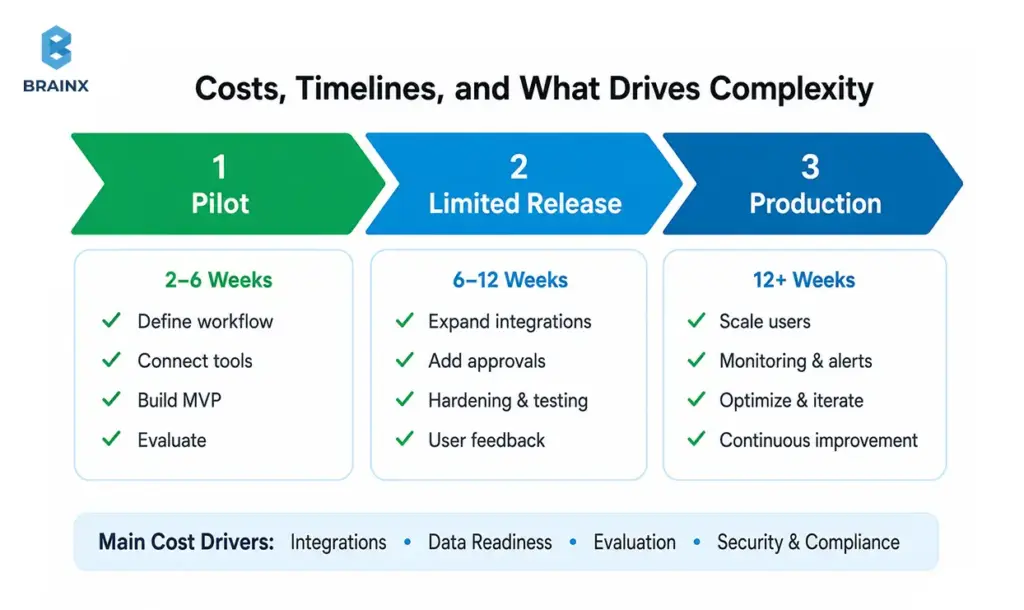
Main Cost Drivers (Integrations, Data, Eval, Security)
The largest cost levers usually are:
- Integrations: number of systems, tool design, auth patterns, rate limits, error handling
- Data readiness: knowledge base quality, permissions, document structure, tenancy boundaries
- Evaluation: building test sets, regression runs, tool-call validation, red-team scenarios
- Security & compliance: audit logs, approvals, secrets management, PII handling, vendor reviews
- UX/product work: confirmations, undo paths, user education, escalation flows
A good scoping exercise identifies which of these can be minimized for the pilot (without cutting corners that cause rework later).
Typical Rollout Phases (Pilot → Limited Release → Production)
Most successful implementations follow a predictable rollout:
- Pilot (2–6 weeks, depending on integrations)
One workflow, limited user group, tight tool scope, heavy logging. - Limited release
Expand to more users/cases, add more tools, formalize evals, introduce approvals for riskier actions. - Production
SLOs, incident playbooks, ongoing evaluation, governance, and operational ownership.
Timelines vary by integration complexity and security requirements. Avoid committing to timelines before confirming tool access, identity patterns, and data constraints.
Build vs Buy vs Partner (What to Consider)
You have three common paths:
- Buy: fastest start, but may limit customization, governance controls, or deep integrations.
- Build: maximum control and differentiation, but requires architecture, eval, and ongoing operations.
- Partner: combine speed with custom engineering—often best when you need production-grade integrations and security without staffing a full internal team.
A practical decision lens:
- If the workflow is generic and low-risk, buying can be enough.
- If it touches core systems (billing, access, healthcare data), you’ll likely need custom work—either in-house or with a partner experienced in enterprise controls.
Risks and Common Mistakes (and How to Avoid Them)
Most failures aren’t “the model wasn’t smart enough.” They’re design failures: too much autonomy, unclear permissions, no measurement, and UX that hides what’s happening. If you’re implementing an AI agent chatbot, treat it like deploying a new operational layer—because that’s what it is.
The goal is not to eliminate risk; it’s to engineer risk down with guardrails, approvals, and visibility.
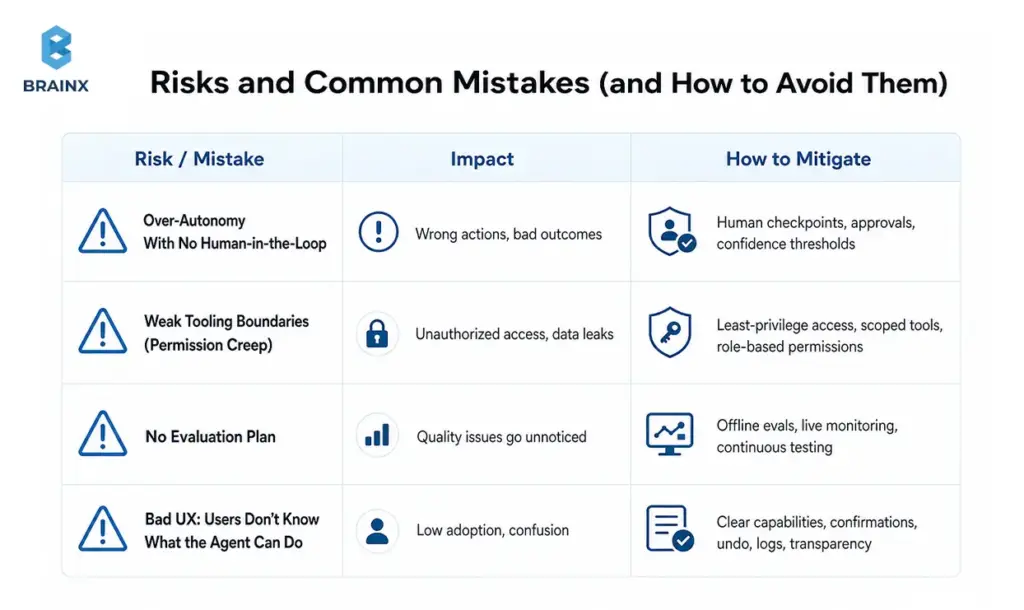
Over-Autonomy Too Soon (No Human-in-the-Loop)
The fastest way to lose trust is letting an agent take irreversible actions without confirmation. Early stages should include:
- Confirmations for any write action
- Approval flows for high-impact actions (refunds, access grants)
- “Draft mode” for messages and updates (human reviews before execution)
Progressive autonomy works better: earn permission through measured reliability.
Weak Tooling Boundaries (Permission Creep)
If every tool has broad access, your agent effectively becomes a super-user. That’s a security and compliance problem.
Prevent permission creep by:
- Scoping tools to specific actions (“issue refund up to $X,” not “write to billing DB”)
- Enforcing allowlists at the gateway
- Using per-user auth where possible (agent acts “on behalf of” the user)
- Rotating secrets and monitoring for abnormal tool usage
No Evaluation Plan (You Can’t Improve What You Don’t Measure)
Teams often rely on anecdotal feedback (“seems good”). That’s not enough when tool calls affect real systems.
Minimum viable evaluation:
- A curated set of representative conversations
- Expected tool calls and success criteria per scenario
- Regression tests for every prompt/tool change
- Monitoring dashboards for tool failure rate, escalation rate, and policy blocks
This turns agent behavior into something you can improve like any other software component.
Bad UX: Users Don’t Know What the Agent Can Do
Users form mental models quickly. If they think the agent can cancel subscriptions but it can’t, they’ll churn. If they don’t realize it did cancel a subscription, you’ll get support fallout.
Fix this with:
- Visible “capabilities” hints in the UI
- Clear confirmation steps and summaries of actions taken
- Receipts: what changed, where, and how to undo it
- A consistent escalation path to humans
How to Get Started With AI Chatbot Agents
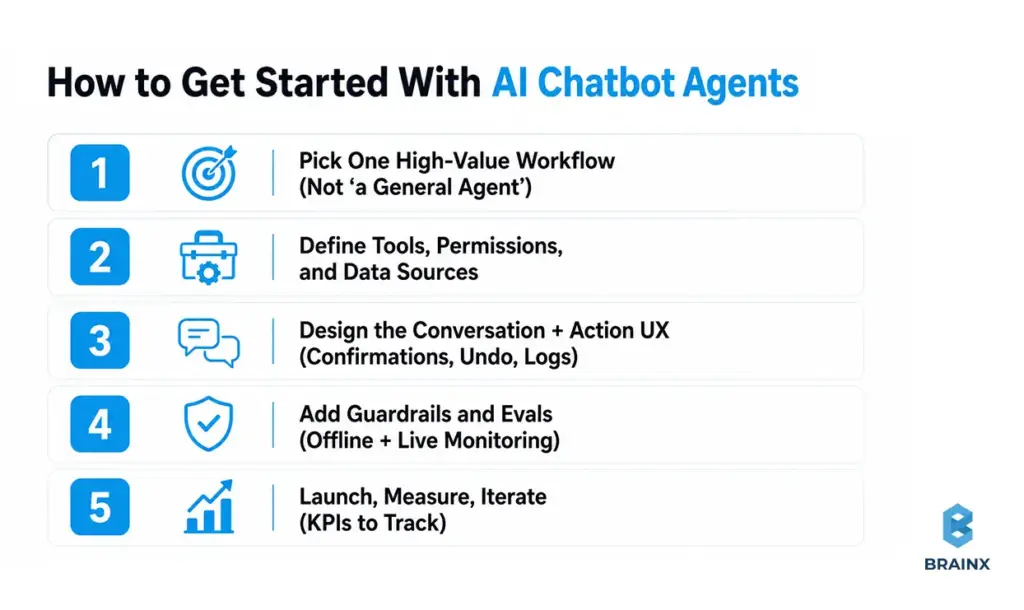
A safe, fast start is absolutely possible—but it requires discipline. The goal is not to build “a general agent.” The goal is to deliver one workflow end-to-end, with logs and evaluation, then expand.
This playbook is what we use to scope and deliver AI chatbot agents so stakeholders can see progress early without compromising on governance.
Step 1 — Pick One High-Value Workflow (Not “a General Agent”)
Choose a workflow with:
- High frequency or high cost
- Clear success criteria (definition of “done”)
- Limited systems at first (1–2 integrations)
- Low-to-moderate risk actions
Examples:
- Support: “collect info + run diagnostics + create ticket with full context”
- Sales ops: “update CRM + schedule follow-up + generate recap”
- IT: “access request intake + approval routing”
Document the workflow like a product spec: inputs, outputs, edge cases, and escalation rules.
Step 2 — Define Tools, Permissions, and Data Sources
Design tools that are:
- Narrow in scope
- Validated by schema
- Permissioned by role and environment
Make a table before you code:
- Tool name
- Read/write
- Data source/system
- Required auth (service account vs user-delegated)
- Approval requirement
- Audit fields to log
This is where security teams can engage early—before the implementation bakes in risky assumptions.
Step 3 — Design the Conversation + Action UX (Confirmations, Undo, Logs)
Your UI needs to make actions legible. Patterns that work:
- “Proposed action” cards (user approves before execution)
- “Receipt” messages with what changed and a link to the system of record
- Undo where possible (or compensating actions)
- Status tracking for long-running workflows
Also decide how the agent asks clarifying questions. Good agents don’t guess missing fields; they request them.
Step 4 — Add Guardrails and Evals (Offline + Live Monitoring)
Guardrails should enforce:
- Tool allowlists
- Required confirmation steps
- Policy constraints (e.g., don’t disclose sensitive fields)
- Safe fallback behavior
Evaluation should include:
- Offline regression tests (tool-call traces, expected outputs)
- Online monitoring (tool error rate, escalation, blocked actions)
- Sampling for human review (especially early)
If you can’t measure it, you can’t safely expand it.
Step 5 — Launch, Measure, Iterate (KPIs to Track)
Ship to a limited group first. Track:
- Task completion rate
- Time-to-complete workflow
- Escalation rate and reasons
- Tool failure rate
- User satisfaction on completed tasks
Then iterate: tighten prompts, improve retrieval, refine tools, and adjust approvals based on real usage. The best systems improve monthly—not annually.
How BrainX Helps With AI Agents Chatbot Projects
If you’re ready to move from experiments to something your team can trust, BrainX Technologies helps you plan, build, and operate agentic systems with production-grade engineering. We focus on measurable workflows, tight integrations, and security-first delivery—so you can prove value early and scale safely.
When clients engage BrainX on an AI agent chatbot initiative, we typically start with a scoped workshop and pilot, then harden for production with evaluation and governance built in.
Discovery & Use-Case Prioritization (ROI + Feasibility)
We help teams avoid “general agent” traps by:
- Mapping your workflows and identifying the best first automation target
- Estimating ROI using current cycle time, volume, and error cost
- Defining success metrics and acceptance criteria for the pilot
- Aligning stakeholders across product, IT, security, and operations
The output is a practical plan you can execute: scope, timeline, architecture outline, and evaluation approach.
Architecture, Tooling, and Integrations (CRM/ITSM/Data)
BrainX builds the agent system around your real environment:
- API integrations (CRM, ITSM, billing, analytics)
- Tool gateways with strict permissioning and schema validation
- Retrieval layers with access control and citations
- Orchestration for routing, state, and policies
We prioritize maintainability: tools that are easy to evolve, and architectures that don’t collapse under “one more integration.”
Guardrails, Evaluation, and LLMOps (Production Readiness)
Production readiness is where many teams stall. We operationalize:
- Offline evaluation sets and regression pipelines
- Observability for tool calls, failures, and escalations
- Guardrails that enforce approvals, policy rules, and safe fallbacks
- Deployment workflows that support iteration without breaking reliability
This reduces risk and makes performance improvements measurable over time.
Pilot-to-Production Delivery (Roadmap, Governance, Adoption)
A good pilot proves value; a good rollout proves repeatability. We support:
- Staged enablement of tool access (progressive autonomy)
- Governance models (owners, change management, audit readiness)
- UX iteration based on real usage
- Team enablement so internal stakeholders can operate and extend the system
The goal is an assistant your users trust—and your security team can sign off on.
Final Checklist (Before You Replace or Upgrade Your Chatbot)
Use this readiness checklist before expanding from conversational help to execution:
- Workflow clarity: Do we have one prioritized workflow with clear “done” criteria?
- Tool design: Are tools narrow, schema-validated, and separated into read vs write?
- Permissions: Are credentials least-privilege with allowlists and environment boundaries?
- Approvals: Which actions require confirmation or human approval—and is it implemented?
- Knowledge grounding: Is retrieval secured with access controls and citations where needed?
- Evaluation: Do we have offline regression tests and a plan to expand coverage?
- Observability: Can we trace tool calls, failures, escalations, and policy blocks?
- UX transparency: Do users understand capabilities, confirmations, and receipts?
- Fallbacks: Is there a safe handoff to humans when confidence is low?
- Ownership: Who owns ongoing tuning, tool changes, and incident response?
- Next step: Do we have a pilot plan and timeline?
If you want a second set of eyes on your plan, BrainX can help you scope a pilot that’s ambitious enough to prove ROI—but constrained enough to ship safely.
FAQs on Why AI Agents Are the Next Step After Chatbots
What is an AI agent chatbot, exactly?
An AI agent chatbot is a chat-based experience where the assistant can go beyond answering questions and complete tasks by calling tools (APIs, workflows, databases) under defined policies. It typically includes an orchestration layer that manages state, routing, and permissions, rather than relying on a single model prompt. The “agent” part refers to goal-driven, multi-step execution with feedback (observe results and adjust). In production, it also includes approvals, audit logs, and monitoring so actions are controlled and traceable.
Are AI chatbot agents the same as agentic AI?
They’re closely related, but not identical. “Agentic AI” is a broader concept describing systems that can plan and act toward goals, sometimes without a chat interface. AI chatbot agents are a common implementation: an agentic back-end presented through a conversational UI. In other words, agentic AI is the capability model; chatbot agents are one of the most practical product forms.
When should I upgrade a chatbot into an AI agent?
Upgrade when users repeatedly ask for outcomes that require multi-step execution or system changes—not just explanations. If your support team spends time copying details from chat into ticketing, CRM, or billing tools, that’s a strong signal. You should also upgrade when you can define success metrics clearly (completion rate, cycle time, deflection with resolution). If you can’t yet control permissions and approvals, stay with a chatbot while you put those foundations in place.
Do AI agents hallucinate more than chatbots—and how do you control that?
They can create higher-impact failures because they take actions, not just produce text. Control comes from system design: grounding with retrieval, restricting tool access, requiring confirmations, and validating tool-call parameters. You also reduce risk with evaluation—regression test suites and monitoring for policy violations and abnormal tool behavior. In practice, the combination of RAG + strict tool gateways + human-in-the-loop for risky actions is what keeps hallucinations from becoming incidents.
What systems can AI agents safely connect to (CRM, ITSM, billing)?
Most systems are connectable if you implement least-privilege access, scoped tools, approvals, and strong logging. Common safe integrations include CRM (Salesforce/HubSpot), ITSM/ticketing (ServiceNow/Jira/Zendesk), and billing (Stripe/Chargebee), but you should start with low-risk read actions and controlled writes. The safest pattern is “agent proposes, system enforces”: the agent suggests actions, while your policy layer decides what’s allowed. Audit logs and idempotent writes are essential for billing and access-related actions.
How do you measure ROI for AI agents in support or internal ops?
Start with baseline metrics: handle time, time-to-resolution, escalation rates, and volume by category. Then measure agent impact on task completion (not just deflection), plus tool execution success rates and reduced touches per case. For internal ops, cycle time and SLA compliance are often the clearest indicators. You’ll get the most credible ROI when you run a controlled pilot with a defined workflow and compare outcomes against a pre-pilot baseline.