 April 17, 2026 -
  18 minutes read

TL;DR / Key Takeaways
- A custom AI development company does far more than choose a model. It handles discovery, data readiness, architecture, testing, deployment, and ongoing improvement.
- A good partner delivers more than a prototype. You should expect documentation, guardrails, evaluation logic, deployment planning, and handover support.
- AI agents are a strong fit when workflows require tool use, live data, multi-step reasoning, or action-taking inside business systems.
- Most successful projects move through discovery, PoC, MVP, production hardening, and post-launch optimization.
- The biggest project risks usually come from weak data, vague success metrics, poor evaluation, and loose security controls.
- The best vendors can explain how they test outputs, manage risk, support production, and measure ROI.
Many teams already have an AI idea on the table.
The harder question is what comes next. How do you turn that idea into something secure, useful, and reliable enough for real users and real workflows?
That is where a custom AI development company becomes important. It helps you move from an early concept to a working AI agent that fits your systems, data, users, and business goals.
This guide walks through that full journey. You will see what a delivery partner should actually build, where AI agents make sense, what the development process looks like, what affects cost and timeline, and how to choose the right team to build it properly.
What A Custom AI Development Company Actually Delivers (Beyond “A Model”)
A custom AI development company should not leave you with a demo, a few prompts, and a loose set of notes.
It should deliver a real working solution that fits your business workflow, your internal systems, and your operational needs. That means the output is not only intelligence. It is also structure, control, documentation, integration, and a clear path to launch.
Typical Deliverables (PRD, Architecture, Data Plan, Eval Suite, Deployment)
A strong AI engagement usually produces a complete delivery package. That often includes:
- Product Requirements Document (PRD): scope, users, use cases, business goals, and success metrics
- Architecture Plan: how the agent, tools, APIs, retrieval layer, and interface work together
- Data Readiness Plan: where the data comes from, how it is cleaned, what permissions are needed, and how privacy is handled
- Evaluation Suite: benchmark prompts, test cases, edge cases, and quality thresholds
- Deployment Plan: environments, monitoring setup, rollback logic, handover materials, and support model
This matters because production AI is never just about whether the model can respond. It is about whether the full system can respond well, safely, and consistently.
Team Roles (PM, ML/LLM Engineer, Backend, DevOps, Security)
AI delivery usually needs a cross-functional team.
Depending on the project, that team may include:
- Product Manager to connect business goals with delivery priorities
- ML or LLM Engineer to design prompts, model logic, RAG pipelines, and evaluation
- Backend Engineer to build orchestration, APIs, and tool integrations
- DevOps or LLMOps Engineer to handle deployment, monitoring, and reliability
- Security Specialist to review privacy, access controls, and risk exposure
- QA Engineer to test workflows, outputs, regressions, and failure cases
More complex projects may also need UX support, data engineering, or domain specialists.
Engagement Models (Workshop → Sprint Delivery → Managed Improvement)
Most AI projects work best when they are delivered in phases.
A common engagement model looks like this:
- Discovery Workshop: align on business goals, users, data reality, and technical constraints
- Sprint Delivery: move from prototype to PoC to MVP in focused build cycles
- Managed Improvement: keep refining prompts, tools, retrieval quality, monitoring, and model behavior after launch
The said structure keeps your project grounded. It also reduces the chance of spending heavily before the team proves real value.
Where AI Agents Fit: Turning An Idea Into An Agentic Workflow
Not every AI use case needs an agent.
Some problems need semantic search. Some need workflow automation. Some only need a smarter interface. But when the workflow involves reasoning, tool use, live data, and action-taking, AI agents become much more relevant.
That is where a custom AI agent development company creates real value. It helps define what the agent should do, what it should not do, and how it should operate within safe boundaries.
AI Agent Vs Chatbot Vs Automation (Quick Comparison)
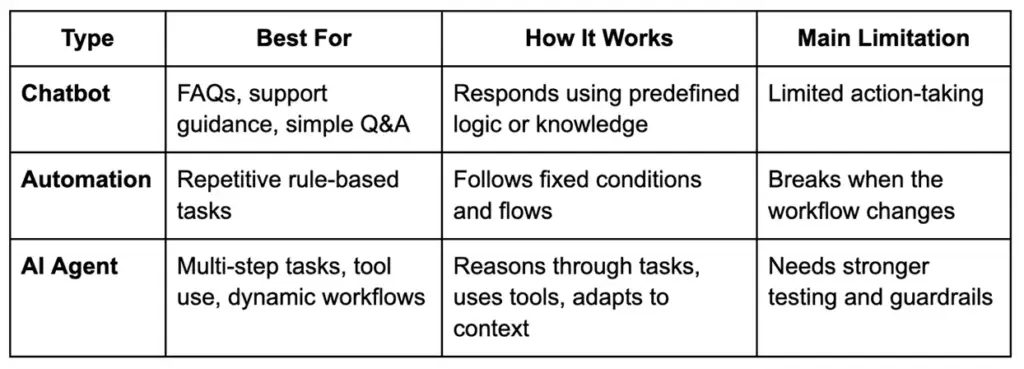
A chatbot usually answers.
Automation usually executes.
An AI agent can reason, retrieve, route, and act within defined limits.
Common Agent Patterns (RAG, Tool Calling, Planners, Multi-Agent, HITL)
There is no single agent architecture for every use case.
Common patterns include:
- RAG: retrieves relevant information from your knowledge base before generating a response
- Tool Calling: lets the agent interact with APIs, databases, CRMs, or internal functions
- Planner-Based Flows: breaks large requests into smaller steps before execution
- Multi-Agent Systems: assigns specialized tasks to different agents
- Human-In-The-Loop (HITL): pauses for review before sensitive actions such as refunds, approvals, or outbound communication
The right design depends on workflow complexity, acceptable risk, speed expectations, and business rules.
Signals You Need An Agent (And When You Don’t)
You likely need an agent if:
- the task spans multiple systems
- the agent must use tools or APIs
- answers depend on live or internal data
- the workflow changes based on context
- the system needs memory, routing, or approvals
You likely do not need an agent if:
- the use case is simple FAQ response
- a rule-based automation already works
- the workflow is static and highly predictable
- autonomy adds more risk than value
A good partner should tell you honestly when an agent is the wrong fit. That is a sign of maturity, not limitation.
The Concept-To-Code Process (BrainX-Style Delivery Playbook)
A strong custom AI development company follows a structured process that turns ideas into production-ready systems.
That process matters because AI projects can look impressive early while still failing under real business pressure. Clear stages, checkpoints, and outputs help prevent that.
Step 1 — Discovery & Success Metrics (KPIs, Constraints, Users)
The first step is defining what success actually looks like.
That includes:
- business goal
- target users
- workflow scope
- technical and legal constraints
- measurable outcomes
Typical success metrics may include response accuracy, support deflection, time saved, reduced manual effort, faster triage, or improved conversion.
Without this step, teams often build clever AI features that never solve the right business problem.
Step 2 — Data Readiness & Access (Sources, Permissions, Privacy)
This step is often where real project complexity shows up.
The team needs to understand:
- what data the agent needs
- where it lives
- who owns it
- what permissions are required
- whether the data is reliable enough
- what privacy or compliance limits apply
This may include internal documents, CRM records, ERP data, support tickets, emails, chats, and structured databases.
For sensitive use cases, strong data handling matters early. That may include redaction, access control, encrypted storage, tenant separation, and logging rules.
Step 3 — Architecture Decisions (RAG Vs Fine-Tune Vs Hybrid)
At this stage, the solution path becomes clearer.
The team may choose:
- RAG when the agent needs access to internal or frequently changing knowledge
- Fine-Tuning when output behavior, tone, or formatting needs to be highly specialized
- Hybrid Architecture when both knowledge grounding and specialized response behavior matter
This decision should not be based on hype. It should be based on cost, latency, explainability, risk, and update frequency.
Step 4 — Agent Design (Tools, Memory, Guardrails, Routing)
Once the core architecture is chosen, the agent itself needs to be designed carefully.
That includes:
- tool registry
- API calling behavior
- session and memory rules
- fallback logic
- escalation paths
- approval workflows
- routing between tools or sub-agents
- response boundaries and restrictions
Many AI failures are not really model failures. They are workflow design failures.
Step 5 — Prototype → PoC (Prove Feasibility Fast)
The PoC should validate the riskiest assumption first.
That might be:
- whether tool use works reliably
- whether retrieval quality is good enough
- whether latency is acceptable
- whether the workflow is genuinely useful to the user
A good PoC is focused. It is not trying to be the final product.
It is trying to answer one important question fast: is this concept worth building further?
Step 6 — MVP Build (Productization: UX, APIs, Reliability)
Once the PoC proves promise, the MVP phase turns the idea into a usable product.
That usually includes:
- frontend or embedded interface
- backend services
- prompt and tool versioning
- instrumentation and logs
- retry logic and error handling
- permissions model
- baseline reliability controls
This is where the project starts behaving like software delivery, not just AI experimentation.
Step 7 — Evaluation & Red Teaming (Before Production)
This is one of the most important trust-building stages in the entire process.
Before launch, strong teams test the system in structured ways. That includes:
- golden datasets
- expected-answer validation
- tool-call accuracy checks
- hallucination testing
- regression testing
- prompt injection testing
- unsafe action scenarios
- edge-case simulations
A polished demo is not enough.
Production trust comes from repeatable evaluation. If a vendor cannot explain how they test risky behavior, failures, and quality drift, that is a serious gap.
Step 8 — Deployment & LLMOps (Monitoring, Incident Playbooks)
Launching the agent is not the end of the work.
A mature deployment includes:
- latency and uptime monitoring
- usage analytics
- failure tracking
- token and cost monitoring
- rollback planning
- incident response playbooks
- change management for prompts, tools, and model versions
This is how you keep the system stable after release.
Step 9 — Iterate & Scale (Roadmap, Model Upgrades, New Tools)
The most valuable AI systems improve after launch.
Once the agent is live, the team can:
- refine prompts and workflows
- improve retrieval quality
- expand tool access
- add new use cases
- refresh evaluation sets
- test better model versions
- roll out to more teams or regions
AI delivery works best when the system is treated like a living product, not a one-time build.
Business Value: What You Get (And How To Measure ROI)
AI agent development should be tied to business outcomes, not just technical capability.
A well-built system can reduce manual effort, speed up repetitive work, improve consistency, shorten handling time, and unlock better customer or employee experiences.
Also Read: Revamping Customer Experiences With AI Chatbots in 2026
Startup Lens: Speed, Differentiation, MVP Learning
For startups, the biggest return is often speed.
A strong AI agent can help a small team:
- reduce operational load
- move faster with customer support
- automate research and internal workflows
- test new product experiences quickly
- create a real point of differentiation
For many startups, ROI shows up first in learning speed, productivity, and product momentum.
Also Read: How AI Chatbots Are Revolutionizing Customer Support and CSAT
Enterprise Lens: Reliability, Governance, Integration, Change Management
For enterprises, ROI is broader.
It may include:
- reduced handling time
- standardized workflows
- lower support or processing cost
- better use of internal knowledge
- stronger audit readiness
- safer access to business systems
- better consistency across teams
This is also where governance becomes part of value. If the system saves time but creates security, privacy, or compliance problems, the real return drops quickly.
KPI Examples By Use Case (Support, Sales Ops, Finance, Engineering)
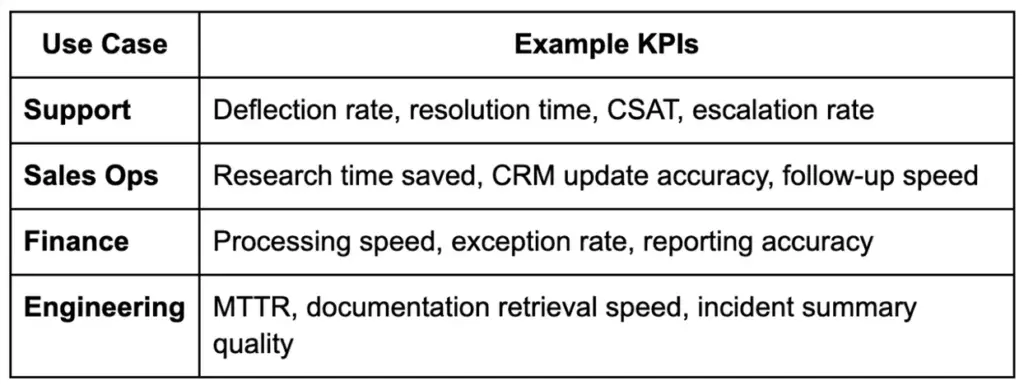
Whenever possible, connect these metrics to hours saved, cost reduction, risk reduction, or revenue support. That makes the business case easier to defend.
Use Cases That Fit A Custom AI Development Service Company (With Examples)
The best use cases for a custom AI development service company are usually the ones that involve internal systems, business rules, approvals, or domain-specific complexity.
These are not generic chatbot tasks. They are real workflow problems.
Customer Support Agent (Knowledge + Actions: Refunds, Status, Triage)
A customer support agent can retrieve answers from a knowledge base, check order status, guide returns, triage requests, and support approved actions such as refunds or escalations.
This works well when support teams handle repetitive volume but still need control and consistency.
Internal Ops Agent (HR/IT Helpdesk, Policy Q&A, Ticket Routing)
Internal teams often lose time jumping between policies, documents, systems, and tickets.
An internal ops agent can answer policy questions, suggest next steps, retrieve the right documents, and route issues into the right workflow.
Revenue Ops Agent (Lead Research, CRM Updates, Email Drafting With Approvals)
Sales and revenue teams often work across scattered platforms.
An AI agent can enrich account context, summarize new leads, update CRM fields, prepare email drafts, and pass actions for approval before anything is sent.
This is a strong example of where a custom AI development service company can add value through smart integration and workflow design.
Engineering Agent (Docs Q&A, Code Search, Incident Summaries)
Engineering teams can use AI agents to search internal docs, summarize incidents, surface likely causes, and support on-call workflows.
These use cases need stronger controls, but they can save meaningful time when speed matters most.
Cost, Timeline, And Resourcing: What Determines The Budget
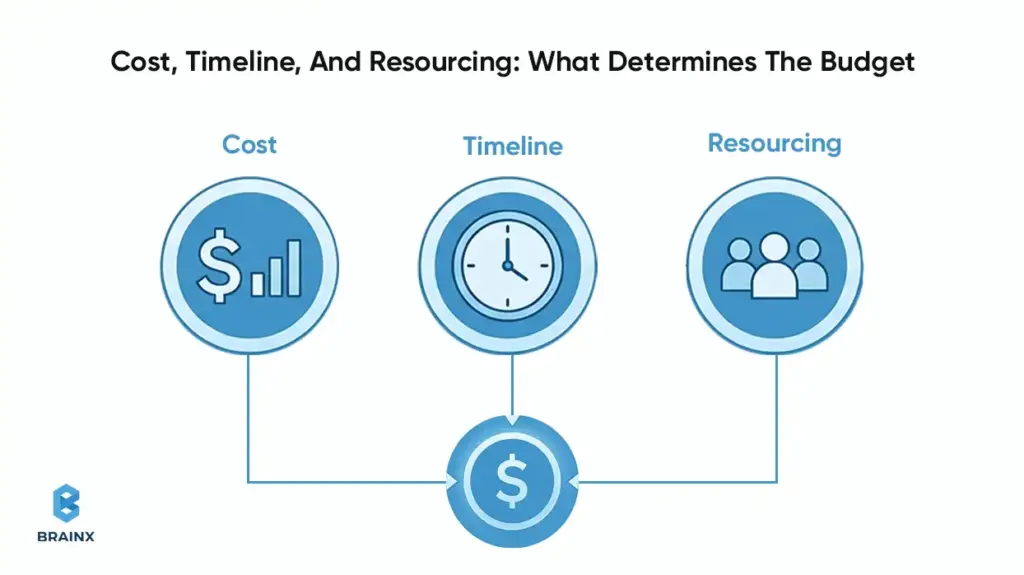
The cost of working with a custom AI development company depends on what you are building, how complex the workflow is, how much testing is needed, and how much operational risk the system must handle.
It helps to look at the budget in phases instead of expecting one simple number.
Typical Timelines (Discovery, PoC, MVP, Production Hardening)
A common timeline looks like this:
- Discovery and Scoping: 1 to 2 weeks
- Proof of Concept: 2 to 4 weeks
- MVP Build: 6 to 12 weeks
- Production Hardening: 2 to 6 weeks
The final timeline depends on data readiness, system integrations, approvals, and evaluation depth.
Cost Drivers (Data Complexity, Integrations, Eval Rigor, Compliance)
The biggest cost drivers usually include:
- messy or fragmented data
- number of systems being connected
- complexity of retrieval and orchestration
- amount of UI or workflow customization
- evaluation depth
- security and compliance requirements
- rollout and support expectations
High-stakes use cases usually cost more because they need stronger testing, tighter controls, and better operational monitoring.
In-House Vs Partner: When Each Makes Sense
Build in-house when:
- AI is central to your product strategy
- you already have strong technical leadership
- you can support evaluation, deployment, and LLMOps over time
Work with a partner when:
- you need faster time to market
- the use case spans multiple systems
- your team wants help with architecture and delivery discipline
- you want to avoid costly trial-and-error during the first rollout
A good partner can shorten the path to value by helping your team avoid common AI delivery mistakes.
Risks, Failure Modes, And How Good Teams Prevent Them
AI systems can create strong business value, but they also introduce new failure modes.
Good teams do not hide those risks. They design around them from the start.
Hallucinations & Bad Actions (Guardrails, Verification, Tool Constraints)
Hallucinations are not only wrong answers.
In agent workflows, they can also become wrong actions.
To reduce this risk, strong teams use:
- grounded retrieval
- guardrails
- action constraints
- fallback logic
- approval steps for sensitive actions
- verification against live systems when needed
If an agent can do things, it should never rely on prompt wording alone to stay safe.
Data Leakage & Privacy (PII Redaction, Access Control, Tenancy)
If the system uses internal or sensitive data, privacy handling must be built in early.
That often includes:
- role-based access
- data masking or redaction
- encryption
- controlled logs
- tenant separation
- limited data exposure to the model layer
This is especially important in enterprise and regulated environments.
Vendor Lock-In (Portable Architecture, Model Abstraction)
Teams should avoid designing everything around one provider if flexibility matters long term.
A healthier architecture may include:
- model abstraction layer
- modular tool setup
- portable data handling
- documented migration paths
This keeps your options open as business needs, provider pricing, and model quality change.
Model Drift & Performance Decay (Monitoring + Eval Regression)
AI performance can slowly decline even when the product still appears to be working.
That is why good teams keep:
- baseline metrics
- regression testing
- live monitoring
- refreshed evaluation sets
- alerting when outputs start shifting
This is how trust stays intact after launch.
How To Choose The Right Custom AI Agent Development Company (Scorecard)
Choosing the right custom AI agent development company is not about who gives the most exciting demo.
It is about who can design, test, secure, deploy, and support the system properly.
Also Read: How to Choose a Software Development Company Fundamental Do’s and Don’ts
Technical Proof To Request (Demo + Eval Results + Architecture)
Ask vendors to show:
- how the workflow is designed
- how tools are used safely
- how quality is measured
- how edge cases are tested
- why they chose the architecture they are proposing
You want evidence they understand how the system behaves outside the happy path.
Delivery Proof (Roadmap, Sprint Cadence, QA, Documentation)
Ask how the team actually delivers work.
Look for:
- clear sprint structure
- defined outputs by phase
- QA discipline
- documentation quality
- handover readiness
- realistic communication process
Trust Proof (Security Posture, Compliance Readiness, References)
Trust matters even more when the workflow touches internal systems or sensitive data.
Ask about:
- security posture
- privacy and compliance handling
- ownership of code and assets
- support after launch
- client references
- examples of long-term project outcomes
Red Flags (Demo-Only, No Evals, Unclear Data Handling)
Watch for these warning signs:
- no evaluation methodology
- vague answers about security or privacy
- no monitoring or rollback plan
- unclear ownership terms
- polished demo, but no explanation of failure handling
If the team cannot explain how it tests risky behavior, that is a gap you should take seriously.
Implementation Checklist (What You Need From Your Side)
Even the best partner needs client-side readiness to move quickly.
The more prepared your side is, the smoother the project becomes.
Stakeholders & Approvals
Make sure you have:
- business owner
- technical owner
- security or compliance input where needed
- decision-maker for scope and rollout
- internal sponsor who can remove blockers
Data Sources & Permissions
Prepare:
- list of knowledge sources
- system access requirements
- data owners
- permission boundaries
- privacy and legal considerations
Tooling/Integrations List
Document the tools the agent will need to interact with, such as:
- CRM
- ERP
- ticketing system
- knowledge base
- communication tools
- analytics platform
- internal databases
Definition Of Done + Rollout Plan
Agree on:
- success metrics
- test criteria
- pilot user group
- rollout phases
- support ownership
- post-launch feedback loop
It gives the project a clearer path and helps both sides move faster.
How BrainX Helps With Custom AI Agent Development
Turning an AI idea into a working system takes more than experimentation. It takes delivery discipline, technical clarity, and a practical understanding of how AI fits into real business workflows.
That is how BrainX works. As a custom AI development company, we help businesses move from concept to production with a delivery approach built around usability, security, and long-term value.
What We Build (Agentic Apps, RAG Systems, Workflow Automation)
We build AI solutions that are designed to work inside real products and real operations.
That includes:
- agentic applications
- RAG-powered business assistants
- workflow automation solutions
- AI systems connected to internal tools and business data
Our focus is not adding AI for trend value. It is building something that solves a real problem and fits the way your team works.
How We Deliver (Discovery, Rapid PoC, Eval-First, Production Hardening)
Our approach starts with understanding the workflow, users, goals, and constraints.
From there, we move into rapid validation, MVP delivery, structured evaluation, and production hardening. We keep a strong focus on measurable outcomes, safe workflows, and practical rollout planning.
That means you are not just getting a model experiment.
You are getting a path to production.
What You Get (Artifacts, Code Ownership, Handover, Support Options)
When you work with BrainX, you get more than a prototype.
You get:
- structured discovery
- delivery documentation
- clear architecture thinking
- production-focused build quality
- practical handover support
- flexible support options after launch
If you are looking for a custom AI development company that can help you move from discovery to PoC to MVP to production, BrainX is ready to help.
FAQ Section
What Does A Custom AI Development Company Do Compared To An Off-The-Shelf AI Tool?
An off-the-shelf tool gives you a shared product with fixed limits. A custom AI development company builds around your workflow, your data, your systems, and your business rules. That gives you more control, deeper integration, and a better fit for complex use cases.
How Do I Know If I Need A Custom AI Agent Development Company Or A Chatbot Platform?
If you only need simple FAQ responses, a chatbot platform may be enough. If the workflow needs tool use, approvals, live data, or multi-step task handling, a custom AI agent development company is usually the better choice.
How Long Does It Take To Build An AI Agent With A Custom AI Development Company?
A focused PoC may take a few weeks. A stronger MVP often takes a few months. A production-ready system takes longer when integrations, compliance requirements, and evaluation depth increase.
How Much Does It Cost To Hire A Custom AI Development Service Company?
The budget depends on the use case, data condition, integration scope, compliance needs, and testing depth. A custom AI development service company will often scope the work in stages so you can validate value before scaling the investment.
How Do Companies Test And Evaluate AI Agents Before Production?
They use structured evaluation methods such as golden datasets, scenario testing, tool-call validation, regression testing, hallucination checks, and red-team style reviews. Strong teams also test how the agent behaves when prompts, data, or workflows go wrong.
Can A Custom AI Agent Integrate With Our CRM, ERP, And Internal Knowledge Bases Securely?
Yes. That is one of the biggest advantages of custom development. With the right design, a custom AI agent can securely connect to internal systems using access controls, encryption, logging, and permission-aware workflows.