 June 8, 2026 -
  55 minutes read

Retail leaders are no longer debating whether cameras can “see,” they are deciding which store decisions should be automated, measured, and tied directly to revenue. Computer vision in retail now means a practical layer of perception across stores and back rooms: systems that detect shelf gaps, mislabels, shrink patterns, queues, safety risks, and process mistakes, then turn those signals into tasks, alerts, and measurable KPIs.
The opportunity in 2026 is not “more video,” it is more operational truth. Continuous measurement of store conditions means increased availability, optimal labor deployment and minimized losses without sacrificing customer experience.
Key Takeaways
- Shelf availability, self-checkout loss prevention, and price/promo compliance generally provide the quickest payback as they relate easily to sales, margin, and shrink KPIs.
- The winning deployment pattern is edge-first inference (low latency, privacy) plus cloud analytics (trend reporting, model monitoring).
- Use video analytics as an operations product: assign an owner, link to POS/inventory/WMS and funnel findings into task management systems for stores to take action.
- Initially, run “instrumentation-light” tests with existing cameras, then include dedicated cameras only when necessary for accuracy.
- A strong rollout includes governance: privacy-by-design, retention policies, model drift monitoring, and a playbook for store adoption.
What Is Computer Vision in Retail (and Why It’s Accelerating in 2026)?
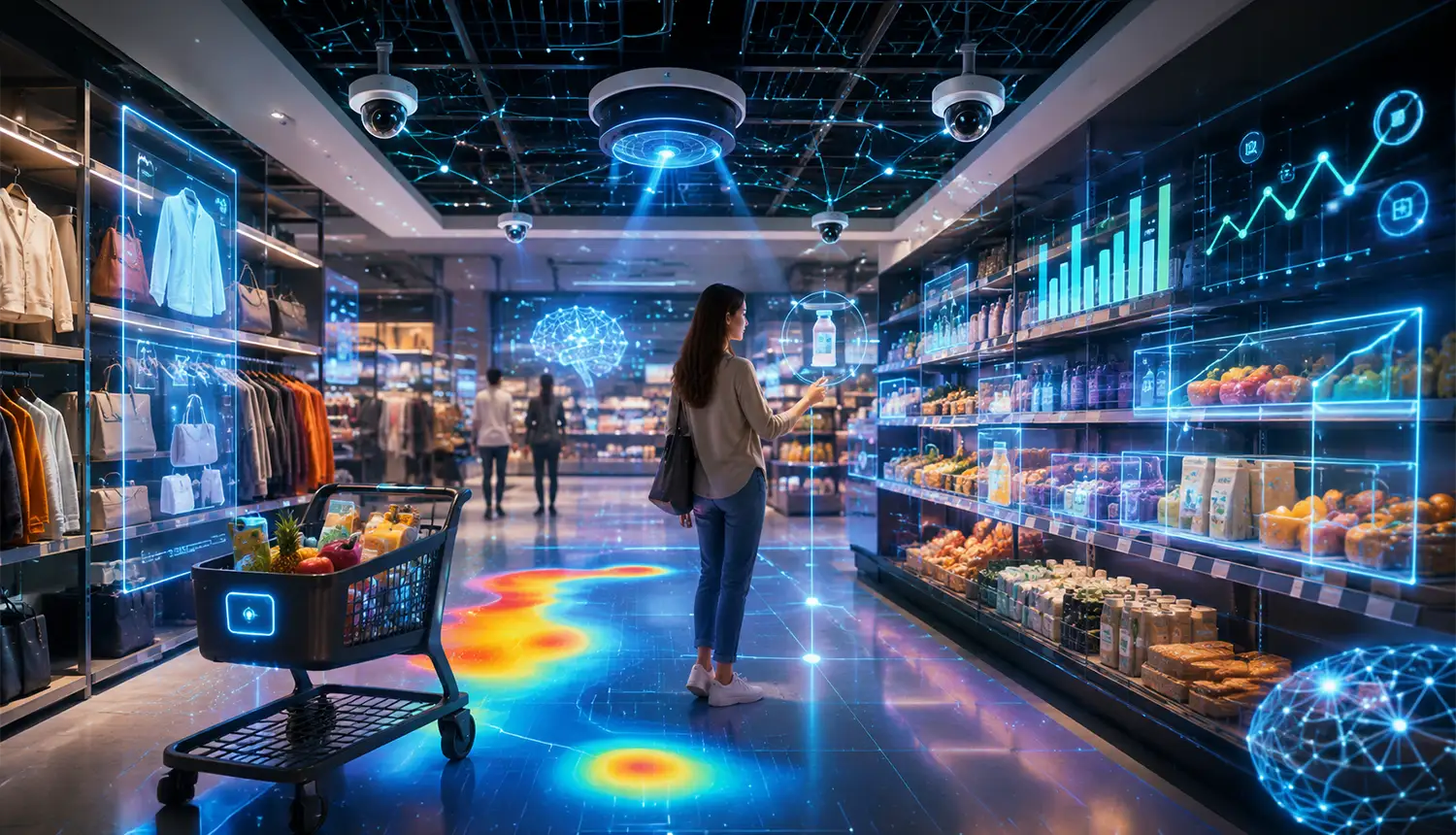
At a practical level, computer vision turns images and video into structured events: “shelf is empty,” “wrong item in facing,” “checkout behavior looks like skip-scan,” or “spill detected in aisle 4.” Those events turn into actions, for instance, opening a task for replenishment, asking an associate for help, or creating an audit report.
In 2026, the change is not the better cameras that have appeared in stores, it's that the economics and reliability of running vision models got better. Model architectures are more efficient, edge accelerators are cheaper, and deployment tooling (MLOps, monitoring, privacy controls) is easier to standardize across hundreds of locations. Continued labor shortages and higher expectations in regard to availability and checkout speed also drive adoption.
The market growth reflects that shift. According to The Business Research Company, the computer vision market reached US$17.75 billion in 2025 and is expected to grow to US$37.1 billion by 2030, at a 15.9% compound annual growth rate. For retailers, that growth matters because computer vision is moving from isolated pilots into practical store operations, including inventory management, loss prevention, checkout support, and customer behavior analysis.
Where it runs matters. To minimize latency and minimize raw video motion, many retailers process the video near the camera (edge inference). Others may opt for a hybrid solution: detection on device, and then upload only events, counts, and confidence scores to the cloud for analytics dashboards and model monitoring.
Last but not least, regulation has improved in the past couple of years. Many programs now ship with explicit retention controls, signage requirements, access logging, and privacy impact assessments. The result is that more teams can move from “interesting demo” to a controlled production system.
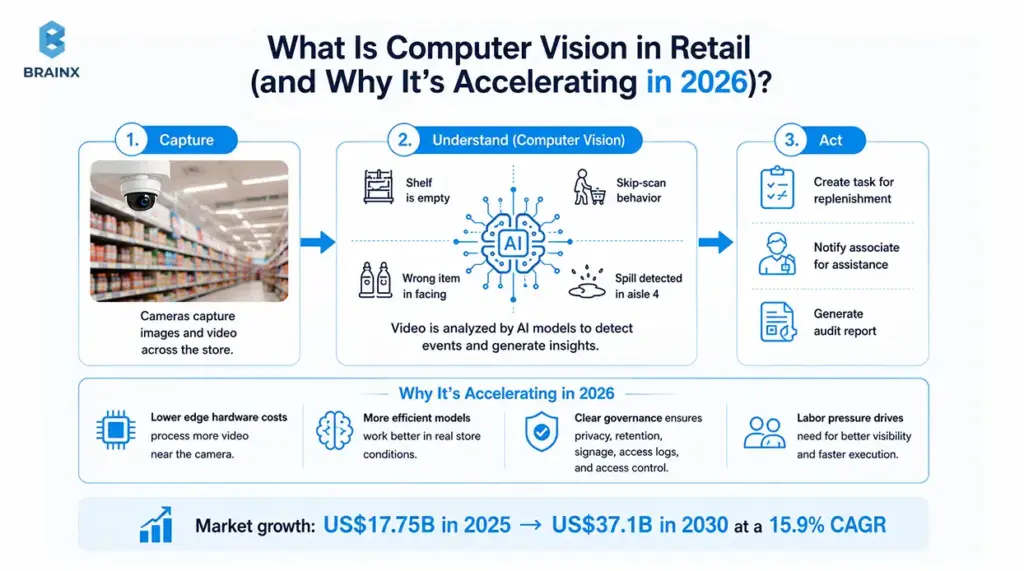
The 2026 acceleration comes from four practical shifts:
- Lower edge hardware costs: Retailers can now process more video near the camera instead of sending every stream to the cloud. It mitigates latency, bandwidth-related stress and privacy risks.
- More efficient vision models: New models are more efficient in challenging real store situations, including glare, occlusion, crowded aisles, and changing packaging.
- Clearer governance expectations: Privacy impact assessments, retention rules, signage, access logs, and on-device processing are becoming standard parts of retail AI programs.
- Labor and execution pressure: Stores need better visibility without adding constant manual audits. Vision systems help teams detect problems earlier and route them into tasks.
Together, these shifts are making computer vision in retail less experimental and more operational. The goal is no longer just to “watch” the store, but to turn visual signals into measurable actions.
Payoffs Of Adopting Computer Vision In The Retail Industry
The payoff of computer vision is not just better visibility, it is better execution. When stores can detect problems earlier and route them into clear workflows, teams can protect sales, reduce losses, improve customer experience, and make store operations more measurable.
For retailers, the strongest returns usually come from practical use cases that solve everyday problems: empty shelves, long queues, pricing errors, shrink, poor product visibility, and slow manual audits.
Better On-Shelf Availability
One of the clearest payoffs is improved shelf availability. If a product is in the stockroom but not on the shelf, the sale can still be lost. Computer vision helps identify shelf gaps, wrong placements, and low-stock areas before they become long out-of-stock periods.
This gives store teams faster replenishment signals and helps category managers understand where availability issues happen most often. The result is fewer missed sales and a more reliable shopping experience.
Reduced Shrink And Margin Leakage
Shrink, mis-scans, ticket switching, pricing errors, and return abuse can quietly reduce profit across stores. Computer vision helps retailers detect these issues earlier, especially in high-risk areas like self-checkout, returns counters, promotional displays, and stockrooms.
The benefit is not only loss prevention. It is also better margin control. When price labels, promotions, and checkout activity are easier to verify, retailers can reduce leakage without adding unnecessary friction for genuine shoppers.
Faster Store Execution
Retail teams often lose time finding problems before they can fix them. Computer vision reduces that delay by turning visual signals into tasks, alerts, or audit records.
Instead of manually checking every shelf, queue, display, or back-room process, teams can focus on the issues that need action. This helps managers respond faster during peak hours and gives store associates clearer priorities during the day.
Improved Customer Experience
A better-run store usually creates a better customer experience. Shoppers are more likely to find products, move through checkout faster, see accurate prices, and feel that the store is clean, safe, and organized.
Computer vision supports this by improving the moments that customers notice most: shelf availability, queue flow, product discovery, checkout accuracy, and store safety. These small improvements can compound across thousands of daily interactions.
More Reliable Audits And Compliance
Manual audits are useful, but they are limited by time, staff availability, and inconsistency across locations. Computer vision can support more frequent checks for planogram compliance, promotional execution, safety risks, restricted areas, and store standards.
This gives operations teams a clearer view of what is happening across stores. It also creates a stronger audit trail because issues can be tracked by time, location, confidence score, response status, and resolution.
Smarter Decisions Across Stores
Computer vision helps retailers compare store performance with more context. Instead of relying only on POS data, teams can understand what happened before the sale or missed sale.
For example, a category may underperform because the product was out of stock, the display was ignored, the aisle was congested, or the checkout experience slowed down. Visual data helps explain the “why” behind store performance.
Stronger Foundation For Retail Automation
The long-term payoff is a more automated and responsive retail operation. Once visual signals are connected to POS, inventory, WMS, task management, and analytics systems, retailers can build smarter workflows over time.
This does not mean removing people from the process. It means giving teams better signals, faster context, and clearer actions so they can run stores with more confidence.
The Main Payoff: Turning Store Conditions Into Action
The real value of computer vision comes when it changes what happens next. A shelf gap should create a replenishment task. A queue should trigger a staffing decision. A pricing mismatch should create a correction workflow. A safety issue should lead to a faster response.
That is the difference between passive video and operational intelligence. Computer vision pays off when it helps retailers act faster, measure better, and scale what works.
The Revenue Framework: How Computer Vision Actually Makes (or Saves) Money
Vision projects are successful when they are run like a revenue program and not like a science experiment. That means mapping each use case to a KPI, a data source, and a payback window before you install a single new camera.
In most cases, business cases are divided into three categories: revenue growth, cost reduction, and risk reduction. The same deployment can contribute to several buckets, but your pilot should select one main KPI to make it clear that the deployment was successful.
A practical rule for 2026: if you cannot connect the detection output to a store action within minutes or hours, it will not change outcomes. Detection without execution becomes another dashboard that nobody checks. This is why integrations (tasking, POS, inventory, WMS) are part of the ROI, not an “extra.”
Below is a KPI map you can use to pressure-test candidates before scoping.
| Use Case | Primary KPI | Data Required | Typical Payback Window |
| Shelf Availability + Planogram Compliance | On-shelf availability, lost sales reduction, task completion time | Cameras, planograms, product catalog, inventory signals | 3–9 months, often faster in high-volume categories |
| Price/Promotion Compliance | Margin leakage reduction, price mismatch rate, complaint rate | Shelf label images, promo calendar, pricing files | 2–6 months |
| Self-Checkout Loss Prevention | Shrink reduction, intervention accuracy, false positive rate | SCO video, POS events, item catalog, incident logs | 3–9 months |
| Freshness & Quality Monitoring | Waste reduction, markdown rate, customer complaints | Category images, quality standards, optional temperature data | 6–12 months |
| Queue & Staffing Optimization | Average wait time, abandonment reduction, conversion lift | Lane cameras, staffing schedules, POS throughput data | 2–6 months |
| Customer Journey Analytics | Zone engagement, dwell time, layout test performance | Overhead cameras, store zone mapping, POS/category sales data | 4–8 months |
| Smart Cart / Scan-And-Go Augmentation | Scan accuracy, checkout speed, scan-and-go shrink reduction | Cart cameras, item catalog, basket events, POS data | 6–12 months |
| Warehouse / Back-Of-Store Verification | Receiving accuracy, picking error rate, dispute reduction | Dock cameras, ASN/PO data, WMS events, SKU identifiers | 6–12 months |
| Safety & Compliance Monitoring | Time-to-response, incident rate, audit completion | Aisle/back-room cameras, safety policies, incident logs | 6–18 months |
| Returns Fraud Detection | Fraud loss reduction, manual review rate, dispute rate | Return-desk camera, product images, transaction history, return policies | 4–8 months |
These payback windows should be treated as directional, not universal. The best business opportunity often can be identified when there is measurable leakage such as shrink, out of stocks, long waits, price errors, or return abuse.
For example, retail shrink has represented more than $100 billion in annual losses in the U.S. market in recent NRF-referenced reporting, while long checkout waits and locked-product friction can directly affect store conversion. This is why the best pilots start with a baseline, a control group, and a clear dollar model before scaling.
Revenue Growth Levers for Computer Vision in Retail
Availability is revenue. The most direct growth lever is ensuring the shopper finds what they came to buy. Vision-based shelf intelligence can identify out-of-stocks, wrong facings, and display non-compliance earlier than cycle counts or occasional audits.
Conversion also depends on flow. Long waits and confusing lanes reduce conversion, especially in convenience and high-frequency formats. Measuring queue length and service time provides operational signals that can be tied to staffing and lane-opening rules.
Merchandising becomes measurable. Heatmaps and dwell analysis help quantify whether endcaps and promotional zones are doing their job. The goal is not surveillance, it is measuring interaction patterns at a zone level so teams can optimize layouts and promotional placement.
Cost Reduction Levers
Shrink and margin leakage are where many pilots find quick payback. Self-checkout supervision and promo/label verification reduce losses without forcing retailers to add headcount everywhere.
Labor optimization is often misunderstood. The biggest savings rarely come from “replacing people,” they come from eliminating low-value audits and reducing rework: fewer rescans, fewer receiving disputes, fewer manual price checks, and fewer repeated replenishment walks caused by inaccurate signals.
Process automation is another lever. When vision outputs create tasks directly in the tools store teams already use, you reduce the overhead of coordinating fixes across departments.
The clearest cost-reduction cases usually come from repeatable, high-volume problems. A single price mismatch may look small, but repeated errors across hundreds of stores can quietly erode margin. The same applies to shelf audits, receiving checks, self-checkout exceptions, and returns verification. When these checks are automated and routed into existing workflows, store teams spend less time finding problems and more time fixing them.
Risk Reduction Levers
Safety incidents (spills, blocked exits, restricted zones) carry direct costs and brand impact. Vision-based detection can reduce time-to-response, and that often matters more than perfect accuracy.
Compliance is both internal and external. Retailers use vision to prove execution: promotional compliance, required signage, and restricted-area policies.
Chargebacks and disputes also show up here, particularly in returns and item condition validation. Vision evidence and structured audit trails can reduce dispute costs and operational friction.
Risk reduction also depends on evidence quality. A useful vision system does not only detect a spill, blocked exit, missing sign, or suspicious return. It records the event, time, confidence score, response status, and final resolution. That audit trail helps retailers improve internal compliance, defend decisions, and reduce the operational confusion that often follows incidents.
Computer Vision Use Cases And Real-World Examples In Retail
The strongest retail use cases are not always the most futuristic ones. They are the ones that solve visible store problems: long checkout queues, inaccurate inventory, missed shelf gaps, shrink, poor product discovery, and inconsistent store execution.
Real-world adoption also shows an important pattern. Retailers are not using computer vision as one large transformation project. They are applying it to focused moments in the customer journey and store workflow, then scaling what proves useful.
Cashierless Checkout And Exit Verification
Cashierless checkout is one of the most visible examples of retail computer vision. Cameras, sensors, item recognition models, and payment systems work together to understand what shoppers pick up, put back, and take out of the store.
Amazon’s Just Walk Out technology is one example. It uses cameras, AI, and sensors to identify items selected from shelves and allow customers to leave without a traditional checkout line. The model has worked better in smaller grab-and-go formats than in some larger grocery environments, which is a useful lesson for retailers planning similar systems.
Sam’s Club is another practical example. Its AI-powered exit technology scans carts at the door and compares items with the customer’s Scan & Go order. The goal is not to remove the entire shopping journey, but to reduce exit friction and speed up verification.
Shelf Intelligence And Inventory Visibility
Shelf monitoring is one of the most practical computer vision use cases because it connects directly to availability and lost sales. Cameras or shelf-scanning systems can detect empty spaces, misplaced products, incorrect labels, and planogram issues.
In real stores, this is valuable because inventory systems often say a product is available even when it is not on the shelf. Computer vision helps close that gap between system inventory and shelf reality.
The best use case is not full SKU recognition from day one. A simpler starting point is gap detection for high-velocity categories, then adding SKU-level recognition where it improves replenishment quality.
Customer Movement, Crowd Flow, And Heat Maps
Retailers also use computer vision to understand how shoppers move through physical spaces. Crowd analysis, footfall tracking, and heat maps can show which entrances, aisles, displays, and checkout areas receive the most attention.
This helps teams answer practical questions:
- Which campaign display actually attracts shoppers?
- Where do customers slow down or abandon the journey?
- Which aisles become congested during peak hours?
- Which store zones create engagement but not sales?
The value is not individual tracking. The value is aggregated store intelligence that supports layout decisions, staffing plans, and merchandising tests.
Loss Prevention And Self-Checkout Monitoring
Loss prevention is another major real-world use case. Computer vision can help detect skip-scans, ticket switching, unusual checkout behavior, restricted-area activity, or repeated patterns linked to shrink.
This is especially relevant as self-checkout and scan-and-go models become more common. The risk is that convenience can create new loss points if the system cannot verify items accurately.
The safest approach is assistive detection. Vision systems should flag high-confidence issues for staff review, not make automatic accusations. This protects customer experience while still helping reduce preventable losses.
Product Discovery And Virtual Try-On
Computer vision is also improving product discovery, especially in categories where appearance, fit, or visual confidence affects purchase decisions.
In apparel, beauty, eyewear, and furniture, visual try-on can help shoppers see how a product may look before buying. In-store image recognition can also help customers scan a product, check stock, find similar items, or request associate support.
This use case matters because it connects physical retail with digital convenience. A shopper can stand in a store, use visual search, and receive the type of product guidance they expect from ecommerce.
Store Operations And Quality Control
Some of the strongest use cases happen behind the scenes. Computer vision can help monitor signage, check display execution, validate receiving, detect damaged goods, inspect freshness, and identify safety risks such as spills or blocked aisles.
These examples may feel less exciting than cashierless stores, but they often have clearer ROI. They reduce repeated manual checks, improve consistency, and give store teams faster visibility into operational issues.
The practical lesson is simple: computer vision works best when it is tied to a store action. If the system sees a problem and routes it to the right person, it can change outcomes. If it only produces another report, the value stays limited.
19 Computer Vision Applications in Retail That Drive Revenue (2026 Playbook)
This is the section most teams wish they had before starting. The difference between a demo and a profitable rollout is clarity on five things: how it works, data needed, KPI, integration, and a rollout tip.
Below are the core computer vision applications in retail that consistently tie to revenue and cost outcomes in 2026, with practical implementation details and “gotchas” that affect payback.
A useful way to read this playbook is to scan for the use cases that match your current pain: shrink spikes, out-of-stocks, promo execution, labor constraints, or returns fraud. Then pick one that can be piloted with minimal new instrumentation.
1. Shelf Availability, Merchandising, And Planogram Compliance
How it works: Cameras capture shelf segments and models detect gaps, low stock, wrong item placement, and planogram deviations. Some systems also estimate facings and compare against planogram expectations for each bay.
Data needed:
- Planograms (or at least category-to-shelf mapping)
- Product catalog images (for SKU recognition in key categories)
- Inventory signals (on-hand, deliveries, replenishment rules)
- Camera calibration per shelf section
KPI to track: On-shelf availability, out-of-stock duration, lost sales proxies (e.g., substitution rate), and task completion time.
Integration: POS + inventory + planogram repository, plus task management for store execution. If you can link to store labor scheduling, you can also measure whether tasks are being created at the right times.
Rollout tip: Start with 1–2 high-velocity categories (beverages, dairy, snacks) where shelf gaps quickly become lost sales. Avoid trying to recognize every SKU on day one. Use “gap detection + category-level classification” first, then add SKU-level recognition where it materially improves task quality.
2. Price Tag & Promotion Compliance (OCR At Scale)
How it works: OCR models read shelf labels and promotional signage, then match the extracted price, unit size, and promo text against your price file and promo calendar. The system flags missing labels, mismatched prices, and expired promos.
Data needed: Price files, promo schedules, label templates (if standardized), and store-specific exceptions (regional pricing, clearance rules).
KPI to track: Margin leakage, number of mismatches per store, time-to-fix, and complaint/refund rate tied to pricing disputes.
Integration: Pricing systems (or ERP), promo management tools, and store tasking. If your POS supports it, connect to override logs to validate whether mismatches are causing manual overrides at checkout.
Rollout tip: Train for your reality: label formats vary by store and often degrade over time. Build a feedback loop where associates can confirm a mismatch in one tap, so the model learns which labels and angles produce the cleanest reads.
3. Loss Prevention At Self-Checkout
How it works: Models observe scan events and customer behavior patterns to detect likely loss modes: skip-scan, ticket switching, mis-scans, item not bagged, or multiple items scanned as one. Strong systems fuse video with POS event streams to reduce false alerts.
Data needed: SCO camera feeds, POS event logs (scan timestamps, item IDs, voids), item catalog images, and known shrink patterns for your format.
KPI to track: Shrink at SCO, intervention rate, false positive rate, and conversion impact (you want lower loss without increasing friction).
Integration: POS, SCO software, associate alerting interface, and incident logging. For enterprise rollouts, integrate into your existing loss prevention case management.
Rollout tip: Position this as assistive intelligence, not accusation. Calibrate thresholds and focus on high-confidence patterns first. Over-alerting burns associate trust and can increase queue times.
4. Quality Control And Freshness Monitoring
How it works: Vision models grade visible freshness indicators (color, bruising, mold patterns, packaging integrity) and identify whether items are being rotated correctly. Some retailers combine this with time-in-case and temperature signals.
Data needed: Category-specific image datasets, quality standards (what counts as “sellable”), and optional sensor data (temperature, humidity) for better root-cause analysis.
KPI to track: Waste reduction, markdown rate, customer complaints, and availability of “fresh” SKUs at peak hours.
Integration: Inventory/ordering systems and task management for rotation and pull lists. If you have a food safety workflow tool, push evidence there.
Rollout tip: Start where visual cues are strongest and lighting is controllable, like bakery displays or packaged meat. Produce can be harder due to variety and lighting changes, so narrow the scope initially.
5. Queue & Staffing Optimization (Wait Time Prediction)
How it works: Cameras count people in line, estimate service time, and predict wait times by lane. Some setups detect when a lane is open versus staffed but idle.
Data needed: Lane camera feeds, store layout mapping, staffing schedules, and time-of-day patterns. POS throughput can help validate predicted service times.
KPI to track: Average wait time, abandonment proxies (basket drop, walkaways), transactions per labor hour, and conversion at peak periods.
Integration: Workforce management, manager dashboards, and optional trigger rules (open a new lane when predicted wait exceeds X minutes).
Rollout tip: Make it operationally actionable: pair predictions with a simple “next best action” for managers. If only a chart is produced as the output, it will not affect the behavior of the shift.
6. Heat Maps And Customer Journey Analytics
How it works: Systems create aggregated heatmaps of movement and dwell at zone level. This can measure if shoppers do or don't make it to endcaps, the amount of time spent in categories, and which paths are associated with buying (at an anonymized level if/when coupled with POS).
Data needed: Overhead cameras, store zone definitions, and optional promotional calendar. If you tie to POS, design for privacy: aggregate patterns, not identity.
KPI to track: Zone conversion rate, promotional engagement (dwell around the displays), and A/B test result of the layout.
Integration: Merchandising analytics and experimentation workflows, plus reporting dashboards for category managers.
Rollout tip: Keep it simple and privacy-forward. Focus on zones and trends, not individual tracking. You will get buy-in faster and still gain merchandising value.
7. Smart Cart / Scan-And-Go Augmentation (Item Recognition)
How it works: Items are added to the cart, and the camera on the cart or at a scan-and-go point recognizes them. The system cross-checks with the digital basket to minimize missed scans and increase customer trust in scan-and-go.
Data needed: Item image catalog, packaging variations, and scan-and-go basket events. For weighed items, integrate with scales or produce recognition workflows.
KPI to track: Scan accuracy, shrink reduction for scan-and-go and customer time-to-checkout.
Integration: Mobile app, POS and identity-free fraud signals (standard, not biometric).
Rollout tip: Start with easier categories (packaged goods) and gradually add in more difficult categories (produce, bulk) using guided UX first, before attempting to fully automate.
8. Warehouse/Back-Of-Store Automation (Receiving, Putaway, Picking Verification)
How it works: Receiving verifies carton counts, detects carton damage, and confirms item identity using cameras. In picking, vision validates the correct item and quantity picked before a tote is sealed.
Data needed: ASN/PO data, SKU identifiers, WMS events, and camera views of docks and staging. Barcode and vision together is often stronger than either used alone.
KPI to track: Receiving accuracy, dispute rate with suppliers, picking error rate, and time per receiving/picking task.
Integration: WMS, ERP and exception management tools for discrepancies and damage claims.
Rollout tip: Start at a single high-volume dock door or a single pick zone. Back-of-store environments are more controllable than aisles, and can deliver high accuracy in a short time with good accuracy in the future.
9. Safety & Compliance Monitoring (PPE, Spills, Restricted Areas)
How it works: Models detect hazards (spills, blocked exits), PPE compliance (where relevant), and presence in restricted areas. Systems can trigger alerts to managers or create tasks for cleanup and incident logs.
Data needed: Camera coverage of key aisles and back-room areas, store policy rules, and incident response workflows.
KPI to track: Time-to-respond, incident rate, and compliance audit completion.
Integration: Task management, incident reporting, and optional integration with security operations if you have one.
Rollout tip: Treat detection as triage, not enforcement. Make alerts actionable and time-bound, and track response outcomes so you can tune thresholds.
10. Returns Fraud Detection (Visual Verification + Anomaly Detection)
How it works: At returns, vision verifies item identity and condition (correct model, packaging intact, no obvious wear) and flags anomalies, such as mismatched serial labels or inconsistent packaging. This is stronger when combined with transactional patterns.
Data needed: Item reference images, serial/label rules (if applicable), return transaction history, and policies (restocking fees, condition grading).
KPI to track: Fraud loss reduction, percentage of returns requiring manual review, and dispute/chargeback rate.
Integration: POS returns module, case management, and optional customer support tooling for consistent adjudication.
Rollout tip: Keep humans in the loop for edge cases. The biggest value is consistent triage and evidence capture, not fully automated decisions on every return.
11. Cashierless Checkout And Frictionless Store Formats
How it works: Cameras, shelf sensors, item recognition models, and transaction systems work together to identify what shoppers pick up, put back, or take with them. The customer can leave the store without going through a traditional checkout lane.
Data needed: Camera feeds, product catalog images, shelf location data, basket events, customer app/session data, and payment confirmation signals.
KPI to track: Checkout time reduction, completed purchases, shrink rate, basket accuracy, and customer adoption rate.
Integration: POS, payment gateway, customer mobile app, inventory system, and loss prevention workflows.
Rollout tip: Do not start with a full cashierless store unless the business case is strong. A safer path is to pilot cashierless zones, micro-markets, or high-frequency categories where item recognition is easier and customer behavior is predictable.
12. Crowd Analysis For Store Flow And Occupancy
How it works: Cameras estimate the number of people in specific zones and detect crowding patterns across entrances, aisles, checkout lanes, and service counters. The system converts movement into zone-level insights without needing to identify individual shoppers.
Data needed: Entrance cameras, overhead store cameras, zone maps, time-of-day traffic data, and optional staffing schedules.
KPI to track: Occupancy accuracy, congestion alerts, staff response time, and traffic distribution across key areas.
Integration: Workforce management, store dashboards, safety/compliance reporting, and queue management systems.
Rollout tip: Keep the focus on aggregated movement, not identity. Crowd analysis works best when it helps store managers understand where pressure is building and where staff should be moved.
13. Footfall Analysis For Campaign And Store Performance
How it works: Footfall analysis measures how many people enter the store, pass by the storefront, or move through key areas. When connected with POS data, it helps retailers understand whether traffic is turning into sales.
Data needed: Entrance cameras, storefront cameras, time stamps, store zone mapping, campaign calendar, and POS transaction data.
KPI to track: Visitor count, walk-in conversion rate, campaign-driven traffic, sales per visitor, and peak-hour performance.
Integration: POS, marketing analytics, BI dashboards, and campaign reporting tools.
Rollout tip: Use footfall analysis to compare stores, campaigns, and time periods. A traffic spike only matters if it leads to conversion, so connect visitor counts with transaction data wherever possible.
14. Image Recognition For Product Discovery And Assisted Selling
How it works: Shoppers or associates can use image recognition to identify a product, check availability, find similar items, or trigger product recommendations. In-store cameras can also recognize product types for shelf, service, or support use cases.
Data needed: Product catalog images, SKU metadata, availability data, store location data, and optional mobile app images.
KPI to track: Product discovery rate, assisted sales, search-to-purchase conversion, and reduced associate lookup time.
Integration: Product information management system, inventory system, mobile app, ecommerce platform, and associate tools.
Rollout tip: Start with categories where visual discovery clearly improves the buying journey, such as apparel, beauty, furniture, electronics, or specialty retail. Keep the user experience simple: scan, identify, check availability, and suggest next action.
15. In-Store Marketing And Personalized Promotions
How it works: Vision systems can measure zone engagement, display interaction, and shopper movement patterns to improve in-store marketing decisions. When used with loyalty or app-based consent, retailers can also trigger more relevant recommendations or offers.
Data needed: Zone-level engagement data, campaign calendar, product placement data, promotional rules, and optional loyalty/app signals.
KPI to track: Display engagement, promo conversion, basket uplift, dwell time near campaign zones, and revenue per promoted area.
Integration: CRM, loyalty platform, digital signage, campaign management tools, and POS.
Rollout tip: Keep personalization consent-based and privacy-forward. For most retailers, the stronger starting point is not identifying shoppers, but measuring which displays, endcaps, and promotional areas actually influence buying behavior.
16. Inventory Management And Automated Cycle Counts
How it works: Computer vision can support inventory accuracy by checking shelf conditions, stockroom placement, receiving activity, and item movement. Instead of relying only on manual counts, the system gives retailers more frequent visibility into what is physically present.
Data needed: Shelf cameras, stockroom cameras, product catalog, inventory records, receiving logs, planograms, and WMS/ERP data.
KPI to track: Inventory accuracy, stockout reduction, phantom inventory reduction, replenishment speed, and cycle count efficiency.
Integration: Inventory management system, ERP, WMS, POS, and replenishment workflows.
Rollout tip: Do not try to automate every inventory process at once. Start with high-value categories, high-shrink SKUs, or areas where inaccurate inventory regularly creates lost sales.
17. Security Systems And Suspicious Activity Detection
How it works: Computer vision can support store security by detecting unusual movement patterns, restricted-area access, repeated visits to blind spots, after-hours activity, or behavior that may require human review.
Data needed: Security camera feeds, store layout maps, restricted zone definitions, incident history, and time-based access rules.
KPI to track: Incident response time, verified security events, false alert rate, and reduction in preventable losses.
Integration: Security operations tools, incident management systems, access control systems, and loss prevention workflows.
Rollout tip: Keep human review in the loop. Security-related alerts should help teams prioritize attention, not automatically accuse shoppers or employees.
18. Store Operations Automation Beyond Checkout
How it works: Vision systems can automate small but frequent store operations tasks, such as monitoring signage, checking blocked aisles, detecting unattended spills, validating display execution, and confirming whether service areas are ready.
Data needed: Store camera feeds, operating standards, task rules, zone maps, and issue categories.
KPI to track: Task completion time, audit pass rate, operational consistency, and manager follow-up time.
Integration: Store task management, operations dashboards, audit tools, and communication platforms.
Rollout tip: Choose operational tasks that are visible, frequent, and easy to verify. Store operations automation works best when it reduces repeated manual checks instead of creating extra reporting work.
19. Virtual Mirrors And Visual Try-On Experiences
How it works: Computer vision and augmented reality allow shoppers to try products visually without physically wearing or applying them. This is especially useful for apparel, eyewear, cosmetics, accessories, and furniture-style placement experiences.
Data needed: Product images or 3D assets, customer-facing camera input, fit/size rules, product variants, and ecommerce or in-store product data.
KPI to track: Product engagement, add-to-cart rate, conversion rate, return reduction, and assisted sales.
Integration: Ecommerce platform, mobile app, product catalog, inventory system, and in-store kiosks or smart mirrors.
Rollout tip: Start with categories where visual confidence directly affects buying decisions. The goal is not to make the experience flashy, but to reduce uncertainty before purchase.
Latest Computer Vision Applications in Retail (What’s Emerging for 2026 & Beyond)
The next wave is less about “new cameras” and more about new interfaces and governance around vision outputs. Several latest computer vision applications in retail are becoming viable because models can understand scenes in richer ways, and because retailers are learning how to deploy them safely.
A practical way to evaluate emerging capabilities is readiness level: production now, pilot next, or later. Teams get into trouble when “cool” becomes the selection criteria, instead of deployment constraints, privacy risk, and integration effort.
Below are the most meaningful emerging patterns we see for 2026 and beyond, with the caveat that maturity varies by store format, regulatory region, and data quality.
Vision-Language Models as the Latest Computer Vision Applications in Retail
Vision-language models (VLMs) add a conversational layer on top of video and images. Instead of building a separate detector for every question, teams can ask: “Show me all instances of blocked fire exits this week,” or “Summarize the last 20 self-checkout incidents by type and aisle.”
The value is speed: faster audits, faster incident review, and lower friction for non-technical users. The risk is governance: prompt-driven systems can hallucinate or over-generalize, so you still need controls like confidence scoring, traceable evidence, and human review for high-impact decisions.
In practice, the most reliable pattern is: structured detectors produce events, and VLMs help search, summarize, and explain those events. That keeps the system auditable and reduces surprises.
Synthetic Data For Faster Rollout Across Stores
Labeling is a bottleneck, especially for rare events like ticket switching, spills, or certain safety incidents. Synthetic data can help by generating controlled variations: lighting differences, camera angles, occlusions, packaging changes, and simulated fraud patterns.
Done well, synthetic data reduces the number of real-world examples needed to reach acceptable accuracy. Done poorly, it trains models on unrealistic patterns and degrades performance in production. The key is to blend synthetic data with a smaller set of high-quality real labels from your actual stores.
For retail teams, the practical win is shortening the time from “pilot in 5 stores” to “expand to 50 stores” without relabeling everything from scratch.
On-Device (Edge) Multimodal Analytics For Privacy-First Deployments
Edge multimodal analytics combines video, audio cues (where permitted), and POS events locally, then emits only metadata. This supports privacy-first deployments because less raw data leaves the store, and it reduces latency for real-time use cases like queue alerts and self-checkout assistance.
The constraints are real: edge devices have limited compute, models must be optimized, and upgrades must be managed across many locations. That pushes teams toward standardized inference runtimes, remote device management, and careful model versioning.
If your legal or compliance team is concerned about centralized video storage, edge-first designs can be the difference between “blocked” and “approved.”
Autonomous Audit Agents (CV + Workflow Automation)
Autonomous audit agents connect detection to operations: they create tickets, attach evidence, route tasks to the right role, and follow up if tasks are not completed. Think “computer vision plus operations automation,” not “computer vision plus more dashboards.”
The emerging advantage is consistency. Store audits become continuous and measurable, and you can compare execution across locations without adding district manager travel or manual checklists.
The caution: if you automate task creation without store context, you will generate noise. The best implementations include task throttling, confidence thresholds, and a feedback loop so stores can mark alerts as useful or irrelevant.
Disadvantages Of Computer Vision
Computer vision can create strong business value, but it is not a plug-and-play fix for every retail problem. The technology depends on store conditions, camera quality, data readiness, integrations, and the way teams respond to alerts.
Because AI systems can create risks for individuals, organizations, and society, NIST recommends managing trustworthiness across the design, development, use, and evaluation lifecycle.
That does not make computer vision weak. It means retailers should understand the trade-offs before they invest. The best projects are planned around both value and limitations from day one.
Accuracy Can Drop In Real Store Conditions
Retail stores are not controlled labs. Lighting changes, crowded aisles, glare, blocked shelves, moving shoppers, seasonal displays, and packaging updates can all affect model accuracy.
A system that performs well on clean test footage may struggle when a camera angle changes or when shelves are partially blocked. This is why real-store validation matters more than demo accuracy.
Retailers should test models across different stores, times of day, categories, and traffic conditions before scaling. Otherwise, the system may create too many missed detections or false alerts.
Data Labeling And Model Maintenance Can Become Ongoing Work
Computer vision systems need labeled examples to learn what they should detect. For simple use cases like queue length or person counting, this may be manageable. For SKU recognition, freshness monitoring, or returns verification, the labeling effort can grow quickly.
The work also does not stop after launch. Retail environments change constantly. New packaging, new shelf layouts, new promotions, and new camera placements can reduce model performance over time.
That means retailers need a maintenance plan for model monitoring, retraining, QA checks, and feedback from store teams. Without this, accuracy can slowly decline even if the system worked well during the pilot.
Integration Complexity Can Delay ROI
The biggest challenge is often not detection. It is getting the detection to do something useful.
For example, a shelf gap alert only creates value if it connects to inventory, task management, and store workflows. A self-checkout alert only helps if it syncs with POS events and reaches the right associate at the right moment.
This makes integrations a major disadvantage for teams that expect fast results. POS, WMS, ERP, CRM, pricing, inventory, and tasking systems may all have different data formats, access rules, and security requirements.
If integrations are not planned early, computer vision can become another disconnected dashboard instead of an operational tool.
Upfront And Hidden Costs Can Be Higher Than Expected
Computer vision costs are not limited to cameras and models. Retailers may also need edge devices, installation work, networking upgrades, data labeling, security reviews, integrations, dashboards, store training, and ongoing MLOps.
A pilot using existing cameras may stay lean. A chain-wide rollout with new cameras, SKU-level recognition, and multiple enterprise integrations can become much more expensive.
The hidden costs often appear after the first pilot: device management, model updates, support tickets, store retraining, and governance reviews. This is why the business case should include both pilot cost and scale cost.
Privacy Sensitivity Can Slow Approvals
Any technology that uses store video needs careful handling. Even if the system does not use facial recognition, video may still capture shoppers, employees, or sensitive store activity. The European Data Protection Board has specific guidance on processing personal data through video devices, including topics such as biometrics and new technology.
This can slow approval from legal, compliance, security, and store operations teams. In some regions, retailers may need signage, privacy impact assessments, access controls, retention rules, and clear documentation on what data is processed.
The disadvantage is not that privacy makes computer vision impossible. The disadvantage is that privacy cannot be treated as an afterthought. If governance is added late, the project can stall even after the technical proof of concept works.
False Alerts Can Disrupt Store Teams
A model that sends too many alerts can create more work instead of less. If associates receive constant shelf-gap alerts, repeated self-checkout warnings, or low-confidence safety notifications, they may start ignoring the system.
This is especially important in customer-facing environments. An unnecessary self-checkout intervention can slow the lane, frustrate shoppers, and reduce trust in the system.
The solution is not to remove alerts. It is to prioritize them. Teams should set confidence thresholds, group similar alerts, limit task volume, and let associates mark alerts as useful or irrelevant. This aligns with risk-management guidance that AI systems should be evaluated and managed for trustworthy use, not only technical performance.
Computer Vision Can Miss Business Context
Computer vision can detect what appears in an image, but it may not understand the full business reason behind it.
A shelf may look empty because inventory is delayed, the product is discontinued, or the store intentionally changed the display. A long queue may be acceptable during a short rush if staffing rules are already optimized. A return may look suspicious but still be valid under policy.
This is why visual signals need context from POS, inventory, WMS, labor scheduling, and store policies. Without that context, the model may detect the right event but recommend the wrong action.
Scaling Across Stores Is Harder Than Piloting
A pilot can be tightly managed. Scaling across dozens or hundreds of stores is different.
Stores may have different layouts, camera positions, lighting, network quality, shelf formats, and operating habits. A model that works in one flagship store may need calibration before it works in older, smaller, or high-traffic locations.
Scaling also requires repeatable deployment processes: device setup, camera naming, store training, monitoring, support, model versioning, and rollback plans. Without standardization, each new store becomes a custom project.
Computer Vision Should Not Replace Human Judgment Completely
In sensitive use cases like loss prevention, returns fraud, safety incidents, or customer behavior analysis, human review still matters.
Computer vision should support decisions, not make every decision on its own. Treating alerts as final judgments can create operational, legal, and reputational problems.
A safer approach is to use the system as assistive intelligence. It detects patterns, provides evidence, and routes issues to the right people, while humans make final decisions in high-impact situations.
When The Disadvantages Matter Most
The disadvantages of computer vision matter most when a retailer is trying to scale too fast, automate too much, or solve a poorly defined problem.
They matter less when the project starts with a focused use case, clean KPI, realistic pilot, strong governance, and clear store workflow.
The practical takeaway is simple: do not avoid computer vision because it has limitations. Build around those limitations from the start.
How To Address Computer Vision Adoption Challenges In Retail
Adoption challenges are easier to manage when retailers treat computer vision as an operational system, not only an AI model. The goal is to make the technology accurate, trusted, useful, and easy for store teams to act on.
Most challenges come from five areas: unclear goals, inconsistent store conditions, privacy concerns, weak integrations, and low adoption by store teams. Each can be reduced with the right planning before the pilot starts.
Start With A Clear Business Problem
The first challenge is choosing a use case that is too broad. “Use AI cameras in stores” is not a strong project brief. “Reduce shelf gaps in high-velocity categories” or “reduce false self-checkout interventions” is much easier to measure.
Start with one business problem, one store workflow, and one primary KPI. This keeps the pilot focused and gives leadership a clear way to judge success.
A good first use case should answer three questions:
- What problem are we solving?
- Who will act on the alert?
- How will we measure the result?
If the answer is unclear, the project is not ready for implementation.
Audit Cameras, Data, And Store Conditions Early
Many computer vision pilots slow down because teams discover too late that camera angles are poor, footage access is restricted, lighting is inconsistent, or the needed POS and inventory data is incomplete.
Before building the model, audit the store environment. Check camera resolution, placement, lighting, blind spots, network access, data permissions, and system integrations.
All of this also helps avoid overbuying hardware. In some cases, existing CCTV is enough for a pilot. In others, a few targeted cameras can improve accuracy more than a larger model or more compute.
Build Privacy And Compliance Into The Pilot
Privacy should be part of the design from the beginning, especially when cameras capture shoppers, employees, or sensitive store areas.
Retailers should define what data is collected, what is processed on-device, what is stored, who can access it, and how long it is retained. If the use case does not require identity, the system should avoid identity-level processing.
A safer approach is to use event metadata wherever possible: counts, zones, timestamps, confidence scores, and short evidence clips only when needed. This keeps the system useful without creating unnecessary privacy exposure.
Choose The Right Edge, Cloud, Or Hybrid Architecture
Architecture decisions can make adoption easier or harder. A fully cloud-based setup may be easier for analytics, but it can create bandwidth, latency, and privacy concerns. A fully edge-based setup can improve speed and data control, but it requires device management across stores.
For most retailers, a hybrid approach is practical. Time-sensitive detections run near the camera, while trend reporting, monitoring, and dashboards sit in the cloud.
The right choice depends on the use case. Queue alerts, self-checkout support, and safety detection often need fast edge inference. Layout analysis, heat maps, and historical reporting can usually run with more cloud support.
Connect Alerts To Existing Store Workflows
Adoption fails when alerts live in a separate dashboard that store teams do not check. Computer vision only creates value when detection turns into action.
If a shelf gap is detected, it should create a replenishment task. If a price label mismatch is found, it should route to the person responsible for pricing. If a queue threshold is crossed, it should trigger a staffing action.
Where possible, connect alerts to the tools teams already use, such as store task management, POS workflows, WMS, ERP, ServiceNow, Jira, or internal operations dashboards.
Keep Humans In The Loop For Sensitive Decisions
Some use cases should never rely on automated decisions alone. Loss prevention, returns fraud, customer behavior analysis, and employee-related alerts need human review.
The system should support store teams by surfacing evidence, confidence scores, timestamps, and recommended next steps. It should not automatically accuse customers, reject returns, or penalize employees without review.
This approach protects customer trust and reduces reputational risk. It also helps teams refine the model because associates can confirm, dismiss, or comment on alerts.
Control Alert Volume And False Positives
Too many alerts can damage adoption quickly. Store teams may start ignoring the system if every small issue becomes a task.
Set confidence thresholds based on the cost of being wrong. Group similar issues into one task, prioritize high-value alerts, and limit low-confidence notifications. For example, one task for a low-stock bay is more useful than ten separate tasks for individual facings.
Measure alert quality like a product metric. Track how many alerts are accepted, ignored, dismissed, or corrected by staff. This feedback helps the model and workflow improve over time.
Plan For MLOps Before Scaling
A model that works during the pilot can still degrade later. Packaging changes, seasonal displays, lighting updates, camera replacements, and store remodels can all affect accuracy.
Retailers need a basic MLOps plan before scaling. This includes model versioning, confidence monitoring, drift detection, retraining workflows, device health checks, and incident logs.
Without this, the system can become unreliable silently. With it, teams can detect performance issues early and update models without disrupting store operations.
Train Store Teams Around The Workflow, Not The Technology
Store teams do not need a deep technical explanation of computer vision. They need to know what the system detects, what each alert means, what action is expected, and how to report a bad alert.
Training should be practical and role-based. A store manager needs KPI visibility and escalation rules. An associate needs clear task instructions. A loss prevention team needs evidence review and exception handling.
The easier the workflow feels, the faster adoption improves.
Scale In Phases, Not All At Once
Retail environments vary by layout, format, traffic, region, and operating maturity. A pilot in one store does not prove that the same setup will work everywhere.
A better scale path is staged:
- Prove the use case in a small set of stores
- Expand to a more diverse group of locations
- Standardize camera setup, calibration, training, and support
- Roll out only after the model and workflow are repeatable
Following these steps keeps scale controlled and prevents every new store from becoming a custom project.
Turn Challenges Into A Rollout Playbook
The final step is documentation. Every challenge discovered during the pilot should become part of the rollout playbook.
That includes camera requirements, data access rules, privacy controls, model thresholds, alert routing, staff training, KPI dashboards, support processes, and escalation paths.
The strongest retail teams do not remove every challenge before starting. They learn from the pilot and turn those lessons into a repeatable system for scale.
What You Need to Implement Computer Vision in Retail
Implementations succeed when you treat them as a product with stakeholders, not as a model you “drop into” the store. You need the right data sources, stable camera coverage, a deployment architecture you can manage, and an operating model for continuous improvement.
The biggest misconception is that the model is the hard part. In most rollouts, the hard parts are: camera variability, lighting, integrating with POS/inventory/WMS, and getting store teams to trust and act on the outputs.
Below is a practical checklist of prerequisites that helps IT and product teams scope a pilot without overbuilding.
Data Sources & Camera Considerations (Placement, Lighting, Angles)
Start by inventorying what you already have: CCTV coverage, camera resolution, frame rate, and whether you can access RTSP streams or NVR exports. Many retailers can pilot with existing cameras for aisle-level and checkout-level use cases, then add targeted cameras where precision is needed.
Lighting and angles are not minor details. Reflections, glare on refrigerated doors, seasonal lighting changes, and camera vibration can all affect accuracy. During discovery, capture sample footage across different times of day and days of week, not just “best case” clips.
Also decide early whether you need identification-level detail. For many analytics use cases, you want zone-level counts and events, which are easier to achieve and easier to govern from a privacy perspective.
Model Approach (Off-The-Shelf Vs Custom) And When Each Wins
Off-the-shelf models can work for generic detections like “person,” “spill,” “line length,” or “box present.” They are often a fast route to a prototype, especially when paired with rules and store-specific thresholds.
Custom models win when your environment is unique: specific packaging, brand-specific planograms, your own shrink patterns, or the need to fuse video with transactional context. Custom also matters when false positives have operational cost, such as unnecessary associate interventions at self-checkout.
A common 2026 approach is hybrid: start with off-the-shelf detectors, then add custom classifiers for the critical business events that drive the KPI.
Deployment Architecture (Edge Vs Cloud Vs Hybrid)
Edge deployment is best for real-time actions and privacy constraints. You process the stream locally and send events to the cloud. This reduces bandwidth and makes it easier to limit raw video retention.
Cloud deployment can be simpler for centralized analytics and model iteration, but it increases bandwidth and compliance burdens, especially if you store video centrally.
Hybrid is the most common: inference at edge, aggregated analytics in cloud. Choose based on latency needs, privacy posture, and what your network can support across all stores.
Integrations (POS, ERP, WMS, CRM, Task Management)
Integrations are where “insight” becomes “impact.” At minimum, most revenue-tied systems need:
- POS events (for self-checkout correlation, transaction timing)
- Inventory signals (to avoid false shelf-gap alerts when stock is truly empty)
- Planograms (to know what “correct” looks like)
- Task management (so associates can act and close the loop)
If you already run ServiceNow, Jira, or a store ops tasking tool, integrate there first. Adoption rises when staff do not need yet another app.
MLOps Essentials (Monitoring, Drift, Retraining, Incident Logs)
Retail environments drift constantly: packaging changes, seasonal displays, camera replacements, remodels, and new checkout flows. Without monitoring, accuracy degrades and teams lose trust.
A minimal MLOps setup for retail includes: model versioning, confidence tracking, drift detection, a labeling feedback loop, and incident logging. You also need clear ownership: who reviews false positives, who approves model updates, and how updates roll out across stores.
Treat the system like any other production software: staged rollouts, rollback plans, and audit logs.
Cost, Timeline, and ROI: What to Expect in a 2026 Retail CV Rollout
Budgeting goes smoother when you separate pilot costs from scale costs. A pilot proves accuracy, integration feasibility, and KPI movement in a controlled set of stores. Scale is where you standardize hardware, roll out MLOps, and operationalize adoption.
A realistic plan also accounts for variability: stores have different lighting, camera placements, and network constraints. A pilot should intentionally include at least one “messy” store so you learn what breaks before chain-wide rollout.
When teams ask for a single number, the best answer is a range tied to scope. Below are typical expectations that you should validate against your footprint, camera situation, and integration complexity.
Typical Pilot Timeline (6–12 Weeks) And Success Criteria
A common pilot runs 6–12 weeks end-to-end, depending on whether you are using existing cameras and how many integrations you need. The timeline is often driven less by model training and more by security reviews, data access, and store ops coordination.
Define success criteria before the pilot starts. Good criteria include:
- Model performance targets (precision/recall at an operating threshold)
- Operational targets (task response time, intervention workflow)
- Business KPI movement (shrink reduction, availability lift, fewer price mismatches)
Make sure you include a baseline period. If you cannot compare “before vs after,” the pilot becomes subjective.
Cost Drivers (Hardware, Labeling, Integration, Maintenance)
The largest cost drivers typically fall into five buckets:
- Hardware: edge devices, targeted cameras, mounting, and store installation labor
- Data work: labeling, dataset curation, and ongoing QA
- Integration: POS/inventory/WMS connections, tasking, dashboards, and security hardening
- MLOps: monitoring, retraining pipelines, and device management at scale
- Operations enablement: store training, playbooks, and change management
For planning purposes, it helps to separate pilot cost from scale cost:
| Cost Area | What It Includes | Budget Impact |
| Cameras & Store Hardware | New cameras, mounts, cabling, edge devices, installation | Low if existing CCTV is usable, higher if new coverage is required |
| Edge / Cloud Compute | Local inference boxes, GPU usage, storage, networking | Higher for real-time use cases and multi-camera analysis |
| Data Labeling & QA | Product images, event labels, false-positive review, test datasets | Higher for custom SKU recognition or rare-event detection |
| Integrations | POS, WMS, ERP, inventory, tasking, dashboards, security review | Often one of the largest cost areas |
| MLOps & Monitoring | Model versioning, drift tracking, retraining, device health, logs | Essential for scale, not optional |
| Store Enablement | Training, SOPs, escalation rules, support workflows | Required for adoption and KPI movement |
As a practical benchmark, a focused pilot is usually easier to justify when it uses existing cameras, one or two priority use cases, and one operational integration.
Costs rise quickly when the project requires new camera infrastructure, full SKU-level recognition, multiple enterprise integrations, or chain-wide device management from day one. If you already have camera access and a clean POS event stream, you can reduce pilot cost significantly.
Measuring ROI for Computer Vision in Retail Projects
ROI measurement should follow the KPI map, but it also needs discipline about attribution. For example, if you launch a promo at the same time as a shelf-availability pilot, you need to isolate effects using store cohorts or staggered rollout.
A practical ROI method is:
- Establish baseline KPIs (4–8 weeks historical)
- Run pilot in matched stores, keep control stores unchanged
- Track operational leading indicators (task completion, alert quality)
- Track business outcomes (shrink, availability, margin leakage)
- Convert to dollars using agreed finance assumptions
Also track “hidden costs,” such as increased intervention time at self-checkout. A project can reduce shrink but still fail if it slows throughput and hurts conversion.
A simple ROI model can look like this:
ROI = Financial gain from KPI improvement - Total project cost / Total project cost
For example, if a shelf-availability pilot reduces lost sales in a high-volume category, calculate the recovered sales using baseline out-of-stock duration, average sales per SKU, and the improvement after deployment. For self-checkout, calculate prevented loss using baseline shrink, intervention accuracy, and the reduction in confirmed exceptions. For price compliance, measure margin preserved from corrected mismatches and reduced refund/complaint events.
The key is to avoid vague “AI value” claims. Every result should connect back to a measurable store outcome, such as fewer stockouts, fewer mismatches, faster response times, lower shrink, or fewer manual audit hours.

Risks, Compliance, and Common Mistakes (and How to Avoid Them)
Risk is not just legal. In retail, the biggest practical risks are: eroding store trust with false alerts, deploying without workflow integration, and creating privacy concerns that stall expansion.
Compliance requirements vary by region and by whether you process biometric identifiers. Even if you do not use facial recognition, video can still be considered personal data depending on jurisdiction and retention. This makes privacy-by-design and governance non-negotiable.
Finally, security matters because camera networks are real infrastructure. Treat video and inference systems as part of your production environment, with access control, logging, and vendor due diligence.
Privacy-By-Design (Minimize PII, Retention, On-Device Processing)
Start by minimizing what you collect and retain. For many use cases, you do not need faces, audio, or raw video storage. You can process on-device and keep only events, counts, and short clips for review when necessary.
Define retention and access policies early: who can view clips, how long they are stored, and how they are audited. Add signage and transparency where required, and ensure your legal team signs off on the exact operating model, not just the concept.
If you are considering facial recognition, treat it as a separate program with a higher bar: explicit legal review, stricter governance, and clearer business justification.
Bias And False Positives (Operational + Reputational Impact)
False positives have a cost: wasted labor, customer friction, and reputational risk if the system appears to target certain groups or behaviors unfairly. Bias can come from unbalanced training data or from how the system is used operationally.
Mitigate this by:
- Testing across diverse stores and conditions
- Monitoring false positives by store segment and scenario
- Designing “assist” workflows, not automated accusations
- Keeping humans responsible for final decisions in sensitive contexts
Operationally, measure alert quality like a product metric: acceptance rate, dismissal reasons, time-to-close.
Over-Automating Without Store Workflows (Alert Fatigue)
A common failure mode is “too many alerts, too little action.” If every shelf gap becomes a task, associates will stop trusting the system. If every self-checkout anomaly triggers an intervention, queues will grow.
Avoid this with throttling and prioritization:
- Set confidence thresholds that match the cost of being wrong
- Limit task volume per hour per department
- Bundle similar issues (one task per bay, not per facing)
- Route issues to the right role with clear instructions
Treat store teams as users. If the system makes their shift harder, adoption will collapse.
Underestimating Change Management (Store Ops Adoption)
Store adoption is not a training slide deck. It is incentives, role clarity, and feedback loops. Make one ops leader accountable for the pilot, and ensure the system creates tasks that match how work is actually done in that format.
Involve store managers early, show them how success is measured, and share wins quickly. Also create an easy way for associates to flag “bad alerts” so the system improves rather than being ignored.
How to Choose the Right Use Case (Selection Matrix for Founders & IT Leaders)
Choosing the first use case is where most ROI is won or lost. Founders and IT leaders should prioritize based on value, feasibility, and time-to-action. A use case that looks valuable but needs major camera refits and three enterprise integrations might be a second-phase project.
A simple selection matrix uses two axes: business value and complexity. You want early wins in the high value, low-to-medium complexity quadrant, ideally using existing camera infrastructure.
This section is especially useful if you are building a roadmap across multiple store formats or piloting in a subset of regions with different compliance requirements.
Retail Computer Vision Use Case Prioritization Matrix
| Quadrant | What It Means | Examples | Recommendation |
| High Value, Low Complexity | Strong business case with limited new infrastructure | Queue measurement, shelf-gap detection, price label OCR | Start here |
| High Value, High Complexity | Strong upside but heavier integration or hardware needs | Smart carts, self-checkout item recognition, advanced loss prevention | Plan after quick wins |
| Low Value, Low Complexity | Easy to pilot but limited business impact | Basic people counting, low-priority area monitoring | Use only for learning |
| Low Value, High Complexity | Hard to deploy and weak ROI connection | Over-customized automation with no clear store action | Avoid |
The best first use case is rarely the most advanced one. It is the one where the detection is reliable, the store response is clear, and the KPI can move within one pilot cycle.
Start With “Instrumentation-Light” Wins (Using Existing Cameras)
Instrumentation-light means you can reuse existing cameras and networks, and the main work is software, calibration, and integration. Common examples include queue measurement, basic shelf-gap detection for a few categories, and some safety monitoring scenarios.
This reduces procurement delays and gets you to a KPI readout faster. It also helps you learn your organization’s bottlenecks: security reviews, store coordination, and data access.
Once you have a successful pilot, it becomes easier to justify targeted camera upgrades where they materially improve accuracy.
Define Success Metrics + Store Ops Owner
Pick one primary KPI and 2–3 supporting metrics. Assign a store ops owner who can make decisions about workflow changes, staffing responses, and how tasks are prioritized.
Without an owner, pilots drift into “interesting insights” rather than operational change. With an owner, you can tune thresholds, refine task routing, and capture feedback that improves the model.
Also define the “stop criteria.” If a pilot cannot hit accuracy targets under realistic conditions, you should either narrow scope or switch use cases.
Pick A Scale Path (10 Stores → 100 → Chain-Wide)
Scaling is not linear. The first 10 stores prove feasibility. The next 100 stores test repeatability across diversity. Chain-wide rollout requires standardization: device management, monitoring, training, and support.
Design your pilot with scale in mind:
- Standardize camera naming and store layouts where possible
- Create a repeatable calibration procedure
- Automate deployment and model updates
- Plan support workflows for store issues and device failures
If you do this early, the step from 10 to 100 becomes a rollout, not a reinvention.
Getting Started: A Practical Pilot-to-Scale Plan (90 Days)
A 90-day plan forces focus. It also gives stakeholders confidence because there is a clear sequence: discovery, prototype, live pilot, then scale hardening. You do not need perfection in 90 days, you need evidence that the system can move a KPI and operate reliably.
This plan assumes you pick one or two use cases, use existing cameras where possible, and integrate into at least one operational tool (tasking or incident logging). If your environment requires new camera installs across many stores, adjust timelines accordingly.
The goal is to end day 90 with: a measured KPI lift (or loss reduction), a validated architecture, and a repeatable rollout playbook.
Week 1–2: Discovery (KPIs, Data Audit, Store Constraints)
Define the business KPI and baseline, then audit what data exists: camera feeds, POS events, inventory signals, and planograms. Identify 3–5 pilot stores that represent diversity, including at least one challenging environment.
Complete a lightweight privacy and security review early. Decide retention, access controls, and whether inference will run on edge devices.
End week 2 with a written scope: use case definition, KPI targets, integration plan, and pilot success criteria.
Week 3–6: Prototype + Data Labeling + Integration Skeleton
Build the first working prototype using representative footage. Label enough data to validate feasibility and identify failure modes. Stand up an integration skeleton that can ingest POS/inventory events and push alerts into a test task queue.
During this phase, focus on iteration speed: shorten the loop between “model change” and “store-relevant result.” Also build the first dashboard that shows model confidence and key operational metrics, not just accuracy.
End week 6 with a prototype that can run on the target architecture (edge/cloud/hybrid) and produce actionable events.
Week 7–10: Pilot In Live Stores + KPI Tracking
Deploy to live stores with controlled rollout. Train store users on what the system does, what it does not do, and how to respond to tasks or alerts.
Track KPI movement against baseline and compare to control stores if possible. Review false positives weekly with store feedback and tune thresholds accordingly.
End week 10 with a KPI readout and a list of changes needed for scale: camera adjustments, workflow tweaks, integration improvements.
Week 11–13: Harden For Scale (Monitoring, Governance, Rollout Playbook)
Add monitoring for drift, device health, and alert quality. Finalize governance: retention policies, access logs, and incident response procedures.
Document the rollout playbook: calibration steps, store training, support processes, and a standard operating procedure for updates and retraining.
End week 13 with a scale-ready package: stable architecture, measurable KPI impact, and a plan for expanding from 10 to 100 stores.
How BrainX Helps With Computer Vision in Retail
BrainX Technologies builds custom AI systems that behave like production software: secure, measurable, integrated, and maintainable. When clients engage us for computer vision in retail, the goal is not a model demo, it is a KPI-moving system that store teams can actually use.
We typically help teams choose a revenue-tied use case, validate feasibility with real footage, and deploy a pilot that integrates into existing retail operations. From there, we harden the solution for scale with monitoring, governance, and repeatable rollout processes.
What BrainX Delivers
We deliver end-to-end execution, with clear artifacts at each step:
- Use-case discovery workshops tied to KPIs and operational workflows
- Data pipelines for video ingestion, event generation, and analytics
- Model development (off-the-shelf, custom, or hybrid) with measurable targets
- MLOps for monitoring, drift detection, retraining workflows, and versioning
- Integrations with POS, inventory/ERP, WMS, and task management tools
Most importantly, we design the system so store teams can close the loop: detection becomes a task, tasks become outcomes, outcomes become ROI evidence.
Reference Architectures And Security/Privacy-First Approach
BrainX uses reference architectures that support edge, cloud, and hybrid deployments, depending on latency and privacy needs. We apply privacy-by-design principles from day one: minimize PII, reduce raw video movement, implement retention controls, and set up audit logging.
On the security side, we align with enterprise expectations: role-based access, encryption, secrets management, and secure integration patterns. If your organization requires vendor risk assessments or formal threat modeling, we can support that process during discovery.
Engagement Options And What You Get In Each
- Workshop (1–2 weeks): KPI definition, feasibility assessment, data audit, architecture recommendation, pilot plan and budget.
- Pilot (6–12 weeks): working system in live stores, integrations, dashboards, accuracy and KPI readout, operational workflow validation.
- Scale: standardized deployment, device management, monitoring, governance, rollout playbook, and continuous improvement cadence.
This structure reduces risk: you do not commit to scale costs until the pilot proves value.
Proof Points
The best proof is a measurable outcome tied to an operational KPI. If you have a target use case, BrainX can share relevant examples during a call, including:
- How we structured pilots to isolate KPI impact
- How we reduced false positives through event fusion (video + POS signals)
- How we designed task workflows that stores actually adopted
- What monitoring and governance looked like in production environments
Conclusion
The retailers winning with vision in 2026 are doing three things consistently: they pick 1–2 revenue-tied use cases, they pilot with clear KPIs and real store workflows, and they scale only after the system proves it can operate reliably across store diversity. Computer vision in retail is most valuable when it becomes an execution engine, not just analytics.
If you want help selecting the right first use case, validating feasibility with your existing cameras, and shipping a pilot that your store teams will actually use, BrainX Technologies can help you move from idea to measurable impact with a practical workshop-to-scale approach.
FAQs About Computer Vision in Retail Projects
What is computer vision in retail and how does it work?
Computer vision uses AI models to interpret images and video and convert them into events like “shelf gap detected,” “queue length high,” or “possible skip-scan at self-checkout.” In retail, the system usually combines camera feeds with operational data such as POS events, inventory, and planograms.
The models run on edge devices, in the cloud, or in a hybrid setup, then push alerts and tasks into store workflows. When implemented well, computer vision in retail improves execution speed because issues are detected continuously rather than through occasional audits.
Which computer vision applications in retail deliver the fastest ROI?
Fast ROI usually comes from use cases that directly map to dollars and have clear actions: shelf availability, price/promo compliance, and self-checkout loss prevention.
These typically improve sales capture, reduce margin leakage, and lower shrink without requiring a full store remodel. Queue optimization can also pay back quickly in high-traffic formats if staffing decisions can change in real time. The key is choosing a use case where detection leads to a fast operational response.
What cameras and infrastructure do I need to start?
Many pilots can start with existing CCTV if you have sufficient resolution, stable angles, and access to the video stream (for example via RTSP/NVR). For real-time use cases, you may add an edge device near the cameras to run inference locally and send only events to the cloud.
You will also need a secure network path, device management, and a place to store metadata and optional short clips. If accuracy is limited by angles or lighting, targeted camera upgrades usually deliver more value than adding more compute.
How do you measure ROI for retail computer vision projects?
Start by defining the KPI in financial terms, such as shrink dollars reduced, sales regained from improved availability, or margin saved from price compliance. Establish a baseline, then run a pilot with matched control stores or staggered rollout to isolate impact. Track leading indicators like alert quality, task completion time, and intervention rate, because they explain why the KPI moved (or did not). Finally, align with finance on assumptions so the ROI calculation is accepted internally.
What are the privacy and compliance risks (especially for facial recognition)?
The biggest risks involve collecting or retaining more personal data than necessary, unclear retention policies, and insufficient access controls. Facial recognition raises additional regulatory and reputational risk and may trigger biometric laws depending on region, so it requires stricter governance and legal review.
Even without facial recognition, video can still be regulated as personal data, so privacy-by-design practices matter: minimize PII, prefer on-device processing, and maintain audit logs. Always validate requirements with counsel for your operating jurisdictions.
Are the latest computer vision applications in retail ready for production in 2026?
Some are, but readiness depends on scope and governance. Vision-language model interfaces are often production-ready for search and summarization when grounded in structured detections and supported by audit trails.
Synthetic data is increasingly practical for accelerating rollout, especially for rare events, but it must be validated against real store footage. Edge multimodal deployments are also mature for latency-sensitive and privacy-first use cases, provided device management and monitoring are in place.