
 April 27, 2026 -
  30 minutes read

TL;DR / Key Takeaways
- Real estate app development cost for production-grade products, in the USA (2026), typically falls into these ranges: MVP: $80k–$180k, v1: $180k–$450k, Advanced v2: $450k–$900k+ (highly dependent on MLS/IDX scope, admin tooling, and media/UX depth).
- Typically, your largest cost drivers are MLS/IDX approvals + rules, search + map experience, admin/back-office workflows, messaging/lead routing, and QA across devices.
- Many teams can save on initial build cost with cross-platform, but integrations, performance requirements (maps/media), and roadmap (AI customization, offline, deep device functionality) can change the best option.
- Use a simple estimator: (scope tier) + (platform strategy) + (integrations) + (risk buffer 10–25%) + (post-launch ops).
- Planning to expand after launch: hosting, storage/CDN, third-party APIs, monitoring, security and maintenance can increase build cost by 15-35% per year, particularly for marketplace and integration intensive applications.
- To achieve quicker, less expensive iteration, combine a focused MVP with a discovery phase that validates workflows and access to data.
Budgeting a real estate app in the US isn’t hard because of “coding”—it’s hard because scope, data access (MLS/IDX), and go-to-market timelines quietly change the numbers. This guide breaks down real estate app development cost for 2026 with clear ranges, assumptions, and a repeatable way to estimate your build before you request proposals.
That challenge matters in a market where property search is already deeply digital. NAR reports that 43% of buyers said their first step was looking for properties online. While Zillow found that in 2025, 81% of recent renters searched on a mobile website and 73% searched on a mobile app.
Whether you’re planning an MVP, upgrading an internal brokerage tool, or launching a two-sided rental marketplace, this guide will help you understand realistic pricing bands, the cost drivers that actually matter, and the questions to answer before you walk into vendor conversations.
Also Read: Fintech App Development Cost Guide With Detailed Breakdown
Real Estate App Development Cost In 2026: Quick USA Ranges
Most teams asking about cost want a fast baseline they can take to finance, leadership, or investors. The ranges below are designed to be scannable and defendable, based on typical US delivery models in 2026.
Assumptions used for the ranges (so you can compare apples-to-apples):
- Team mix: product + UX/UI + mobile + backend + QA + DevOps (part-time roles included where typical)
- US market pricing: blended delivery rates often span $60–$180/hr depending on team location mix, seniority, and engagement model [CITE: 2026 US software dev hourly rate benchmarks from multiple sources (e.g., Clutch, Accelerance, Gartner/IDC)]
- Platforms: iOS + Android, either via cross-platform or two native apps
- Backend: API + database + admin panel (even minimal builds need admin)
- Compliance & security: baseline secure auth, logging, and privacy controls (no “prototype-only” shortcuts)
Cost Range Table (MVP vs v1 vs Advanced v2)
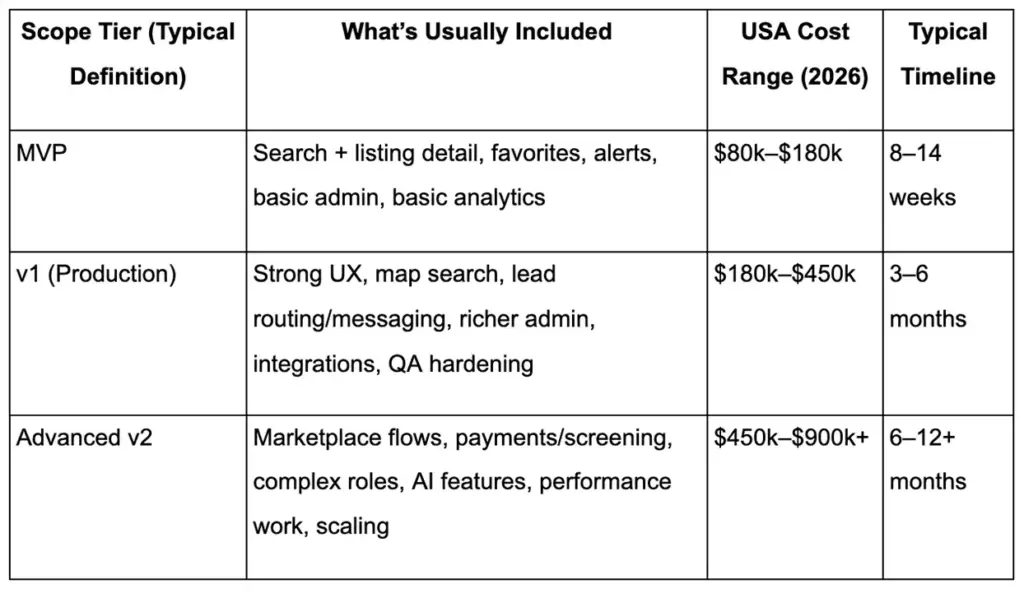
These numbers are a useful starting point, but your real estate app development cost changes most when data access and workflows get real—especially if you need MLS/IDX plus brokerage-grade admin processes.
Also Read: AI App Development Cost Guide: How Much Does AI App Development Cost?
Cost By Scope Tier (MVP vs v1 vs v2)
MVP: Designed to validate demand and acquisition channels, not to cover every edge case.
Typical MVP scope includes:
- Listing discovery (feed/search), listing detail
- Favorites and saved searches
- Basic push/email alerts
- Minimal admin controls (approve content, manage users, basic CMS)
v1: Where most real estate products become commercially viable.
Common additions:
- Map-first search with polygon/draw tools
- Lead capture forms + routing rules
- Messaging, scheduling, and richer analytics
- More robust admin tooling, moderation, and QA coverage
v2: Where complexity compounds.
Typical v2 adds:
- Two-sided marketplace capabilities (landlords/tenants, agents/buyers)
- Payments, screening, identity checks
- AI personalization and content automation
- Scaling work (caching, search infra, observability, SRE practices)
A practical way to think about it: scope tiers don’t just add screens—they add systems (approval flows, routing logic, audit trails, permissioning), and those systems are what move budgets.
Cost By Platform (iOS, Android, Cross-Platform)
Platform decisions change the budget in two ways: initial build and long-term iteration.
- iOS-only (rare for broad consumer real estate): lower initial cost, faster launch, but limits demand capture.
- Android-only: similar economics, different device fragmentation and QA patterns.
- Cross-platform (Flutter/React Native): one shared codebase for many features; can reduce time-to-market for MVP/v1.
- Two native apps: higher upfront cost, but can win on performance for heavy map/media and deep OS integrations.
For many 2026 launches, cross-platform is viable—until you combine complex map interactions + high media volume + multiple integrations, where native performance tuning may become a priority.
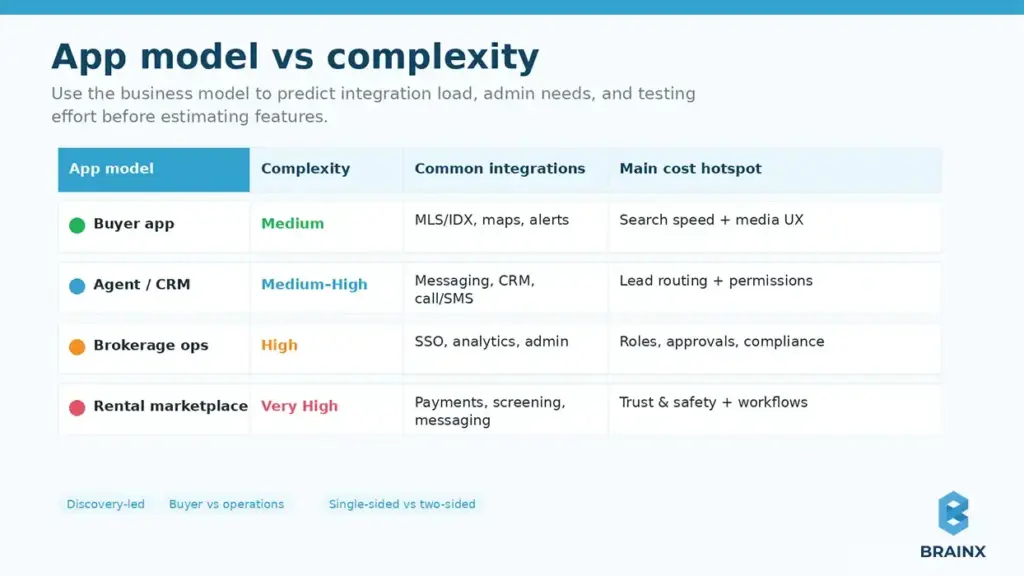
Cost By App Type (Agent App, Brokerage App, Buyer App, Rental Marketplace)
Your “app type” determines not only features, but also who needs admin power and what risks exist.
- Agent/CRM companion: heavier on lead routing, tasks, messaging, and permissions.
- Buyer/seller search experience: heavy on discovery UX, maps, performance, and retention features.
- Brokerage operations app: heavy on roles, approvals, compliance, analytics, and integration breadth.
- Rental marketplace: adds payments, screening, disputes, and two-sided trust/safety features.
The same feature list can cost very differently depending on the model, because the workflow complexity behind it is not the same.
What Type Of Real Estate App Are You Building? (Cost Changes By Model)
Before you estimate anything, align on the business model and primary workflow. Two apps can both be “real estate apps,” yet one is a lead-gen product and the other is an operations platform with compliance constraints.
One easy way of self-identification is to ask:
- Is the app primarily discovery (search homes) or operations (manage leads, listings, agents)?
- Is it single-sided (one user type) or two-sided (marketplace)?
- Does it rely on MLS/IDX or proprietary inventory?
- Do you need payments, screening, or other regulated flows?
Once that’s clear, it’s easier to predict the integration load, admin requirements, and the testing scope that moves pricing.
Agent/Broker CRM Companion Apps
These apps support agents in day-to-day selling, so they tend to be workflow-heavy and integration-heavy.
Common characteristics:
- Lead capture + routing rules
- Follow-up tasks, reminders, pipeline stages
- Messaging and call/SMS tracking
- Admin controls for teams and brokerages
Cost tends to rise due to permissioning, analytics, and reliable communication tooling. The UX also matters: if agents don’t adopt it, the app fails regardless of feature count.
Buyer & Seller Apps (Search + Saved Homes + Tours)
These are typically consumer-facing and UX-dependent.
Expect workload around:
- Fast search + filters (including “sticky” preferences)
- High-quality listing detail pages (photos, tours, neighborhood info)
- Saved searches and alerts
- Tour scheduling and inquiry flows
Budgets are driven by performance (maps + media), QA across many devices, and retention features that reduce churn.
Rental Marketplaces (Two-Sided, Payments, Screening)
Rental marketplaces behave more like fintech-enabled marketplaces than “listing apps.”
Typical adds:
- Applications, document upload, and verification
- Application fees or rent payments
- Background/credit checks and screening workflows
- Trust & safety: reporting, moderation, dispute handling
Cost increases because you’re building more back-office workflows and taking on more security/compliance requirements.
New Construction / Developer Showcase Apps
Such apps often look simpler but can become content and media-heavy quickly.
Common needs:
- Unit availability, floor plans, interactive galleries
- Appointment booking and lead capture
- Content management and brand-grade UI polish
- Integration with CRM/marketing automation
The surprise driver here is usually the CMS/back office and the media pipeline (video, 3D/AR, virtual tours).
Factors Affecting the Cost of Real Estate Application Development
Even within the same budget range, two real estate apps can end up costing very differently. That is because pricing is shaped by more than screen count. The real estate app development cost usually rises or falls based on how complex the workflows are, how many systems need to connect, and how polished the final product needs to feel.
This is also why early estimates often shift once teams move from idea to implementation. A simple search app, an agent workflow tool, and a rental marketplace may all look similar at a high level, but their technical depth, admin requirements, and long-term operating needs are not the same.
1. Complexity And Feature Set
Feature depth is one of the biggest cost drivers in any real estate product. A basic MVP with listing discovery, saved properties, alerts, and inquiry forms will cost far less than an app that includes polygon search, tour scheduling, lead routing, payments, screening, or AI-powered recommendations.
Complexity also increases when features are connected to business rules. For example, “messaging” may sound simple, but once you add role-based access, conversation history, response tracking, and escalation logic, it becomes a much larger system. In real estate apps, cost grows when features stop being standalone screens and start becoming connected workflows.
2. Platform Choice
Your platform strategy affects both upfront budget and long-term maintenance. A single-platform launch can reduce initial cost, but it may limit reach. A cross-platform build can speed up development for iOS and Android, especially for MVP and v1 launches, because more code is shared across devices.
At the same time, some real estate products need stronger performance optimization. If the app depends heavily on map interactions, media-rich listing pages, background processes, or device-specific behavior, native development may become the better fit. In other words, real estate mobile app development cost is not only about how many platforms you support, but about what level of performance you need on each one.
3. UI/UX Design Requirements
Real estate apps are highly visual and decision-heavy. Users compare listings, revisit properties, scan photos, check maps, and move between search, saved homes, and inquiry flows. That means design work has to support both clarity and trust.
Costs increase when the product requires custom search experiences, polished listing layouts, advanced filters, map-list synchronization, interactive galleries, or stronger accessibility support. Good UI/UX is not just about appearance here. It reduces friction, improves lead conversion, and makes the app easier to use across buyers, renters, agents, and admins.
4. Backend Infrastructure And Integration Needs
Behind every smooth front-end experience is a backend that handles listings, users, permissions, alerts, media, admin actions, and data syncing. Even a relatively focused real estate app needs APIs, a database, admin controls, and secure user management.
The cost rises when backend logic becomes more operational. That includes syncing external property feeds, handling saved searches and notifications at scale, managing listing status changes, supporting moderation, or preparing for marketplace workflows. A stronger backend may cost more upfront, but it often prevents expensive rework later when the app grows.
5. Development Team Location And Experience
Who builds the app also changes the budget. Rates vary widely by region, but cost should not be judged on hourly price alone. A more experienced team may look expensive at first, yet still reduce total spend by improving estimation, avoiding rework, and handling architecture decisions better from the start.
This matters even more in real estate, where data sources, compliance concerns, and admin workflows can create hidden complexity. A team with relevant product experience is often better at spotting risk early, defining a focused MVP, and planning the right trade-offs between speed, quality, and scalability.
6. Third-Party Integrations
Third-party services can speed up development, but they also add build effort, testing, and recurring costs. Real estate apps commonly depend on mapping tools, messaging platforms, analytics systems, payment providers, identity tools, and MLS/IDX-related services.
Each integration adds its own requirements. Some need custom data mapping. Some have approval processes. Others add usage-based pricing after launch. This is why integrations can quietly become one of the biggest budget variables. The more external systems your product relies on, the more important it becomes to validate them early and include both implementation and ongoing operating cost in the estimate.
Essential Features For A Real Estate App (A Cost Breakdown)
If you want an estimate you can defend internally, break the build into features and assign complexity bands (not just “screen count”). This section ties real functionality to cost logic, using practical ranges teams use for planning.
In most proposals, real estate mobile app development cost expands when features require (1) non-trivial backend logic, (2) third-party integrations, (3) admin workflows, and (4) extensive QA due to device fragmentation and edge cases.
Below is a feature-oriented model you can use in planning workshops and vendor conversations.
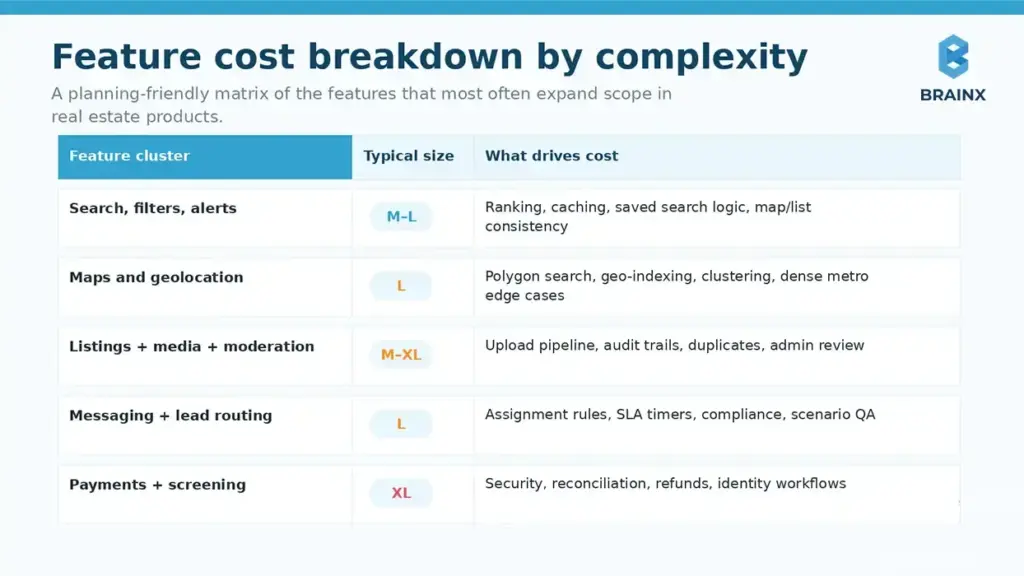
How to read the bands
- S (Small): mostly UI + simple API work; minimal edge cases
- M (Medium): multiple states, backend rules, moderate QA
- L (Large): major workflows, complex rules, heavy QA/integration
- XL (Extra Large): multi-system coordination, compliance/security, performance engineering
Core Features (Search, Filters, Favorites, Alerts)
These look “basic,” but they define user value, so quality matters.
Typical complexity drivers:
- Advanced filters (price history, school zones, commute time)
- Saved search logic + alert throttling
- Personalization rules (e.g., suggest similar listings)
- Search performance and caching strategy
Cost often rises when search must be fast under load and consistent across map/list views, with reliable alert delivery.
Maps & Geolocation (Polygon Search, Draw-On-Map)
Map features are among the most expensive parts of real estate UX because they combine UI performance with geo queries.
Work that adds cost:
- Draw polygon / boundary tools
- Cluster markers, smooth pan/zoom, and intelligent loading
- Geo-indexing in the backend
- Handling edge cases like zoom thresholds and dense metros
If map interactions are central to the product, plan time for performance profiling and device-specific tuning.
Listings Management (Create/Edit, Media, Status, Moderation)
This area is often underestimated because teams think “it’s just CRUD.”
Real drivers:
- Media upload pipeline (compression, retries, ordering)
- Status transitions and audit trails (draft → published → under contract)
- Moderation tools for flagged content
- Bulk edits and import flows
If your inventory is user-generated (agents/landlords), the admin and moderation workflows become a real product—budget accordingly.
Messaging + Lead Routing (Agent Assignment, Response SLAs)
Lead routing is not “a chat widget.” It’s business logic that impacts revenue.
Common complexities:
- Routing rules (zip code, round-robin, availability)
- SLA timers and escalation paths
- Conversation history + attachments
- Compliance/audit requirements for brokerage operations
This is also where QA expands—because you must test numerous routing scenarios and fallbacks.
Scheduling (Tours, Calendar Sync, Reminders)
Scheduling looks small until you include real-world calendars and rescheduling logic.
Typical scope:
- Tour requests + agent confirmation
- Calendar sync (Google/Microsoft)
- Reminders and cancellations
- Admin visibility and reporting
If you need marketplace-style scheduling (multiple agents, time windows, routing), complexity jumps.
Payments (Rent, Application Fees) & Escrow/Mortgage Touchpoints
Payments introduce security, dispute cases, and reconciliation.
Cost drivers include:
- Payment provider integration (Stripe, Adyen, etc.)
- Refunds, chargebacks, receipts, reporting
- Identity verification requirements (sometimes)
- Escrow or mortgage “touchpoints” (often informational, but can be workflow-based)
Even if payments are “phase 2,” design your data model early so you don’t refactor core flows later.
Admin Panel & Back Office (Roles, Content, Approvals, Analytics)
Admin work is one of the most consistent budget multipliers in real estate builds.
Expect needs like:
- Role-based access control (agents, brokers, admins, support)
- Content approvals and moderation queues
- User support tooling and audit logs
- Funnel analytics, lead reporting, and export
If your admin panel is treated as an afterthought, you’ll pay later in rework and operational friction.
Integrations That Can Make Or Break Cost (MLS/IDX + Data Providers)
Integrations are where budgets swing the most—especially MLS/IDX. Unlike a typical SaaS API, MLS ecosystems involve approvals, rules, and varying technical standards across markets.
This is also where real estate app development cost becomes unpredictable unless you map constraints up front: which MLSs, what data fields, update frequency, branding/display rules, and whether your business qualifies for access.
MLS/IDX Basics: Approval, Fees, Rules, Timelines
MLS access isn’t purely technical—there’s a process.
Plan for:
- Eligibility: Often requires broker sponsorship or membership
- Paperwork + approvals: Timelines vary widely by MLS
- Fees: Setup and recurring costs can apply
- Display and compliance rules: Branding, attribution, disclaimers, refresh frequency
These constraints can affect UX and even your roadmap (e.g., what can be shown publicly vs behind login).
RESO Web API Vs Other MLS Feeds (Impact On Dev Effort)
Standards reduce friction, but reality varies by MLS.
- RESO Web API: More standardized, modern patterns; can reduce custom parsing work.
- RETS (legacy) or custom feeds: Often require more custom handling, mapping, and maintenance.
- IDX vendor intermediaries: Can simplify approvals and data normalization, but add vendor costs and constraints.
Your integration approach impacts:
- Data mapping and normalization effort
- Sync strategy (polling vs push)
- Error handling and reconciliation tooling
- Ongoing maintenance as MLS fields evolve
Maps (Google Maps/Mapbox) Cost Considerations
Maps are both a product feature and a recurring cost center.
Budget impacts come from:
- API usage pricing (tiles, geocoding, places, routing)
- Overuse due to inefficient loading (can inflate monthly bills)
- Offline/low-connectivity handling (more engineering)
- Custom styling and performance tuning
A good engineering team will instrument map calls and reduce unnecessary requests early—this is one of the easiest ways to avoid post-launch surprises.
Identity, Communications, Analytics (Auth0, Twilio, Segment, Etc.)
These tools speed delivery, but they introduce recurring fees and integration effort.
Common categories:
- Auth: Auth0, Cognito, Firebase Auth (MFA, SSO for enterprises)
- Messaging/voice: Twilio, Vonage (SMS, call masking, notifications)
- Analytics/CDP: Segment, Amplitude, Mixpanel
- Push + email: Braze, OneSignal, SendGrid
The cost lever isn’t just “integration time”—it’s also the operational work: template management, deliverability, event taxonomy, consent, and logging.
Design, UX, And Conversion: Why Real Estate UI Costs More Than “Standard Apps”
Real estate is a high-consideration purchase. That means users don’t forgive confusing flows, missing trust cues, or slow listing detail pages. UX work here is not decoration—it directly affects lead conversion and retention.
Where teams under-budget design:
- Complex browsing behavior: users compare, revisit, and share listings repeatedly
- Content-heavy screens: photos, maps, tours, floor plans
- Trust requirements: verification, attribution, reporting, privacy
Done well, UX reduces support load, increases inquiry rates, and improves agent responsiveness.
Key User Journeys (Buyer, Agent, Admin)
You’re typically designing at least three products in one:
- Buyer journey: search → shortlist → compare → inquire → schedule → follow up
- Agent journey: receive lead → respond fast → schedule → track outcomes
- Admin journey: manage inventory/users → monitor quality → handle disputes → report
Each journey requires different information density, controls, and error handling—especially on mobile.
Accessibility & Trust Design (Reviews, Verification, Safety)
Trust design is a real cost driver because it involves policy and workflow, not just UI.
Examples:
- Verified agents/landlords badges and verification flows
- Review moderation and reporting tools
- Privacy controls for location and contact details
- Accessibility standards (contrast, font scaling, screen reader support)
If you operate a marketplace, trust & safety becomes a product area with ongoing iteration.
Content-Heavy UI (Photos, Video, Virtual Tours)
High media volume affects:
- Design (gallery patterns, progressive loading, skeleton states)
- Engineering (caching, compression, CDN strategy)
- QA (device memory constraints, slow networks)
If you plan to support 3D tours or video walkthroughs, align early on the media pipeline and hosting strategy to avoid late-stage redesign.
Tech Stack Choices And Their Cost Impact (2026-Ready)
Tech stack doesn’t just affect build speed—it affects how expensive your roadmap becomes. The best stack for a real estate app is the one that keeps iteration fast while staying stable under map/media load and integration growth.
This section is where real estate mobile app development cost often diverges across vendors, because teams make different assumptions about native vs cross-platform, backend architecture, and how much will be “custom” vs managed.
Native Vs Cross-Platform: When Each Wins In Real Estate
Native (Swift/Kotlin) tends to win when you need:
- Best-in-class map performance and smooth gestures
- Heavy media and device-level optimizations
- Complex background behavior and OS-specific features
- Long-term platform differentiation
Cross-platform (Flutter/React Native) tends to win when:
- You need iOS + Android quickly with shared UI/logic
- Your MVP/v1 focuses on core flows and integrations
- You want a single team to ship consistent UI across platforms
- You’re optimizing for cost and speed early
Performance gaps have narrowed by 2026, but map-heavy experiences and deep OS behaviors still benefit from native expertise.
Backend Options (Custom Vs BaaS) And Pricing Implications
Backend choices influence both build cost and operational complexity.
- Custom backend (e.g., Node/.NET/Go + Postgres + Redis + search): higher upfront, best control for MLS normalization, complex workflows, and scaling.
- BaaS (Firebase/Supabase/etc.): faster MVP delivery, but can become costly or limiting with complex permissioning, heavy search requirements, and multi-tenant admin models.
- Hybrid: BaaS for auth/notifications + custom services for MLS sync and search.
In real estate, search, indexing, and data normalization often justify custom components earlier than in simpler apps.
AI Features (Recommendations, Chat, Image Tagging) And Cost Considerations (Optional/Advanced)
AI can improve conversion and ops—but it’s rarely “cheap add-on” work.
Common AI features:
- Personalized recommendations (“homes you’ll likely save”)
- Semantic search (“2-bed near good schools under $X”)
- Image tagging and quality scoring (flag duplicates, detect low-quality images)
- Agent-assist chat for lead qualification (with compliance-aware logging)
Budget drivers:
- Data readiness (clean events, labeled images, feedback loops)
- Model strategy (hosted models vs custom fine-tuning)
- Guardrails, monitoring, and evaluation
- Ongoing inference costs
If AI is on your roadmap, design your event taxonomy and content pipeline early to avoid rebuilding later.
Real Estate App Development Process (Timeline To Budget Mapping)
Time and money are coupled: longer timelines mean more labor, more coordination, and more opportunity for scope changes. But “fast” isn’t always cheaper if it creates rework.
Use this section to translate delivery phases into budget planning and stakeholder expectations. For many teams, controlling real estate app development cost is really about controlling phase gates and acceptance criteria.
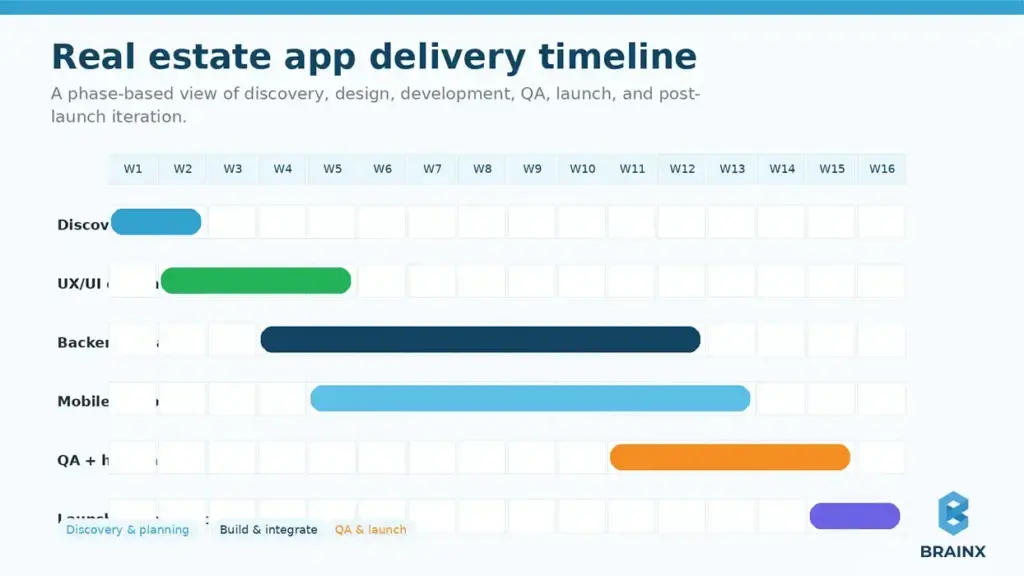
Discovery & Estimation (What You Get)
Discovery is where accurate estimates are made—not guessed.
Deliverables that reduce risk:
- Workflow maps (buyer/agent/admin)
- Integration plan (MLS/IDX, maps, auth, messaging)
- Feature list prioritized by value vs effort
- Data model outline and admin requirements
- Release plan (MVP → v1 → v2)
This phase is also where teams confirm MLS eligibility and identify “unknown unknowns” before they become ‘change orders’.
UX/UI Design Sprint
A strong design sprint creates:
- Clickable prototype (key journeys)
- Design system foundations (typography, components, states)
- Content strategy for listing media and metadata
- Accessibility requirements and trust cues
Real estate UI has many states (empty results, low connectivity, map/list sync), and designing them early saves expensive engineering iteration.
Development & QA (Sprints, Environments)
A typical production approach includes:
- Sprint-based delivery (2-week cadence)
- Separate environments (dev/staging/prod)
- Automated testing where practical + manual device QA
- Analytics instrumentation and event validation
QA scope grows with maps, media, and device fragmentation—plan it, don’t squeeze it.
Launch, App Store Review, And Post-Launch Iteration
Launch is not a finish line; it’s a handoff into measured iteration.
Budget time for:
- App Store / Play Store review buffers
- Release checklists (privacy labels, permissions, crash monitoring)
- Post-launch bug fix sprint
- Data-driven improvements (conversion funnel tuning)
Teams that plan a post-launch iteration window avoid “panic rebuilds” after user feedback arrives.
Hidden Costs To Budget For (Beyond Development)
Even a well-built app can become expensive if you only budget for development. Real products carry recurring costs such as infrastructure, third-party tools, compliance, and ongoing engineering.
When teams model total cost of ownership early, they make better scope decisions and avoid painful mid-year budget surprises.
A practical planning benchmark is to reserve roughly 15–35% of the initial build cost per year for maintenance, infrastructure, monitoring, security, and third-party services, with higher ranges common for marketplace and integration-heavy apps.
Infrastructure (Hosting, Storage, CDN, Database)
Typical cost areas:
- Hosting (containers/serverless)
- Database and read replicas
- CDN for images/video
- Search infrastructure (Elasticsearch/OpenSearch or managed search)
- Observability (logs, metrics, traces)
Media-heavy apps can see storage and CDN costs rise quickly if images and tours aren’t optimized.
Third-Party Fees (Maps, SMS, Email, MLS/IDX)
Recurring fees often include:
- Maps/geocoding usage [CITE: vendor pricing references]
- SMS/voice (per message/minute)
- Email delivery (volume-based)
- MLS/IDX access fees and vendor subscriptions [CITE: IDX/MLS vendor fee references where applicable]
A common mitigation: instrument usage early and set budget alerts, especially for maps and messaging.
Maintenance, Monitoring, And SLA Support
Plan ongoing budget for:
- OS updates and device compatibility
- Bug fixes, security patches, dependency upgrades
- Monitoring and incident response
- SLA support hours (especially for marketplace apps)
If you’re handling payments or screening, downtime costs more than engineering time—SLA planning is part of the product.
Security & Privacy (Pen Testing, Logging, Incident Response)
Security is not optional, especially when handling identity documents, payments, or sensitive contact data.
Budget items can include:
- Penetration testing and remediation
- Secure logging and audit trails
- Key management and secrets rotation
- Privacy compliance work (consent, retention policies, user data export/delete)
Common Mistakes That Inflate Real Estate App Development Cost
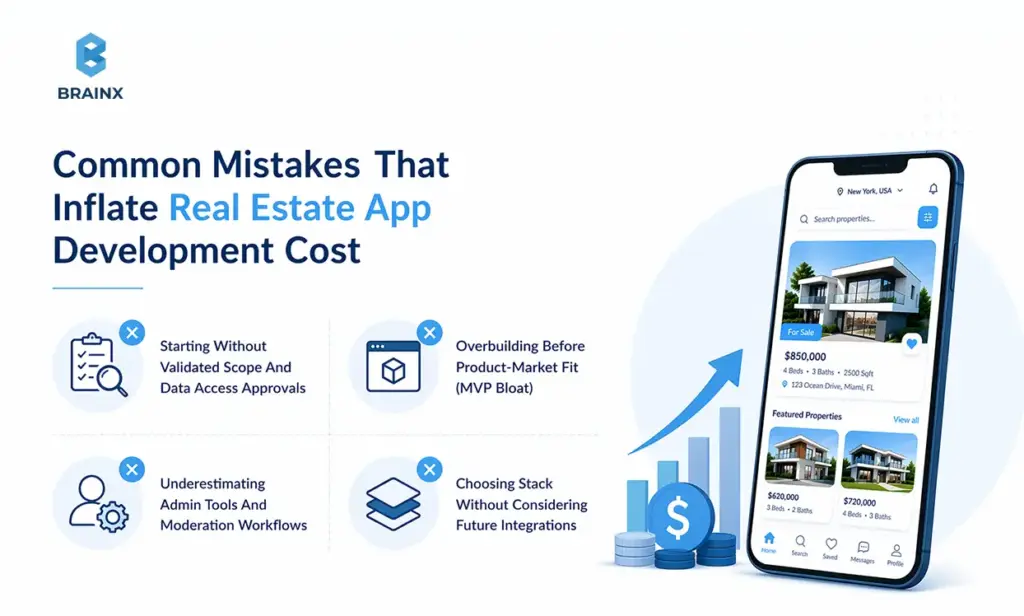
Most cost overruns are not caused by “unexpected code complexity.” They’re caused by avoidable planning mistakes—especially around data access, admin tooling, and MVP discipline.
Use the checklist below as a risk filter before you commit to a timeline. It’s one of the fastest ways to reduce real estate app development cost without reducing product quality.
Starting Without Validated Scope And Data Access Approvals
If you start building before confirming:
- which MLSs you can access,
- which data fields you will receive,
- and what display rules apply,
…you may redesign major UX and data models mid-build. Approval timelines alone can force idle time or rushed workarounds.
Overbuilding Before Product-Market Fit (MVP Bloat)
Common MVP bloat patterns:
- Complex profiles and social features before retention is proven
- Multi-market expansion features before one market works
- Advanced AI before you have clean events and feedback loops
A disciplined MVP protects budget and accelerates learning.
Underestimating Admin Tools And Moderation Workflows
If your listings, users, or messages can be created by others, you need:
- moderation queues,
- role permissions,
- audit logs,
- and support tooling.
Skipping this in v1 often means building it under pressure after launch—more expensive and riskier.
Choosing Stack Without Considering Future Integrations
Teams sometimes choose stack based solely on MVP speed, then struggle when they add:
- Additional MLS sources
- Payments/screening
- CRM integrations
- Enterprise SSO
Make sure your stack supports your 12–18 month roadmap, not just the next 8 weeks.
Cost-Saving Tips For Real Estate App Development
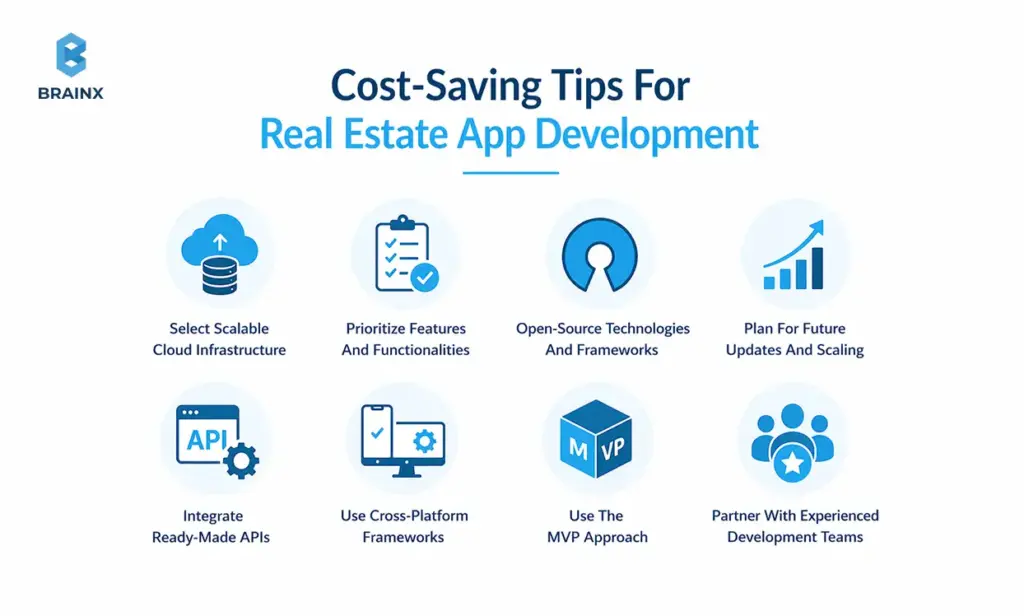
Reducing cost does not mean stripping quality from the product. In most real estate builds, the smartest savings come from better scope control, better technical choices, and fewer avoidable rebuilds later. The goal is not to make the app “cheap.” The goal is to spend where it creates value and avoid spending where it creates complexity too early.
Select Scalable Cloud Infrastructure
Infrastructure choices affect both launch cost and long-term efficiency. A setup that is too heavy for an early-stage product can increase unnecessary spending, while a setup that is too limited can force expensive changes later.
A scalable cloud approach helps teams start lean and expand as usage grows. That is especially useful for real estate products where media storage, search load, maps, and notifications can increase quickly once traction builds.
Prioritize Features And Functionalities
One of the fastest ways to control budget is to focus only on the features that support the app’s main user journey. For most real estate products, that means getting core workflows right before adding “nice-to-have” enhancements.
This keeps the team focused on what drives adoption first. It also reduces design, engineering, and QA time across features that may not matter in the first release.
Open-Source Technologies And Frameworks
Open-source technologies can reduce licensing costs and give teams more flexibility during development. They are especially useful when the product needs reliable foundations without unnecessary vendor lock-in early on.
That said, cost savings only happen when the team chooses mature, well-supported tools. Unsupported or poorly matched frameworks can create maintenance problems later, so this should be a strategic choice, not just a budget shortcut.
Plan For Future Updates And Scaling
Many expensive rebuilds happen because the first version was scoped only for launch and not for the next stage of growth. Even if the MVP is intentionally small, the architecture should still account for likely future needs.
That includes things like added markets, more listings, richer admin workflows, or heavier integrations later. Planning for growth early does not mean overbuilding. It means avoiding decisions that make future expansion harder and more expensive.
Integrate Ready-Made APIs
Not every feature should be built from scratch. Using ready-made APIs for things like maps, messaging, authentication, analytics, or payments can reduce development time and shorten launch timelines.
The key is to use them where they remove low-value custom work. This lets the team focus more of the budget on product-specific functionality instead of rebuilding capabilities that established tools already handle well.
Use Cross-Platform Frameworks
Cross-platform development can be a practical way to reduce initial build cost when the product needs both iOS and Android support. Shared code and shared UI patterns often make MVP and v1 delivery faster.
This approach works best when the app’s core experience is similar across platforms. If the product becomes highly performance-sensitive later, the team can decide whether deeper native optimization is needed based on actual usage and roadmap priorities.
Use The MVP Approach
A focused MVP is still one of the strongest ways to save money without sacrificing learning. It helps teams test demand, validate workflows, and gather user behavior before committing to a larger build.
In real estate apps, that often means starting with one core audience, one market, and one primary workflow instead of trying to support every user type or every transaction scenario from the beginning.
Partner With Experienced Development Teams
Choosing the lowest-cost team often leads to more expensive outcomes if scope is weak, QA is rushed, or architecture decisions do not hold up under real growth. An experienced team may not have the lowest hourly rate, but it often delivers better total cost control.
That matters even more in real estate, where integrations, admin workflows, and approval-dependent data sources can introduce hidden risk. Teams with relevant experience usually make better trade-offs earlier and reduce avoidable rework.
How To Estimate Your Real Estate Mobile App Development Cost (Simple Model)
This is the practical framework you can reuse with internal stakeholders and vendors. It’s intentionally simple: define workflows, integrations, scope tier, platform strategy, and then apply a risk buffer.
In real planning, real estate mobile app development cost depends less on “number of features” and more on integration count + workflow complexity + admin depth.
To keep the estimate stable, write down assumptions in plain language (what’s in/out, which markets, which MLSs, expected traffic). Then vendors can quote against the same baseline—reducing pricing noise.
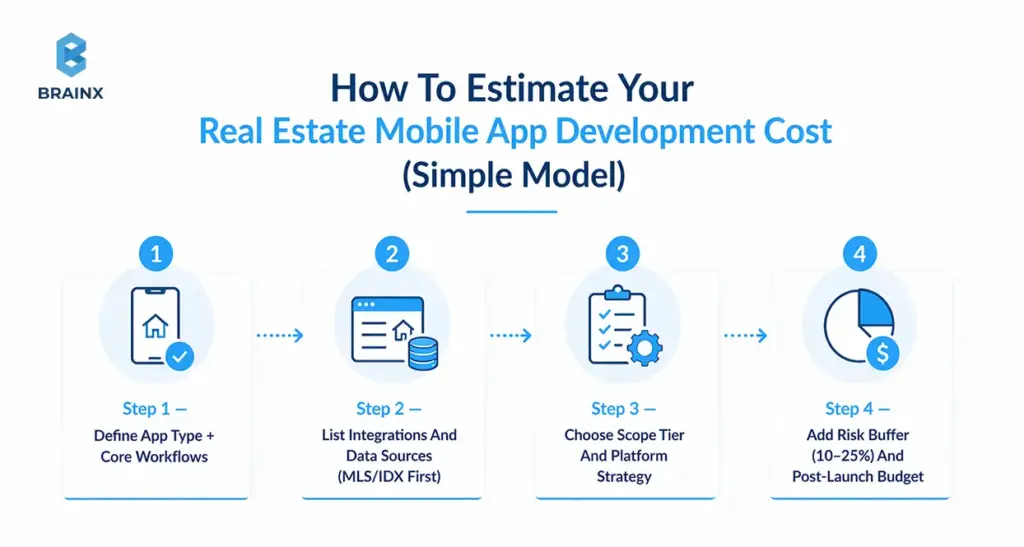
Step 1 — Define App Type + Core Workflows
Document your primary workflow in 5–10 steps:
- Buyer: search → filter → view → save → inquire → schedule
- Agent: receive lead → qualify → respond → schedule → track status
- Admin: approve listing → handle reports → manage users → export analytics
If you can’t write this clearly, the estimate will drift later.
Step 2 — List Integrations And Data Sources (MLS/IDX First)
For each integration, capture:
- Vendor/source (MLS name, IDX provider, maps vendor, messaging)
- Authentication method (API key, OAuth, SSO)
- Data frequency (real-time, daily, hourly)
- Approval requirements and timelines
- Ongoing costs
MLS/IDX belongs at the top because it can dictate UX constraints and schedule risk.
Step 3 — Choose Scope Tier And Platform Strategy
Pick one of these as your baseline:
- MVP (validate)
- v1 (commercially viable)
- v2 (scale + marketplace/AI)
Then choose platform:
- iOS only (rare)
- Android only (rare)
- Cross-platform
- Dual native
Be explicit about what you’re trading: speed vs optimization vs long-term flexibility.
Step 4 — Add Risk Buffer (10–25%) And Post-Launch Budget
Risk buffer is not padding—it’s realism.
Typical buffer guidance:
- 10%: well-known scope, known integrations, single market
- 15–20%: MLS dependencies, multiple roles, richer admin workflows
- 25%: marketplace + payments + screening + multi-market expansion
Also allocate a post-launch budget for the first 60–90 days of fixes and iteration; that’s when real user behavior shows up.
Cost Benchmarks Table (Sample Budgets For Common Real Estate Builds)
The table below gives scenario-based budgets with assumptions—because “$X to $Y” ranges without context aren’t useful. Use these as planning references and adjust based on your integrations, admin needs, and quality bar.
These examples also show how real estate app development cost changes when you move from lead-gen UX into operations, messaging, and marketplace requirements.
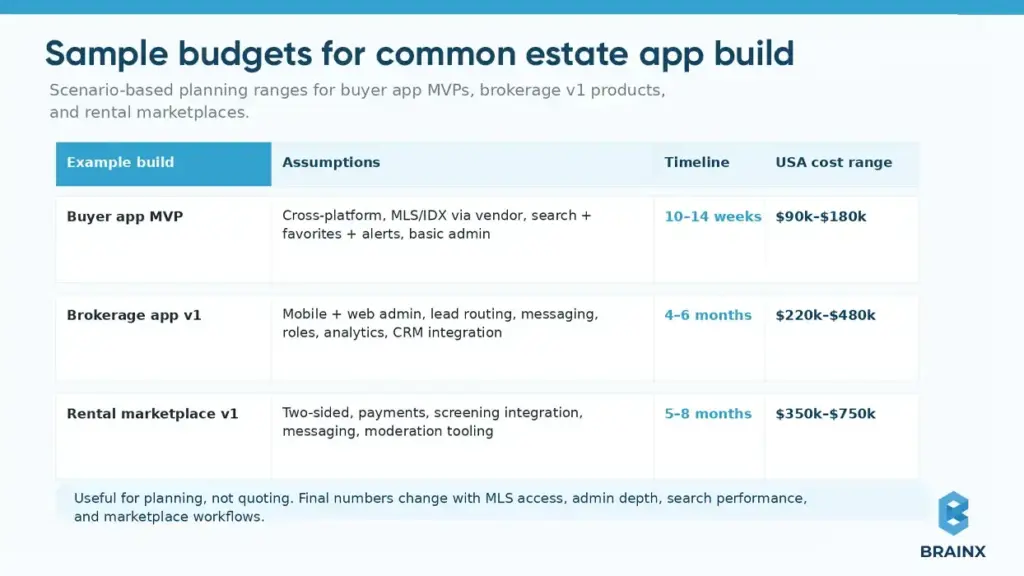
Example 1 — Buyer App MVP (Search + Favorites + Alerts)
Good fit when: you need to validate acquisition channels and retention before expanding.
Typical scope:
- Listing search + filters
- Listing details with rich media
- Favorites + saved searches
- Alerts (push/email)
- Minimal admin tools and analytics
Main cost swing: MLS/IDX approach and map-first UX depth.
Example 2 — Brokerage App v1 (CRM + Lead Routing + Admin)
Good fit when: you’re improving agent productivity and lead conversion.
Typical scope:
- Lead intake + routing rules + SLA timers
- Agent messaging/inbox
- Pipeline stages and tasking
- Admin roles, reporting, exports
- CRM/marketing integrations
Main cost swing: routing complexity, permissions, and enterprise requirements (SSO, audit logs).
Example 3 — Rental Marketplace v1 (Payments + Screening + Messaging)
Good fit when: your business requires transactions and trust & safety.
Typical scope:
- Landlord and tenant onboarding
- Listings + availability + applications
- Payments (fees or rent) + receipts/refunds
- Screening provider integration
- Moderation and dispute workflows
Main cost swing: compliance, security, and operational tooling depth.
How BrainX Helps With Real Estate App Development Cost (And Accurate Estimation)
Accurate budgeting requires more than a feature list. At BrainX Technologies, we focus on turning scope into a defendable estimate with explicit assumptions, integration discovery, and a delivery plan you can socialize internally.
If your main concern is controlling real estate app development cost while still shipping a product users trust, the key is to reduce unknowns early and ship in phases that match your commercial milestones.
A practical example is BrainX’s LevelUp real estate web and mobile apps, built for Coldwell Banker Select to standardize agent onboarding, coaching, communication, and performance tracking across web and mobile. The product included features such as agent onboarding, training modules, task assignment, and goal tracking, and later expanded with multi-tenant functionality as adoption grew.
Such kind of delivery experience helps us estimate more realistically, especially when scope includes role-based workflows, admin complexity, and phased product growth.
Whether you are planning a full scale real estate platform or expanding an existing product into a property super app, BrainX can guide you through the decisions that matter and help you build a platform people trust with their property journey.
Discovery Workshop That Produces A Defendable Estimate
Our discovery workshops typically produce:
- Workflow maps (buyer/agent/admin) with acceptance criteria
- Integration plan (MLS/IDX, maps, messaging, analytics)
- Prioritized backlog with effort bands and dependencies
- Release plan (MVP → v1) plus risk register
- Clear assumptions (markets, MLS coverage, data fields, non-goals)
That means your estimate isn’t a guess—it’s a plan.
Build Options (MVP, Phased Rollout, Platform Strategy)
We help teams choose the build strategy that matches constraints:
- MVP-first for fast validation
- Phased rollout by market (especially when MLS access varies)
- Cross-platform vs native based on UX/performance needs
- Backend architecture that won’t collapse under integration growth
The goal is predictable delivery and an app you can evolve.
Transparency: Scope, Assumptions, And Change Control
Cost control comes from clarity:
- What’s in/out of the release
- What’s fixed vs variable (especially integrations)
- How change requests are handled
- How we track progress (burnup, demos, acceptance criteria)
This approach protects both timeline and budget when reality shifts.
Next Step: Get A Tailored Estimate For Your App
By telling us about your target markets, your MLS/IDX plan (even if unknown), and desired scope of MVP/v1, we can assist you in mapping a realistic budget and delivery plan, without going to the features you do not need at this time.
BrainX Technologies can support discovery, design, development and post-launch iteration to help your team go through from estimates to launch with fewer surprises.
FAQ Section
What is the average real estate app development cost in the USA in 2026?
For a production-grade build in the US market, the real estate app development cost commonly falls between $180k and $450k for a solid v1, with MVPs often landing $80k–$180k and advanced marketplace-style apps reaching $450k–$900k+. The biggest variables are MLS/IDX scope, map-first UX complexity, admin/back-office depth, and integrations like messaging and payments. If you want an “average” that’s actually useful, define your app model (buyer search vs brokerage ops vs rental marketplace) and your data access plan first. Without that, averages are misleading.
How does real estate mobile app development cost differ for iOS vs Android vs cross-platform?
Real estate mobile app development cost is typically lowest for a single-platform launch, higher for two native apps, and often most efficient for cross-platform when your feature set is largely shared. Cross-platform can reduce duplicated UI and feature work across iOS and Android, but map-heavy performance, media pipelines, and OS-specific behavior can narrow the savings. Two native apps may cost more upfront but can reduce long-term friction for advanced UX and platform-specific optimizations. The most cost-effective choice depends on your roadmap (e.g., marketplace features, AI, offline support) and quality bar.
What’s the cheapest way to build a real estate app MVP without sacrificing quality?
Keep the MVP focused on one primary journey (usually search → save → alert → inquire), limit markets/MLS scope initially, and avoid building complex admin tooling you don’t need on day one—while still including essential moderation and analytics. Choose proven third-party services where they reduce risk (auth, push, basic messaging), and invest in a short discovery phase to validate workflows and data constraints. Use a phased rollout: ship the MVP, measure funnel performance, then add map depth, messaging, and scheduling based on real usage. “Cheap” becomes expensive when it creates rework, so prioritize clean architecture and clear acceptance criteria.
How long does it take to build a real estate app (and how does timeline affect cost)?
An MVP commonly takes 8–14 weeks, a robust v1 takes 3–6 months, and advanced builds can take 6–12+ months, depending on integrations and marketplace complexity. Timeline affects cost because longer projects require more engineering and QA hours, more coordination overhead, and more change management as stakeholders learn. MLS approvals can also extend schedules, which can create idle time or force parallel workarounds. The best way to manage timeline-driven cost is to lock an MVP scope, confirm data access early, and plan post-launch iteration explicitly.
What ongoing costs should I expect after launch (maintenance, hosting, third-party fees)?
Plan for infrastructure (hosting, database, CDN/storage, search), third-party services (maps, SMS/email, analytics, MLS/IDX fees), and ongoing engineering for OS updates, bug fixes, and security patches. If you run a marketplace or handle payments/screening, budget for monitoring, incident response, and stronger support coverage. Many teams also add periodic pen testing and compliance work as the product scales. A practical approach is to model operating costs monthly and set alerts for usage-based services like maps and messaging.