
 June 8, 2026 -
  35 minutes read

TL;DR / Key Takeaways
- This Telemedicine app development guide breaks scope into MVP, v1, and enterprise, allowing you to deliver faster while not compromising patient trust, reliability, or compliance.
- Telehealth is no longer a side channel. According to the AMA, in 2024, 71.4% of physicians utilized telehealth weekly, compared with 25.1% in 2018. It’s a testament to why virtual care is now a key component of the healthcare product strategy.
- MVPs are mostly around scheduling, video visits, secure messaging, payments (if applicable), and visit summaries. v1 introduces integrations and admin controls. Enterprise adds SSO, RBAC at scale, advanced analytics, multi-location workflows, and SLAs.
- Patients usually do not ask for more features first. They seek quicker appointments, clear provider credentials, transparent pricing, stable calls in bad network conditions, privacy measures, accessibility support, and next steps following the visit.
- Compliance is not a checkbox at the end. PHI data flow mapping, access control, audit logs, encryption, vendor BAAs (if necessary), risk analysis, retention rules and incident response readiness are all required for a healthcare product.
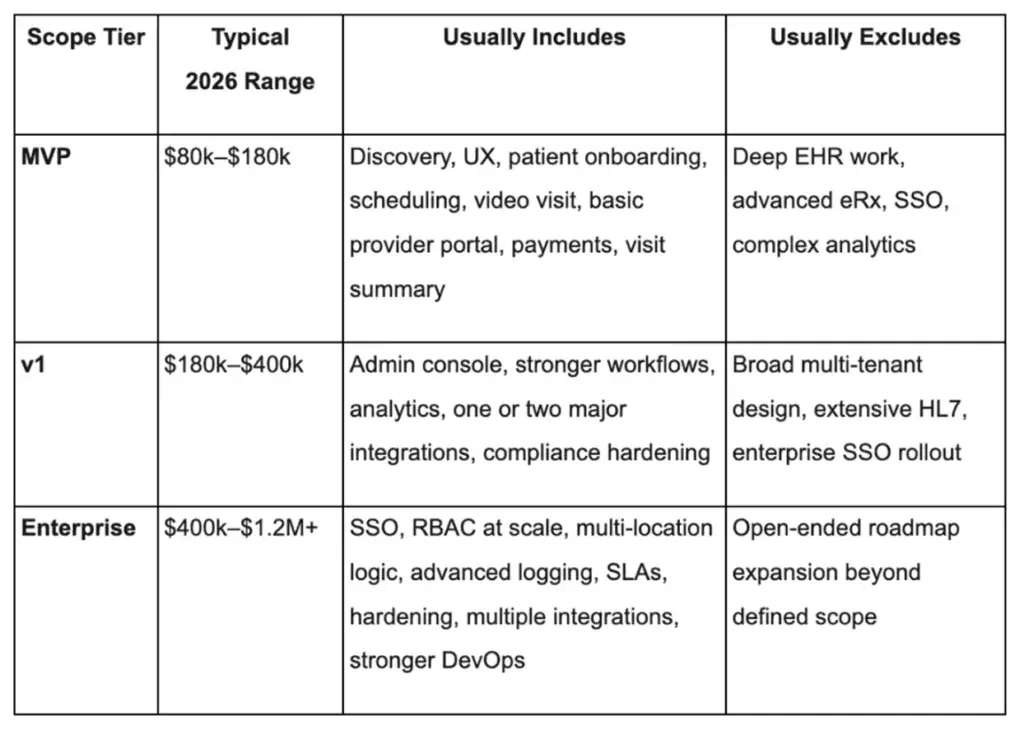
- A practical custom build budget for a/an MVP is $80k-$180k, v1 is $180k-$400k and enterprise scope is $400k-$1.2M+ depending on video infrastructure, integrations, depth of compliance, QA, and support model.
Healthcare teams don’t fail at telemedicine because they lack video. They fail because patients can’t get to a first appointment fast, can’t trust what happens next, or hit friction at the exact moment they need care. This Telemedicine app development guide is set up to help you avoid all that. It translates real patient expectations into product requirements, cost decisions, compliance must-dos, and technical choices your engineering team can actually ship.
If you are thinking of developing a telemedicine product, you likely have three questions on your mind: what should the product be, how can you afford it, and what will patients do with it? This guide gives you a practical, build-ready view of product scope, from care model selection and MVP planning to video architecture, integrations, launch readiness, and post-launch improvement.
What This Telemedicine App Development Guide Covers (and Who It’s For)
Our Telemedicine app development guide is meant to reduce ambiguity. Most telemedicine projects stall due to lack of stakeholders' consensus on the care model, compliance limits, and what “done” looks like within the first release. After you’re done, you ought to be able to lock scope, estimate timelines and understand what unknown risks are to be expected before development begins.
You'll also find out where teams typically over spend, such as creating custom video infrastructure too early, and where they under invest, such as onboard, connection recovery, audit logs, etc.
Whether you're going through the vendor selection process, internal approval or even a build-vs-buy scenario, this guide provides you with language and artifacts to be reused: feature tiers, integration maps, a compliance checklist, and a vendor evaluation scorecard.
What This Telemedicine App Development Guide Helps Teams Decide
- Which care model you’re supporting (urgent care, specialty, RPM companion, teletherapy, employer portal)
- What your MVP must prove (activation, first completed visit, clinical workflow fit, payment viability)
- Which telemedicine app features belong in MVP vs later releases (to control cost and risk)
- Whether to build or integrate video, chat, notifications, identity verification, and analytics
- What “HIPAA-ready” means in architecture terms: PHI mapping, access control, auditability, vendor BAAs
Who Should Use This Guide: Founders, PMs, and Healthcare IT Leaders
- Startup founders trying to validate product-market fit and reimbursement pathways
- SaaS product managers who are scoping v1 for pilots and enterprise readiness
- Provider organization leaders who want to modernize patient access while maintaining compliance
- Enterprise IT teams working on aligning security, integration, and vendor governance with clinical needs
Telemedicine vs Telehealth (and Why It Changes Your Product Scope)
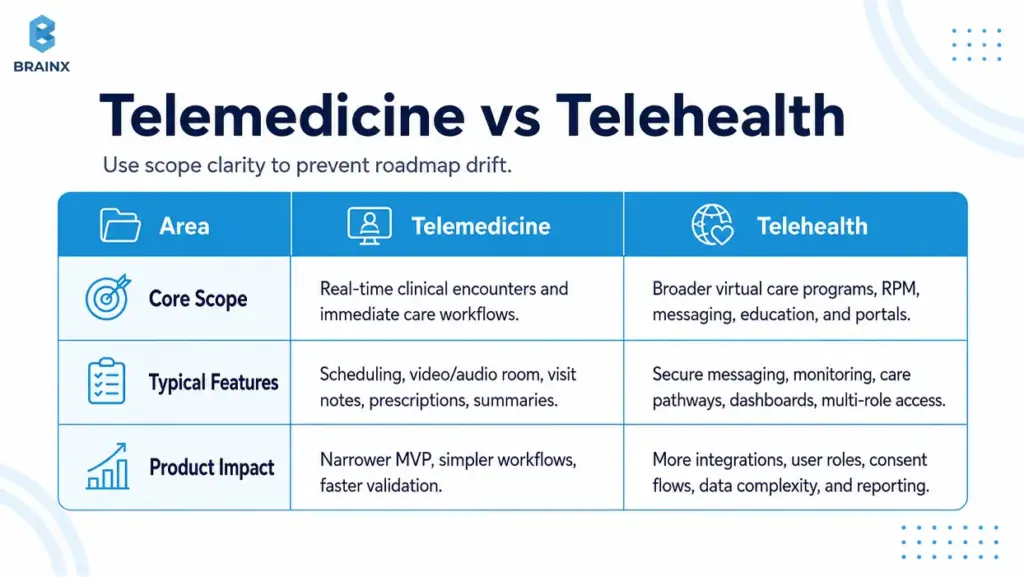
Teams often use “telemedicine” and “telehealth” interchangeably, but scoping gets messy fast when those words mean different things to different stakeholders. The fastest way to blow a timeline is to discover mid-build that “telehealth” for one person meant RPM devices, care programs, and an employer portal, while another person meant only video visits.
Usually, telehealth app development is broader than a visit-only telemedicine product given real world scenarios. HHS defines telehealth as the delivery of services via telephone, video, secure messaging, and technology to assist patients in sharing health data (e.g., blood pressure). Such a broad definition usually expands your data model, integration needs, user roles, consent flows, and compliance surface area.
In case you’re pitching internally, define the term you’re building for in writing and then map it to real feature sets. It prevents scope creep by vocabulary.
How Telehealth App Development Changes Product Scope
When you move from “telemedicine visits” to broader telehealth, you often add:
- Asynchronous care (store-and-forward, secure messaging triage)
- Remote patient monitoring programs (vitals, device ingestion, alerts)
- Care pathways (education, tasks, follow-ups, longitudinal plans)
- Multi-role portals (care teams, case managers, employer admins)
- Advanced analytics and population-level reporting
Each of these adds requirements around consent, retention, reporting, escalation, and integration with EHR or care management systems.
Where Telemedicine Stops and Broader Telehealth Begins
A practical boundary many teams use:
- Telemedicine: Clinical encounters in real time and instant supporting workflows (scheduling, video, notes, prescriptions workflow, post-visit summary).
- Telehealth: All of the above, plus longitudinal programs, device-connected care, non-visit interactions and administrative/benefit experiences.
Your product can be either—just don’t treat them as the same thing in planning, budgeting, or compliance conversations.
Common Types of Telemedicine Apps (Pick Your “Care Model” First)
Your care model determines the workflow, monetization, compliance posture, and even UI layout. Before you finalize screens or architecture, pick the clinical and operational “shape” of your product. This is where Common Types of Telemedicine Apps becomes more than taxonomy—it becomes your roadmap.
Different models also imply different risk points. Urgent care needs tight queuing and fast identity intake. Teletherapy needs continuity, privacy cues, and a calmer interface. Specialty care may need photo capture, structured intake, and referrals.
If you support all models from the beginning, the MVP is not an MVP anymore. Select one, strengthen its core, then expand with a structured growth plan.
Common Types of Telemedicine Apps for Live Video Care
These are “visit-first” products, where success is measured by completed appointments:
- On-demand urgent care (queue + triage + visit)
- Scheduled primary care (calendar + reminders + continuity)
- Specialty consults (structured intake + document exchange + visit)
Revenue commonly comes from per-visit payments, memberships, or provider contracts.
Asynchronous Care (Store-and-Forward, Secure Messaging)
Async models reduce clinician load and can improve access in low-bandwidth environments:
- Symptom intake + clinician review later
- Secure messaging with response SLAs
- Image-based consults (e.g., dermatology)
Async often needs strong expectation-setting (“you’ll hear back within X hours”) and careful messaging around emergency scenarios.
Remote Patient Monitoring (RPM) Companion Apps
RPM companion apps support chronic care and post-discharge monitoring:
- Device ingestion (BP cuffs, glucose meters, pulse oximeters)
- Patient-reported outcomes (PROs)
- Alerts and escalation workflows
RPM brings extra integration and data quality considerations—plus program design (thresholds, clinician review cadence).
Teletherapy/Behavioral Health
Teletherapy products tend to win on trust and continuity:
- Recurring scheduling
- Stable video, minimal friction
- Privacy cues (headphones reminders, discreet notifications)
- Progress tracking and care plans (optional)
Depending on jurisdiction and provider model, licensing checks and documentation workflows can be significant.
Specialty Telemedicine (Derm, Urgent Care, Women’s Health)
Specialty apps often need domain-specific modules:
- Dermatology: photo capture guidance + structured questionnaires
- Women’s health: labs, longitudinal tracking, sensitive privacy UX
- Urgent care: triage rules, quick prescriptions workflow, follow-up instructions
Specialty scope is where templates, clinical content, and integrations can become differentiators.
Employer/Insurance Telehealth Portals
Portals are often “access + navigation” products:
- Eligibility checks
- Provider directories
- Visit booking and benefits explanation
- Reporting for employers/payers
These tend to require SSO, role-based access, and analytics earlier than consumer-first apps.
What Patients Actually Want From a Telemedicine App (Non-Negotiables)
Patients rarely judge your product by your tech stack. They judge it by whether they got help quickly, understood what happened, and felt safe sharing sensitive information. If you want retention, reduce no-shows, and build trust, you need to translate patient expectations into specific telemedicine app features and operational behaviors.
The “non-negotiables” below are also where many apps lose people: long verification flows, unclear pricing, unreliable calls, confusing post-visit steps, and accessibility issues. Fixing these early is cheaper than trying to patch churn later.
This is also where research-backed product decisions matter. HHS highlights faster appointments, time savings, and more provider choice as practical telehealth benefits. In product terms, that means patients are not just looking for access to a video room. They are looking for less waiting, fewer unclear steps, and a care journey that feels safe from booking to follow-up.
Use patient research when you can—survey data, usability tests, support ticket analysis, and drop-off metrics. Then bake those findings into requirements and acceptance criteria.
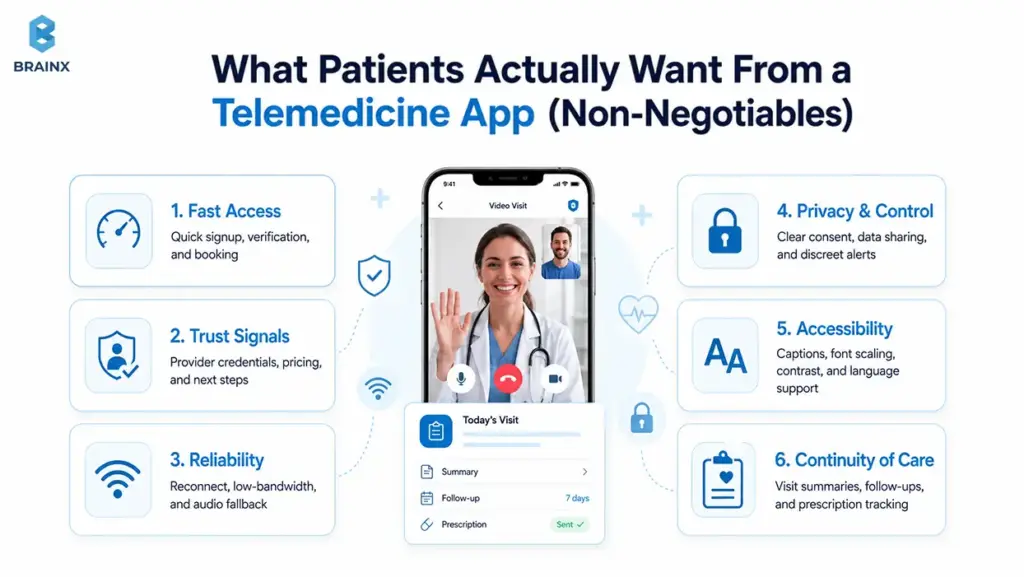
Fast Access: Signup, Verification, and First Appointment in Minutes
Patients want to complete the first meaningful action—booking or joining a visit—without a multi-day setup process.
Product requirements that support this:
- Progressive onboarding (collect only what’s needed to book)
- Smart defaults (auto time zone, remember preferred pharmacy if applicable)
- “Continue later” for non-critical profile steps
- Clear eligibility guidance (especially if insurance is involved)
A common pattern: allow booking after phone/email verification, then collect additional clinical intake before the visit.
Trust Signals: Provider Credentials, Transparent Pricing, Clear Next Steps
Trust is UX. Patients need to know who they’re seeing, what it costs, and what happens after.
Build trust with:
- Provider profiles (credentials, languages, specialties, availability)
- Clear pricing and refund policies (or benefit explanation)
- Pre-visit expectations (duration, what to prepare)
- Post-visit “what now” steps (meds, follow-ups, red flags)
If you have variable pricing or coverage, show ranges and clearly explain what’s estimated vs confirmed.
Reliability: Low-Bandwidth Mode, Reconnect, Audio Fallback
In real life, visits happen in cars, rural areas, and busy homes. Reliability needs explicit design.
Requirements that matter:
- Connection quality indicator (simple, not technical)
- Auto-reconnect with a visible timer
- One-tap audio-only fallback
- Resume without losing context (chat summary, visit notes draft)
If your app fails during a visit, the patient’s trust resets to zero—plan for graceful degradation.
Privacy and Control: Consent, Data Sharing Clarity, Discreet Notifications
Privacy isn’t just compliance; it’s perceived safety.
Patient-first privacy controls:
- Clear consent screens (what data, why, who can see it)
- Granular notification settings (SMS vs push, content redaction)
- Discreet app icon/name options where appropriate (use cautiously)
- Easy access to data export and deletion requests (within policy)
Make privacy settings discoverable—not buried.
Accessibility: WCAG Basics, Captions, Font Scaling, Language Support
Accessibility isn’t optional in healthcare. It’s also a growth and trust factor because patients may be older, stressed, using small screens, relying on assistive technology, or joining from low-quality devices.
Baseline requirements:
- Dynamic type and font scaling
- High-contrast support
- Screen reader labels for key actions
- Keyboard-accessible web flows where relevant
- Captions for video when feasible
- Multilingual UI and interpreter workflows if your market requires them
- Simple language for consent, pricing, prescriptions, and next steps
WCAG 2.2 includes guidance for making content more accessible across disabilities and device types. It also expects text to resize up to 200% without loss of content or functionality, and includes live caption requirements at Level AA. In a telemedicine product, that translates into readable intake forms, clear visit instructions, scalable text, accessible controls, and support for patients who cannot rely only on audio or small visual cues.
Even small changes, like readable consent screens and larger tap targets, can reduce abandonment.
Continuity of Care: Follow-Ups, Prescriptions, Care Plans, Summaries
A visit is a moment; healthcare is a process. Patients want to leave with clarity.
Continuity features that drive satisfaction:
- Visit summary (diagnosis, instructions, next steps)
- Follow-up scheduling prompts
- Prescription status tracking (where applicable)
- Secure channel for clarifying questions (with clear response expectations)
This is also where clinician efficiency improves: fewer repeat questions and fewer avoidable follow-up calls.
Must-Have Telemedicine App Features (MVP vs v1 vs Enterprise)
Feature lists are easy. Prioritizing them is where most teams struggle. The goal here is to define telemedicine app features by tier so your team can ship a safe, usable product without dragging in every “nice-to-have” from day one.
This section also covers Features of a Telehealth App on the provider and admin sides—because telemedicine products fail when they only optimize the patient experience and ignore clinical workflows.
A good rule: every feature should map to a measurable outcome (activation, show-up rate, clinician throughput, reduced support tickets, compliance requirement).
Patient-Side Telemedicine App Features for MVPs (Account, Onboarding, Scheduling, Video Visit, Chat, Payments, Visit Summary)
An MVP should prove that patients can book, attend, and complete care with minimal friction.
MVP patient-side essentials:
- Account creation + verification (email/phone; optional ID verification by risk profile)
- Profile basics + medical intake (progressive, not all upfront)
- Provider search or “next available” matching
- Scheduling + calendar integration + reminders
- Video visit join flow + pre-call device checks
- Secure in-visit chat (for links, instructions, backup communication)
- Payments (if direct-to-consumer) and receipts
- Visit summary + next steps
MVP exclusions that often wait: complex care plans, advanced analytics dashboards, multi-language content libraries (unless required), and deep EHR integration (unless your model demands it).
Provider-Side Features of a Telehealth App (Availability, Patient List, Notes, Prescriptions Workflow, Messaging)
Provider workflows determine throughput. If clinicians hate it, adoption stalls.
Provider-side essentials:
- Availability management + appointment list
- Patient profile view (intake + prior visits within your system)
- Documentation (structured notes + templates)
- Orders/prescriptions workflow (or integrated eRx where required)
- Secure messaging with patients (and internal notes if needed)
- Post-visit actions: follow-up, referrals, summaries
Design tip: providers need speed and minimal clicks; patients need clarity and reassurance.
Admin Console Features (User Management, Roles, Audit Logs, Content/Templates)
Even early-stage products need basic admin control to support operations and compliance.
Admin essentials:
- User management (patients, providers, support staff)
- Roles and permissions (basic RBAC)
- Audit logs (logins, record access, message access where applicable)
- Content/templates (visit summary templates, intake forms)
- Support tools (account recovery, appointment overrides with logging)
Admin capability often reduces “engineering as support” later.
Enterprise Features (SSO, Advanced Analytics, Multi-Location, SLAs, RBAC at Scale)
Enterprise adds governance and scale requirements:
- SSO (SAML/OIDC) and SCIM provisioning
- Advanced RBAC (location, department, care team)
- Multi-location scheduling rules and routing
- Analytics for operations (show-up rate, time-to-first-visit, clinician utilization)
- SLA readiness: monitoring, incident response, uptime reporting
- Multi-tenant architecture (if selling to multiple orgs)
Enterprise scope is less about flashy UI and more about auditability, resilience, and predictable operations.
HIPAA-Compliant Telemedicine App: What You Actually Need to Build
A HIPAA compliant telemedicine app is not “HIPAA certified” because a vendor says so in a pitch deck. It is a product with well-defined PHI data flows, security safeguards, policies, vendor agreements, and operational controls that match HIPAA Security Rule and Privacy Rule expectations.
HHS says the HIPAA Security Rule requires appropriate administrative, physical, and technical safeguards to protect electronic protected health information. In product terms, that means you need to know where PHI is created, stored, processed, transmitted, logged, backed up, and accessed.
Your job as a product team is to design the system so compliance is feasible and provable. You should be able to explain who can access PHI, why they can access it, how access is logged, which vendors touch PHI, what happens during an incident, and how data is retained or deleted.
This section is practical build guidance, not legal advice. Confirm your exact obligations with qualified legal and compliance professionals.
HIPAA Compliant Telemedicine App Data Flows: PHI Mapping + Where It’s Stored/Processed
Start with a PHI map. If you can’t diagram it, you can’t protect it.
Document:
- What data is PHI (intake forms, visit notes, recordings if any, messages, prescriptions)
- Where it’s created (mobile app, web app, provider console)
- Where it travels (API, video provider, notifications, analytics)
- Where it rests (databases, object storage, logs, backups)
Then define your “PHI boundary”—what systems are allowed to handle PHI and what systems are explicitly prohibited.
Encryption, Key Management, Secure Media (Video/Chat)
Encryption is table stakes, but details matter:
- TLS in transit for APIs and web apps
- Encryption at rest for databases and object storage
- Key management via a managed KMS where possible
- Secure handling of media streams and chat data
Decide early whether you will allow recordings; recordings increase risk and storage/compliance burden.
Access Control: RBAC, Least Privilege, Session Management
HHS guidance connects access control to the need to authorize ePHI access only when it is appropriate for a user’s role. For the product team, that means support staff, clinicians, admins, and patients should not see the same data by default.
Build this into the app through:
- Role-based access control
- Least-privilege permissions
- MFA for providers and admins
- Session expiry and device/session management
- Logged support actions
- “Break glass” access only if your operating model truly needs it
Access should feel invisible to users, but it should be visible and reviewable to your security and compliance teams.
Audit Trails + Monitoring (Who Accessed What, When)
Auditability is often the difference between “we think we’re compliant” and “we can demonstrate safeguards.”
HHS identifies audit controls as part of the technical safeguards for systems that use or contain ePHI. So audit trails should not be treated as a hidden backend detail. They should help your team answer practical questions: who accessed a record, when they accessed it, what changed, which role they used, and whether the action looked unusual.
Log:
- Authentication events
- PHI access events (read/write, by user, timestamp, IP/device where appropriate)
- Admin actions (role changes, exports, deletions)
- Security alerts and anomaly signals
Make logs tamper-resistant and set retention aligned with policy.
BAAs and Vendor Management (Video, SMS, Email, Analytics)
Your vendors can become your biggest compliance risk because many telemedicine products depend on third-party services for cloud hosting, video, SMS, email, analytics, support, file storage, or identity verification.
If a vendor creates, receives, maintains, or transmits ePHI on your behalf, HHS guidance makes BAAs and appropriate safeguards important. That does not mean every tool automatically needs a BAA, but it does mean your team must know exactly what data each vendor touches.
For any vendor that touches PHI, evaluate:
- Will they sign a BAA where required?
- What data do they process, and where?
- Do they support encryption, access controls, and audit logs?
- What are their incident notification terms?
- Can you limit what data reaches that tool?
Be cautious with SMS and email content. Often the safer approach is notification only, with no PHI, and a prompt that brings users back into the app for details.
Retention, Deletion, Backups, Incident Response Readiness
Operational readiness is part of compliance:
- Define retention periods for records, messages, and logs
- Provide deletion workflows where appropriate (and document exceptions)
- Backup strategy with encryption and access controls
- Incident response plan: detection, containment, notification, recovery
- Regular access reviews and security testing cadence
If you’re selling B2B, expect security questionnaires—prepare evidence early. Also review analytics and tracking tools carefully. HHS has warned that tracking technologies on regulated websites and mobile apps can create HIPAA issues when sensitive health information is disclosed to third parties.
For telemedicine products, analytics should measure product performance without casually leaking appointment, condition, prescription, or provider details into external tools.
Video Consultation App Development: Architecture and Build Options
Video consultation app development is a product decision as much as a technical one. The best choice depends on your timeline, compliance needs, expected volume, support model, and where you want differentiation.
WebRTC is the foundation under many real-time communication products. MDN describes WebRTC as a technology that enables web apps and sites to capture and stream audio/video media and exchange data between browsers. In simple terms, it makes real-time voice, video, and data communication possible inside modern web experiences.
For most teams, the early question is not “Do we need video?” It is “How much of the real-time stack should we control?” Many teams should integrate a proven SDK early, then revisit custom infrastructure only when scale, cost, or control makes it worth the added engineering and DevOps complexity.
Video also affects support load. A slightly more expensive video provider can be cheaper overall if it reduces failed visits, refunds, reschedules, and support escalations.
Video Consultation App Development: Build vs Integrate (Twilio/Vonage/WebRTC SDKs)
Most teams choose between two paths:
- SDK integration: Faster to ship, better operational maturity, known scaling patterns, and vendor compliance options depending on the provider and plan. This is usually the better MVP and v1 path.
- Custom WebRTC stack: More control, more customization, and possibly better economics at very high scale, but it also brings higher engineering, security, monitoring, and DevOps complexity.
A practical approach for many products:
- Launch MVP with a trusted SDK.
- Validate workflows, completion rate, support load, and unit economics.
- Reassess build vs integrate once volume and requirements are clearer.
If your differentiation is clinical workflow, patient trust, or provider efficiency, do not sink the early roadmap into building your own video infrastructure too soon.
Handling Poor Connections (Adaptive Bitrate, Reconnect, Audio-Only)
Reliability features should be in scope, not “nice-to-haves”:
- Adaptive bitrate and resolution changes
- Auto-reconnect with session continuity
- Seamless fallback to audio-only
- Pre-call network test with user-friendly guidance
- Provider-side indicators (so clinicians can adapt)
Also plan operationally: what happens if video fails—does the visit continue by audio, phone, or reschedule with a documented trail?
Security Considerations for Real-Time Communications
Key security requirements include:
- End-to-end protections appropriate to your model (at minimum, encrypted transport)
- Token-based session access (short-lived, scoped)
- Waiting rooms or controlled join links
- Controls for screen sharing (if enabled)
- Safe handling of chat attachments (scanning, type restrictions)
Also decide whether any media is stored; storage expands compliance needs significantly.
Cross-Platform Considerations (iOS/Android/Web)
Cross-platform decisions affect time-to-market:
- Native iOS/Android can offer best performance and device integration
- Web can reduce friction for one-off visits and enterprise rollouts
- Many products do a hybrid: mobile-first for patients, web-first for providers/admins
Make sure your device matrix is defined early (older Android devices and low-end networks can change implementation details).
Integrations That Make or Break Telehealth Products (EHR, FHIR, Payments, eRx)
Integrations are where timelines go to die unless you treat them as first-class scope. In broader telehealth app development, integrations often determine whether your product becomes a true workflow tool or just a standalone experience with manual workarounds.
FHIR is one of the most important standards to understand here. HealthIT.gov describes FHIR as a widely used API-focused standard for representing and exchanging health information, including clinical and administrative data. ONC has also reported that a majority of digital health companies integrating with EHRs use the FHIR standard.
That does not mean FHIR makes integration effortless. You still need to plan around stakeholder approvals, sandbox access, scopes, authorization, data mapping, terminology differences, rate limits, testing, rollout, and what happens when an integration fails.
This section focuses on the integrations most likely to affect architecture, cost, and user experience.
EHR Integration Basics (FHIR, HL7—What to Expect)
Most modern EHR integration conversations start with FHIR, but real delivery is still mixed. FHIR gives teams a cleaner API-focused resource model for common health data, but every implementation still has local constraints.
What to expect:
- FHIR APIs for demographics, appointments, medications, allergies, conditions, and observations, depending on the EHR setup
- HL7 v2 still appearing in event-driven workflows
- SMART on FHIR or OAuth-style authorization patterns
- Data mapping work across codes, local fields, and terminology systems
- Sandbox limitations and approvals before production access
- Retry, queue, and reconciliation logic for failed syncs
Also decide whether your app is the system of record or a workflow layer that syncs key data back to the EHR. That one decision changes the whole architecture.
ePrescribing and Pharmacy Workflows (Where Applicable)
eRx can be complex depending on geography and controlled substances rules.
Common approaches:
- Integrate with an eRx network/vendor (often with certification steps)
- Use EHR-native prescribing where your provider users already work inside an EHR
- Start with “prescription request” workflow and expand later (if clinically acceptable)
Define what “done” means: sent to the pharmacy, confirmed, received, patient notified, and documented.
Insurance/Eligibility, Billing, Claims (If in Scope)
If you’re billing insurance, scope increases quickly:
- Eligibility checks (real-time or batch)
- CPT/ICD coding workflows
- Claims submission, remittance, reconciliation
- Patient balances and statements
If you’re not ready for full billing, many teams start with self-pay and add insurance once operations stabilize.
Notifications (Push/SMS/Email) + Consent Implications
Notifications drive show-up rates, but they can create privacy risks.
Best practices:
- Keep notification content generic (no PHI)
- Explicit consent for SMS/email
- Quiet hours and preference controls
- Delivery tracking and fallback logic
Also document which notification vendor touches what data, and whether a BAA is required.
Analytics That Won’t Violate Compliance Expectations
Analytics is important, but be deliberate:
- Separate product analytics from PHI where possible
- Avoid sending PHI to third-party analytics tools
- Use self-hosted or HIPAA-ready analytics patterns if you must analyze PHI-adjacent events
- Define event naming that doesn’t encode sensitive details
A safer baseline: measure funnel events (signup complete, appointment booked, visit started) without capturing medical specifics.
Telemedicine App Development Cost (2026 Ranges + What Drives the Budget)
Budgeting becomes easier when you tie scope to modules and risk. Telemedicine app development cost is less about the number of screens and more about video reliability, integrations, compliance hardening, QA depth, and operational readiness.
The ranges below are planning estimates for custom builds in 2026, not universal benchmarks. Your actual price depends on whether you are building one narrow workflow or a multi-system product with enterprise controls.
If you want a tighter estimate, define your care model, must-have features, integration targets, compliance boundaries, and launch platform first.
Telemedicine App Development Cost Range for MVPs (What’s Included / Excluded)
MVP cost stays lower when you pick one care model, one patient journey, one provider workflow, and minimal integrations. The goal is not to build every feature. The goal is to prove that patients can book, attend, complete care, and understand what happens next.
What usually drives MVP variance:
- One platform vs two (web + mobile)
- Video SDK integration complexity
- Identity verification needs
- Basic admin and support tooling
Usually excluded: deep EHR integration, enterprise SSO, advanced analytics, multi-tenant controls, and heavy customization for multiple clinics.
v1 Cost Range (Integrations, Admin, Analytics)
v1 rises once the product needs operational tooling, analytics, care-plan logic, templates, stronger admin controls, and real interoperability work. At this stage, the “real-world” requirements are added to make the product operational:
- EHR/FHIR integration (partial)
- Stronger admin controls + audit log review tools
- Analytics and reporting
- Better provider workflows and templates
- Expanded notification logic and consent management
The main multiplier is integration complexity and stakeholder coordination with provider orgs.
Enterprise Cost Range (SSO, Compliance Hardening, Multi-Tenant)
Enterprise budgets increase because reliability, documentation, access controls, uptime expectations, security reviews, environment management, and cross-system orchestration all become first-class deliverables.
- SSO + SCIM, advanced RBAC
- Formal security processes, threat modeling, pentest remediation
- Multi-tenant architecture, SLAs, monitoring, incident response
- Data retention tooling and export controls
- Advanced analytics with compliance constraints
At this level, you’re paying for reliability engineering and compliance operations as much as feature work.
Major Cost Drivers (Video, Integrations, Compliance, QA, Hosting, Support)
The biggest cost drivers are usually:
- Video + real-time reliability (especially if not using a managed SDK)
- EHR/FHIR integrations (mapping, auth, testing, stakeholder approvals)
- Compliance hardening (audit trails, access controls, policies, vendor BAAs)
- QA depth (device matrix, network simulation, load testing)
- Operational tooling (support workflows, monitoring dashboards)
When budgeting, include time for “integration unknowns”—they are rarely linear.
Ongoing Costs (Cloud, Support, Monitoring, Security, Vendor Licenses)
Do not ignore these recurring costs that typically include:
- Cloud hosting (compute, storage, bandwidth)
- Video vendor fees (often usage-based)
- SMS/email delivery costs
- Monitoring/logging platforms
- Security tools and periodic testing
- Support and on-call coverage
Many teams under-budget operating cost even when their initial build estimate looks reasonable. Plan for ongoing improvement work too. Healthcare products are never “done,” especially as regulations, devices, and clinical workflows evolve.

Telemedicine App Development Best Practices (From Discovery to Launch)
Execution quality is your moat. Telemedicine app development best practices are about de-risking the build: validating workflows early, catching compliance gaps before they’re expensive, and launching with operational readiness.
If you treat this as a standard mobile app, you’ll pay for it later in failed visits, provider complaints, and security rework. If you treat it as a healthcare workflow product from day one, you’ll ship fewer features—but the right ones.
Below is a practical plan from discovery through post-launch iteration.
Telemedicine App Development Best Practices for Discovery: Clinical Workflow Mapping + Patient Journey
Discovery should produce artifacts engineering can build from:
- Care model definition (who does what, when)
- Patient journey map (from intent → booking → visit → follow-up)
- Provider workflow map (intake → visit → documentation → next steps)
- Risk register (compliance, integration unknowns, operational constraints)
Include frontline clinicians and support staff early. Their “small” constraints (like how they document) often shape your entire UX.
Prototype & Usability Testing (Patient + Provider)
Before building full systems, validate the hardest UX flows:
- Signup and first booking
- Joining a visit and recovering from bad connectivity
- Provider documentation and post-visit actions
- Consent and privacy settings comprehension
Run usability tests with representative patients (including accessibility needs) and providers with real time pressure. You’ll get more value from 8–12 quality sessions than 100 internal opinions.
Security/Compliance Baked Into Sprint Rituals
Compliance is a workflow, not a phase.
Operational practices that work:
- Define PHI boundaries and enforce them in code reviews
- Threat modeling for major features (video, messaging, file uploads)
- Security acceptance criteria in stories (logging, RBAC checks)
- Vendor reviews and BAA checks before integration goes live
This reduces “surprise rework” right before launch.
QA Strategy (Device Matrix, Network Simulation, Load Testing)
Telemedicine QA needs more than happy-path testing.
Include:
- Device coverage (older Android, smaller screens, tablets if providers use them)
- Network simulation (3G, spotty Wi‑Fi, packet loss)
- Load testing for scheduling and session creation
- Regression suites for critical flows (booking, join visit, payments)
Also test operational scenarios: rescheduling, refunds, appointment disputes, and support escalations.
Launch Checklist (App Store Privacy, Policies, Support Ops)
Launch is part product, part operations.
Checklist items:
- App store privacy disclosures aligned with actual data use
- Clear user policies (cancellation, refunds, emergencies)
- Support playbooks (failed visits, billing issues, account recovery)
- Monitoring dashboards and alerting thresholds
- Incident response readiness and escalation contacts
A smooth launch reduces churn more than adding another minor feature.
Post-Launch Iteration (Metrics: Activation, Show-Up Rate, Repeat Visits)
Measure what matters:
- Activation: signup → booked appointment
- Show-up rate: booked → completed visit
- Time-to-first-visit
- Visit failure rate (and root causes)
- Repeat visits / retention
- Support tickets per 100 visits
Then iterate with a bias toward reliability, clarity, and continuity—not just adding modules.
Key Benefits of Telehealth App Development
The business case is important, particularly for the stakeholders who are providing funding for the build. The Key Benefits of Telehealth App Development typically tend to be access expansion, operational efficiency and continuity.
Importantly, benefits differ by buyer. Startups want distribution and repeatable care delivery. Providers want capacity and reduced administrative load. Member experience and cost containment are priorities for enterprises and payers.
As you develop your ROI model, make sure to connect each benefit to a measurable metric (e.g., show-up rate, utilization, time-to-care, support costs, clinician throughput).
Key Benefits of Telehealth App Development for Startups: Faster Distribution, New Care Models, Revenue Streams
Startups commonly benefit from:
- Faster market entry via an MVP-first approach
- New care models (subscriptions, bundles, async-first triage)
- Geographic expansion where regulations allow
- Better unit economics through async workflows and smart routing
The “win” is repeatable operations: consistent outcomes with predictable clinician time.
For Providers: Capacity, Follow-Ups, Chronic Care Efficiency
Provider org benefits often show up as:
- More completed visits per clinician day (when workflows are tight)
- Better follow-up adherence through reminders and summaries
- Reduced administrative burden with templates and structured intake
- Chronic care efficiency via RPM and async check-ins (when appropriate)
Telehealth works best when it reduces friction, not when it adds another disconnected tool.
For Enterprises/Payers: Cost Containment, Member Experience, Data Visibility
Enterprises and payers often prioritize:
- Lower avoidable utilization (when telehealth diverts non-emergent cases appropriately)
- Improved member experience and access
- Better visibility into engagement and outcomes (within compliance boundaries)
- Standardized care pathways across locations or populations
These buyers will also look closely at and scrutinize a vendor's security position and governance.
Choosing a Telemedicine App Development Company (Evaluation Checklist)
Do not evaluate a telemedicine partner like a general mobile app studio. A telemedicine app development company must demonstrate regulated product delivery, integration maturity, and the ability to design for patient trust and clinical workflow realities.
The aim is to minimize delivery risks such as non-compliance, integration delays, unreliable video, and poor handover. The right partner will guide you through the scoping phase realistically and will challenge you when your backlog poses a direct threat to patient safety or viability of the launch.
Here's a practical checklist that you can use when interviewing vendors and scoring them.
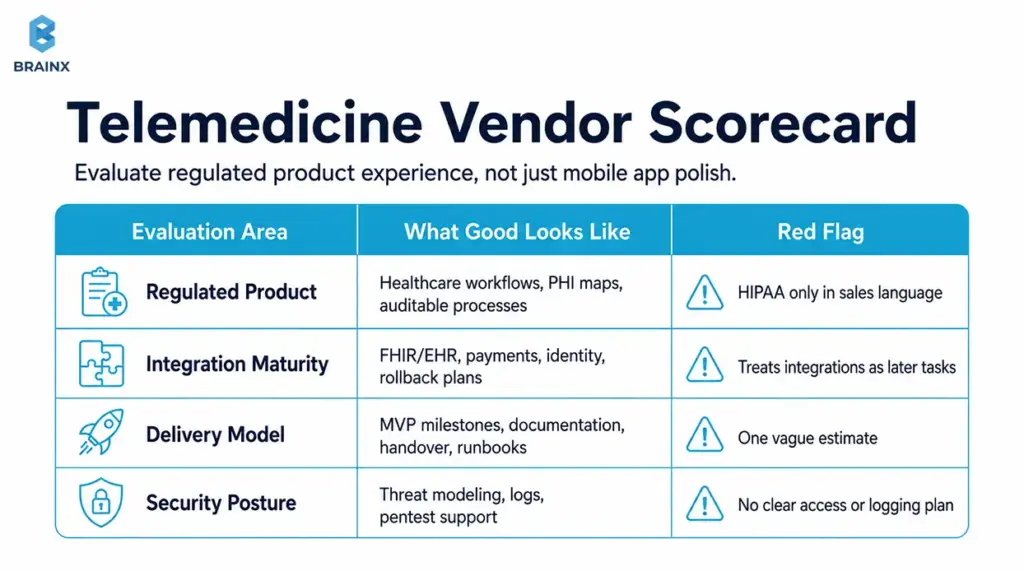
How to Evaluate a Telemedicine App Development Company for Regulated Product Experience
Look for evidence of:
- Healthcare workflow products shipped (not just “health apps”)
- Security-by-design practices (threat modeling, secure SDLC)
- Experience with HIPAA-adjacent architecture patterns and auditability
- Clear documentation and QA discipline
- Ability to collaborate with compliance, legal, and IT stakeholders
Ask for concrete artifacts: sample audit log approach, sample PHI map, sample release checklist.
Integration Experience (FHIR/EHR, Payments, Identity)
Integration maturity is a major differentiator.
Assess:
- Past FHIR/HL7 projects and how they handled data mapping
- Approach to sandboxing, testing, and rollback
- Payments experience (if DTC) with secure tokenization patterns
- Identity verification and fraud prevention (if relevant)
A strong team will talk about “unknowns” early instead of promising a fixed timeline without discovery.
Delivery Model (MVP-First, Milestones, Documentation, Handover)
Operational clarity matters as much as code quality.
Evaluate:
- MVP-first planning with measurable outcomes
- Milestone-based delivery with demos and acceptance criteria
- Documentation quality (architecture, runbooks, API docs)
- Post-launch support options and knowledge transfer
You should know exactly what you’ll own at the end: repos, infra access, CI/CD pipelines, and runbooks.
Security Posture (Threat Modeling, Pentest Support, Logging)
Security posture isn’t a slide—it's a process.
Confirm:
- Secure coding standards and review process
- Logging/audit strategy baked into requirements
- Support for third-party pentests and remediation
- Secrets management, access reviews, and environment controls
- Incident response readiness (who does what)
It is a red flag if a vendor cannot explain how they deal with logs and PHI boundaries.
Questions to Ask on the First Call (Scope, Risks, Timeline)
Use these to surface maturity quickly:
- “What are the top three risks you see in our scope, and how would you de-risk them in the first 2–3 weeks?”
- “Which vendors typically require BAAs, and how do you validate that?”
- “How do you test video reliability under weak networks?”
- “What’s your approach to PHI mapping and audit logs?”
- “What does your MVP exclude, and what metrics define success?”
Good partners are comfortable saying “not yet” to features that don’t serve the MVP goal.
How BrainX Helps With Telemedicine App Development
BrainX Technologies is here to help build patient-first, security-conscious, and ready-to-go telemedicine solutions. We tend to start early when scope is still not set in stone and help choose the correct care model, define MVP boundaries and finalize the technical approach before costs start to stack up.
When teams come to BrainX after a first failed build, the issues are usually the same like unclear workflows, under-designed provider tooling, and compliance bolted on late. Our process is designed to prevent those problems.
Discovery & Product Strategy (Patient + Provider Workflow Mapping)
We run structured discovery to produce build-ready outputs:
- Care model definition and workflow mapping
- Patient journey friction analysis (activation → visit → follow-up)
- MVP scope and phased roadmap (what to prove first)
- Risk register for integrations, compliance, and reliability
This keeps stakeholders aligned and reduces rework.
UI/UX for Clinical-Grade Experiences
Our UX work focuses on the moments that drive outcomes:
- Fast booking and low-friction onboarding
- Clear consent and privacy controls
- Reliability cues and failure recovery (reconnect, audio fallback)
- Provider workflows optimized for speed and accuracy
We also support usability testing so decisions are grounded in patient/provider feedback.
HIPAA-Minded Architecture + Secure Development
We design with compliance realities in mind:
- PHI mapping and data boundary definition
- Secure auth patterns, RBAC, and audit logging
- Vendor evaluation for BAAs and compliant data handling
- Security testing support and remediation planning
The goal is a system you can explain and defend—not just one that “seems secure.”
MVP to Enterprise Scaling (DevOps, Monitoring, Reliability)
Reliability and operational readiness become the product as you keep scaling.
We help with:
- CI/CD pipelines, environment strategy, and observability
- Performance and load planning (especially for scheduling and session initiation)
- Incident response readiness and runbooks
- Scaling patterns for multi-location and enterprise governance
Engagement Models (Team Augmentation vs End-to-End)
Depending on your team and timeline, BrainX can support:
- End-to-end delivery (strategy → design → engineering → QA → launch)
- Team augmentation (specialists embedded into your squad)
- Hybrid models for faster MVP delivery with internal ownership
If you share your care model and target launch window, we can propose a phased plan with deliverables: MVP scope, timeline, and a budget range.
Conclusion: A Practical Next Step (Pick Your Type, Define MVP, Validate With Patients)
A telemedicine product succeeds when it is scoped to a specific care model, designed around real patient friction, and built with reliability and auditability from the start. Use this Telemedicine App Development Guide to choose your app type, define an MVP that proves value quickly, and validate workflows with patients and providers before scaling features and integrations.
If you want a second set of eyes on scope, compliance boundaries, or cost drivers, BrainX Technologies can help you turn your requirements into a phased delivery plan with clear milestones.
FAQs About Telemedicine App Development
What Is Included in a Telemedicine App Development Guide for Startups?
A strong guide includes care model selection, MVP feature tiers, compliance requirements, and cost drivers tied to real architecture decisions. It should also cover video build options, integration expectations (like FHIR/EHR), and a launch checklist that includes operational readiness.
The best guides translate “patient experience” into specific requirements like onboarding time, reconnect behavior, and post-visit continuity. This is exactly what a Telemedicine App Development Guide should help you finalize before you commit a budget.
What Are the Must-Have Telemedicine App Features for an MVP?
Most MVPs need patient onboarding, scheduling, a reliable join flow for video visits, secure messaging, and a post-visit summary. If you’re direct-to-consumer, payments and receipts are usually required in v0–MVP.
You’ll also want minimal admin tools for user management and support workflows, plus basic audit logging if PHI is involved. The goal is to prove that patients can book and complete care with low friction and that providers can document outcomes efficiently.
How Do You Build a HIPAA Compliant Telemedicine App (and What Should Be Outsourced vs In-House)?
Start by mapping PHI data flows, then design access control, encryption, audit logs, retention policies, vendor governance, and incident response around that map. Most teams outsource commodity components like video infrastructure, SMS/email delivery, cloud services, and identity verification, but only to vendors that meet security needs and sign BAAs where required.
Core logic that reflects your clinical workflow and product differentiation is usually best kept in-house or built with a dedicated product partner under your ownership. Confirm requirements with qualified legal and compliance advisors before launch.
What Is the Typical Telemedicine App Development Cost for MVP vs Enterprise?
Typical telemedicine app development cost planning in 2026 often lands around $80k–$180k for an MVP, $180k–$400k for a more complete v1, and $400k–$1.2M+ for enterprise-grade scope.
The difference is usually less about the number of screens and more about integrations, reliability expectations, security hardening, QA depth, documentation, and support requirements.
What’s the Best Approach for Video Consultation App Development: Build WebRTC or Use an SDK?
For most teams, video consultation app development moves faster with a trusted SDK because it reduces operational complexity and accelerates reliability.
Building deeper on WebRTC makes more sense when you need unusual customization, tighter media control, or long-term platform economics at scale. A practical strategy is to integrate an SDK for MVP or v1, learn from real usage, then revisit build-vs-buy once demand and constraints are clearer.
How Do I Choose a Reliable Telemedicine App Development Company?
Choose a partner with evidence of healthcare workflow delivery, not just general app experience. Look for strong discovery practices, integration maturity (FHIR/EHR), and a security posture that includes threat modeling, audit logging, and support for third-party pentests.
Ask how they test weak networks for video visits and how they document PHI boundaries and vendor BAA requirements. Finally, evaluate handover quality—repos, infrastructure access, CI/CD, and runbooks—so you’re not locked in.