
 May 4, 2026 -
  20 minutes read

TL;DR / Key Takeaways
- UX-first engineering turns web design and development into shared ownership, not “design first, dev later.” It ties UX outcomes to engineering definition-of-done.
- It’s most worth it when you face feature parity, conversion pressure, and speed-to-market constraints.
- The process change is practical: integrated discovery, UX architecture before pixels, component-driven delivery, and measurement loops.
- Expect improvements in rework, release confidence, Core Web Vitals, accessibility compliance, and funnel performance if you set targets early.
Shipping “one more feature” rarely moves the needle when competitors can match you within weeks. Instead, it's what makes the experience feel good to use your product–how quickly it loads, how easy it is to understand, and how effortlessly users get their jobs done. That’s why web design and development can’t be treated as separate lanes anymore.
UX-first engineering is a process model where design intent, technical feasibility, and business outcomes are co-owned—day one through post-release. Instead of throwing mockups over the fence, teams align on measurable UX outcomes (conversion, time-to-value, accessibility, performance budgets) and build a system that ships predictably.
What UX-First Engineering Means in Web Design and Development
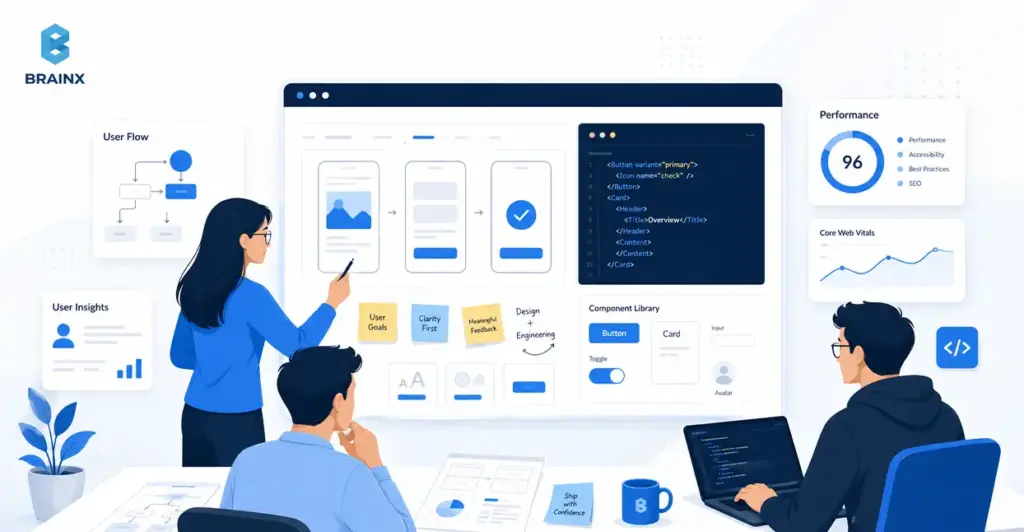
UX-first engineering is a delivery model where user experience goals are treated as engineering requirements, not creative preferences. In practice, it means research insights become constraints, designs become testable hypotheses, and the build is governed by performance, accessibility, and usability acceptance criteria—not just “it matches Figma.”
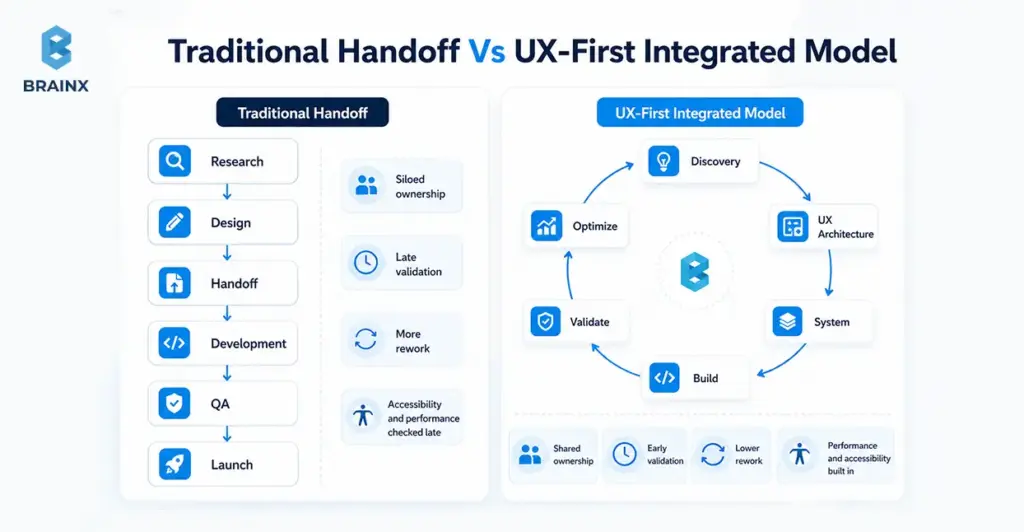
In web design and development, the biggest shift is eliminating the “design then dev” baton pass. Rather than a waterfall process, you have an integrated loop: discovery → UX architecture → system → build → validate. Designers and engineers, thus, co-own the “why,” the “what,” and the “how.”
This model is also not the same as “making the UI look modern.” UX-led product development is evaluated on the business results: reduced time-to-complete, fewer support tickets, higher activation, faster pages, and fewer regressions after releases.
For a more in-depth read on discovery and UX architecture documents that map directly to development, start here:
Design-Led Vs Engineering-Led Vs Stakeholder-Led (And Why Only One Scales)
Most teams tend to operate in one of the following three ways:
- Engineering-led: delivery is optimized for throughput. The risk is a product that’s “technically done” but confusing, inconsistent, or conversion-weak.
- Stakeholder-led: prioritization is driven by the loudest opinions, internal politics, or on the basis of HIPPO decisions. The risk is churned roadmaps and constant reversals.
- Design-led (UX-first): the product is led by user outcomes and validated decisions. The risk—if done poorly—is over-indexing on aesthetics without constraints.
Only the design-led model scales because it creates a decision system. It reduces “subjective debates” by using evidence (analytics, usability tests) and shared artifacts (flows, component rules, acceptance criteria). Engineering stays efficient because requirements are clearer and changes are less chaotic.
They might say that your approach doesn’t scale: people can repeatedly ask, “What are we building again?”—or worse, “Why did we build this?” UX-first engineering makes those answers visible and testable.
Also Read: Follow These 14 Simple Rules To Outsource A Development Team
UX Outcomes Are Engineering Outcomes (Performance, Accessibility, Reliability)
Users don’t separate UX from engineering. If a web page is slow to load, the button is difficult to click, or if the checkout doesn't work under load, it's a UX problem–no matter how beautiful the UI is.
A UX-first model treats these as first-class deliverables:
- Performance: fast LCP/INP/CLS targets tied to user journeys, not generic “optimize later.”
- Accessibility: keyboard navigation, focus states, color contrast, semantic HTML, ARIA where needed that is built into components from the start.
- Reliability: resilient states (loading, empty, error), consistent across devices/browsers, and less bugs.
This is where UX-first engineering creates leverage: when performance and accessibility are baked into the component library, you don’t “re-fix” them on every page. You inherit quality by default.
Why Design-Led Web Delivery Wins in Competitive Markets
In crowded markets, customers compare experiences more than feature lists. They see traces of doubt, discomfort, and dis-coherence immediately—especially when comparing different vendors. Done right, web design and development becomes a revenue-protection layer: it helps people understand value faster, trust you sooner, and complete actions with less doubt.
Design-led delivery also protects roadmaps. When teams validate flows early, they avoid building features that don’t change user behavior. That matters when budgets are tight and leaders expect proof, not guesses.
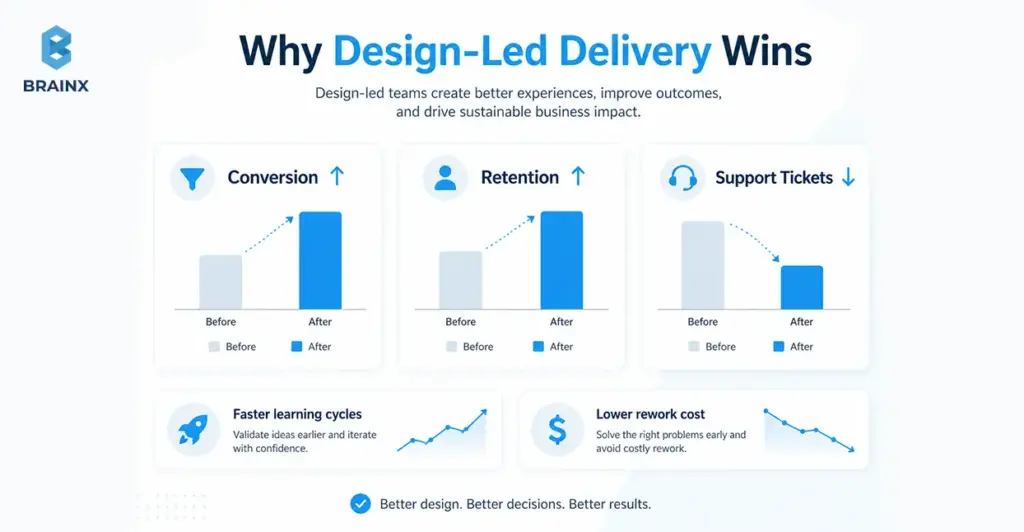
There’s also a strong body of evidence that usability and UX improvements correlate with better business outcomes like conversion, retention, and reduced support costs.
Faster Learning Cycles Beat Faster Shipping Cycles
Shipping faster only helps if you’re shipping the right things. UX-first engineering prioritizes learning velocity: how fast you can validate people’s needs, drop-offs, and what helps or hinders.
Instead of debating in meetings, teams:
- instrument key journeys (signup, onboarding, quote request)
- run usability checks on risky flows before coding
- ship smaller increments behind flags where needed
- measure behavior changes and iterate
This reduces “big reveal” launches that miss expectations. It also makes roadmaps more defensible because decisions are traceable to evidence, not internal preference.
Lower Rework Cost: Fewer Rebuilds, Fewer Stakeholder Reversals
Rework usually comes from a handful of predictable sources:
- unclear requirements (“build it like this… actually like that”)
- missing edge states (empty/error/loading)
- inconsistent components that don’t scale across pages
- late discovery of performance or accessibility issues
- stakeholder feedback arriving after code is “done”
UX-first engineering cuts rework by turning ambiguity into artifacts early: flows, IA, content models, acceptance criteria, and component rules.
If you need a defensible number for leadership discussions, cite credible engineering management research on the cost of late changes and defect multipliers.
Trust Signals: Accessibility, Performance, And Consistency
Trust isn’t just branding—it’s the cumulative effect of small signals:
- the UI behaves consistently across pages
- forms don’t surprise users
- content is readable and structured
- pages load quickly on real devices
- the experience works for keyboard and assistive tech users
In regulated or enterprise contexts, accessibility is also procurement reality. Aligning to WCAG reduces risk and increases adoption across teams and customer environments.
When your experience signals care and competence, buyers are less likely to churn during evaluation—and users are more likely to complete key tasks without needing support.
The UX-First Engineering Framework (BrainX-style Delivery Playbook)
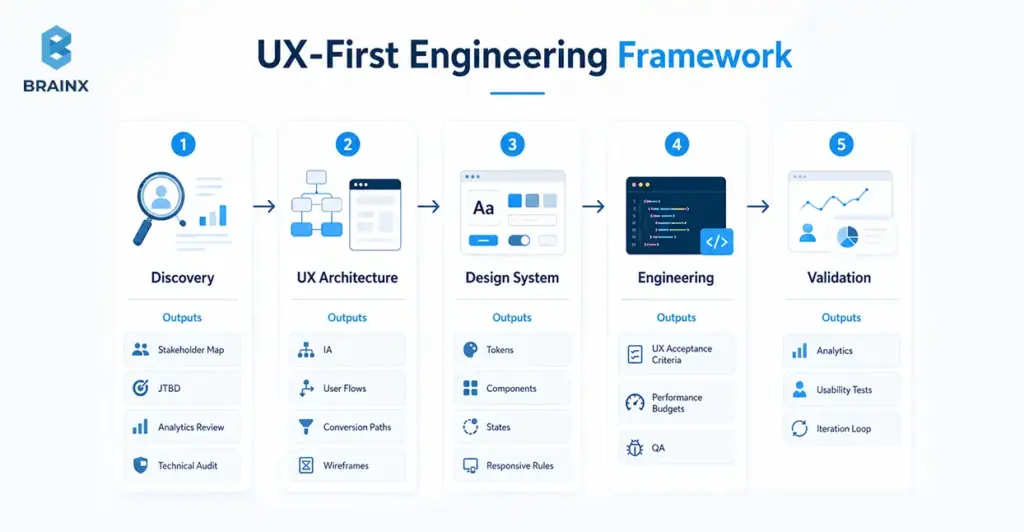
Teams often ask for “a UX process,” but what they really need is a delivery system: who decides what, which artifacts are required, what gates prevent rework, and how quality is measured. That’s the difference between a checklist and an operating model.
Below is a practical framework BrainX uses to make UX-first delivery predictable in web design and development—and easy to evaluate in a partner. The differentiator isn’t just the phases; it’s the artifacts plus gates that keep momentum without sacrificing quality.
Phase 1 — Discovery That Engineers Actually Use
Discovery fails when it produces insights that don’t translate into build decisions. UX-first discovery is engineered for delivery: it creates constraints, acceptance criteria, and architecture inputs—not just personas.
Artifacts that make discovery usable:
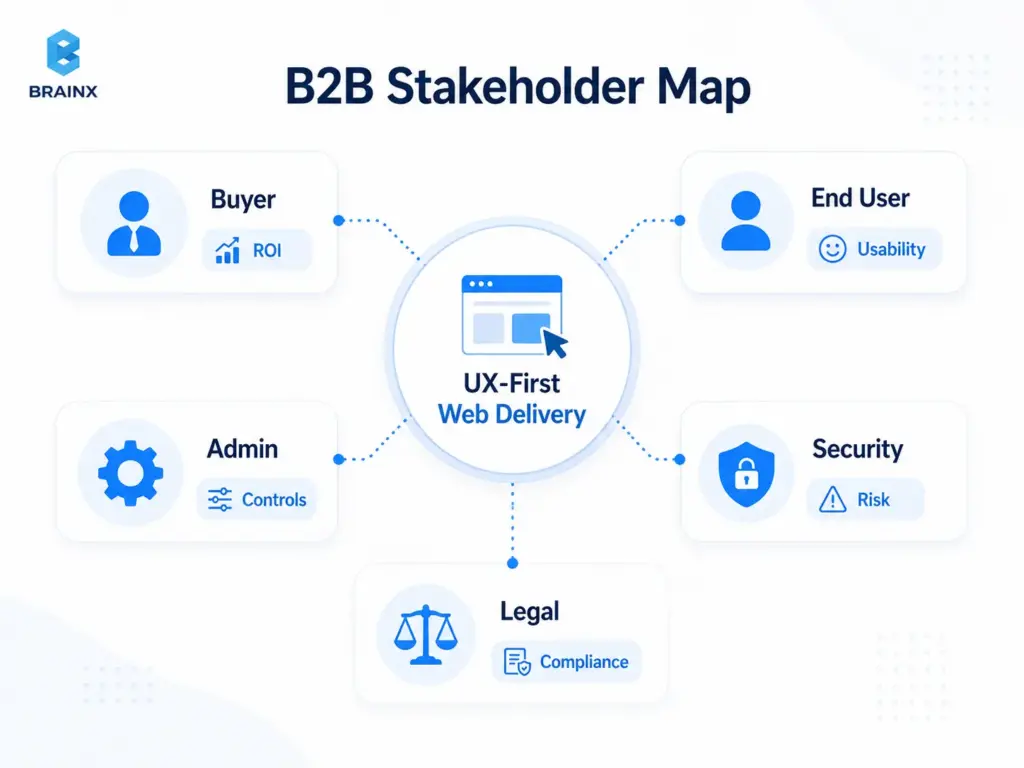
- Stakeholder mapping: who approves, who uses, who administers, who supports, who secures.
- JTBD (Jobs To Be Done): what users want to do, the triggers and the "success moment".
- Analytics review: funnel drop-offs, high-exit pages, device breakdown, top search terms, and common paths.
- Technical audit: current stack constraints, rendering strategy, performance bottlenecks, accessibility issues, and third-party script impact.
- Content model: what content types exist (and should exist), required fields, governance rules, and ownership.
Key gate: discovery isn’t “done” until you can write testable requirements (flows + acceptance criteria) and identify the highest-risk unknowns.
Phase 2 — UX Architecture: Flows, IA, And Conversion Paths
Before pixels, you need structure. UX architecture aligns the team on how users move through the product and how information is organized—so design iterations don’t turn into endless rearranging later.
What this phase typically produces:
- Information architecture (IA): navigation structure, page hierarchy, content grouping.
- Critical user flows: happy paths and edge cases (errors, empty states, retries).
- Conversion paths: where commitment increases (micro-yes steps), where reassurance is needed, where friction is acceptable.
- Content-first wireframes: hierarchy and content first layouts, decoration comes second.
This phase prevents a common failure mode: teams “design screens” without designing the journey. When the journey is clear, UI becomes easier—and development becomes more predictable.
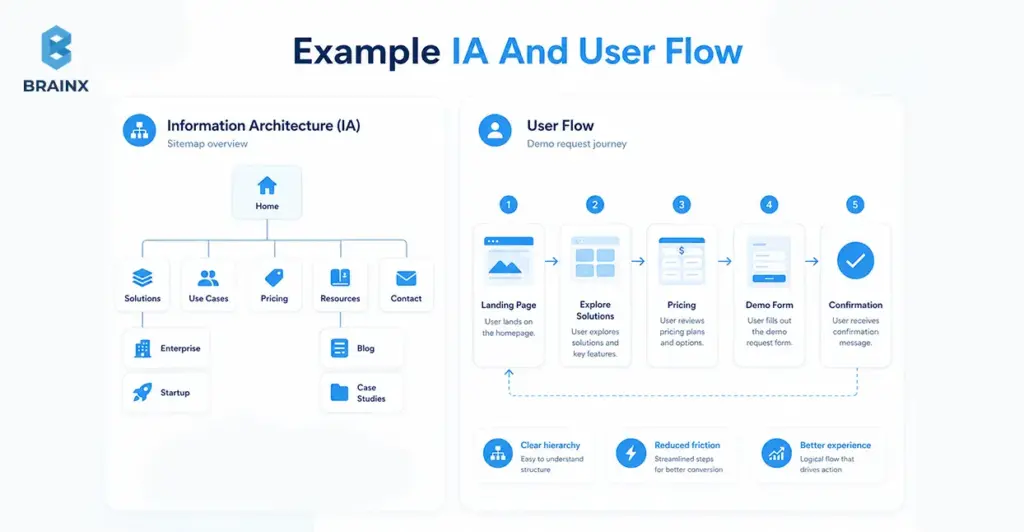
Phase 3 — Design System + Component Strategy (Bridge From Figma To Code)
This is where custom web design and development stops being expensive and starts being scalable. A design system is not a “UI kit”; it’s the shared contract between design and engineering: tokens, components, states, and usage rules.
In the first paragraph of this phase, it’s worth being explicit: custom web design and development pays off when you invest in a component strategy that reduces future build cost while improving consistency.
What to define (so the system survives real-world changes):
- Design tokens: color, typography, spacing, radii, shadows, motion—mapped to code variables.
- Components with states: default/hover/active/disabled, loading, error, empty, validation rules.
- Responsive behavior rules: breakpoints, layout constraints, content priority on smaller screens.
- Composition patterns: how smaller components combine into sections (hero, pricing table, comparison, forms).
- Content guidelines: truncation, localization readiness, long/short copy behavior.
A practical bridge artifact is a mapping table that makes ownership clear:
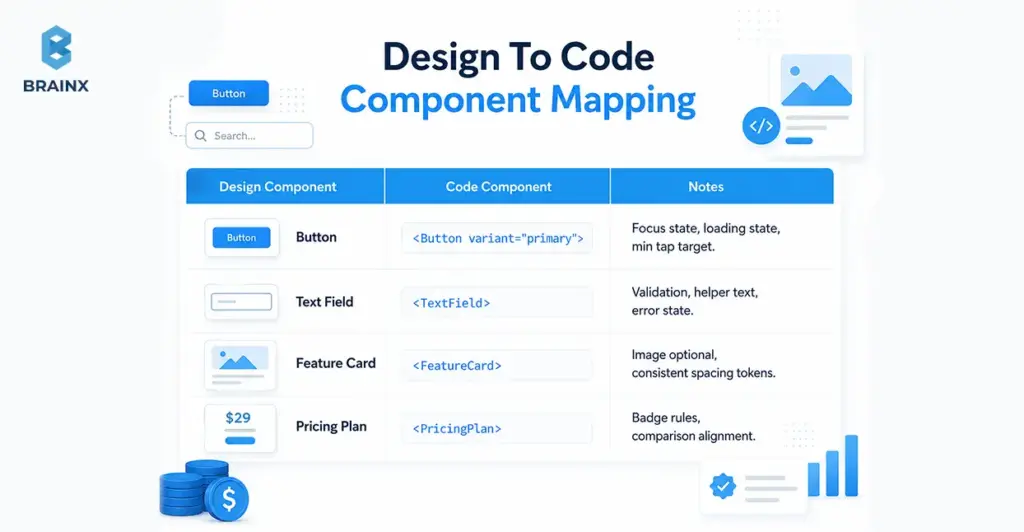
This is also where teams decide whether to implement a component library (e.g., Radix, Headless UI) and skin it via tokens—or build fully bespoke. The right choice depends on time, accessibility maturity, and long-term maintenance goals.
Phase 4 — Engineering with UX Acceptance Criteria (Not “Done When Shipped”)
UX-first engineering changes the definition of done (DoD). Instead of “it matches the design,” it becomes “it meets user and quality targets.”
A strong “UX DoD” usually includes:
- Accessibility acceptance criteria: keyboard support, focus order, semantic structure, contrast, screen reader behavior.
- Performance budgets: bundle size targets, image strategy, SSR/CSR decisions, Core Web Vitals thresholds by key route.
- Interaction quality: consistent states, microcopy behavior, error prevention and recovery, predictable navigation.
- Cross-browser/device testing scope: agreed list of browsers and device classes.
- Observability for UX: logging for critical errors, front-end performance monitoring, feature flag safety.
This phase is where many teams regain trust internally. Releases stop feeling risky because quality is defined and validated continuously, not argued after the fact.
Phase 5 — Validation & Iteration: QA + Usability + Analytics Loop
UX-first doesn’t end at launch. It ends when you’ve measured the outcome and decided what to do next—based on behavior, not assumptions.
A stable iteration loop includes:
- QA that covers UX behavior: states, responsiveness, a11y checks, and regression testing on components.
- Usability spot-checks: quick task tests on high-risk flows, especially onboarding and forms.
- Analytics instrumentation: events related to funnel steps, drop-off points, and time-to-value indicators.
- Iteration cadence: weekly or biweekly triage of learnings → backlog updates → scoped experiments.
To operationalize this, many teams benefit from aligning QA + analytics with a shared “release scorecard.” It turns subjective feedback into trackable changes.
Business Value: What Improves When UX Leads Web Design and Development
Leaders don’t fund UX because it’s “nice.” They fund it because it changes measurable outcomes: pipeline, revenue, cost-to-serve, and delivery predictability. When UX leads, web design and development becomes a growth and governance function—not a one-off project.
What improves depends on your baseline, but the categories are consistent:
- Revenue lift: clearer positioning, lower friction, better activation, stronger lead quality.
- Cost reduction: fewer support interactions, fewer rework cycles, less QA churn.
- Delivery speed with stability: component reuse, fewer regressions, and less “hotfix mode.”
You can support these claims with credible benchmarks when presenting to stakeholders.
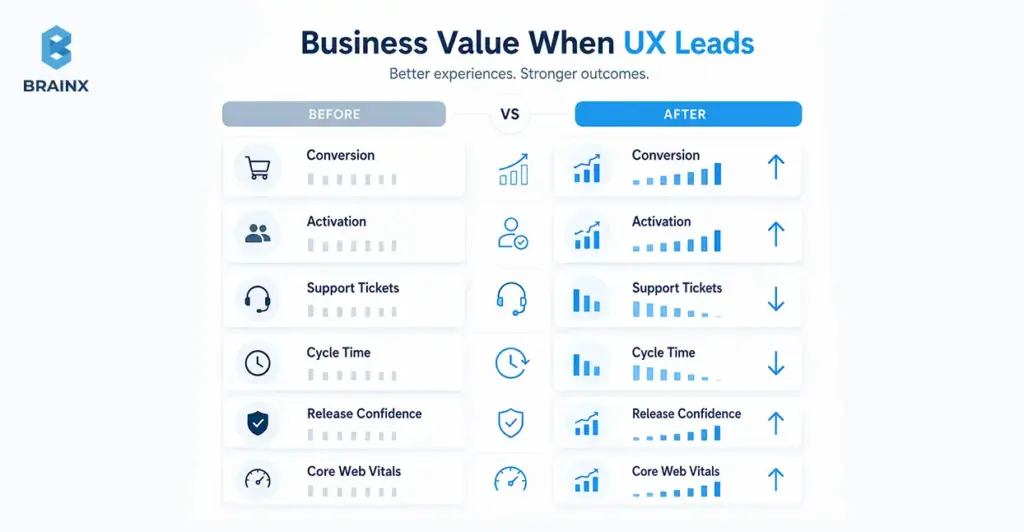
Revenue Metrics (Conversion, Activation, Lead Quality)
UX-first improvements tend to show up first in “clarity” metrics:
- higher click-through to primary CTAs
- improved form completion and lower abandonment
- higher activation rates (users reaching the first success moment)
- better lead quality (fewer unqualified inquiries because messaging is clearer)
The key is to tie UX work to one or two critical journeys. For example: “Improve demo request completion rate from X to Y” or “Reduce onboarding time-to-value by Z%.” Without a narrow target, teams end up with broad redesigns that are hard to attribute.
Even in enterprise contexts, small UX changes can materially affect the pipeline—especially where buyers evaluate credibility quickly and compare multiple vendors in parallel.
Cost Metrics (Support Tickets, Training, Dev Rework)
Cost savings are often more reliable than revenue projections because they show up internally:
- fewer “how do I…?” tickets from unclear UI
- reduced onboarding and training time for internal tools/portals
- fewer regressions due to standardized components
- less time spent debating subjective UI changes after release
A practical way to quantify impact is to tag support tickets by UX root cause (navigation, permissions, unclear copy, broken flows) and compare volume pre/post changes. For rework, track churned tickets or reopened issues tied to late requirement changes.
When leaders see cost-to-serve dropping, UX stops being seen as “design polish” and starts being seen as operational leverage.
Delivery Metrics (Cycle Time, Predictability, Release Confidence)
A design system and shared acceptance criteria can reduce cycle time while increasing quality because teams stop rebuilding the same UI patterns differently across pages.
Delivery improvements typically come from:
- higher component reuse (measurable in your codebase)
- fewer integration surprises (“this layout doesn’t work with real content”)
- fewer last-minute stakeholder reversals (because flows were validated earlier)
- clearer QA scope (because UX DoD is explicit)
The big shift is predictability. When stakeholders trust the process, teams spend less time firefighting and more time shipping improvements that compound.
B2B Web Design and Development: What Changes (and What Doesn’t)
B2B web design and development has unique constraints—buying committees, compliance, complex products—but the UX-first model still applies. What changes is the shape of the user journeys and the governance demands, not the underlying principle: reduce friction, increase clarity, and make quality measurable.
In the first paragraph of this section, it’s worth stating plainly: B2B web design and development succeeds when you design for multiple audiences at once—buyers, evaluators, admins, and end users—without creating a maze of content and approvals.
What doesn’t change:
- you still need clear flows and information hierarchy
- you still need performance and accessibility built into the system
- you still need analytics tied to outcomes (pipeline, activation, adoption)
Buying Committees, Internal Politics, And Approval Gates
B2B journeys are rarely linear. A single deal can involve procurement, security, legal, IT, and multiple business owners—each with different concerns. UX-first engineering makes this manageable by designing for approval gates rather than being surprised by them.
Practical tactics:
- build a stakeholder map early and assign “decision owners”
- define what must be proven for each gate (security, compliance, ROI, integration feasibility)
- create reusable artifacts (security notes, accessibility statements, performance targets) to reduce repeated work
- run structured reviews at predefined moments (flow review, system review, pre-release scorecard)
This reduces the “late-stage derailment” where teams rebuild pages because a committee member finally looked at the product.
Complex IA, Roles/Permissions, And “Non-Marketing” UX
B2B experiences aren’t just marketing sites. They include:
- dashboards and reporting views
- admin portals with roles/permissions
- onboarding sequences with setup steps
- integrations and data mapping flows
- “edge-case heavy” screens where errors and empty states are common
UX-first engineering treats these as core product surfaces, not secondary pages. That means designing and building:
- permission-aware navigation (users see what they can act on)
- clear system states (syncing, partial failures, missing data)
- guidance patterns (tooltips, inline education, progressive disclosure)
- consistent data tables and filters as reusable components
When these patterns are standardized, teams ship new admin features faster and users feel less cognitive load—especially across complex products.
Governance: Accessibility, Security, Compliance, Brand Consistency
Governance is where many B2B teams struggle: they want speed, but they also need compliance and consistency. UX-first engineering supports governance by turning it into system rules rather than manual policing.
Key governance layers:
- Accessibility governance: component-level WCAG alignment and documented usage rules.
- Security/compliance alignment: approved UI patterns for authentication flows, session timeouts, data visibility, and auditability.
- Brand consistency: tokens and templates that enforce typography, spacing, and tone without redesigning each page.
The net effect: reviews become faster because the defaults are already compliant.
Custom Web Design and Development: When It’s Worth It vs Templates
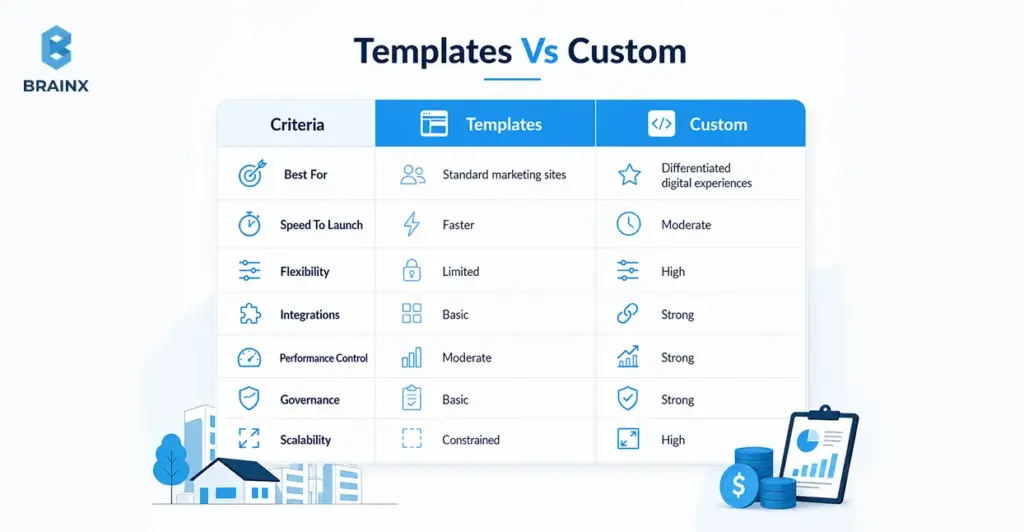
Templates are fine when your needs are common and your differentiation is minimal. But when your product, funnel, or integrations are unique, templates can become a ceiling. Custom web design and development is worth it when it reduces long-term friction—either for customers (conversion/activation) or for internal teams (governance and scalability).
In the first paragraph here, be explicit: custom web design and development should be scoped around outcomes and system reuse, not “make everything bespoke.” The goal is to customize what drives advantage and standardize everything else.
Signals You Need Custom (Differentiated UX, Integrations, Workflows)
You likely need a custom approach if you recognize several of these signals:
- Your funnel requires unique flows (multi-step qualification, role-based routing, complex pricing logic).
- You need deep integrations (CRM, billing, SSO, product data) that templates don’t handle cleanly.
- Your UX must support multiple user roles with different permissions and journeys.
- You’re scaling content and need a content model + governance, not ad-hoc pages.
- Performance and accessibility targets are strict—and third-party template bloat makes them hard to hit.
- Your brand relies on interaction quality (micro-interactions, state behavior, clarity), not just visuals.
Custom doesn’t have to mean “from scratch.” It often means using solid primitives (headless CMS, accessible component foundations) and building the system layer that templates can’t provide.
Where Custom Goes Wrong (Over-Engineering, No System, No Metrics)
Custom projects fail for predictable reasons:
- Over-engineering: building complex infrastructure before validating the journey.
- No system: every page is a one-off, so changes become slow and inconsistent.
- No metrics: teams redesign without defining what success looks like, so outcomes are unclear.
- Design/dev drift: Figma evolves, code lags, and the “source of truth” becomes political.
- Ignoring real content: layouts look great with placeholder copy but break with actual data.
The fix is not “more process.” It’s the right artifacts at the right time: flow validation early, component rules before scale, and a release scorecard that measures what matters.
Implementation Checklist: How to Start UX-First Engineering in 30 Days
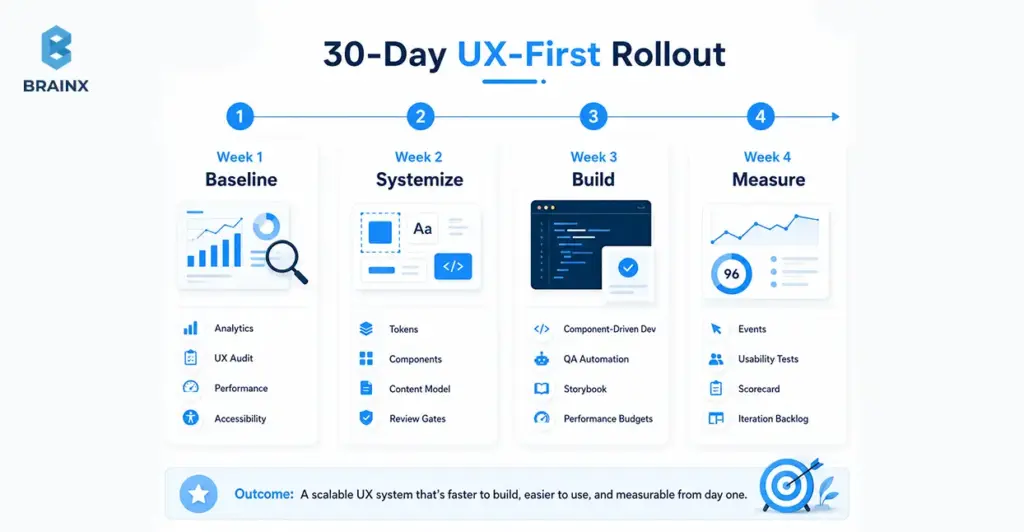
If you want to improve UX without pausing delivery, treat the next 30 days as a controlled rollout: baseline → systemize → build → measure. The goal isn’t a full redesign; it’s establishing the operating model that makes future web design and development faster and more consistent.
Use this as a practical kickoff plan, even if your team is mid-roadmap. The key is to pick one journey (e.g., signup → activation, or lead capture → qualification) and apply the loop end-to-end.
Week 1 — Baseline (Analytics, UX Audit, Performance/Accessibility Checks)
Set benchmarks before you change anything. Otherwise, you won’t be able to prove impact.
Checklist:
- Analytics baseline: top journeys, drop-off points, conversion rates, device/browser split
- UX audit: heuristic review of key pages/flows (clarity, friction, consistency)
- Performance checks: Core Web Vitals for key routes and templates
- Accessibility scan: automated checks + quick manual keyboard review
- Content issues: unclear headings, inconsistent CTAs, missing reassurance content
Deliverable by end of week: a one-page baseline scorecard + top 5 issues ranked by impact/effort.
Week 2 — Systemize (Tokens, Components, Content Model)
Week 2 is where you create reusable foundations so improvements compound.
Checklist:
- Define tokens (type scale, spacing, color roles) and document usage rules
- Identify your top components (buttons, inputs, cards, nav, table patterns)
- Agree on component states (loading, empty, error, validation)
- Draft a content model for key pages (what fields exist, who owns them)
- Establish review gates: “flow sign-off,” “system sign-off,” “pre-release scorecard”
Deliverable by end of week: a thin design system starter + a component backlog aligned to business journeys.
Week 3 — Build (Component-Driven Dev, QA Automation For UX)
Now you operationalize the system in code and make UX quality testable.
Checklist:
- Implement core components with accessibility baked in (focus, keyboard, semantics)
- Create Storybook (or equivalent) for component documentation and QA visibility
- Add automated checks where feasible (linting, visual regression, basic a11y tests)
- Define performance budgets and enforce them in CI for key routes (where practical)
- Integrate real content early to avoid “looks good in mockups, breaks in reality”
Deliverable by end of week: a working component library powering at least one real flow or page template.
Week 4 — Measure (Events, Funnels, Usability Tests, Iteration Loop)
Close the loop. Week 4 is about proving value and building the iteration habit.
Checklist:
- Instrument events for the chosen journey (step completion, errors, abandon points)
- Run 5–8 usability sessions (internal + target users if possible) on the updated flow
- Compare baseline vs current scorecard (conversion, task time, CWV, accessibility issues)
- Create an iteration backlog: what to fix now vs later, with measurable hypotheses
- Establish cadence: weekly triage + biweekly release scorecard review
Deliverable by end of week: a measurable before/after summary and a prioritized roadmap for the next 30–60 days.
Common Pitfalls (and How to Avoid Them)
UX-first engineering doesn't work if you think it's a design project rather than a delivery model. The following pitfalls are common—but avoidable—if the team is given clear expectations early on and some strict guidelines.
The best prevention tactic is to define ownership: who owns outcomes, who owns system quality, and who owns measurement. When that’s unclear, teams drift back to handoffs and opinion-driven decisions.
If you’re rolling this out across squads, align on a shared scorecard and a shared definition of done first.
“UX Is Subjective” → No Success Metrics
When teams don’t define success, feedback becomes unresolvable. One stakeholder prefers version A, another prefers version B, and engineers get stuck rebuilding.
Fix:
- Choose 1–2 primary metrics per journey (conversion, activation, time-to-complete)
- Add supporting quality metrics (error rate, CWV thresholds, accessibility defect count)
- Require a hypothesis for major UX changes (“We expect X to improve because Y”)
- Use usability tests and analytics as tie-breakers, not opinions
This doesn’t remove judgment; it makes judgment accountable.
Figma Handoff Without Engineering Alignment
A beautiful design can be a delivery trap if it doesn't account for constraints like variability, responsiveness, component states, performance, and accessibility.
Fix:
- Run joint design/engineering reviews early (wireframes and flow stage)
- Use component inventories and state tables before high-fidelity mockups
- Define acceptance criteria per component and per journey
- Keep design and code synchronized via a design system and documentation
The goal isn’t to slow design down—it’s to prevent “late surprises” that cause delays.
No Design System → Inconsistent UI And Slow Scaling
Without a system, every new page is a new mini-project. You get UI drift, inconsistent interactions, and a growing maintenance burden.
Fix:
- Start small: tokens + 8–12 high-usage components
- Build states and accessibility into components once, then reuse everywhere
- Document usage rules (when to use which component, content constraints)
- Measure reuse and track “one-off UI” as a delivery smell
Systems are how you keep custom experiences scalable.
Also Read: Revamping Customer Experiences With AI Chatbots
Accessibility/Performance Treated As “Later”
“Later” almost always means “never,” or “expensive remediation.” Accessibility and performance are easiest when they’re defaults, not patchwork.
Fix:
- Make accessibility and performance part of definition-of-done
- Set performance budgets and enforce them in PR review / CI where possible
- Implement WCAG-aligned components and document constraints
- Monitor real-user metrics (RUM) so you don’t optimize only in lab conditions
This is also a trust issue: fast, accessible experiences signal competence and care.
How BrainX Helps With Web Design and Development (UX-First Engineering Approach)
BrainX Technologies delivers web design and development through a UX-first engineering model designed for measurable outcomes and predictable delivery. That means you don’t just get screens—you get an operating system: shared artifacts, component strategy, quality gates, and an analytics loop that proves impact.
We typically embed a cross-functional pod (product/UX + engineering + QA) with clear cadence, transparent artifacts, and governance aligned to your stakeholders. If you already have a team, we can augment and systemize; if you need end-to-end delivery, we run the full playbook.
What You Get (Deliverables List)
Deliverables vary by scope, but a UX-first engagement typically includes:
- UX audit summary (heuristics + prioritized friction points)
- Stakeholder map + decision gates (who approves what, when)
- JTBD + journey definitions for key user segments
- Analytics review + measurement plan (events, funnels, dashboards)
- User flows + IA (happy paths + edge states)
- Wireframes and content model (structure before visuals)
- Design system (tokens, components, states, responsive rules)
- Component library in code (documented, reusable, testable)
- Performance budget + CWV targets aligned to key routes
- Accessibility checklist and component standards aligned to WCAG
- QA plan (including regression strategy for UX-critical components)
- Iteration loop (post-release monitoring, backlog, experimentation plan)
This set is designed to prevent “design drift,” reduce rework, and make releases less risky.
Engagement Options (Startup Vs Enterprise)
We generally see two common engagement shapes:
Startup (MVP + conversion-focused launch):
- fast discovery with sharp positioning and primary journey focus
- lean design system starter (tokens + core components)
- rapid build with measurement from day one
- post-launch iteration to stabilize activation and conversion
Enterprise (modernization, design systems, governance, scale):
- UX and technical audits across multiple properties or modules
- enterprise-grade design system + governance model
- accessibility and performance standards embedded in components
- phased modernization to reduce risk and maintain continuity
Both models prioritize the same thing: measurable UX outcomes delivered through shared engineering standards.
Proof Points To Include
When evaluating a partner, ask for evidence in three categories:
- Business impact: conversion lift, activation improvements, lead quality changes
- Delivery impact: cycle time reduction, fewer reopened tickets, improved predictability
- Technical impact: Core Web Vitals improvements, accessibility defect reduction, fewer regressions
If you share your current baseline (analytics + performance + constraints), BrainX can propose a phased plan with clear gates and measurable targets.
Conclusion
Feature parity is unavoidable. Friction isn’t. When UX-first engineering leads web design and development, teams reduce rework, ship with more confidence, and improve the metrics executives actually care about—conversion, activation, cost-to-serve, and predictable delivery.
If you want to pressure-test your current process and identify the highest-leverage fixes, the simplest next step is to take a short consultation.
FAQs About UX Led Web Design and Development
1. What is web design and development in a UX-first engineering model?
In a UX-first engineering model, web design & development is a single, integrated delivery discipline where user outcomes are treated as build requirements. Designers and engineers align on flows, component rules, accessibility standards, and performance budgets before heavy implementation. The work is validated continuously through usability checks, QA, and analytics—not only by whether it “matches the design.” The result is a site or product experience that’s easier to maintain and easier for users to complete key tasks within.
2. How is UX-first engineering different from traditional design handoff?
Traditional handoff is sequential: design finishes mockups, then development tries to implement them—often discovering missing states, constraints, or content issues late. UX-first engineering replaces that baton pass with shared ownership and shared artifacts (flows, acceptance criteria, component specs). Engineers influence feasibility early, and designers account for real data, responsiveness, and system states up front. That reduces rework and prevents the “looks right but works wrong” problem.
3. Is UX-first worth it for B2B web design and development with complex stakeholders?
Yes—often more so—because B2B initiatives are more vulnerable to approval churn, governance requirements, and multi-audience complexity. B2B web design and development benefits from defined decision gates, reusable compliance-ready components, and evidence-based reviews that reduce subjective debates. UX-first engineering also helps align marketing, product, security, and legal by translating needs into explicit requirements. The key is to scope the work around critical journeys and measurable outcomes, not broad redesigns.
4. When should you choose custom web design and development over a template?
Choose custom web design and development when templates become a constraint: you need differentiated flows, complex integrations, role-based experiences, or strict performance/accessibility targets. Custom is also justified when you expect frequent iteration and want a component system that scales without UI drift. Templates can be fine for simple marketing sites with standard content structures. A practical middle path is to use proven foundations (headless CMS, accessible primitives) while customizing the system and journeys that drive advantage.
5. What metrics should we track to prove UX-first improvements?
Track a mix of outcome metrics and quality metrics. Outcome metrics include conversion rate on primary CTAs, activation rate, task completion time, and form abandonment. Quality metrics include Core Web Vitals (LCP/INP/CLS), accessibility defect counts, error rates on key flows, and support tickets tagged to UX issues. The best approach is to pick one journey, set a baseline, and measure deltas after each iteration.
6. How do design systems help engineering teams ship faster without losing quality?
Design systems reduce duplication by turning UI decisions into reusable tokens and components with documented rules and states. Engineers stop rebuilding buttons, forms, tables, and layouts in slightly different ways, which cuts QA time and regression risk. Quality improves because accessibility and performance constraints can be enforced at the component level once, then inherited across the product. Over time, this increases release confidence and makes delivery more predictable.