 June 24, 2026 -
  25 minutes read

Your AI app is not “just another web service.” It supports spiky inference traffic, has strict latency SLOs, and has background pipelines that can become the biggest cost center without you noticing. That is why the serverless vs containers decision shows up earlier than most teams expect, often right after the first demo goes viral or the first enterprise customer asks about compliance, uptime, and data residency.
Pick the wrong runtime and you will feel it in week two: p95 latency creeping up, surprise bills, throttling during bursts, or a DevOps workload your team cannot sustain. Choose the right one, and you have predictable performance, keep costs controllable, and get a path from MVP to production without rebuilding everything.
Here's some good news. In most cases for AI workloads, these decisions can be made with a few tangible indicators such as time to request, concurrency, GPU requirements, model size, and maturity of your team's operations.
Key Takeaways
- Consider serverless if your AI use case is event-driven, has traffic in bursts, has short requests and needs lots of iterations with fewer ops.
- Select containers if you have a consistent workload, require custom runtimes, long-running processes, predictable warm performance, and/or access to GPUs.
- Choose a hybrid when you want serverless for “glue” (webhooks, queues, schedulers) and containers for heavy inference or model serving.
- In most teams, the fastest path is: serverless MVP for product learning, then selectively moving hot paths to containers once unit economics and latency are understood.
Mini decision snapshot
- If your p95 latency target is tight and you cannot tolerate cold starts, lean container-first.
- When you can't predict demand and want pay-for-what-you-use, lean serverless first.
- For portability and managed operations, sometimes the pragmatic middle way is serverless containers.
| Choose | Best When |
| Serverless | Traffic is unpredictable, workloads are event-driven, and you want minimal infrastructure management |
| Containers | Traffic is steady, latency requirements are strict, or you need custom runtimes, GPUs, and long-running services |
| Hybrid | Your AI platform combines APIs, pipelines, model serving, and background processing |
You will see containers vs serverless tradeoffs come down to utilization, latency budgets, and operational ownership more than “which is modern.”
What “Serverless” and “Containers” Mean in 2026 (and Why People Confuse Them)
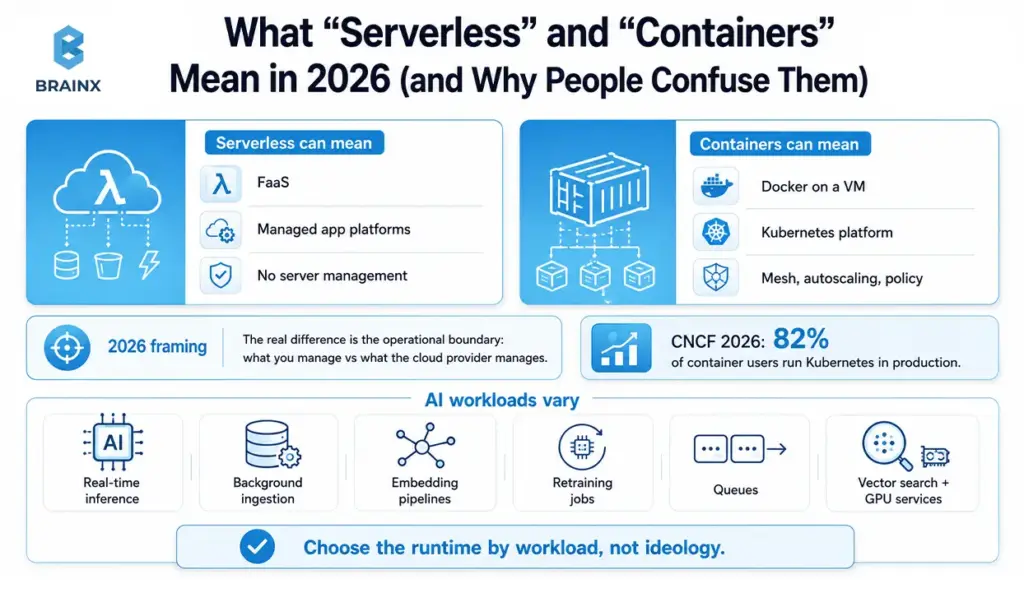
People still talk past each other because “serverless” can mean FaaS, managed app platforms, or simply “I do not want to run servers.” Containers can mean Docker on a VM or a full Kubernetes platform with service mesh, autoscaling, and policy enforcement. Defining terms first will save you from flawed comparisons later on.
In practice, 2026 architecture conversations are more about where the operational boundary is than about ideology: what you manage, and what the cloud provider manages.
A useful way to frame the 2026 market is this: containers are still the backbone of production cloud-native infrastructure, even though serverless is widely useful and applicable.
The CNCF Annual Cloud Native Survey, published in 2026, found that 82% of container users run Kubernetes in production, with CNCF describing Kubernetes as a common operating layer for modern production-grade systems and AI workloads.
For AI teams, the stronger decision is not “which runtime is better?” It is “which runtime fits this specific AI workload?” That matters because the same AI product may include real-time inference, background ingestion, embedding pipelines, retraining jobs, queues, vector search, and GPU-backed services.
Serverless Computing vs Containers: The Core Difference
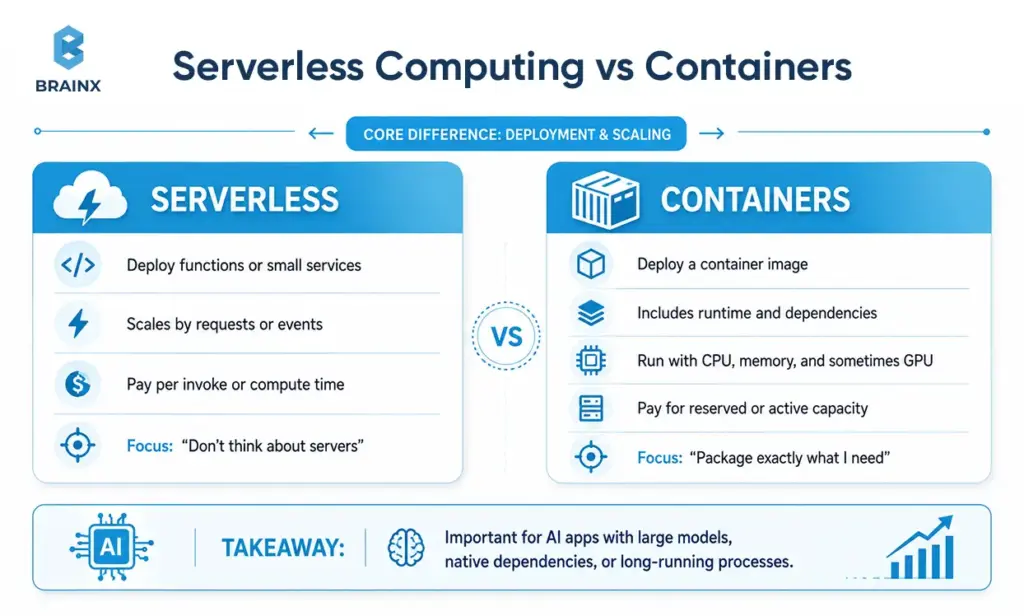
The fundamental distinction is on the level of deployment and scaling:
- In the case of serverless, the functions or small services are normally deployed to scale according to the number of requests or events raised, and you are charged per invoke or per compute time.
- For containers, you deploy a container image (which has your runtime and dependencies), and you run it with allocated CPU/memory (and at times GPU) for which you pay for reserved or active capacity based on the platform.
To put it simply: Serverless optimizes for “don't think about servers”, while containers are about “package exactly what I need and run it consistently”. It's important to distinguish between the two when your AI application contains large model artifacts, native dependencies, or even long-running processes.
Serverless computing (FaaS) vs “serverless platforms” (managed services)
FaaS (Function-as-a-Service) is the classic serverless model: short-lived compute triggered by HTTP requests, queue events, cron schedules, or file uploads.
There is one important distinction though: packaging a function as a container image doesn't necessarily make it a general purpose container platform. The function still exists in the serverless execution model, and has its lifecycle, limits, scaling properties, and cold-start profile. That is why teams should compare the operating model, not just the packaging format.
But many teams now say “serverless” when they really mean a serverless platform: managed services that remove ops toil while still running containers or services underneath. Examples include managed databases, managed vector stores, managed queues, managed API gateways, and managed model endpoints.
This matters because a “serverless-first” AI architecture often includes plenty of non-FaaS components, and your real bottleneck may be the database, vector retrieval, or network path rather than the function runtime.
Containers (Docker) vs orchestrated containers (Kubernetes/ECS)
A container image is just a packaging format. Running containers reliably at scale requires an orchestration layer or a managed runtime:
- Docker on a VM: simple, but you own scaling, rollouts, and node patching.
- ECS / managed orchestrators: you get scheduling and autoscaling with less platform complexity than full Kubernetes.
- Kubernetes: maximum flexibility and ecosystem support, but more moving parts.
Kubernetes remains a common choice for teams that need custom networking, sophisticated deployment strategies, and standardized operations across environments.
The middle ground: serverless containers (Cloud Run, Fargate, Azure Container Apps)
Serverless containers are often the “why not both?” answer. You ship a container image, but the platform handles scaling, patching, and much of the operational surface area.
| Deployment Model | What It Really Means In 2026 | Best Fit |
| Serverless FaaS | Per-invocation functions with strong lifecycle constraints | Event handlers, glue code, lightweight APIs |
| Serverless Containers | Containers on managed autoscaling infrastructure | Teams that want container flexibility without full cluster ops |
| Orchestrated Containers | Containers on ECS, Kubernetes, or similar platforms | Steady load, deep control, custom networking, and GPU-heavy services |
For AI apps, this is attractive when you want:
- Container portability and dependency control
- Autoscaling without running your own cluster
- Simpler security boundaries than a full multi-tenant cluster setup
This middle ground frequently reduces the anxiety in serverless computing vs containers debates because it preserves developer control without forcing a Kubernetes commitment.
Why Serverless vs Containers Matters Specifically for AI Apps
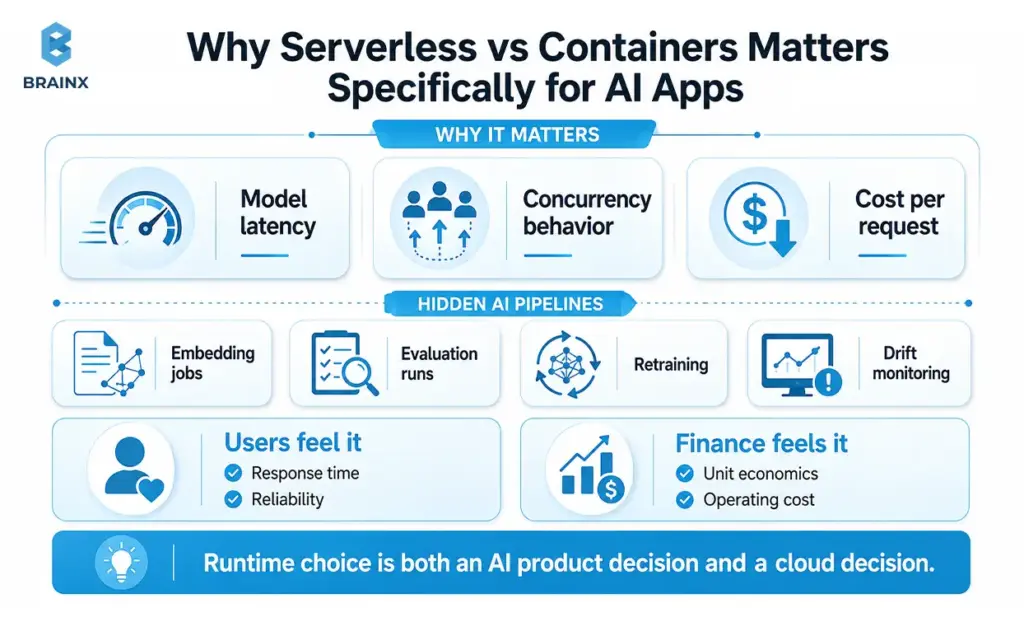
The runtime decision is not just infrastructure preference. It changes model latency, concurrency behavior, and cost per request. AI workloads also include “hidden” pipelines: embedding jobs, evaluation runs, retraining, and monitoring for drift.
This is where serverless vs containers becomes an AI product decision as much as a cloud decision: your users feel it as response time and reliability, and finance feels it as unit economics.
Why Runtime Choice Affects AI Performance, Cost, and Scale
AI services are sensitive to:
- Warm vs cold performance: loading models, tokenizers, and native libs takes time.
- Concurrency behavior: whether each request gets its own isolated environment or shares a process.
- State and caching: keeping embedding caches, model weights, or connection pools warm.
- Cost per inference: driven by utilization, memory footprint, and compute time.
If your model is large or your dependency tree is heavy, runtime overhead becomes a first-order concern, not an implementation detail.
Real-time inference APIs (latency + concurrency)
Real-time inference has two failure modes: slow responses and inconsistent responses. Latency is not just average latency, it is p95 and p99 during spikes.
Key implications:
- Serverless can scale quickly, but cold starts and platform concurrency limits can introduce tail latency.
- Containers can keep workers warm and tuned, but you must size and autoscale correctly to avoid queueing under burst loads.
If your AI endpoint fronts an LLM, even a small increase in overhead can be noticeable. Many teams solve this by keeping “hot” inference in containers while using serverless for request validation, routing, or lightweight enrichment.
Background jobs (queues, schedulers) and batch inference
AI apps almost always have background work:
- generating embeddings for new documents
- running nightly evaluations
- batch labeling and data cleanup
- asynchronous summarization or enrichment jobs
Serverless is often excellent here because it pairs naturally with queues and event triggers. Batch workloads also benefit from parallelism, where paying per execution can be efficient.
That said, long-running jobs or memory-heavy pipelines often fit better in container jobs (or managed batch systems) where you can control runtime limits, retries, and resource sizing.
Data + model lifecycle (retraining, versioning, rollbacks)
Your runtime is part of your MLOps story. You need a repeatable path for:
- model version promotion (dev → staging → prod)
- safe rollbacks when quality regresses
- canarying a new model or prompt template
- tracking data and evaluation artifacts
Containers typically make environment parity easier because “what you test is what you run.” Serverless can still be robust, but you must be more deliberate with packaging, dependency pinning, and deployment orchestration.
GPU realities (and when serverless isn’t enough)
GPU is the most common reason AI teams abandon pure serverless approaches. While GPU options are expanding in managed platforms, availability, pricing, and limitations vary widely by cloud and region.
The important nuance is that GPU support is no longer a simple yes/no question. Some serverless container platforms now offer GPU-backed options, but availability, limits, pricing, startup behavior, and regional support vary by provider. For AWS-heavy teams, GPU-backed inference often still points toward ECS or EKS on GPU-capable infrastructure rather than Fargate-style serverless containers.
Practical guidance:
- If you need consistent GPU access and predictable warm performance, container-based model serving (managed Kubernetes or managed container services) is usually safer.
- If you only need GPU occasionally, you can decouple: run CPU serverless for control-plane logic, and dispatch heavy inference to GPU-backed container jobs or managed endpoints.
Serverless vs Containers: The Comparison That Actually Decides the Outcome
Most comparisons focus on “simplicity vs control.” For AI apps, the decision is more specific: latency tails, utilization thresholds, and operational ownership. If you map those three to your workload, the right answer becomes clearer.
This section is the practical heart of serverless vs containers. Use it to pressure-test your assumptions before you commit to an architecture that is expensive to unwind.
Serverless vs Containers at a Glance: Cost, Latency, Scaling, and Ops
| Dimension | Serverless (FaaS) | Serverless Containers | Orchestrated Containers (ECS/Kubernetes) |
| Cost | Best for spiky usage | Good balance | Best for high utilization |
| Latency | Cold starts possible | Fewer cold starts, still possible | Best warm stability |
| Scaling | Fast, but quotas apply | Fast, configurable | Powerful, but you manage it |
| Ops | Lowest | Low to medium | Medium to high |
| Portability | Lower | Medium | Highest |
Use this table as a starting point, then validate with your actual model size, request patterns, and concurrency targets.
Cost model: pay-per-invocation vs pay-for-capacity (and utilization thresholds)
Cost is where containers vs serverless gets real. Serverless shines when:
- traffic is unpredictable
- you have many idle hours
- requests are short and lightweight
Containers often win when:
- you have consistent throughput
- you can keep utilization high
- you can right-size resources and keep workers warm
A practical rule of thumb: once an endpoint is busy enough that you are paying for near-continuous execution time, container capacity pricing often becomes more favorable. The only honest way to confirm is to model your monthly request volume, average duration, memory footprint, and concurrency.
Performance: cold starts, warm pools, and p95 latency
For AI, p95 latency matters more than the mean. Cold starts can include:
- spinning up an execution environment
- downloading dependencies
- loading model weights into memory
- establishing network connections
For AI workloads, cold starts are not just a platform inconvenience. They can become a product experience issue. A traditional API may tolerate occasional startup delay, but an LLM or RAG endpoint may also need to initialize dependencies, load model assets, warm retrieval connections, or prepare inference libraries before it can respond. That is why p95 and p99 latency matter more than average latency when comparing runtime options.
Mitigations exist:
- provisioned concurrency / warm pools (platform-dependent)
- smaller artifacts and aggressive dependency trimming
- splitting “router” and “inference worker” responsibilities
- using serverless containers with min instances for always-warm behavior
Still, if your product has hard real-time expectations, you should benchmark on your target cloud and region rather than relying on generic guidance.
Scaling: burst traffic, throttles/quotas, and concurrency controls
Serverless can scale rapidly, but it is not infinite. You will hit:
- account-level concurrency limits
- per-function or per-service throttles
- downstream bottlenecks (DB connections, vector store QPS, third-party APIs)
Containers scale via:
- horizontal pod/task autoscaling
- queue-based scaling (workers pull jobs)
- pre-warmed pools for surge traffic
In AI apps, downstream systems often dictate scaling more than compute does. A RAG system can be limited by vector retrieval throughput long before inference saturates.
In AI systems, the runtime is rarely the only scaling constraint. The first bottleneck may be GPU availability, vector database throughput, database connections, model server queue depth, third-party model APIs, or tenant-level rate limits. That is why load testing should include the full request path, not only the compute layer.
Operational overhead: who patches, who on-calls, who debugs
Serverless reduces “undifferentiated heavy lifting,” but it does not eliminate operations. You still own:
- deployment safety
- incident response
- observability
- cost guardrails
- data governance
Containers increase operational surface area: base image patching, node security (if self-managed), cluster upgrades, autoscaling policies, and more. The upside is deeper control when you need it.
A good decision question is: “Do we have the people and process to operate this 24/7?” If not, lean toward managed runtimes until you do.
Observability: logs, traces, request context, and model monitoring
Traditional APM is not enough for AI. You need:
- request traces across API, retrieval, and inference
- token counts and latency by model and prompt template
- quality metrics (helpfulness, hallucination rate proxies)
- drift signals for embeddings and retrieval performance
Serverless observability can be excellent if you standardize structured logging and distributed tracing early. Containers give you more freedom in agents and sidecars, but also more ways to misconfigure telemetry.
If you expect enterprise customers, build model monitoring as a first-class concern, not an afterthought.
Security & compliance: isolation, IAM, secrets, supply chain
Security posture differs by runtime and platform:
- Serverless often integrates tightly with cloud IAM and reduces exposed surface area, but can complicate network controls and egress policies depending on setup.
- Containers let you standardize hardening (base images, scanners, policies), but you must enforce it continuously.
For regulated environments, you will care about:
- workload isolation and tenancy boundaries
- secrets management and rotation
- audit logs and immutable deployment histories
- data residency and VPC/network segmentation
Supply chain security matters in both models: SBOMs, signed images, and dependency pinning are now table stakes.
Portability & vendor lock-in: what’s easy to move and what isn’t
Containers usually win on portability: build once, run on many. Serverless can be more coupled to provider-specific triggers, IAM patterns, and event schemas.
That said, “portable” is not the same as “easy to migrate.” AI systems often lock in through:
- managed vector databases
- proprietary model endpoints
- eventing and workflow services
- observability stacks
If strategic flexibility matters, keep your domain logic separate from platform glue, and use interfaces so you can swap implementations later.
Best-Fit Scenarios (AI Workload Mapping)
A runtime decision should map directly to the shape of your AI workload. If you are still debating in abstract terms, pick a few representative flows (login, chat, document ingestion, evaluation job) and classify them.
This is also where serverless vs containers stops being a binary choice. Many successful AI products mix approaches intentionally, using each runtime where it is strongest.
Containers vs Serverless: Which Fits Your AI Workload?
Use workload mapping to make the conversation concrete:
- User-facing inference: chat responses, classification, extraction
- Ingestion: file upload, parsing, chunking, embedding generation
- Retrieval: vector search + reranking + caching
- Orchestration: workflows, retries, idempotency, queue handling
- Model lifecycle: evaluation, retraining, rollout control
Once you have these flows, you can assign runtime choices based on latency, duration, and resource needs rather than preference.
Choose serverless when… (event-driven, spiky, low ops, fast iteration)
Serverless is a strong fit when:
- traffic is bursty or unpredictable (launches, integrations, webhooks)
- requests complete quickly and can tolerate occasional cold start mitigation
- you want to minimize ops while iterating on product and prompts
- you are building event-driven pipelines (ingestion, enrichment, notifications)
So choose serverless when demand is unpredictable, work is event-triggered, and your team wants to move fast without managing infrastructure.
AI-specific examples:
- webhook-triggered document processing that queues embedding jobs
- lightweight routing service that chooses a model based on tenant policy
- scheduled evaluation jobs that run small batches on demand
Choose containers when… (steady load, custom runtime, long-running, GPUs)
Containers are usually the safer bet when:
- inference traffic is steady and you can keep workers warm
- you need native dependencies or specialized libraries
- requests are long-running or streaming
- you require GPU acceleration and predictable availability
In practical terms, choose containers when the workload runs continuously, latency must stay predictable, GPU support matters, or runtime customization is non-negotiable.
AI-specific examples:
- self-hosted model serving (vLLM, TensorRT-LLM, or custom inference servers)
- a multi-tenant inference gateway with fine-grained rate limiting
- RAG reranking services that hold models in memory for low latency
Choose serverless containers when… (container portability + managed ops)
Serverless containers are best when you want:
- container packaging for consistency and dependency control
- autoscaling without managing nodes or clusters
- simpler deployment workflows than Kubernetes
- a smoother path from MVP to production without a big platform team
Simply put, choose serverless containers when you want Docker-style packaging without taking on full Kubernetes operations.
AI-specific examples:
- a containerized inference microservice with min instances set to keep it warm
- a set of ingestion workers that autoscale from zero based on queue depth
- an internal tools API that needs consistent libraries across environments
Red flags / anti-patterns (when each option will hurt you)
Watch for these traps:
Serverless red flags
- very large model files that must load on every cold start
- strict p95 latency SLOs without warm pool options
- heavy concurrency to downstream databases, causing connection storms
- runtime limits that conflict with your request duration or memory needs
Container red flags
- tiny team with no on-call capacity or platform ownership
- frequent releases without robust CI/CD and rollback discipline
- overbuilding Kubernetes for a simple product, slowing delivery
- poor autoscaling policies that create either waste or outages
Decision Framework: Pick Your Runtime in 10 Minutes
You can make a defensible choice quickly if you answer five questions: SLOs, load shape, runtime constraints, team constraints, and then score options. The key is to decide based on measurable inputs rather than vendor marketing.
If you are debating serverless vs containers in a planning meeting, run this framework with real numbers, even if they are estimates. Then validate with a small pilot.
Step 1 — Define SLOs: p95 latency, uptime, cost ceiling
Write down:
- p95 latency target for your main user interaction (not just average)
- uptime target (for example 99.9% vs 99.99%)
- monthly cost ceiling for the MVP and for production
- acceptable degradation behavior (fallback model, cached answer, “try again”)
If you cannot state these, you will not be able to judge tradeoffs, and any choice will feel arbitrary.
Step 2 — Characterize load: bursty vs steady, concurrency, request duration
Estimate:
- peak requests per second during launches or customer spikes
- average and peak concurrency
- average request duration (including retrieval and inference)
- streaming vs non-streaming response patterns
Many teams discover their “AI app” is actually multiple workloads with different shapes. That is a strong signal for hybrid architecture.
Step 3 — Runtime constraints: dependencies, model size, startup time
List:
- model artifact sizes (weights, tokenizer files, embeddings caches)
- native dependencies (FFmpeg, OCR libs, GPU drivers)
- startup time tolerance (how much warm-up is acceptable)
- memory footprint per worker at steady state
This is where serverless computing vs containers comparisons become concrete. If your model takes 20 seconds to load, the platform limits and warm pool features matter more than theoretical autoscaling.
Step 4 — Team constraints: DevOps maturity, compliance, release cadence
Be honest about:
- who will carry pager duty
- how quickly you need to ship changes
- whether you have security/compliance requirements (SOC 2, HIPAA, GDPR)
- whether your org can support Kubernetes operations or prefers managed services
A smaller team often benefits from managed runtimes first, then adds complexity when the business case is proven.
Step 5 — Make the call (simple scoring matrix)
Score each option 1 to 5 (5 is best). If your top two are close, choose the one that gets you to a pilot faster.
Criteria you can score:
- Meets latency SLOs with mitigations
- Fits cost model at expected utilization
- Supports required dependencies and model sizes
- Scales to peak demand without fragile workarounds
- Matches team operational capacity
- Satisfies security and compliance needs
- Minimizes lock-in risk for your roadmap
This gives you a rational paper trail for stakeholders, and it makes later migrations less political.
Serverless vs Containers Scoring Matrix for AI Teams
| Criteria | Serverless (FaaS) | Serverless Containers | Containers (ECS/Kubernetes) |
| P95 latency predictability | 2–4 | 3–4 | 4–5 |
| Bursty traffic economics | 4–5 | 4–5 | 2–4 |
| Steady-state economics | 2–4 | 3–4 | 4–5 |
| Custom dependencies | 2–3 | 4–5 | 4–5 |
| GPU readiness | 1–3 | 2–4 | 4–5 |
| Operational overhead | 4–5 | 3–4 | 2–4 |
| Portability | 2–3 | 3–4 | 4–5 |
Scoring note: 1 = weak fit, 5 = strong fit.
Reference Architectures for AI Apps (Serverless, Containers, Hybrid)
Teams move faster when they start from a known-good pattern. Below are practical reference architectures you can adapt, with clear “what goes where” guidance for inference, ingestion, and RAG.
These are not vendor-specific blueprints, but you can map them to AWS, GCP, or Azure equivalents.
Serverless-first AI API (API Gateway + Functions + managed DB/vector store)
Best when your product is early, traffic is unpredictable, and you want minimal ops.
Typical components:
- API Gateway (auth, rate limiting, request shaping)
- Functions for routing, policy checks, and lightweight transformations
- Managed database for app state and tenant metadata
- Managed vector store for retrieval
- Queue + functions/workflows for ingestion and embedding generation
- Managed secrets and IAM for least-privilege access
Design tip: keep inference logic modular. If you later move heavy inference into a container service, your API contract and authorization layer can stay the same.
Container-first AI service (Kubernetes/ECS + autoscaling + model serving)
Best when you need consistent warm performance, specialized dependencies, or GPUs.
Typical components:
- Containerized inference service (model server + app logic)
- Autoscaling based on CPU/GPU utilization and request queue depth
- Separate retrieval service or sidecar caching layer (if RAG)
- Observability stack with distributed tracing and model metrics
- CI/CD with canary releases and rollback automation
This approach works well for enterprise workloads where you need fine-grained control over networking, isolation, and deployment strategies.
Hybrid that works for most teams (serverless for glue, containers for inference)
This is often the fastest route to production stability.
Pattern:
- Serverless endpoints for request validation, auth, tenant routing, and event handling
- Queues/workflows for ingestion, retries, idempotency
- Container service for hot-path inference and heavy transforms
- Managed data services for state, vector search, caching
The hybrid approach gives you the operational simplicity of managed triggers plus the performance consistency of always-warm inference workers.
Where RAG fits (retrieval, embeddings, caching layers)
RAG introduces additional hotspots:
- embedding generation pipelines
- vector retrieval latency and throughput
- reranking compute
- caching strategy (query, chunk, and answer caches)
Common placement:
- Embedding generation: event-driven jobs (serverless or container workers)
- Retrieval API: often a small always-warm service, because it is on the critical path
- Reranker: containerized if it is model-based and needs warm performance
- Caching: managed cache service, with careful TTL policies per tenant
If RAG quality is a differentiator, invest early in evaluation harnesses and observability that correlates retrieval results with response quality.
Implementation Considerations (What Will Slow You Down in Week 2)
Most architecture decisions fail not on day one, but in the second week when the team tries to ship safely, debug production issues, and control costs.
Whether you choose functions or containers, these implementation details determine speed and reliability. They also determine whether your initial serverless vs containers choice remains viable as usage grows.
CI/CD and deployments (blue/green, canary, rollbacks)
Minimum bar for AI apps:
- automated builds with pinned dependencies
- environment-based config (dev/staging/prod)
- blue/green or canary releases for model or prompt changes
- automated rollback triggers when error rate or latency spikes
AI twist: you may need to roll back not only code, but also model versions, prompt templates, retrieval configs, and feature flags.
Secrets, config, and environment parity
Avoid “it worked in staging” failures by standardizing:
- secrets management (no secrets in env files in repos)
- runtime config injection (per-tenant keys, model routing rules)
- consistent network paths (VPC/VNet settings, private endpoints)
- reproducible builds (lockfiles, image digests, artifact versioning)
Environment parity is easier with container images, but serverless can be just as disciplined if you adopt strong deployment automation.
Monitoring: cost, latency, errors, and model drift
You need two monitoring layers:
1. Platform monitoring
- request volume, error rate, p95/p99 latency
- throttling events and retry rates
- database and vector store saturation
- per-tenant usage and rate limit enforcement
2. Model and RAG monitoring
- token usage and cost per request
- retrieval hit rate and top-k overlap
- “quality” indicators from eval sets
- drift signals (embedding distribution changes, topic shifts)
Without this, teams end up arguing about architecture based on feelings rather than data.
Testing strategy: local emulation vs containerized integration tests
Serverless teams often rely on local emulators, but they can diverge from real cloud behavior (IAM, networking, throttles). Container teams often do integration tests in Docker Compose or ephemeral environments.
A pragmatic testing stack:
- unit tests for pure logic
- contract tests for API boundaries
- integration tests that exercise retrieval + inference end-to-end
- load tests that model realistic concurrency and payload sizes
For AI endpoints, include “performance tests” that capture p95 latency under burst load, not just correctness.
Cost & Timeline Expectations (Budgeting for an AI MVP vs Production)
Cost and timeline depend on scope, but you can still budget intelligently by understanding the levers: utilization, latency requirements, model choice, and operational expectations.
This is where teams frequently revisit serverless vs containers after an MVP proves demand. The goal is not to “avoid change,” it is to design so that change is incremental, not a rewrite.
MVP phase: optimize for speed and learning
In an MVP, your priorities are:
- shipping a reliable demo
- instrumenting usage and quality
- iterating on prompts, UX, and retrieval configs
Serverless or serverless containers often reduce time-to-first-release because you can avoid building a platform. A typical MVP timeline is driven more by product integration and data readiness than by compute runtime.
Budget levers:
- choose smaller models where acceptable
- cache aggressively
- avoid premature GPU spend
- limit ingestion frequency until value is proven
Production phase: optimize for reliability and unit economics
In production, you are optimizing:
- predictable p95 latency
- controlled cost per request
- incident response and change management
- compliance and auditability
This is where container-first inference frequently appears, especially if you have steady usage and need consistent warm performance. It is also where hybrid architectures become standard: serverless for orchestration, containers for heavy lifting.
Hidden Costs in Containers vs Serverless Projects
Hidden costs are rarely line items at the start, but they show up fast:
Serverless hidden costs
- provisioned concurrency or always-warm settings to hit latency SLOs
- data transfer and managed service costs (vector DB, gateways, observability)
- debugging time when distributed tracing is missing
Container hidden costs
- cluster management (if Kubernetes), upgrades, and security patch cycles
- building a reliable autoscaling strategy
- on-call load and incident tooling
- platform engineering time that competes with product work
The cheapest architecture is the one your team can operate confidently while meeting SLOs.
Common Mistakes When Choosing Between Serverless Computing vs Containers
Most mistakes come from deciding too early, without measuring, or from assuming your AI workload behaves like a standard CRUD app. Avoiding these pitfalls will save months of churn.
This section is intentionally pragmatic. The point is not to pick a side, it is to make the serverless vs containers decision based on evidence and operational reality.
Choosing Serverless Computing vs Containers Without Testing Real Workloads
The most expensive assumption is that your workload “should be fine.” AI payload sizes, retrieval latency, and model initialization time can break that assumption quickly.
What to do instead:
- create a representative load test with realistic prompts, context sizes, and retrieval calls
- measure p95 latency, not just average
- include cold-start scenarios and burst traffic
- track cost per successful request
If you only test happy paths, you will optimize for the wrong thing.
Picking based on ideology (“Kubernetes everywhere” / “serverless everywhere”)
Platform ideology is seductive because it feels consistent. But consistency is not the same as fitness.
“Kubernetes everywhere” can slow small teams with unnecessary operational complexity. “Serverless everywhere” can fail when you need GPUs, long-running processes, or strict latency predictability.
Pick what fits your top workloads now, then design interfaces so you can evolve later.
Ignoring cold starts and payload/model size
Cold starts are not just “a few hundred milliseconds” in AI contexts. Model load time, dependency downloads, and initialization can dominate.
Also watch payload and artifact size limits. Even if you can technically deploy, the operational experience can be brittle if every scale-out event triggers heavy initialization.
Mitigate by splitting services, preloading models where possible, and keeping artifacts lean.
Underestimating on-call and debugging costs
If you cannot explain a latency spike, you cannot reliably improve it. AI systems add more layers to debug: retrieval, third-party model calls, caching, and prompt variability.
Invest early in:
- request IDs across services
- distributed traces with key attributes (tenant, model, prompt version)
- dashboards that correlate cost and latency with model choices
This reduces both downtime and team burnout.
Overlooking compliance boundaries and data residency
Enterprise buyers will ask:
- where data is stored and processed
- how secrets are managed
- what audit logs exist
- how you isolate tenants
- how you handle deletion requests and retention policies
Some platforms make these easier, others require careful design. Decide early whether your AI app must run in specific regions or within private networking boundaries.
How BrainX Helps With Architecture Decisions for AI Apps
BrainX Technologies supports organizations in making architecture decisions based on workload realities, not infrastructure trends. Teams rarely need more opinions. They need a quick, evidence-based way to choose, validate, and ship.
We help product and IT leaders make runtime decisions through a structured process that reduces risk and avoids overbuilding.
- Architecture workshop (1 to 2 sessions): clarify user journeys, AI workload mapping, SLOs, and compliance constraints.
- Workload assessment: measure model sizes, dependency constraints, concurrency targets, and data flows.
- Reference architecture selection: serverless-first, container-first, or hybrid, with explicit tradeoffs documented.
- Pilot implementation: a thin slice that includes observability, cost tracking, and load testing.
- Cost and performance validation: verify p95 latency and cost per request under realistic load.
- Production hardening: CI/CD, rollbacks, security controls, and monitoring for model quality and drift.
Next Steps (Choose, Pilot, Measure, Then Scale)
The fastest way to reduce uncertainty is to pilot the top two options against the same workload and measure outcomes. Most teams can do this in two weeks without derailing product delivery, especially if they keep the pilot narrow and metrics-driven.
If you are still unsure about serverless vs containers, treat the first decision as a reversible bet. Build clean boundaries, measure production-like behavior, and plan a migration path from day one.
A 2-Week Serverless vs Containers Pilot Plan
Days 1 to 3: Define and instrument
- pick one critical endpoint (for example, “chat response with RAG”)
- define p95 latency, error rate, and cost metrics
- set up logging, tracing, and dashboards
Days 4 to 8: Build two thin slices
- implement the same API contract in two runtimes (for example, serverless container vs orchestrated container)
- connect to the same vector store and data sources
- keep model choice constant to avoid confounding variables
Days 9 to 12: Load test and cost test
- run burst tests and steady-load tests
- include cold-start scenarios
- record p95 latency, throttle events, and cost per successful request
Days 13 to 14: Decide and document
- choose the baseline architecture
- document constraints, quotas, and operational runbooks
- identify what can remain “glue” logic vs what must be always-warm inference
Want a second set of eyes on your pilot plan? Talk to BrainX Technologies for a practical architecture review focused on AI workloads.
Migration path if you choose wrong initially
Choosing imperfectly is normal. What matters is whether you designed for change. Common migration paths include:
| Starting Point | Possible Next Step |
| Serverless FaaS | Serverless containers |
| Serverless FaaS | Kubernetes or ECS for hot-path inference |
| Containers | Managed container platforms |
| Single runtime | Hybrid architecture |
A safe migration path typically looks like:
- Keep API contracts stable behind an API gateway or routing layer.
- Separate orchestration (queues, workflows, auth) from inference workers.
- Move only the hot path first (the endpoint that drives most latency and cost).
- Run parallel deployments with canary traffic splits.
- Validate quality metrics, not just latency and cost.
This is why hybrid designs are so common: they reduce the blast radius of change and let you evolve each workload independently.
FAQs about Serverless and Containers Comparison
Serverless vs containers: which is better for real-time AI inference?
Containers are usually better for strict real-time AI inference because they keep models warm and latency more predictable. Serverless can still work for short, spiky APIs with warm-pool or minimum-instance settings.
For many AI products, the best setup is hybrid: serverless handles routing, auth, and lightweight logic, while containers run inference services that need stable p95 latency or models kept in memory.
What are the biggest cost differences between containers vs serverless for AI workloads?
Serverless costs follow usage, while containers usually cost based on allocated or running capacity. Serverless often wins for idle or spiky workloads; containers often win when traffic is steady and utilization is high.
For AI workloads, the real cost difference depends on request duration, memory use, model size, GPU needs, and concurrency. A small load test with cost tracking is the safest way to compare both options.
Do serverless platforms support GPUs for AI models?
Some serverless platforms support GPUs, but availability varies by cloud provider, region, and service type. For predictable GPU-backed inference, containers or managed model-serving endpoints are still usually safer.
A common pattern is to keep control-plane logic serverless and send heavy inference jobs to GPU-backed container services. Always confirm regional GPU availability, quotas, startup behavior, and pricing before committing.
How do cold starts affect LLM or RAG applications on serverless?
Cold starts can increase tail latency because the runtime may need to initialize dependencies, connect to services, or load model assets before responding. This can be especially noticeable in LLM and RAG applications.
For RAG, cold starts may combine with retrieval latency, cold caches, and vector database calls. Mitigations include provisioned concurrency, minimum instances, smaller artifacts, and separating lightweight routing from heavier inference work.
Is Kubernetes required to run containers for an AI product?
No. You can run containers on managed services like ECS, Cloud Run, Azure Container Apps, or similar platforms without directly operating Kubernetes.
Kubernetes becomes useful when you need advanced scheduling, custom networking, complex deployments, service mesh, or standardized operations across multiple teams. For early-stage AI products, managed containers are often faster and safer.
Can I use a hybrid approach (serverless + containers) in one AI architecture?
Yes. A hybrid approach is often the most practical architecture for AI apps because different workloads have different latency, scaling, and runtime needs.
Use serverless for event-driven glue such as ingestion triggers, queues, schedulers, and lightweight APIs. Use containers for always-warm inference, custom dependencies, GPU-backed services, and workloads that need predictable performance.