 June 25, 2026 -
  30 minutes read

Your “critical” system is working, except when it isn't. Releases take weeks, a single change triggers late-night incidents, and every roadmap bet feels hostage to a codebase nobody fully understands. Legacy system modernization is not a vanity project, it is usually the difference between predictable delivery and permanent firefighting.
The hard part is not agreeing that you need to modernize. The difficult part is deciding which course to take, either to refactor, rebuild or replace. If you get it wrong, you may have to pay twice over a period of 6 to 18 months, once to keep the lights on, and then to fix the approach.
This guide establishes stakes (velocity, risk, and cost) and provides a framework for making a decision with engineering, product, security, and finance.
Key Takeaways
- If the architecture is fundamentally sound but delivery suffers, opt for refactoring, and work on the modules with the highest rate of change first.
- If the core is untestable, the architecture is in conflict with your business model, or stack is not viable, then opt for a rebuild with a strict parity plan and phased cutover.
- Don't use the software if it is predominantly commodity (e.g., HR, CRM, ticketing, payroll, basic billing). Replace it with SaaS/COTS and spend time on integration and change management.
- Focus on operational stability (observability, tests, reliability work) when the biggest risk lies in outages and on-call load, before making any large-scale change.
- If the largest risk is missed market windows, select the option that will improve lead time the quickest, which often is through an incremental refactor or a targeted rebuild slice.
- If regulatory deadlines are close, then go for the solution that can help you to reduce audit scope fast (patch, segmentation, identity controls) while the longer plan runs.
- If integrations are the bottleneck, treat APIs, eventing, and data contracts as priority work, regardless of refactor, rebuild, or replace.
- If you don't know what success metrics are, then stop and figure them out (lead time, change failure rate, uptime, defect rate, unit cost per feature).
What “Legacy System Modernization” Actually Means (and What It Doesn’t)
Legacy system modernization is the enhancement of an existing software estate to ensure it can meet the current requirements of the business with respect to delivery, reliability, security, integration, and ownership. It is a business capability upgrade delivered through technical change.
At enterprise scale, “legacy” does not only mean old. It might be obsolete technology, unsupported infrastructure, unsustainable maintainability, insufficient security or an architecture that's no longer relevant to the business. NIST frames legacy environments as older systems that still require protection from modern threats, while Microsoft describes modernization as updating outdated software, frameworks, languages or infrastructure to allow systems to become more efficient, scalable, maintainable.
It does not automatically mean “move everything to microservices,” “rewrite in the newest framework,” or “lift-and-shift to cloud and call it done.” Those can be the tactics but modernization is defined by the outcomes, and not by technologies involved.
A useful way to align stakeholders is to agree on what “legacy” actually means in your context, because teams often talk past each other.
Legacy = Old Tech Vs High Debt Vs Wrong Architecture
Most “legacy” systems are categorized into one (or more) of these buckets:
- Old tech (end-of-life risk): The language, framework, OS or database version are no longer supported. The problem is not only features, it is patchability and hiring.
- High debt (productivity risk): The stack might be modern but the codebase is brittle so you get low test coverage, tangled dependencies, inconsistent patterns, and tribal knowledge.
- Wrong architecture (strategic risk): The architecture of the system is not aligned with the business anymore. Common examples are a monolith that must behave like a platform, or a database schema that cannot model new product lines without hacks.
A system can be “new” and still be legacy if it has the wrong architecture or a debt profile that blocks safe change. On the other hand, there are older systems that are stable and well-understood, and may require targeted upgrades only.
Modernization Outcomes
When teams modernize well, they can measure it in outcomes that executives and engineers both care about:
- Speed: shorter lead time from idea to production, smaller batch size, fewer blocked releases
- Reliability: fewer incidents, faster recovery, lower change failure rate
- Security: faster patching cycles, reduced attack surface, clearer access control boundaries
- Integration: stable APIs, event-driven patterns, easier partner and internal connectivity
- AI readiness: data accessibility, quality, and governance that make AI features feasible and safe
This is why modernization is now connected to broader technology investment, not just maintenance. AI, application modernization and infrastructure modernization are all still considered investment priorities by CIO research, with modernization reports revealing most organisations are now prioritizing application modernization as a critical element for long-term success.
AI readiness deserves special mention because many organizations realize that the bottleneck isn't the model, the issue lies with data contracts, data lineage and the ability to push changes through without impacting downstream consumers.
Why Modernize Now: Business Triggers That Make Waiting More Expensive
Modernization urgency usually appears when the cost of delay starts compounding. Not just “we ship slower,” but “we cannot respond to customers, regulators, or competitors within the time window that matters.”
Technical debt is not a soft cost. Industry research often shows that a meaningful share of technology budgets gets diverted into debt-related work instead of new product development. That means delay does not simply preserve the status quo. It can quietly reduce innovation capacity while increasing future migration pressure.
The triggers below help you build an executive narrative without turning the conversation into a purely technical debate. If you recognize two or more, you likely need a modernization program, not a string of isolated fixes.
Security/Compliance Exposure
Security and compliance pressure is often the fastest way modernization gets funded, and for good reason. Legacy stacks tend to have:
- Patching gaps due to unsupported components or risky release processes
- Weak segmentation where internal services can overreach
- Audit friction because evidence, access logs, and change control are inconsistent
Unsupported products become riskier over time because known weaknesses may remain unpatched. For leadership, the concern is not only technical exposure. It is the potential cost of incidents, audit delays, customer trust loss, and emergency remediation when systems cannot be updated safely.
The practical signal is simple: when security fixes take weeks because releases are painful, risk becomes structural, not procedural.
Delivery Slowdown
If your teams are shipping less with more people, your system is likely taxing your delivery engine. Watch for:
- Long lead time because deployments require coordination across teams
- High change failure rate due to poor testability and unclear dependencies
- On-call burnout because “normal changes” cause incidents
It's convenient here to use DORA style metrics as they can convert engineering pain to delivery risk. If you're not completely adhering to DORA reporting, it's easy to determine whether the system is becoming more difficult to change based on the monitoring of deploy frequency, lead time, and incident rates.
Talent Risk
Talent risk shows up quietly, then all at once. If a system relies on:
- a framework few engineers want to work in,
- a deployment process only one person understands, or
- undocumented business rules living in a handful of minds,
then attrition becomes a direct business continuity risk.
A practical red flag is when new engineers take months to become productive, not because the domain is complex, but because the system is opaque and fragile.
This is why legacy risk often becomes a hiring and continuity problem. When only a few people understand the system, every resignation, contractor exit, or delayed handover increases operational dependency.
Data & Integration Bottlenecks
Modern products are integration products. If your legacy system cannot expose stable APIs, cannot support eventing, or cannot produce clean analytical datasets, you will feel it as:
- delayed partner integrations
- brittle ETL pipelines and reconciliation work
- AI initiatives that stall due to missing data contracts and unclear ownership
This is also where modernization intersects with platform strategy. If the rest of your org is moving toward self-serve data, internal developer platforms, or AI-enabled workflows, the legacy system becomes the constraint that everyone works around.
Rebuild vs Refactor vs Replace: The Clean Definitions (No Vendor Spin)
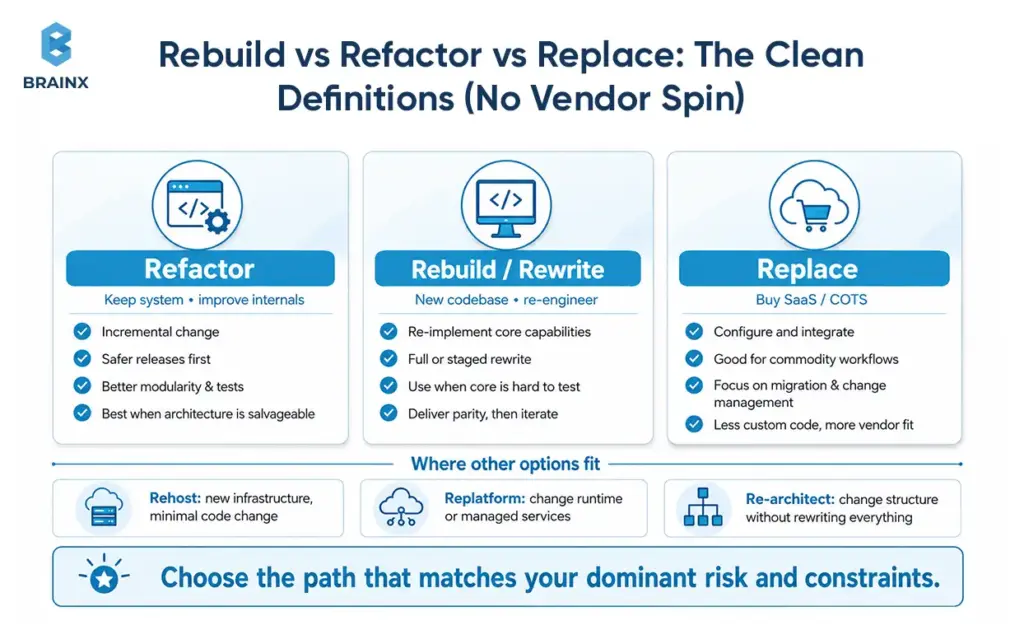
The majority of misunderstandings result from teams assigning different meanings to the same words. Clear definitions let you discuss tradeoffs without getting pulled into ideology.
This section frames options in the context of legacy system modernization, to select the one that aligns with your dominant risk and constraints (not just your most exciting option).
Refactor (Keep System, Improve Internals; Incremental)
Refactoring mostly maintains the system's external behavior, but improves internal aspects. The goal is safer change, not new features first.
Common refactor results are improved modularity, increased test coverage, decreased coupling, and more predictable releases. Refactoring, when done well, is incremental and helps enable continuous delivery.
Refactor can be a good option if the business can't afford long freezes, and the architecture is salvageable.
Rebuild / Rewrite (New Codebase; Re-Engineer)
A rebuild (rewrite) creates a new codebase that re-implements core capabilities. It may be a complete rewrite or a staged rewrite with slices being re-built over time.
Rebuilds make sense when the existing code pattern is structured in a way that does not support the business, for example if you can't test the core, the domain model is incorrect, or the runtime environment is end-of-life and there is no safe path to upgrade.
The key is governance: rebuilds fail when they become “build the dream system” instead of “deliver parity and then iterate.”
Replace (Buy SaaS/COTS; Configure & Integrate)
Replacement involves picking a SaaS or commercial off-the-shelf (COTS) product and customizing it to your process before integrating it with your ecosystem.
Replace is often the best option for commodity workflows where differentiation does not come from custom code. The real work and focus shifts from coding features to vendor evaluation, integration, data migration, and change management.
Where “Replatform / Re-Architect / Rehost” Fits (Avoid False Trilemma)
Many modernization programs are not strictly refactor, rebuild, or replace. You may also consider:
- Rehost: Migrate to new infrastructure with minimal code change (useful for data center exit, limited modernization value)
- Replatform: Moderate code changes to change runtime/managed services, e.g., moving to managed databases, containers, or PaaS.
- Re-architect: Alter the structure of the system, typically to enhance scalability or domain boundaries, but without rewriting everything.
These options are significant because they enable you to focus on the flow restrictor. If your primary problem is the operational toil, replatforming could provide value sooner than rewriting.
The Decision Framework: How to Choose the Right Modernization Path
The best decision framework helps you avoid falling into these two traps, one is “keep patching forever” and the other is “rewrite everything.” Instead, it forces clarity on scope, risk, and measurable outcomes.
Follow the steps below to facilitate a structured workshop with product, engineering, security and operations. The aim is to come up with a plan that is defensible, not a perfect forecast.
Step 1: Inventory
Start with what the business actually does, not what the code looks like. Inventory:
- Capabilities: billing, pricing, onboarding, fulfillment, reporting, identity, etc.
- Users and volumes: internal users, customers, peak loads, seasonality
- Integrations: upstream/downstream systems, partners, file feeds, APIs
- Data domains: key entities, ownership, compliance classification, retention rules
This inventory prevents “unknown dependencies” from becoming your biggest risk during cutover, and it sets you up to modernize capability-by-capability rather than system-by-system.
Step 2: Score the System
Create a simple scorecard (1 to 5) for each dimension and record evidence to support each rating:
- Maintainability: modularity, readability, test coverage and coupling
- Reliability: incident rate, MTTR, failure modes and observability
- Scalability: performance headroom, database constraints and concurrency issues
- Security: patch cadence, access control, secrets management and audit logging
- Change velocity: lead time, release frequency, rollback confidence, etc.
| Dimension | What To Ask | Refactor Bias | Rebuild Bias | Replace Bias |
| Business Differentiation | Is this workflow part of your moat? | High | High | Low |
| Testability | Can you change behavior safely in small slices? | High | Low | Medium |
| Architecture Fit | Does the current shape still support the roadmap? | Medium | Low | Low |
| Integration Complexity | Are there many custom dependencies? | Medium | High | High |
| Process Standardization | Is the workflow mostly commoditized? | Low | Low | High |
It isn't the score that's important, it's the discussion it creates. When stakeholders disagree, the evidence trail helps to show the reasons for a disagreement and whether it is a technical issue, organizational issue, or both.
Step 3: Evaluate Constraints
Constraints decide what “best” means. Capture:
- Time-to-market pressure: upcoming launches, competitive moves, customer commitments
- Regulatory deadlines: audits, certifications, regional expansions
- Budget and runway: capex/opex preferences, procurement cycles
- Operational tolerance: how much downtime or disruption is acceptable
A team that has 12 months and stable cash can take a different path than a team with 90 days to reduce risk exposure.
Step 4: Choose Based on “Dominant Risk”
Make the choice based on your dominant risk:
- Operational risk dominates (outages, security exposure): prioritize stabilization, refactor hot spots, replatform where it reduces toil
- Delivery risk dominates (slow shipping, high change failure): refactor for testability and modularity, rebuild only where necessary
- Strategic risk dominates (architecture blocks new business models): rebuild slices that enable the new model, or replace commodity functions
This is where you turn analysis into a plan. Document what you will do now, what you will defer, and what you will explicitly not do.
When Refactoring Is the Best Option
Refactoring is often the highest-ROI path because it improves delivery without forcing a large, risky cutover. It is also the easiest option to get wrong, because “clean up the code” is not a business outcome.
In simple terms, refactoring means improving the internal structure of software without changing what users see on the outside. The goal is not to “make code prettier.” The goal is to make future changes safer, faster, and less expensive.
Successful refactoring programs treat the system like a product: you pick targets, measure improvement, and ship continuously.
Signals Refactor Will Work (Architecture OK, Debt Localized, Tests Feasible)
Refactor is usually the right call when:
- The domain model is mostly correct, even if implementation quality is uneven
- The biggest pain is localized, such as a few modules that change constantly
- You can introduce tests and observability without rebuilding everything
- The stack is supportable, or can be upgraded incrementally
A strong “yes” signal is when you can draw clear boundaries around high-risk areas and improve them without destabilizing the whole system.
What To Refactor First
Refactor priorities should follow change and risk, not aesthetics. Start with:
- Hot paths: the flows that drive revenue or support load (checkout, invoicing, onboarding)
- High-churn modules: where changes happen weekly and break things
- Integration seams: adapters, API layers, message handlers that amplify blast radius
- Operational pain points: batch jobs, cron pipelines, long-running processes that fail silently
This sequencing creates visible wins: fewer incidents, faster releases, and a clearer structure for future work.
Refactor Execution Patterns
Two patterns reduce risk during refactoring:
- Branch by abstraction: introduce an interface layer, implement the new behavior behind it, then switch callers gradually. This avoids long-lived branches and makes rollback easier.
- Feature flags: ship changes behind a flag, test in production safely, and decouple deploy from release.
Combine these with contract tests at boundaries, and you can modernize critical components while continuing feature delivery.
Risks & Failure Modes
Common refactor failure modes include:
- Refactoring without tests: teams change internals but cannot prove behavior, so risk increases and velocity drops.
- Perpetual cleanup: the work never ships business value, and stakeholders lose trust.
- Local optimization: one team cleans their module while cross-service contracts remain unstable.
- Underestimating data risk: even refactors can break reporting, reconciliation, and downstream consumers if contracts are implicit.
A practical rule: if you cannot define what gets measurably better in 4 to 6 weeks, the refactor scope is too vague.
When Rebuilding (Rewriting) Is the Best Option
Rebuilds are justified when incremental change cannot overcome structural limits. The best rebuilds are disciplined: they deliver an MVP slice, prove parity, and migrate users safely.
A rebuild can be part of legacy system modernization, but it should be chosen for specific reasons, not as a default “fresh start.”
Signals You Should Rebuild
You should strongly consider rebuilding when:
- The architecture cannot support your product direction (multi-tenant, real-time, platform APIs)
- The core is effectively untestable, with side effects everywhere and no reliable regression safety net
- The stack is obsolete or out of support, and upgrades are riskier than replacement
- Performance and scaling require invasive changes across the entire system
- Security fixes require deep surgery repeatedly
In these cases, refactoring becomes “refactor everything,” which is just a slow rewrite with less clarity.
How To Prevent The “Rebuild Fantasy”
Rebuild fantasy happens when teams mix three goals: re-implement, improve UX, and add new features. Control it with:
- A parity plan: define what “same behavior” means, including edge cases and reports
- An MVP slice: pick one end-to-end flow that proves the new architecture in production
- A scope gate: new features must have a business sponsor and a clear reason they cannot wait
This discipline keeps the rebuild on a delivery track, not an engineering wish list.
Cutover Strategies
There are three common cutover strategies:
- Parallel run: old and new systems run simultaneously, outputs are compared, and confidence builds before switching traffic. Best for high-risk domains like billing and finance.
- Incremental replacement: replace capabilities one by one, often using a strangler pattern at the edge (routing requests to new components). Best for reducing risk while making steady progress.
- Big-bang: switch everything at once. Sometimes unavoidable due to licensing, infrastructure deadlines, or extreme coupling, but it carries the highest risk and demands extensive rehearsal.
A practical guideline: if you can isolate traffic routing at the edge, incremental replacement is usually safer than a single cutover event.
A common pattern here is the strangler approach: route selected traffic or capabilities to the new system while the old system continues to run. Over time, more functionality moves to the new architecture until the legacy system can be safely retired.
Data Migration Considerations (Schemas, Reconciliation, Rollback Plan)
Data is where rebuilds succeed or fail. Treat migration as a product:
- Schema mapping: define canonical entities and how they translate between old and new
- Reconciliation: automated checks to prove totals and invariants match (counts, sums, balances)
- Rollback plan: what happens if the new system produces incorrect outputs, and how you revert without data loss
- Dual writes: used carefully, because they can create consistency bugs if not designed with clear ownership and idempotency
If data is messy, start by profiling it. It is cheaper to discover quality issues before you have built the new schema around false assumptions.
When Replacing with SaaS/COTS Is the Best Option
Replacement is the fastest way to reduce custom code, but only when you pick the right scope. Teams get burned when they replace a deeply differentiating workflow with a tool designed for “average” processes, then over-customize it back into complexity.
Replacement decisions are also where procurement, legal, security, and operations need to be involved early, not as a last-mile review.
Strong Fit Scenarios (Standard Workflows, Commodity Features)
Replace is a strong fit when:
- The workflow is standard across your industry (ticketing, basic CRM, HRIS, payroll)
- Your differentiation is in product, data, or customer experience, not in the back-office process
- Time-to-value matters more than deep customization
- The SaaS ecosystem supports your integration needs (webhooks, APIs, data export)
A good sign is when you can configure 80 to 90 percent of needs out of the box, and the remaining gaps are acceptable process changes.
Red Flags (Over-Customization, Vendor Lock-In, Integration Complexity)
Replacement is risky when:
- You require heavy customization that breaks upgrade paths
- Data export and portability are limited, creating lock-in
- The vendor’s roadmap conflicts with yours
- Integrations are numerous and brittle, especially if you have complex event flows
- Performance, latency, or data residency requirements are strict
A practical red flag is “we will build a custom layer to make SaaS behave like our old system.” That often recreates complexity without gaining control.
Replacement Checklist
Use this checklist during vendor evaluation:
- Data portability: export format, frequency, and completeness (including audit logs)
- APIs and webhooks: rate limits, event coverage, idempotency support
- SLAs: uptime, support response, incident communication
- Compliance: SOC 2/ISO, GDPR, HIPAA, data residency options
- Extensibility: custom fields, workflow automation, app marketplace, sandbox environments
- Identity and access: SSO, SCIM, granular permissions
- Observability: logs, audit trails, admin APIs
The right question is not only “Can this vendor support our process?” It is “Can this vendor support our process without recreating our legacy complexity in a new tool?”
This is where security teams appreciate specifics. “SOC 2 compliant” is not enough without understanding controls, scope, and evidence access.
TCO Model: License + Implementation + Integration + Change Management
Total cost of ownership for replacement includes more than license fees:
- License/subscription costs: per seat, per transaction, or tiered
- Implementation: configuration, process mapping, vendor professional services
- Integration: middleware, custom connectors, monitoring, retries, error handling
- Data migration: extraction, cleansing, validation, cutover support
- Change management: training, internal documentation, support desk impact
- Ongoing ops: admin work, vendor management, periodic reconfiguration
| Cost Area | Rebuild | Replace With SaaS/COTS |
| Upfront Cost | Higher engineering and architecture cost | Lower initial build cost, but implementation fees apply |
| Ongoing Cost | Maintenance, hosting, DevOps, QA | Licenses, admin, vendor support, integrations |
| Customization | High control | Limited by vendor flexibility |
| Integration Work | Built around internal needs | Often requires middleware or custom connectors |
| Change Management | User migration and process updates | Training, adoption, vendor workflow changes |
| Long-Term Risk | Internal ownership burden | Vendor lock-in and roadmap dependency |
If you model TCO, include both “steady state” and “year 1” costs, because year 1 often carries the integration and migration peak.
Cost, Timeline, and Resourcing: What to Expect from Legacy System Modernization Services
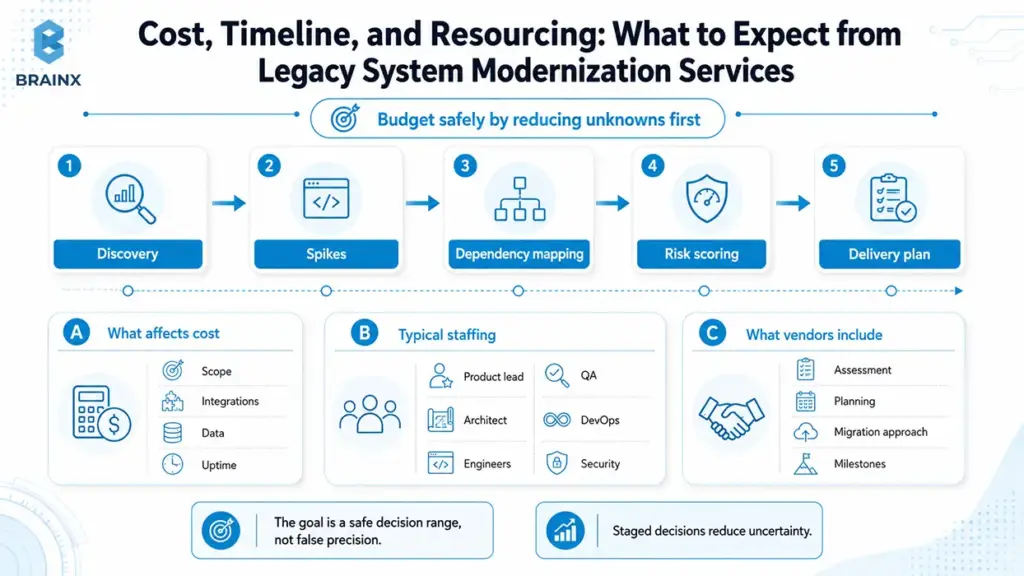
If you are budgeting for legacy system modernization services, you need estimates that acknowledge uncertainty without becoming useless. The goal is not a perfect number, it is a safe decision range with clear risk drivers.
The safest way to budget is to treat modernization as a staged decision, not a single estimate. Discovery, technical spikes, dependency mapping, and risk scoring should come before a fixed delivery plan, especially when integrations, data migration, or uptime requirements are unclear.
This section explains what pushes cost and timeline up or down, what staffing typically looks like, and what reputable vendors include in scope.
Cost Drivers (Scope, Integrations, Data, Test Coverage, Uptime Requirements)
The biggest cost drivers are usually:
- Scope breadth: number of capabilities, screens, and business rules
- Integration count: every upstream/downstream dependency adds testing and coordination
- Data complexity: volume, quality issues, compliance classification, historical retention
- Test coverage: low coverage increases risk and slows change until you build safety nets
- Uptime requirements: 24/7 systems need blue-green deploys, parallel runs, and stronger rollback plans
- Security requirements: threat modeling, pen testing, audit evidence, secure SDLC
A useful budgeting technique is to separate “platform work” (tests, observability, CI/CD, identity) from “capability work” (features and migrations). Platform work is often what makes the rest predictable.
Typical Timelines By Approach (Refactor Vs Rebuild Vs Replace)
While every system differs, typical ranges look like:
- Refactor: 8 to 24 weeks for meaningful improvements in a bounded area, ongoing program for larger estates
- Rebuild: 4 to 12 months depending on scope and migration strategy, sometimes longer for regulated domains
- Replace: 6 to 20 weeks for selection plus implementation for a bounded function, longer when integrations and data migration are complex
The hidden factor is decision latency. If stakeholders cannot align on scope, parity, and cutover approach, the calendar expands even before engineering begins.
Team Composition
Modernization is cross-functional by necessity. A typical team includes:
- Product lead: clarifies scope, prioritizes capabilities, manages parity decisions
- Solution architect: defines target architecture, boundaries, integration patterns
- Domain experts: validate business rules, edge cases, reporting requirements
- Engineers: implement changes, build tests, maintain migration tooling
- QA/automation: builds regression safety nets and contract tests
- DevOps/SRE: CI/CD, environments, observability, reliability controls
- Security: threat modeling, controls mapping, audit evidence
If you do not staff domain expertise, you will rebuild the wrong behavior faster.
How To Estimate Safely (Discovery Sprint, Spikes, Risk Buffer)
Safe estimates come from reducing unknowns early:
- Discovery sprint (2 to 4 weeks): inventory, dependency mapping, architecture review, risk register
- Spikes: timeboxed experiments to validate key unknowns, such as data migration feasibility or performance constraints
- Risk buffer: explicit contingency tied to identified risks, not a generic padding number
- Milestone-based plan: deliver slices with measurable outcomes rather than a single end date
This approach turns estimation into a learning process, and it creates decision points where you can stop, adjust, or change strategy.
What Legacy System Modernization Services Usually Include
Most credible engagements include:
- Assessment of current architecture, code health, and delivery pipeline
- Dependency and integration mapping
- Data profiling and migration approach
- Target architecture and transition plan
- Security and compliance review, including access controls and audit requirements
- CI/CD improvements, test strategy, and QA automation plan
- Observability plan: logs, metrics, traces, alerting, SLOs
- Delivery roadmap with milestones, resourcing, and risk management
When comparing vendors, ask what they deliver that you can reuse internally, such as scorecards, templates, migration tooling, and runbooks.
Common Modernization Risks (and How to Reduce Them)
Modernization fails less often due to “bad code” and more often due to unmanaged uncertainty. The good news is that most risks are knowable, and you can reduce them with explicit practices.
Use this section as a risk register starter. If a vendor claims these are “not an issue,” that is usually a sign they have not done enough discovery.
Hidden Business Logic & Missing Documentation
Legacy systems often contain rules that exist nowhere else, including pricing exceptions, tax handling, customer-specific behaviors, and billing edge cases.
Mitigations that work:
- capture rules through domain workshops and shadowing support teams
- mine logs and historical tickets for “weird cases”
- write characterization tests that document behavior before changing it
- prioritize rebuilding/reporting parity for finance-related outputs early
Data Quality And Reconciliation Failures
Data issues surface at the worst time, during migration or after cutover. Typical problems include duplicate entities, inconsistent identifiers, and “meaning drift” across fields.
Mitigate with:
- upfront data profiling and quality scoring
- automated reconciliation jobs and dashboards
- a staged migration plan with verification gates
- ownership clarity for each data domain
Integration Blast Radius (Upstream/Downstream Dependencies)
Integrations create nonlinear risk: one change can impact multiple consumers. Common issues include undocumented file formats, fragile API clients, and implicit contracts.
Mitigate with:
- explicit API contracts and versioning
- contract tests at boundaries
- event schemas with compatibility rules
- integration observability, including dead-letter queues and retry policies
Security Regressions During Migration
During major changes, teams can accidentally weaken security, such as relaxed firewall rules for testing or missing authorization checks in new services.
Mitigate with:
- threat modeling for the target architecture
- secure defaults in templates and pipelines
- secrets management and least-privilege access
- security testing integrated into CI/CD
For regulated environments, plan evidence collection early so compliance does not become a last-minute scramble.
Change Management (Users, Support, Training)
Even “internal-only” systems have real users. If you change workflows without training and support readiness, productivity drops and the project gets blamed.
Mitigate with:
- early user involvement and feedback loops
- training materials and role-based enablement
- phased rollout with feature flags
- support playbooks and escalation paths
A Practical Modernization Roadmap (90 Days to a Confident Decision)
If you are not ready to commit to a rebuild or a multi-quarter program, you can still make meaningful progress in 90 days. The goal is to reduce unknowns, prove feasibility, and produce a plan leadership can fund with confidence.
This roadmap is intentionally pragmatic. It assumes you keep delivering while learning.
Week 1–2: Assessment + Architecture Review + Dependency Mapping
Outputs you want by the end of week 2:
- system inventory by capability and data domain
- dependency map for integrations and consumers
- current-state architecture diagram with pain points
- baseline metrics: release frequency, lead time, incident rate, on-call volume
- initial risk register and constraint list
This is where you identify “hairball” areas that will govern the rest of the strategy.
Week 3–6: Proof-Of-Concept / Slice Migration + Test Strategy
In weeks 3 to 6, prove one critical unknown. Examples:
- migrate one small but representative flow through the new architecture
- introduce contract tests for a key integration
- implement a parallel-run reconciliation for a financial report
- validate performance and cost assumptions with a production-like load test
Also define the test strategy: which tests you need, where to place them, and how they will run in CI/CD. Without a testing plan, every modernization path becomes a higher risk.
Week 7–12: Plan + Backlog + Target Architecture + Delivery Milestones
By the end of 90 days, you should have:
- target architecture and transition design
- prioritized backlog with milestones and acceptance criteria
- cutover strategy proposal (phased, parallel run, or limited big-bang)
- resourcing plan and delivery model
- measurable success metrics agreed across stakeholders
This becomes the artifact leadership funds, and engineers trust.
Success Metrics
Pick a small set of metrics and track them consistently:
- Lead time for change and deploy frequency (delivery speed)
- Change failure rate and MTTR (delivery safety and ops resilience)
- Defect escape rate (quality)
- Uptime/SLO attainment (reliability)
- Cloud cost per transaction or per customer (unit economics)
- Cycle time from request to production (end-to-end flow)
The key is to tie metrics to the modernization goals you set up front.
How BrainX Helps As A Legacy System Modernization Company
BrainX Technologies works with teams that need clarity first, then safe execution. As a legacy system modernization company, BrainX focuses on decision-grade assessments, pragmatic delivery plans, and implementation that does not stall your product roadmap.
If you are evaluating vendors, ask how they handle scope governance, data migration, integration safety, and measurement. Those are the areas where real-world modernization succeeds or fails.
Modernization Assessment + Decision Workshop
BrainX typically starts with a structured assessment and workshop that produces:
- a scorecard across maintainability, reliability, security, scalability, and change velocity
- modernization options with tradeoffs (refactor vs rebuild vs replace, plus replatforming where relevant)
- a risk register and mitigation plan
- an ROI narrative leadership can use for prioritization and funding
This is also where we align stakeholders on what “done” means, including success metrics and cutover constraints.
Delivery Models
Depending on your constraints, BrainX supports multiple delivery models:
- Incremental refactor focused on testability, modular boundaries, and hot-path stabilization
- Rebuild with phased cutover using strangler-style routing, parallel run when needed, and explicit parity gates
- SaaS replacement with integration where we handle vendor-facing technical due diligence, integration architecture, and migration verification
If you need legacy system modernization services that keep feature delivery moving, these models are designed to reduce risk while still shipping.
What You Get Out Of It
A typical BrainX engagement delivers tangible assets, not just advice:
- current-state and target architecture diagrams
- a migration plan with sequencing, cutover strategy, and rollback approach
- security controls mapping and secure SDLC integration
- QA automation plan and implementation, including regression and contract tests
- observability baseline: logs, metrics, traces, and actionable alerting
- a delivery roadmap with milestones and measurable outcomes
This creates continuity so your internal team can operate and extend the system after the engagement.
Why BrainX Is the Right Legacy System Modernization Company
Teams choose BrainX when they want:
- senior technical leadership that can translate business constraints into architecture choices
- practical governance that prevents scope drift and rebuild fantasy
- disciplined migration engineering, especially around data and integrations
- delivery that supports production realities: uptime, auditability, and support readiness
If you are comparing a legacy system modernization company shortlist, look for evidence of these capabilities in case studies, artifacts, and how they run discovery.
Not sure whether to refactor, rebuild, or replace? Start with a modernization assessment. BrainX can review your current architecture, map dependencies, score risk areas, and give you a practical 90-day roadmap before you commit to a full implementation.
Final Checklist: Choose Rebuild, Refactor, or Replace
Use this checklist to pressure-test your decision quickly. It is designed for executive and product conversations, but engineering should validate the answers.
10-Question Executive Checklist (Yes/No)
Answer yes or no:
- Are critical components out of support or unpatchable within your security SLAs?
- Is the system’s domain model misaligned with how the business works today?
- Do releases routinely require cross-team coordination and long freezes?
- Is test coverage too low to change core logic safely within weeks?
- Are incidents frequent, and is MTTR high due to poor observability?
- Can you isolate high-risk areas, or is coupling so high that changes ripple everywhere?
- Is the functionality mostly commodity, with limited competitive differentiation?
- Do integrations and data flows block analytics or AI initiatives due to missing contracts/ownership?
- Is there a hard deadline (audit, contract, market event) that makes long rewrites risky?
- Would a SaaS product meet 80 to 90 percent of needs without heavy customization?
Recommended next step based on outcome
- Mostly “yes” to 3, 5, 6, with “no” to 2: start with refactoring plus platform work (tests, observability, CI/CD).
- Mostly “yes” to 1, 2, 4, 6: plan a rebuild, but do it slice-by-slice with parity gates and a cutover strategy.
- Mostly “yes” to 7 and 10: evaluate replacement first, and invest in integration, data migration, and change management.
- If you cannot answer 4, 6, or 8 confidently: run a 2 to 4 week assessment and dependency mapping before choosing.
Conclusion
The best modernization decisions are not driven by trend or preference. They are driven by your dominant risk, your constraints, and your ability to ship safely while changing the system. Legacy system modernization works when you make the tradeoffs explicit, measure outcomes, and choose to refactor, rebuild, or replace based on evidence.
If you want a practical scorecard and a 90-day plan you can fund with confidence, BrainX Technologies can help you assess the current state, define the target architecture, and execute a phased migration without derailing delivery.
FAQs on Legacy System Modernization Today
What is legacy system modernization?
Legacy system modernization is the process of upgrading an existing software system so it can meet current requirements for delivery speed, reliability, security, and integration.
It can involve refactoring parts of the codebase, rebuilding key components, replacing functions with SaaS, or improving the platform through rehosting or replatforming. The goal is not “new tech,” it is measurable improvement in business outcomes. Good modernization also includes governance, testing strategy, and a safe cutover plan.
How do I decide whether to rebuild or refactor a legacy system?
Decide based on what is fundamentally blocking you. If the architecture and domain model are mostly correct and you can introduce tests and modular boundaries, refactoring is usually faster and lower risk.
If the core is untestable, the stack is obsolete, or the architecture cannot support your business direction, rebuilding is often more honest than years of incremental patching.
A scorecard across maintainability, reliability, security, and change velocity helps make the choice defensible.
When should you replace a legacy system with SaaS instead of rewriting it?
Replace with SaaS when the workflow is mostly commodity and your differentiation does not come from custom implementation details.
SaaS also makes sense when time-to-value is critical and the product can meet 80 to 90 percent of requirements through configuration.
Avoid replacement when you would need heavy customization, when portability is weak, or when integration complexity would recreate the same fragility outside your codebase. Always model year-1 TCO, not just subscription price.
How long does legacy system modernization take?
Timelines vary by scope and approach. Targeted refactoring can show meaningful results in 8 to 24 weeks, especially when focused on high-churn modules and reliability improvements.
Rebuilds often take 4 to 12 months, depending on parity requirements and whether you can cut over incrementally.
Replacements can take 6 to 20 weeks for selection and implementation, but integration and data migration can extend that.
How much do legacy system modernization services typically cost?
Costs depend on scope breadth, integrations, data complexity, test coverage, and uptime requirements. A bounded assessment and planning phase is usually the smallest starting investment, while implementation programs scale with the number of capabilities and dependencies.
Replacement projects often shift cost into integration, migration, and change management rather than feature development. The most reliable way to estimate is a discovery sprint plus technical spikes that reduce unknowns before committing to a full roadmap.
What should I look for in a legacy system modernization company?
Look for a partner that starts with discovery, produces decision-grade artifacts (scorecards, target architecture, risk register), and has a proven approach to data migration and integration safety.
Ask how they prevent scope drift during rebuilds, how they measure delivery improvements, and what their cutover playbook looks like.
A strong legacy system modernization company will also demonstrate secure delivery practices, QA automation capability, and observability discipline. Finally, prioritize teams that can communicate tradeoffs clearly to both executives and engineers.